

Advisory entries now carry CWE and CVSS data
Security advisories in the GitHub Advisory Database and Dependabot alerts now include Common Weakness Enumeration (CWE) and Common Vulnerability Scoring System (CVSS) information. These two standards give you a clearer picture of what a vulnerability is, how it might be exploited, and what the fallout could be — without needing to dig through raw CVE descriptions.
CVE identifiers give the security industry a shared label for a known vulnerability, but they don’t tell you much about the nature of the problem. CWE fills that gap by classifying the underlying weakness — for example, cross-site scripting or improper input validation. CVSS, meanwhile, quantifies severity on a 0.0 to 10.0 scale by breaking down how easy a flaw is to exploit and what impact exploitation would have on the target application. GitHub uses the CVSSv3.1 specification for these scores.
According to GitHub’s curated data for open source packages, the most common CWEs currently appearing in the Advisory Database are missing encryption of sensitive data and path traversal. The table below lists the top CWEs observed across supported ecosystems.
Most common CWEs in GitHub Advisory Database
| CWE | Name |
| CWE-311 | Missing Encryption of Sensitive Data |
| CWE-22 | Improper Limitation of a Pathname to a Restricted Directory (‘Path Traversal’) |
| CWE-79 | Improper Neutralization of Input During Web Page Generation (‘Cross-site Scripting’) |
| CWE-400 | Uncontrolled Resource Consumption |
| CWE-20 | Improper Input Validation |
| CWE-506 | Embedded Malicious Code |
| CWE-94 | Improper Control of Generation of Code (‘Code Injection’) |
| CWE-200 | Exposure of Sensitive Information to an Unauthorized Actor |
| CWE-78 | Improper Neutralization of Special Elements used in an OS Command (‘OS Command Injection’) |
| CWE-74 | Improper Neutralization of Special Elements in Output Used by a Downstream Component (‘Injection’) |
What you can see from the advisory page
When you open an advisory in the GitHub Advisory Database, the right-hand sidebar shows the associated CWE identifiers and the full CVSS vector string. You can also filter or search advisories by CWE to quickly find issues in a particular weakness category.
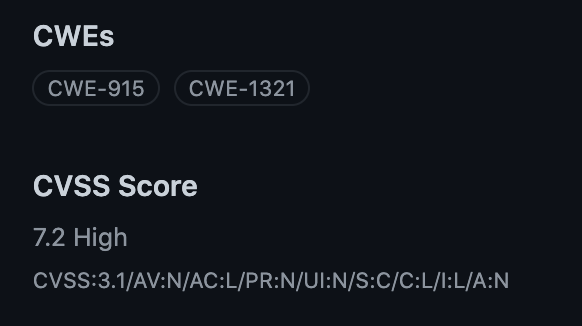
For maintainers reporting a vulnerability in their own project, the security advisory form now accepts CWE and CVSS details alongside the severity field. You can select one or more CWEs from dropdown menus. If you know the CVSS vector string, you can paste it in directly; if not, an integrated calculator will build the score for you. There’s no penalty for skipping the detailed fields — if you only provide a severity level, GitHub’s curation team will review the advisory and fill in the rest.

The next time you get a Dependabot alert, click through to the related advisory in the GitHub Advisory Database. The CWE and CVSS information will show you not just that a dependency is vulnerable, but why it’s rated the way it is — and that context makes prioritization far easier.




