Security Headers Quick Reference
This reference covers the HTTP security headers that protect websites from common attacks. It's organized by the level of protection each header provides, from baseline hardening to advanced isolation features.
Threats and Defenses at a Glance
Injection vulnerabilities, including reflected, stored, and DOM-based cross-site scripting (XSS), allow attackers to run malicious scripts in your origin. Autoescaping templates and careful handling of user data help, but security headers add a critical layer of defense.
- Content Security Policy (CSP) restricts which scripts the browser executes.
- Trusted Types forces sanitization of data passed to dangerous JavaScript APIs.
- X-Content-Type-Options prevents browsers from misinterpreting resource MIME types.
Web isolation threats—such as clickjacking, cross-site request forgery (CSRF), cross-site script inclusion (XSSI), and cross-site leaks—arise when other sites can embed or interact with yours. The Post-Spectre Web Development W3C document offers deeper background on these mechanisms.
- X-Frame-Options blocks your documents from being embedded by malicious sites.
- Cross-Origin Resource Policy (CORP) prevents cross-origin sites from loading your resources.
- Cross-Origin Opener Policy (COOP) isolates your windows from interactions with other websites.
- Cross-Origin Resource Sharing (CORS) explicitly controls which cross-origin documents can access your resources.
For sites using advanced features, the Spectre side-channel makes data within the same browsing context group potentially readable. Browsers gate powerful APIs like SharedArrayBuffer behind a state called cross-origin isolation, which requires both COOP and Cross-Origin Embedder Policy (COEP).
Encryption gaps—such as mixed content, cookies lacking the Secure attribute, or lax CORS validation—can expose traffic. HTTP Strict Transport Security (HSTS) enforces HTTPS for all interactions with your site.
Content Security Policy (CSP)
Content-Security-Policy mitigates XSS by limiting which scripts a page may execute. For server-rendered HTML, use a nonce-based strict CSP; for statically served or cached pages, such as single-page applications, use a hash-based strict CSP.
A nonce-based policy requires a fresh random value per request. The server sets the header and the matching nonce attribute appears on each <script> tag:
Content-Security-Policy:
  script-src 'nonce-{RANDOM1}' 'strict-dynamic' https: 'unsafe-inline';
  object-src 'none';
  base-uri 'none';
Generate a unique nonce on the server for every response and reference it in your header configuration:
Content-Security-Policy:
  script-src 'nonce-{RANDOM1}' 'strict-dynamic' https: 'unsafe-inline';
  object-src 'none';
  base-uri 'none';
Then set the nonce attribute of each <script> tag to the same value in your HTML:
<script nonce="{RANDOM1}" src="https://example.com/script1.js"></script>
<script nonce="{RANDOM1}">
  // Inline scripts can be used with the <code>nonce</code> attribute.
</script>
Google Photos is a reference example of a nonce-based strict CSP; you can inspect its implementation with DevTools.
Hash-based policies require your script content to be inline, since most browsers do not support hashing external scripts. Your header configuration lists the allowed hashes:
Content-Security-Policy:
  script-src 'sha256-{HASH1}' 'sha256-{HASH2}' 'strict-dynamic' https: 'unsafe-inline';
  object-src 'none';
  base-uri 'none';
Inline scripts in your HTML are then allowed if their content matches the hash:
<script>
...// your script1, inlined
</script>
<script>
...// your script2, inlined
</script>
For loading external scripts alongside a hash policy, refer to the "Load sourced scripts dynamically" guidance in the strict CSP article. The CSP Evaluator tool is both a validator and a practical example of a strict policy.
Other CSP notes:
- The
frame-ancestorsdirective protects against clickjacking and allows you to specify which origins may embed your site, unlike the simpler all-or-nothingX-Frame-Options. - Using CSP to force HTTPS loading is less necessary now, as browsers natively block mixed content.
- CSP can run in report-only mode for testing, but this mode cannot be used with a
<meta>tag, only with the HTTP header.
Trusted Types
Trusted Types closes DOM-based XSS by making dangerous sinks—such as innerHTML and location.href—require a sanitized value that cannot come directly from an attacker-controlled string.
Enabling Trusted Types via the Content-Security-Policy header forces you to route data through a policy-created function:
- Set the header value
trusted-typesto enforce the policy. - Wrap any assignment to a dangerous sink in a
<em>TrustedHTML</em>value created by your policy.
Trusted Types libraries like DOMPurify integrate with this mechanism, and the needless of <em>unsafe-inline</em> makes the enforcement strict. The require-trusted-types-for directive activates the enforcement.
X-Content-Type-Options
The X-Content-Type-Options header with the nosniff value instructs browsers to treat the declared Content-Type as authoritative. A browser that might otherwise "sniff" an HTML file served as an image and execute its scripts is prevented from doing so.
This header protects against attacks where an uploaded file is stored on your domain with a misleading MIME type. Even when resources are served from a separate host, adding this header is a defense-in-depth measure.
X-Frame-Options
X-Frame-Options controls whether your site may be rendered inside an <iframe>. The two most relevant values:
DENY: No site may frame your content.SAMEORIGIN: Your own pages may frame your content.
This header prevents clickjacking, where a user is tricked into clicking an invisible button on your site while viewing the attacker's page. For a more granular allowlist, use the CSP frame-ancestors directive as a modern alternative, but be aware frame-ancestors is ignored in older browsers that only respect X-Frame-Options.
Cross-Origin Resource Policy (CORP)
Cross-Origin-Resource-Policy, also known as CORP, restricts which origins can include your site's resources in documents. Its purpose is to mitigate side-channel or XS-Leak attacks by preventing malicious sites from loading your resources as subresources.
The header takes three values:
same-site: Only requests from the same site can load your resources.same-origin: Only requests from the same origin can load your resources.cross-origin: No restrictions; any site can load the resource.
The same-origin value is recommended for most cases. Applying CORP to your static resources is important because some browsers historically allowed cross-origin reads via <script>, <link>, or <!DOCTYPE> tags without CORS checks. CORP complements CORS by being enforced even when a CORS error would not be triggered.
Cross-Origin Opener Policy (COOP)
Cross-Origin-Opener-Policy severs the reference to your window's opener from documents in other browsing context groups, which strengthens isolation against a class of attacks that rely on window.opener interception.
Three policy values exist:
unsafe-none: No isolation; the default browser behavior.same-origin: Your page is isolated from cross-origin documents that open it, but stays compatible with same-origin popups that may need opener access.same-origin-allow-popups: An intermediate mode that does not guarantee full isolation.
Setting Cross-Origin-Opener-Policy: same-origin protects your window by ensuring that cross-origin documents opened from it do not inherit a reference back to your document. This is a layer of hardening against certain XS-Leaks and UI-redressing attacks.
HTTP Strict Transport Security (HSTS)
HSTS is an opt-in that instructs browsers to connect only over HTTPS for a stated period. The header provides two primary directives: a max-age in seconds, and a includeSubDomains flag to enforce the policy on all subdomains.
For sites with a valid HTTPS certificate, serving the following header locks in the security posture for the specified duration:
Strict-Transport-Security: max-age=31536000 (one year) is a common starting value. HSTS also mitigates SSL-stripping attacks, where an inactive network listener intercepts the user's first request and downgrades it to HTTP.
Cross-Origin Resource Sharing (CORS)
Modern browsers enforce the same-origin policy for most reads. CORS is the standard for a deliberate cross-origin request, enabling an application like https://api.example.com to accept requests from a different frontend.
You configure CORS via the Access-Control-Allow-Origin header on the responding server. If the request requires credentials or is not a simple request, the server must also handle a preflight OPTIONS request and set the appropriate headers such as Access-Control-Allow-Methods and Access-Control-Allow-Headers.
Access-Control-Allow-Origin: Must be a specific trusted origin, not*, when credentials are used.Access-Control-Allow-Credentialsmust betrueto allow the sending and receiving of cookies.Access-Control-Max-Agecan reduce preflight frequency.Access-Control-Expose-Headersallows client scripts to read non-simple list of response headers.
Lax or over-permissive CORS settings can expose private data. Strictly validate the origins you allow, especially if your application manages sensitive user data. When implementing CORS, never reflect an untrusted Origin header back without checking against an internal allowlist.
Cross-Origin Embedder Policy (COEP)
An origin that needs to use powerful features like SharedArrayBuffer or WebAssembly.Threads in a stable and secure way requires cross-origin isolation. This feature requires both COOP and Cross-Origin-Embedder-Policy (COEP).
COEP with the value require-corp forces all resources to be same-origin or to be explicitly allowed via CORS or CORP headers. Resources from third parties, such as CDNs that don't serve suitable headers, will be blocked.
A strict example of the pair:
- Send
Cross-Origin-Opener-Policy: same-origin. - Send
Cross-Origin-Embedder-Policy: require-corpon every response. - Ensure every third-party resource is either CORS-enabled or its responses carry a
Cross-Origin-Resource-Policyheader allowing the embedding origin.
COEP impacts integrations with external embeds, video players, or caching layers that don't set any of these headers. Because it's inherently restrictive, it's designed for sites conveying sensitive data and that genuinely need the post-isolated browsing context.
Restricting Script Execution With Trusted Types
DOM-based XSS occurs when untrusted data reaches a sink that supports dynamic code execution, such as eval() or .innerHTML. Trusted Types mitigate this by enforcing that such dangerous APIs only accept a special object—a Trusted Type—rather than a string. This enforcement is configured via a CSP directive, making JavaScript code secure by default.
To generate these objects, you define security policies. These policies ensure that security rules, such as escaping or sanitization, are consistently applied before data reaches the DOM. They become the sole points in your code where DOM XSS might be introduced. For example:
Content-Security-Policy: require-trusted-types-for 'script'
// Feature detection
if (window.trustedTypes && trustedTypes.createPolicy) {
// Name and create a policy
const policy = trustedTypes.createPolicy('escapePolicy', {
createHTML: str => {
return str.replace(/\</g, '<').replace(/>/g, '>');
}
});
}
// Assignment of raw strings is blocked by Trusted Types.
el.innerHTML = 'some string'; // This throws an exception.
// Assignment of Trusted Types is accepted safely.
const escaped = policy.createHTML('<img src=x onerror=alert(1)>');
el.innerHTML = escaped; // '&lt;img src=x onerror=alert(1)&gt;'
Enforcing and Using Policies
Begin by enforcing Trusted Types through a CSP header. At present, 'script' is the only accepted value for the require-trusted-types-for directive. You can merge this with other CSP directives, such as combining it with a nonce-based policy:
Content-Security-Policy: require-trusted-types-for 'script'
Content-Security-Policy:
  script-src 'nonce-{RANDOM1}' 'strict-dynamic' https: 'unsafe-inline';
  object-src 'none';
  base-uri 'none';
  require-trusted-types-for 'script';
You can optionally restrict allowed policy names using the trusted-types directive (e.g., trusted-types myPolicy), though this isn't required. Next, define your policy and then apply it when writing data to the DOM:
// Feature detection
if (window.trustedTypes && trustedTypes.createPolicy) {
  // Name and create a policy
  const policy = trustedTypes.createPolicy('escapePolicy', {
    createHTML: str => {
      return str.replace(/\/g, '>');
    }
  });
}
// Assignment of raw strings are blocked by Trusted Types. el.innerHTML = 'some string'; // This throws an exception.</p> <p>// Assignment of Trusted Types is accepted safely. const escaped = policy.createHTML('<img src="x" onerror="alert(1)">'); el.innerHTML = escaped; // '<img src=x onerror=alert(1)>'
With require-trusted-types-for 'script', using a Trusted Type is mandatory. Any attempt to use a dangerous DOM API with a plain string will result in an error.
Preventing MIME Sniffing: X-Content-Type-Options
If a malicious HTML document is served from your domain—for instance, an uploaded image containing valid HTML—some browsers may treat it as an active document and allow script execution in your application's context. The X-Content-Type-Options: nosniff header prevents this by asserting that the MIME type declared in the Content-Type header is correct. This header is recommended for all of your resources:
X-Content-Type-Options: nosniff
Configuration
Serve X-Content-Type-Options: nosniff for all resources alongside the appropriate Content-Type header:
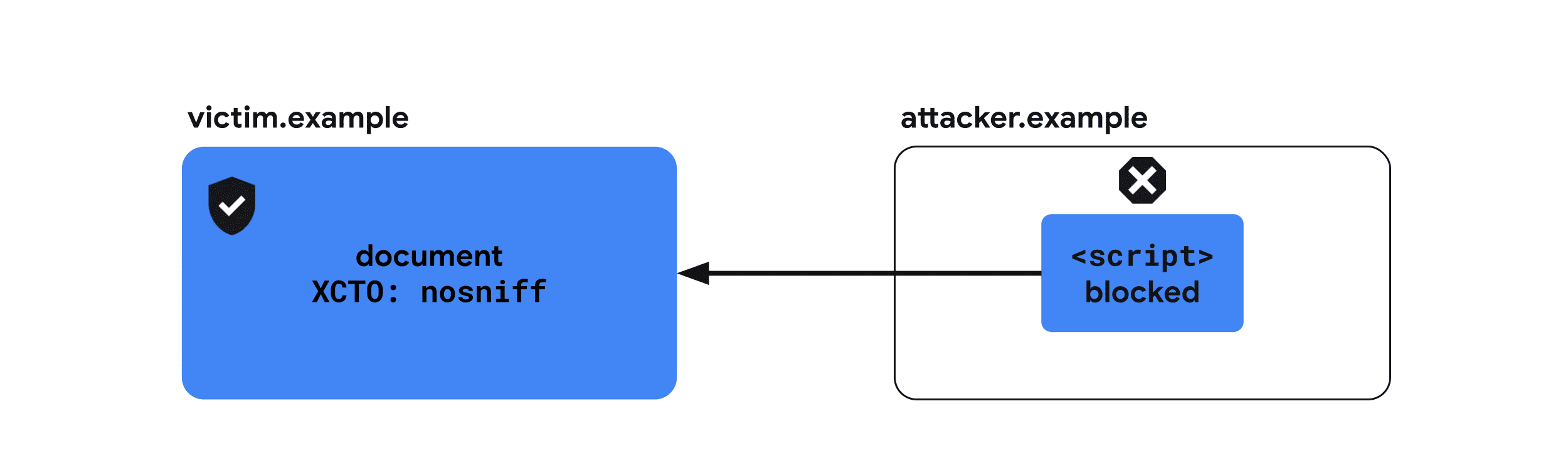
For example, headers sent with an HTML document:
X-Content-Type-Options: nosniff
Content-Type: text/html; charset=utf-8
Iframe Embedding: X-Frame-Options
A malicious site embedding your pages in an iframe enables clickjacking attacks and, in some cases, Spectre-type exploitation to learn about the embedded document's contents. The X-Frame-Options header dictates whether a browser may render your page within a <frame>, <iframe>, <embed>, or <object>. All documents should send this header to state their embedding policy.
X-Frame-Options: DENY
Configuration
All documents that are not intended to be embedded should include this header. Two primary configurations offer different levels of protection.
Deny all embedding
To prevent your site from being embedded by any other document:

X-Frame-Options: DENY
Allow only same-origin embedding
To permit embedding solely by same-origin documents:
X-Frame-Options: SAMEORIGIN
Limiting Resource Loading: Cross-Origin Resource Policy (CORP)
Attackers can embed cross-origin resources from your site to infer information about them via cross-site leaks. The Cross-Origin-Resource-Policy header restricts which websites can load your resources and takes one of three values: same-origin, same-site, or cross-origin. All resources should send this header.
Cross-Origin-Resource-Policy: same-origin
Configuration
Resource-type decisions determine the recommended header value.
Allowing cross-origin loading
CDN-like services are advised to use cross-origin, unless resources are already served via CORS, which has a comparable effect:

Cross-Origin-Resource-Policy: cross-origin
Limiting to same-origin
Apply same-origin for resources intended for same-origin pages only, such as user-sensitive information or same-origin-only APIs. This header prevents embedding but does not stop direct navigation to the resource URL:

Cross-Origin-Resource-Policy: same-origin
Limiting to same-site
For resources that other subdomains of your site need to load, use same-site:

Cross-Origin-Resource-Policy: same-site
Window Isolation: Cross-Origin Opener Policy (COOP)
An attacker's site can use a popup to open your site and glean information through cross-site leaks, potentially enabling Spectre-based side-channel attacks. The Cross-Origin-Opener-Policy header lets a document isolate itself from windows opened via window.open() or links with target="_blank" that lack rel="noopener". This ensures that a cross-origin opener has no reference to and cannot interact with the isolated document.
Cross-Origin-Opener-Policy: same-origin-allow-popups
Configuration
You can set COOP to one of three primary values, with an optional reporting mechanism.
Full isolation with same-origin
Setting same-origin isolates a document from all cross-origin windows:

Cross-Origin-Opener-Policy: same-origin
Isolation with popup allowance
Setting same-origin-allow-popups allows a document to keep referencing its own popups, unless those popups set COOP to same-origin or same-origin-allow-popups. This protects the document when opened as a popup, while still permitting communication with its own popups:

Cross-Origin-Opener-Policy: same-origin-allow-popups
Explicit no-isolation
unsafe-none is the default value. You may set it explicitly to indicate a document can be opened by cross-origin windows and retain mutual access:

Cross-Origin-Opener-Policy: unsafe-none
Reporting COOP violations
Use the Reporting API to capture reports when COOP blocks cross-window interactions:
Cross-Origin-Opener-Policy: same-origin; report-to="coop"
Additionally, COOP supports a report-only mode to receive these reports without actually blocking any communication:
Cross-Origin-Opener-Policy-Report-Only: same-origin; report-to="coop"
The CORS Mechanism
Cross-Origin Resource Sharing (CORS) isn't a header in the traditional sense; it's a browser mechanism that lets servers opt in to allowing cross-origin requests. By default, browsers enforce the same-origin policy, which prevents scripts from reading resources loaded from a different origin. Even when a cross-origin image renders on a page, JavaScript can't inspect its data without the server's explicit permission via CORS.
Understanding the two request types is key to configuring CORS correctly:
- Simple requests: These use
GET,HEAD, orPOST, only set custom headers from the setAccept,Accept-Language,Content-Language, andContent-Type, and restrictContent-Typetoapplication/x-www-form-urlencoded,multipart/form-data, ortext/plain. - Preflighted requests: Everything else. These are preceded by an
OPTIONSrequest to verify that the intended request is permitted.
Simple Requests in Practice
For a simple request, the browser attaches an Origin header identifying the requesting origin. The server responds with headers that specify access rules.
The two critical response headers are:
Access-Control-Allow-Origin: Specifies which origin may read the response. A value of*permits any site but requires that the request be made without credentials.Access-Control-Allow-Credentials: true: Allows the resource to be loaded by requests carrying cookies. Without it, authenticated requests will be rejected even if the requesting origin is listed inAccess-Control-Allow-Origin.
Preflighted Request Flow
For preflighted requests, the browser first sends an OPTIONS request. The client's Access-Control-Request-Method and Access-Control-Request-Headers headers declare the method and custom headers intended for the actual request. The server's response uses:
Access-Control-Allow-Methods: Lists the methods permitted for the subsequent request.Access-Control-Allow-Headers: Lists the headers the subsequent request may include.Access-Control-Max-Age: Defines how long, in seconds, the preflight result can be cached.
Cross-Origin Embedder Policy (COEP)
Features that rely on side-channel isolation, like SharedArrayBuffer and performance.measureUserAgentSpecificMemory(), are disabled by default to mitigate Spectre-based attacks. The Cross-Origin-Embedder-Policy: require-corp header enforces a stricter regime: documents and workers cannot load cross-origin resources—images, scripts, stylesheets, iframes, and so on—unless those resources explicitly opt in through CORS or the Cross-Origin-Resource-Policy (CORP) header.
COEP is often paired with Cross-Origin-Opener-Policy to achieve cross-origin isolation. Use this header when you need COOP/COEP-based isolation for your document.
COEP accepts the single value require-corp, which directs the browser to block any resource that doesn't opt in via CORS or CORP.
Enabling Isolation and Reporting
To enable cross-origin isolation, send Cross-Origin-Embedder-Policy: require-corp along with Cross-Origin-Opener-Policy: same-origin.
COEP integrates with the Reporting API so you can collect reports of blocked resources. You can pair this with a Report-To header that designates an endpoint for these reports. COEP also has a report-only mode; in this mode, the browser sends reports about what would be blocked without actually blocking the resources.
HTTP Strict Transport Security (HSTS)
Plain HTTP traffic is unencrypted and vulnerable to network-level eavesdropping. The Strict-Transport-Security header instructs the browser to refuse HTTP connections to the domain for a specified period and to use HTTPS exclusively. Once this header is received, the browser will skip the redirect and go directly to HTTPS for the duration defined in the header.
Any site that has migrated from HTTP to HTTPS should respond with Strict-Transport-Security when it receives a request over plain HTTP.
For a deeper look at related topics, the W3C's Post-Spectre Web Development document offers broader guidance on building secure, web-platform-friendly applications.



