

Short-lived cloud credentials without GitHub secrets
GitHub Actions workflows that deploy to AWS, Azure, GCP, or HashiCorp Vault can now use OpenID Connect (OIDC), which is generally available. The feature lets workflows request a short-lived access token directly from the cloud provider, eliminating the need to store long-lived cloud credentials as encrypted GitHub secrets.
The OIDC approach separates configuration concerns cleanly: you manage the trust relationship in the cloud portal, and the workflow configuration in GitHub. Without OIDC, a deployment workflow had to retrieve a stored secret every time it ran and present it to the cloud provider, which meant managing token expiry and rotation. With OIDC, the cloud provider issues a temporary token that is valid only for a single workflow job and expires automatically when the job finishes.
How the token exchange works
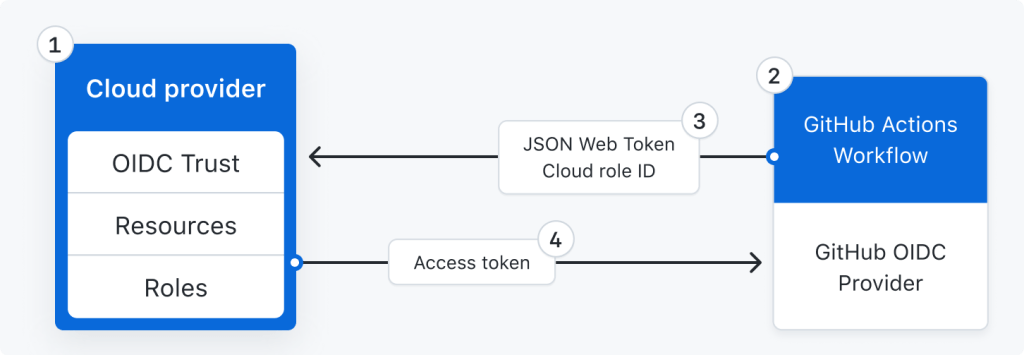
- Developers configure OIDC trust on their cloud roles, defining which workflows may access which cloud resources.
- During a deployment, the GitHub Actions workflow mints an auto-generated OIDC token containing the metadata needed to verify the workflow's identity.
- Cloud login actions fetch this token and present it to their respective cloud providers.
- The provider validates the claims in the OIDC token against the role definition and returns a short-lived access token. Workflow steps within the same job use that token to connect and deploy; it expires when the job completes.
Granular access control
Administrators get more fine-grained control over which workflows can reach cloud resources, since the cloud provider's own authentication and authorization tooling governs the access decision. The workflow's identity is verifiable through the metadata in the OIDC token, and the cloud provider's role definitions determine exactly what the session may do.
Getting started
OIDC support is already built into official login actions from major cloud partners:
- AWS via
aws-actions/configure-aws-credentials - Azure via
Azure/login - GCP via
google-github-actions/auth - HashiCorp Vault via
hashicorp/vault-action
Documentation for security hardening with OIDC is available in the GitHub Actions deployment guides, along with the GitHub Universe session covering OIDC support in GitHub Actions.



