
Setting Up a Dropbox App for Multi-User OAuth
Before writing any code, you need an app in the Dropbox App Console with the Dropbox API, App Folder access, and a unique name. If you plan to authorize users other than the app owner, enable additional users in the app's settings page.
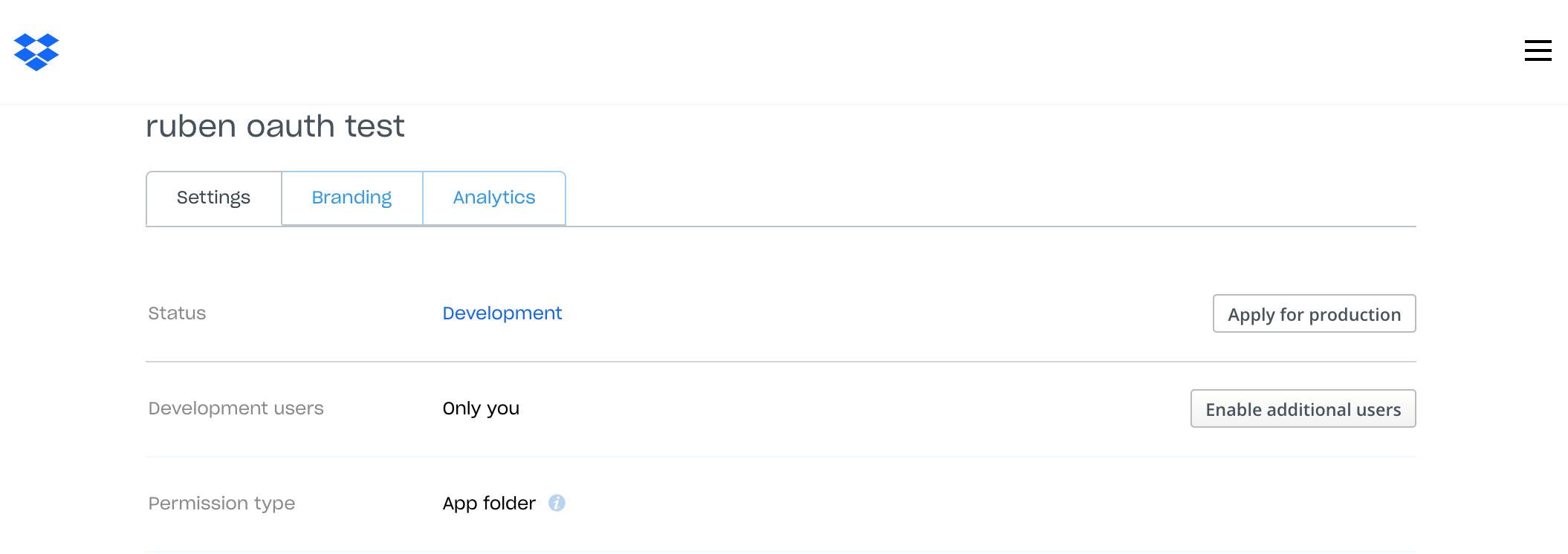
For development, pre-register a redirect URI in the app's settings. Since localhost is the only permitted HTTP redirect in development, add http://localhost:3000/auth.

Project Dependencies and Configuration
This setup assumes Node.js version 8.2.1 or newer (for ES7 support). Generate an Express project skeleton with the Handlebars template engine, then install the following libraries:
dotenv— loads secrets from an.envfile intoprocess.envexpress-session— server-side sessions for storing OAuth tokens per userdropbox— Dropbox JavaScript SDKisomorphic-fetch— a dependency of the Dropbox SDKcrypto— generates random state stringsnode-cache— local caching for state validation
npm install dotenv express-session dropbox isomorphic-fetch crypto node-cache --saveNever hardcode credentials. Put sensitive values in an .env file at the project root and ensure it is ignored by version control (e.g., add it to .gitignore). At the top of app.js, load these values:
require('dotenv').config({silent: true});The .env file needs the app key and secret from the Dropbox App Console, plus a value used to sign the session cookie:
DBX_APP_KEY=<your_app_key_from_developer_console>
DBX_APP_SECRET=<your_app_secret_from_developer_console>
SESSION_ID_SECRET=<create_your_own_secret>
Web sessions are what allow the same server to handle multiple Dropbox users without forcing re-authentication on every request. Configure express-session in app.js right after the Express app is instantiated:
//session configuration
const session = require('express-session');

let session_options = {
  secret: process.env.SESSION_ID_SECRET,
  resave: false,
  saveUninitialized: false,
  cookie: { secure: false } //only for dev purpose
}
app.use(session(session_options));
This minimal configuration sends an encrypted session ID cookie to the browser; the session data itself lives server-side. The SESSION_ID_SECRET signs that cookie. Note that this setup is for development only: the default MemoryStore is explicitly not designed for production, leaks memory, and does not scale past a single process. For production, use a store such as Redis.
The Authorization Code Flow
The flow works as follows. When a request hits the home route /, the server first checks whether the user's session already contains a Dropbox access token. If yes, that token is used directly. If not, the server generates a random state string with crypto, stores it in node-cache with the session ID as a value (the cache entry expires after a few minutes), and redirects the user to Dropbox's authorization URL obtained via the SDK.
After the user authorizes the app, Dropbox redirects back to the registered redirect URI with the original state and an authorization code. The server validates that the state matches a session ID in the cache, then exchanges the code for an access token using the SDK. That token is stored in the session so subsequent visits bypass the authorization step until the token expires.
Handling multiple users works because each authorization attempt has a unique state paired with its own session ID, and the short cache lifetime prevents reuse of stale state values.
Replace the contents of /routes/index.js with the route handlers for both the home page and the OAuth callback:
// /routes/index.js
var express = require('express');
var router = express.Router();
const controller = require('../controller');

router.get('/', controller.home); //home route
router.get('/auth', controller.auth); //redirect route

module.exports = router;
Then create a controller.js at the project root with the logic that generates the authorization URL, exchanges the code, and retrieves the user's Dropbox profile:
const crypto = require('crypto');
const NodeCache = require( "node-cache" );
const Dropbox = require('dropbox').Dropbox;
const fetch = require('isomorphic-fetch');

//Redirect URL to pass to Dropbox. Has to be whitelisted in Dropbox settings
const OAUTH_REDIRECT_URL='http://localhost:3000/auth';

// Dropbox configuration
const config = {
  fetch: fetch,
  clientId: process.env.DBX_APP_KEY,
  clientSecret: process.env.DBX_APP_SECRET
};

var dbx = new Dropbox(config);
var mycache = new NodeCache();

module.exports.home =  async (req, res, next)=>{
  if(!req.session.token){
    //create a random state value
    let state = crypto.randomBytes(16).toString('hex');
    // Save state and the session id for 10 mins
    mycache.set(state, req.session.id, 6000);
    // get authentication URL and redirect
    authUrl = dbx.getAuthenticationUrl(OAUTH_REDIRECT_URL, state, 'code');
    res.redirect(authUrl);
  } else {
    // if a token exists, it can be used to access Dropbox resources
    dbx.setAccessToken(req.session.token);
    try{
      let account_details = await dbx.usersGetCurrentAccount();
      let display_name = account_details.name.display_name;
      dbx.setAccessToken(null); //clean up token

      res.render('index', { name: display_name});
    } catch(error){
      dbx.setAccessToken(null);
      next(error);
    }
  }
}

// Redirect from Dropbox
module.exports.auth = async(req, res, next)=>{

  if(req.query.error_description){
    return next( new Error(req.query.error_description));
  }

  let state= req.query.state;
  if(!mycache.get(state)){
    return next(new Error("session expired or invalid state"));
  }

  if(req.query.code){
    try{
      let token =  await dbx.getAccessTokenFromCode(OAUTH_REDIRECT_URL, req.query.code);
      // store token and invalidate state
      req.session.token = token;
      mycache.del(state);
      res.redirect('/');
    }catch(error){
         return next(error);
    }
  }
}
Finally, update /views/index.hbs so the home page shows the user's display_name (fetched via the SDK) once they have a valid token:
<!-- /views/index.hbs -->
<h1>Logged in!</h1>
<p>Hello {{name}}</p>
Start the server locally and visit http://localhost:3000. You'll be taken through the Dropbox authorization screen and, on return, see the name associated with the account you authorized.
npm startGoing Further
For more detailed information on OAuth and available scopes, consult the Dropbox OAuth guide. If you need help or have questions about this implementation, the Dropbox Developer forums are the place to ask.



