
Passkeys arrive on GitHub.com in public beta
Passwords remain the root cause of over 80% of data breaches, with most attacks relying on low-cost methods like credential theft, social engineering, and phishing rather than exotic exploits. GitHub's latest step in its ongoing 2FA initiative is a public beta for passkey authentication on GitHub.com, aiming to reduce password-based attacks while keeping sign-in friction low.
Passkeys extend the work of traditional security keys with easier setup and better recoverability. Because they are unique per site, they cannot be repurposed to track users across the web, unlike SMS- or email-based methods. They also bring GitHub closer to a fully passwordless authentication flow.
Enabling passkeys on your account
To try passkeys, go to your account's Settings sidebar, open the Feature Preview tab, and enable passkeys. Once active, you can register new passkeys and upgrade eligible security keys. During sign-in, GitHub will check with your browser whether you can set up a passkey; if your device supports it and you haven't already configured one, you'll be prompted to create one. Registering durable credentials across devices helps reduce account lockouts from device loss.
A passwordless sign-in flow
Passkeys on GitHub.com require user verification, combining two authentication factors in one: something you are or know (biometrics or a PIN) and something you have (your physical device). That strength means your password is no longer needed to confirm your identity. With broader browser support, autofill can present your passkey directly on the login page, making sign-in immediate. This works for all users, not just those with 2FA already enabled.
Passkeys aren't confined to the device where they were created. Cross-device authentication lets you sign in on your desktop using a passkey stored on your phone or tablet. You select a linked device or scan a QR code, verify on the mobile device, and the desktop session completes. Since your phone needs to be physically near your computer, this flow retains FIDO's phishing resistance.
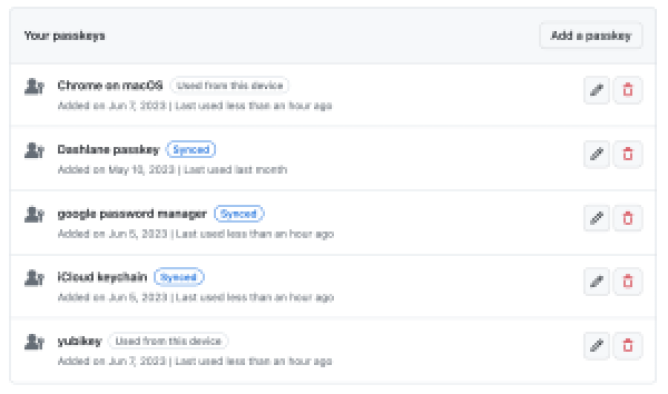
Many passkey providers also sync credentials across devices. Depending on the provider, passkeys may sync automatically — from iOS to macOS via iCloud, across Android through Google Password Manager, or across platforms via password managers like 1Password and Dashlane. OS and browser vendors are still extending sync support, but the underlying engines are in place. GitHub's user settings will label credentials that report syncing status, so you can choose which passkey setup matches your risk model.
Upgrading existing security keys
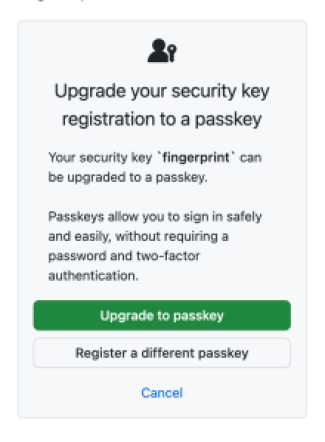
Security keys already on your account may be eligible for an upgrade if they can verify your identity — for example Touch ID, Windows Hello, Android thumbprints, or PIN-locked and biometric hardware keys. On your next sign-in with such a key, GitHub will ask whether you want to convert it to a passkey. This re-registers the credential with your passkey provider, making it discoverable during authentication and synced where supported. Because passkey registration is privacy-preserving, you may need to trigger the key a few times during the upgrade so GitHub can confirm it's updating the correct credential. Once complete, the key is ready for passwordless use.
Feedback on the passkey beta can be left in GitHub's public discussion, and more details are available in the official passkey documentation.



