
Passkeys Without a Display: A New Cross-Device Flow
Passkeys have established themselves as a phishing-resistant alternative to passwords, and the standard cross-device flow is familiar: a device shows a QR code, a nearby phone scans it, and the user approves the login. But that model breaks down for the growing class of devices with no accessible screen — think XR headsets, smart home hubs, or industrial sensors. Those devices can't display a scannable code, yet they still need the same trust and proximity guarantees as a desktop browser.
A new implementation from Meta, now available on Quest devices running Horizon OS, takes a different route. Instead of rendering the QR payload on the headset, it pushes that same payload through an authenticated companion app on the user's phone. The underlying cryptographic handshake is untouched; only the transport changes. The approach builds on the FIDO Alliance's CTAP hybrid protocol and is intended as a template for bringing passkeys to screenless device categories.
Why the QR Code Is the Limiting Factor
The standard cross-device passkey flow depends on two mechanisms:
- QR code scanning: The relying party displays a code on the device, which the mobile authenticator scans to establish a secure channel.
- Bluetooth/NFC proximity: Local communication protocols handle discovery and initiate the secure exchange.
Eliminating the display removes the QR path entirely. Proximity-based discovery can still work, but without any visual feedback on the device, there's a real risk around user verification and intent confirmation. Users need clear assurance that they're approving the right request on the right device, especially when there's no screen to confirm it.
Channeling the Request Through a Companion App
The core insight is that the QR code is just a carrier for a command. When the user initiates a passkey login on a display-equipped device, the QR payload contains a nonce that tells the authenticator to start a hybrid flow. For devices with a companion app already bound to the same account, that command can travel over the app's authenticated push channel instead of a camera scan.
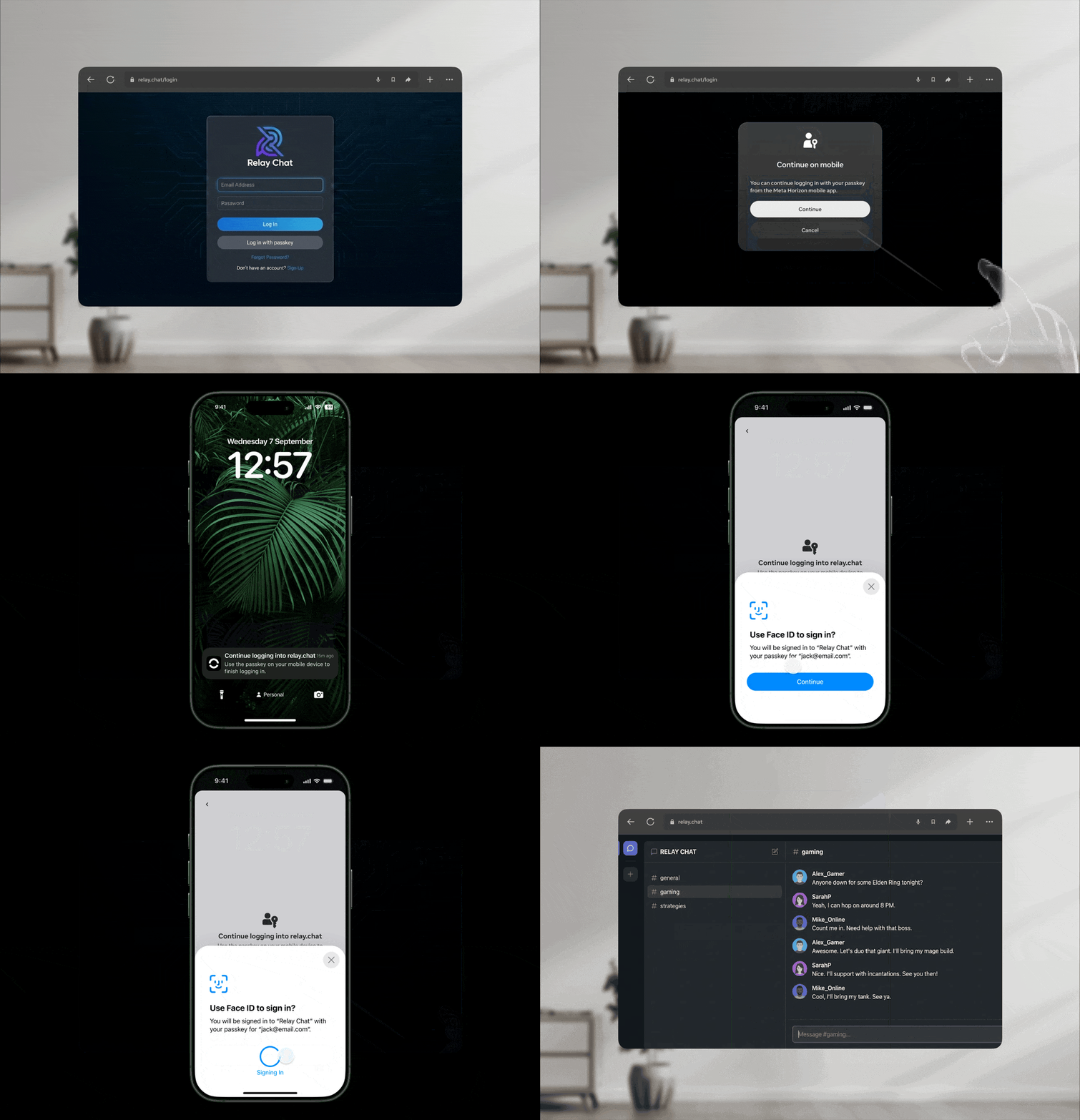
On Meta Quest, the flow works like this:
Constructing the Hybrid Message
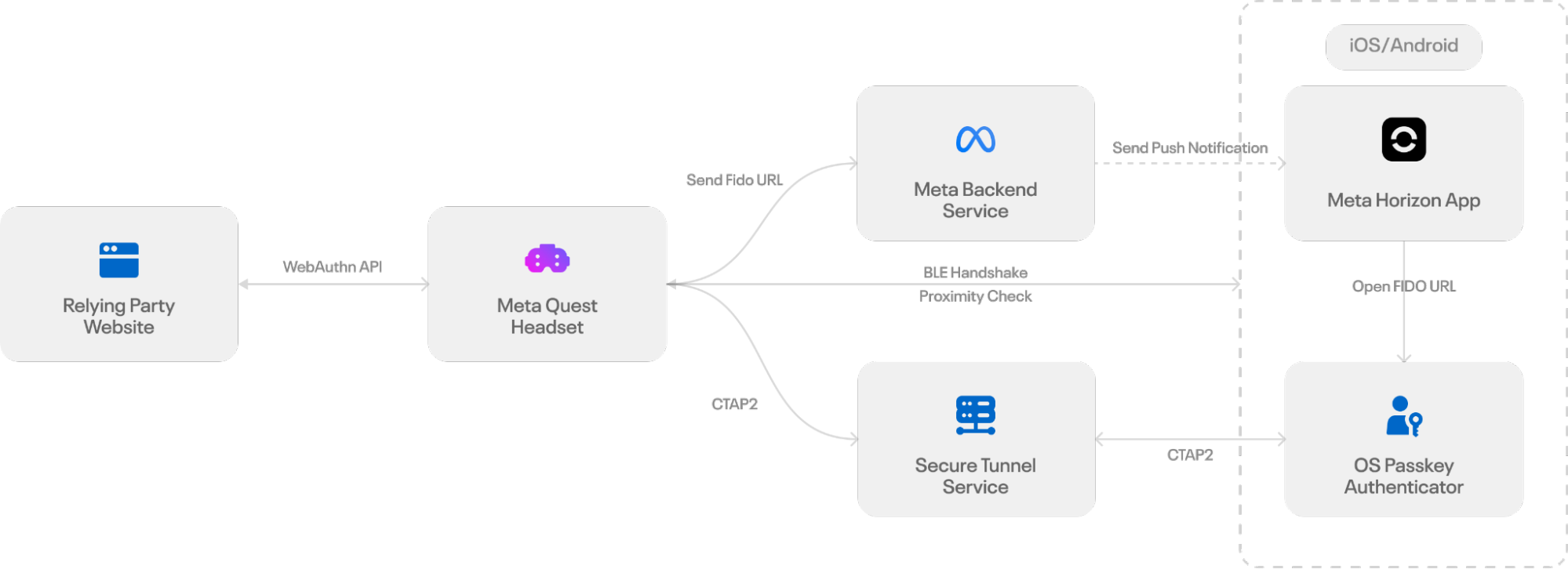
When a passkey login is initiated on the headset, its browser builds the same payload that would normally be embedded in a QR code. That payload includes a fresh ECDH public key, a session-specific secret, and routing information for the handshake. Rather than rendering it as an image, the browser encodes it into a FIDO URL — the standard mechanism defined for hybrid transport — which instructs the phone to begin the passkey authentication flow.
Delivering the Message to the Phone
Because the headset can't present a QR code, it needs a secure, deterministic way to move the FIDO URL to the user's mobile device. The Quest system uses the Meta Horizon app's authenticated push channel. When the user selects the passkey option in the login dialog, the headset wraps the FIDO URL as structured data inside a GraphQL-based push notification. The companion app, signed in with the same account as the headset, receives the payload and validates the delivery context so the request is routed to the correct user.
Surfacing the Request to the User
Once the payload reaches the phone, the platform's push service displays a standard iOS or Android notification indicating a pending login request. Tapping it routes a deep link to the Meta Horizon app, which opens the FIDO URL via the system URL launcher and invokes the operating system's passkey interface.
For users who have disabled notifications, simply launching the Meta Horizon app works too: the app queries the backend for pending passkey requests tied to the user's account. Valid requests expire after five minutes; if one exists, the app automatically opens the FIDO URL and begins the same flow.
From that point, the mobile device starts the hybrid transport sequence — broadcasting a BLE advertisement, establishing an encrypted tunnel, and producing the passkey assertion. Both the system notification and the direct app launch path serve as consent surfaces and entry points into the standard hybrid workflow.
Completing the Authentication
After the user approves the action on their phone, the secure channel is established exactly as WebAuthn specifies. The only difference is timing in the challenge exchange:
- The inaccessible device generates the standard WebAuthn challenge and waits.
- The mobile authenticator initiates the secure BLE/NFC connection.
- The challenge is transmitted over that secure channel.
- Upon successful user verification, the mobile device generates the appropriate response — either
AuthenticatorAssertionResponseorAuthenticatorAttestationResponse. - The response is sent back to the inaccessible device.
From there, the device acts as a conduit, forwarding the response to the relying party server to complete the transaction, just as a display-equipped device would.
What This Unlocks
This implementation sidesteps the need for an on-device display in the cross-device flow while preserving the proximity and trust requirements of standard passkey authentication. The hope is that other platforms and ecosystems adopt a similar strategy, extending passwordless login beyond mobile and desktop into wearables and IoT hardware. The work acknowledges the role of the FIDO Alliance and mobile OS vendors in establishing the hybrid transport and interoperable frameworks that make such adaptations possible.



