

Locking Down a GitHub Enterprise Server Instance
GitHub Enterprise Server (GHES) comes with a solid security baseline, but administrators who want a stricter posture have several controls available. The highest-impact changes involve who holds privileged access, how the appliance is reached on the network, and which features are exposed to unauthenticated users.
Reinforce the Management Console password and administrative access
The Management Console is the most powerful administrative tool on a GHES instance, because it can grant SSH access to the administrative shell. Start by setting a strong Management Console password and rotating it on a regular schedule, such as with each feature release upgrade.
Site admins hold broad rights, including user impersonation and access to every private repository. Keep that list short, with roughly two site admins per time zone to cover typical working days. Note that site admins can also mint personal access tokens with the site admin scope for automated work; reserve those tokens for systems that are carefully secured and audited.
Admins with SSH access to the administrative shell effectively have full control of the appliance, including the ability to promote themselves to site admin. Each admin should use an individual, passphrase-protected SSH key so that activity is auditable. When uploading a key to the Management Console, append a comment describing the key's owner or purpose:
ssh-ed25519 AAA...key...ZZZ Mona Lisa, Employee ID 123
                            ^^^^^^^^^^^^^^^^^^^^^^^^^^
                              SSH key comment section
Keep the administrative shell access list minimal. Two keys typically must remain on that list: the replica key (usually named admin-ssh-key) used in high availability configurations, and the key used by the backup server to reach the primary. SSH keys without passphrases that support automation, such as backups, should live only on hardened systems. People with access to the virtualization platform, hypervisor, or physical appliance also have a path to your data, so keep that group small too.
Stay current with upgrades
Run the latest supported hot-patch release as soon as possible after GitHub's roughly biweekly update cadence. Hot-patch upgrades (for example, moving from 2.20.4 to 2.20.5) deploy without downtime and can be scheduled during working hours. Additionally, plan for a full version upgrade (such as 2.20.5 to 2.21.3) at least twice a year to remain on a supported release and pick up new features.
Require two-factor authentication and enforce TLS
If your authentication backend supports it, require two-factor authentication for all users. Built-in accounts and LDAP accounts can use GitHub's own 2FA; most SAML providers support 2FA as well, and enabling it there strengthens the overall setup.
Switch the appliance to "TLS only" encryption for all web traffic, and restrict allowed protocols to 1.2 and 1.3.
Isolate components and shut off unauthenticated access
Subdomain isolation keeps GitHub's internal components separate from one another. This matters because users can publish arbitrary HTML on GitHub Pages, and without isolation that content can become a cross-site scripting vector into other parts of the appliance.
Private mode enforces valid login credentials for all content on the appliance, and disabling public Pages means no Pages content is visible without authentication. Likewise, disabling anonymous Git read access guarantees that source code is always served only to authenticated users.
Harden the network perimeter
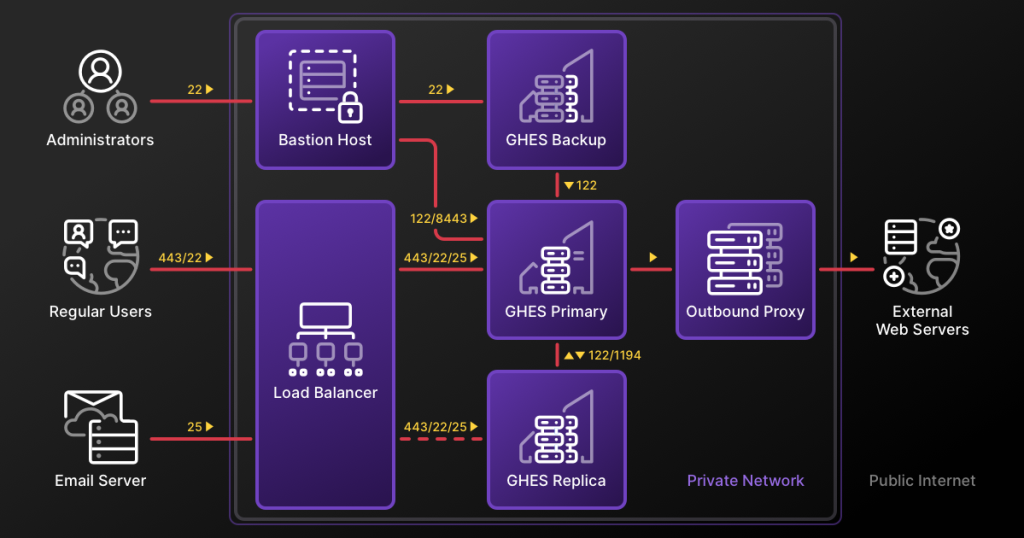
Webhooks configured by your users can push potentially sensitive payloads, including issue comments, to external servers when the appliance has internet connectivity. An outbound proxy gives you a point of control over which external web servers those webhooks can reach; contacting GitHub Professional Services is the recommended route for proper setup.
Regular users only need HTTPS/443 and SSH/22 to reach the appliance. A common arrangement places a load balancer in front of GHES that forwards only those ports, while administrators reach management ports through a bastion host as needed.
Secure the backup host
Run backups regularly with GitHub's backup-utils on a dedicated machine. That host should run an up-to-date Linux distribution, and the number of users with accounts on it should be limited. Be aware that all GitHub data is stored unencrypted by default on the backup server.



