

Why Gradio is worth modeling in CodeQL
Gradio is a Python web framework for demoing machine learning applications, and it has grown rapidly in popularity. Modeling a framework like this in CodeQL is a practical way to scale vulnerability research across the many projects that depend on it. In this case, the effort has already produced 11 vulnerabilities across several open source projects, including AUTOMATIC1111/stable-diffusion-webui, one of the most popular repositories on GitHub and a fixture in both the 2023 and 2024 Octoverse reports.
The process is straightforward in principle: identify sources (entry points that accept user input) and sinks (functions that could be dangerous), then model them so that CodeQL's data flow analysis can detect paths between the two. The Gradio work builds on a general methodology demonstrated in earlier parts of this series, and the accompanying exercises are available in the CodeQL zero to hero repository.
How Gradio apps are put together
Gradio offers two primary ways to build an interface. The first is the Interface class, which is a simple wrapper around a function.
import gradio as gr

def greet(name, intensity):
    return "Hello, " + name + "!" * int(intensity)

demo = gr.Interface(
    fn=greet,
    inputs=[gr.Textbox(), gr.Slider()],
    outputs=[gr.Textbox()])

demo.launch()
The Interface constructor takes three main arguments:
fn— a reference to the function implementing the application logic, likegreetabove.inputs— a list of input components. Here, atext(equivalent togr.Textbox) and aslider(equivalent togr.Slider).outputs— a specification of whatfnshould return, such as atext(gr.Textbox).
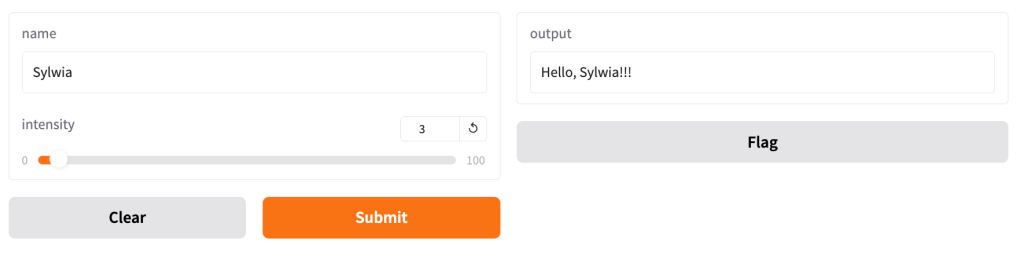
The second approach is gr.Blocks, which gives finer control over layout and event handling. Components like sliders, dropdowns, checkboxes, and radio buttons can be wired to trigger functions from event listeners.
import gradio as gr

def sentence_builder(quantity, animal, countries, place, morning):
    return f"""The {quantity} {animal}s from {" and ".join(countries)} went to the {place} in the {"morning" if morning else "night"}"""

with gr.Blocks() as demo:

    gr.Markdown("Choose the options and then click **Run** to see the output.")
    with gr.Row():
        quantity = gr.Slider(2, 20, value=4, label="Count", info="Choose between 2 and 20")
        animal = gr.Dropdown(["cat", "dog", "bird"], label="Animal", info="Will add more animals later!")
        countries = gr.CheckboxGroup(["USA", "Japan", "Pakistan"], label="Countries", info="Where are they from?")
        place = gr.Radio(["park", "zoo", "road"], label="Location", info="Where did they go?")
        morning = gr.Checkbox(label="Morning", info="Did they do it in the morning?")

    btn = gr.Button("Run")
    btn.click(
        fn=sentence_builder,
        inputs=[quantity, animal, countries, place, morning],
        outputs=gr.Textbox(label="Output")
    )

if __name__ == "__main__":
    demo.launch(debug=True)
Running that code and providing inputs produces a simple application that builds a sentence from the selected component values.
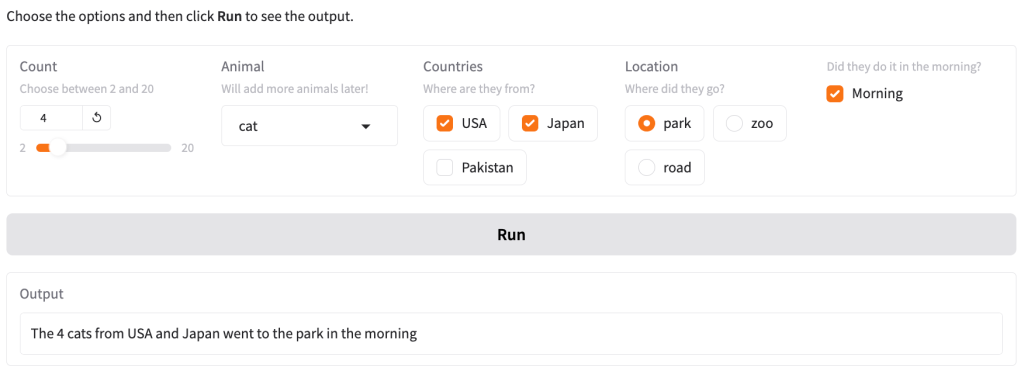
Both styles expose the same kind of entry points to the framework, and both are worth examining for sources.
Finding the attack surface
A practical way to map a framework's attack surface is to run a small app and observe the traffic. With the Interface example above, submitting a string "Sylwia" and an integer 3 results in a request that sends the values in JSON — the string and the integer appear inside the "data" key.
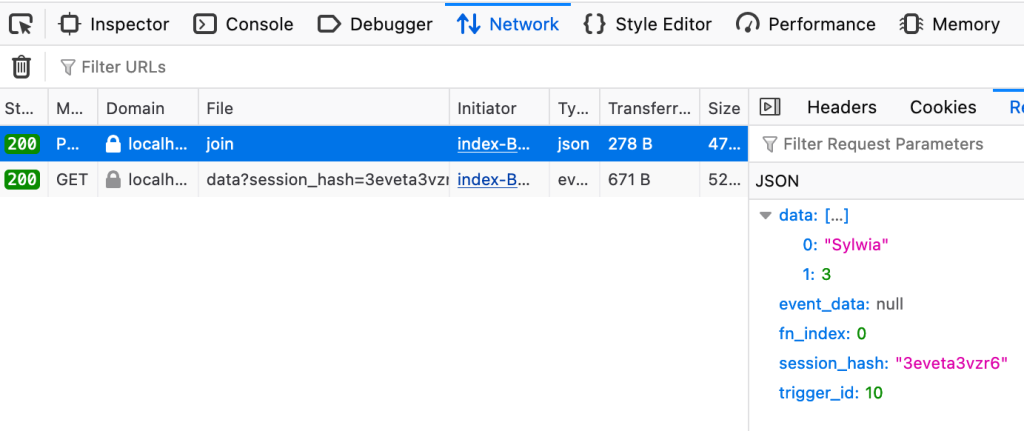
The text box obviously accepts any string. What happens if you send something else, like an integer 1000, in its place?
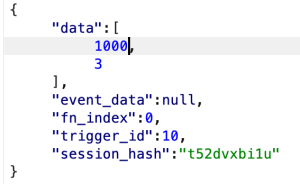
That is allowed. What if you send a string "high" where a slider expects an integer from 2 to 20?
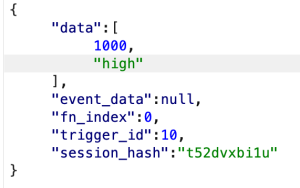
That produces an error:
File "/**/**/**/example.py", line 4, in greet
    return "Hello, " + name + "!" * int(intensity)
                                    ^^^^^^^^^^^^^^
ValueError: invalid literal for int() with base 10: 'high'
The significant detail here is not the type error itself, but where it originates. The framework does not reject the value early because of enforced component types. Instead, the first problem arises when the int function attempts to convert the value in Python. Until that conversion, the value can be arbitrary and could be passed on to any downstream functionality — which makes these component inputs strong candidates for sources.
The same check applies to a gr.Blocks app. Sending the example inputs produces a request containing values tied to each component.
![Screenshot showing request with data in a form of a JSON. The “data” key takes a list with two values: 4,"cat",["USA","Japan"],"park",true’](https://github.blog/wp-content/uploads/2024/12/blocks-test-1.png?w=300&resize=300%2C295)
The inputs correspond to the following components:
- A
Sliderset to take values from 2 to 20. - A
Dropdownwith options"cat","dog","bird". - A
CheckboxGroupwith options"USA","Japan","Pakistan". - A
Radiogroup with options"park","zoo","road". - A single
Checkbox.
Now try sending values that violate the component expectations:
- A slider value of
"a thousand"instead of an integer. - A dropdown value of
"turtle", which is not one of the options. - A checkbox group with a list such as
["USA","Japan", "Poland"], including an unlisted option. - A radio value sent as a list
["a", "b"], when the component is meant to accept a single value. - A checkbox value of
123, when the component should only handle booleans.
![Screenshot showing request with data in the form of a JSON. The “data” key takes a list with two values: "a thousand","turtle",["USA","Japan", "Poland"],["a", "b"],123’](https://github.blog/wp-content/uploads/2024/12/blocks-test-2.png?w=234&resize=234%2C300)
None of these generate a framework-level error. The values pass through, which reinforces the idea that these inputs can be modeled as sources for data flow analysis.
A version-specific caveat
Shortly after the initial research and modeling of Gradio 4.x sources, the Gradio team commissioned a security audit from Trail of Bits. The resulting report — by Maciej Domański and Vasco Franco — described a number of issues, many of which were fixed in Gradio 5.0, released on October 9, 2024.
One specific finding is relevant to this discussion. TOB-GRADIO-15 reported that the dropdown component's pre-processing step did not limit values to those in the dropdown list.

That issue was fixed in Gradio 5.0. Since then, submitting values that are not valid choices for gr.Dropdown, gr.Radio, and gr.CheckboxGroup results in an error like this:
gradio.exceptions.Error: "Value: turtle is not in the list of choices: ['cat', 'dog', 'bird']"
With that change, vulnerabilities that depend on these components as sources may no longer be exploitable in Gradio 5.0 and later. The audit also resulted in other security fixes to the framework, all documented in the Trail of Bits report.
That raises a natural question: should the CodeQL models for these sources be updated? Since applications running Gradio versions before 5.0 are still affected, the models remain accurate and useful as they are. The framework still presents a meaningful attack surface, but only for older versions.
Turning Gradio Components Into CodeQL Sources
With the candidate source patterns identified in the previous section, the next step is to encode them as CodeQL models. These models let us combine our Gradio-specific sources with CodeQL's existing sinks to surface vulnerabilities across many applications. First, though, we need a database to test against.
Standing up a test database
CodeQL works by first building a database from source code, then running queries against that database to find flaws.

CodeQL databases are created from source, then queries are executed against them.
For our test case, we use intentionally vulnerable code centered on gr.Interface. The application is vulnerable to command injection through both the folder and logs arguments, which flow straight into the first argument of an os.system call.
import gradio as gr
import os

def execute_cmd(folder, logs):
    cmd = f"python caption.py --dir={folder} --logs={logs}"
    os.system(cmd)

folder = gr.Textbox(placeholder="Directory to caption")
logs = gr.Checkbox(label="Add verbose logs")

demo = gr.Interface(fn=execute_cmd, inputs=[folder, logs])

if __name__ == "__main__":
    demo.launch(debug=True)
A second example uses gr.Blocks with a gr.Button.click listener to mirror earlier patterns. This one is similarly exposed to command injection via the same arguments. It is a simplified reproduction of a vulnerability found in an open source project and disclosed in GHSL-2024-019 to GHSL-2024-024.
import gradio as gr
import os

def execute_cmd(folder, logs):
    cmd = f"python caption.py --dir={folder} --logs={logs}"
    os.system(cmd)

with gr.Blocks() as demo:
    gr.Markdown("Create caption files for images in a directory")
    with gr.Row():
        folder = gr.Textbox(placeholder="Directory to caption")
        logs = gr.Checkbox(label="Add verbose logs")

    btn = gr.Button("Run")
    btn.click(fn=execute_cmd, inputs=[folder, logs])

if __name__ == "__main__":
    demo.launch(debug=True)
Two additional snippets use positional arguments instead of keywords to exercise a slightly different call shape. All test code is available in the CodeQL zero to hero repository.
To build a database, install the CodeQL CLI—either as a gh extension (recommended) or as a standalone binary. With the CLI in place, run the following from the directory containing the source tree:
codeql database create gradio-cmdi-db --language=python --source-root='./gradio-tests'
That produces a new folder gradio-cmdi-db with the extracted program model. If you already have the VS Code CodeQL starter workspace configured, add the new database via the “Choose Database from Folder” button and point it at gradio-cmdi-db.

Deciding what counts as a source
Returning to the vulnerable code, an important subtlety emerges: not every Gradio component is a source.
import gradio as gr
import os

def execute_cmd(folder, logs):
    cmd = f"python caption.py --dir={folder} --logs={logs}"
    os.system(cmd)
    return f"Command: {cmd}"

folder = gr.Textbox(placeholder="Directory to caption")
logs = gr.Checkbox(label="Save verbose logs")
output = gr.Textbox()

demo = gr.Interface(
    fn=execute_cmd,
    inputs=[folder, logs],
    outputs=output)

if __name__ == "__main__":
    demo.launch(debug=True)
In the Interface example, the UI has a textbox on the left that accepts user input and an output text component on the right. A component only becomes a source when it is listed under the inputs keyword argument—either as a single component or inside a list. Those components feed the function assigned to fn, and that function may process the data insecurely. So in our example, folder and logs are the true sources; the components passed to inputs determine which parameters those are.
The same reasoning applies to gr.Blocks and gr.Button.click. Anything specified in the inputs argument of the click handler becomes a source that reaches execute_cmd.
Modeling gr.Interface
To identify values passed to inputs, we first locate all calls to gr.Interface. Python's ApiGraphs library makes this straightforward: we look for API::CallNode instances that resolve to a call of that class.
The initial query uses @kind problem so results render as alerts. The from clause declares node as an API::CallNode, the where clause restricts it to Gradio's Interface, and the select outputs the node itself:
/**
 * @id codeql-zero-to-hero/4-1
 * @severity error
 * @kind problem
 */

import python
import semmle.python.ApiGraphs

from API::CallNode node
where node =
    API::moduleImport("gradio").getMember("Interface").getACall()
select node, "Call to gr.Interface"
Running it against the test database should return two alerts, confirming the query fires on both interface instantiations.
![creenshot from the VS Code CodeQL extension showing two alerts in files “cmdi-interface-list.py” and in “cmdi-interface.py”. The first one is highlighted and shows a the “cmdi-interface-list.py” file open on the right side. In the file, the code line “demo = gr.Interface(fn=execute_cmd, inputs=[folder, logs], outputs=output)” is highlighted.](https://github.blog/wp-content/uploads/2024/12/interface-vuln-alert-1.png?w=1024&resize=1024%2C335)
The query reports two calls.
Next we resolve which parameters of the fn function those input components map to—effectively extracting folder and logs.
import gradio as gr
import os

def execute_cmd(folder, logs):
    cmd = f"python caption.py --dir={folder} --logs={logs}"
    os.system(cmd)
    return f"Command: {cmd}"

folder = gr.Textbox(placeholder="Directory to caption")
logs = gr.Checkbox(label="Save verbose logs")
output = gr.Textbox()

demo = gr.Interface(
    fn=execute_cmd,
    inputs=[folder, logs],
    outputs=output)

if __name__ == "__main__":
    demo.launch(debug=True)
The implementation grabs the function reference held by the fn argument, then enumerates that function's own parameters:
/**
 * @id codeql-zero-to-hero/4-2
 * @severity error
 * @kind problem
 */

 import python
 import semmle.python.ApiGraphs

 from API::CallNode node
 where node =
     API::moduleImport("gradio").getMember("Interface").getACall()

 select node.getParameter(0, "fn").getParameter(_), "Gradio sources"
Here, getParameter(0, "fn") favors the first positional argument but falls back to the keyword name. Calling getParameter(_) on the resolved function yields all of its declared parameters, and the wildcard underscore ensures we collect every one. The query reports three alerts.
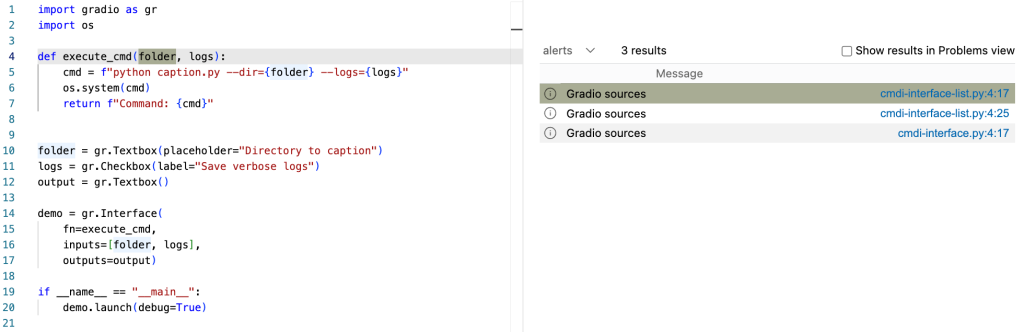
The query flags three parameters across the sample programs.
This logic can be wrapped in a reusable class. The added benefit is wrapping it in the RemoteFlowSource::Range supertype:
/**
 * @id codeql-zero-to-hero/4-3
 * @severity error
 * @kind problem
 */

 import python
 import semmle.python.ApiGraphs
 import semmle.python.dataflow.new.RemoteFlowSources

 class GradioInterface extends RemoteFlowSource::Range {
    GradioInterface() {
        exists(API::CallNode n |
        n = API::moduleImport("gradio").getMember("Interface").getACall() |
        this = n.getParameter(0, "fn").getParameter(_).asSource())
    }
    override string getSourceType() { result = "Gradio untrusted input" }

 }

from GradioInterface inp
select inp, "Gradio sources"
RemoteFlowSource is an abstract class—effectively a union of all its subclasses. Because our GradioInterface class inherits from RemoteFlowSource::Range, any query that already references RemoteFlowSource will automatically incorporate our new Gradio sources. Querying for all RemoteFlowSource results now merges in the Gradio-derived ones:
/**
 * @id codeql-zero-to-hero/4-4
 * @severity error
 * @kind problem
 */

 import python
 import semmle.python.ApiGraphs
 import semmle.python.dataflow.new.RemoteFlowSources

class GradioInterface extends RemoteFlowSource::Range {
    GradioInterface() {
        exists(API::CallNode n |
        n = API::moduleImport("gradio").getMember("Interface").getACall() |
        this = n.getParameter(0, "fn").getParameter(_).asSource())
    }
    override string getSourceType() { result = "Gradio untrusted input" }

 }

from RemoteFlowSource rfs
select rfs, "All python sources"
The practical upshot: library files carrying these models propagate the new sources into nearly all existing Python security queries—SQL injection and others—without edits. The approach is demonstrated in the pull request that originally added Gradio models to CodeQL.
Modeling gr.Button.click
The gr.Blocks case requires one extra hop because click() is invoked on an object returned by gr.Button(). The API graph chain reflects that:
/**
 * @id codeql-zero-to-hero/4-5
 * @severity error
 * @kind problem
 */

 import python
 import semmle.python.ApiGraphs

 from API::CallNode node
 where node =
     API::moduleImport("gradio").getMember("Button").getReturn()
     .getMember("click").getACall()

select node.getParameter(0, "fn").getParameter(_), "Gradio sources"
API::moduleImport("gradio").getMember("Button").getReturn() captures the result of the gr.Button() constructor, and chaining .getMember("click").getACall() finds every invocation of the event listener on that object. This yields three alerts as well.
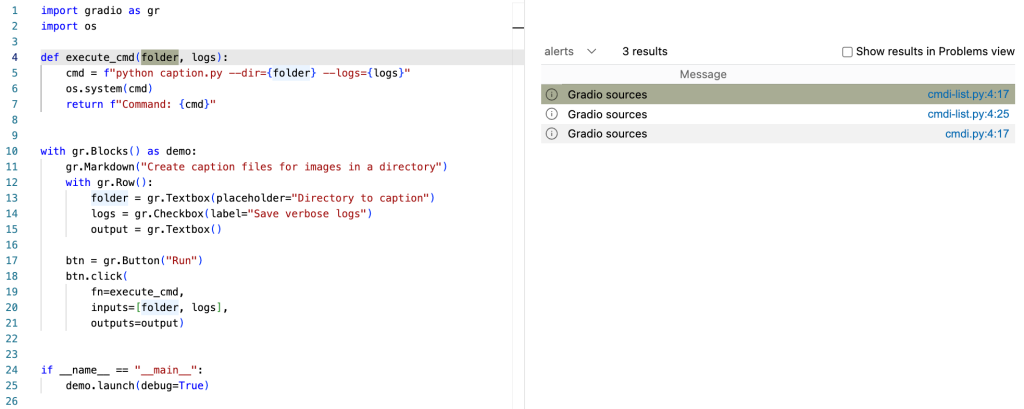
The click handler query reports three hits.
Equally, this pattern can be encapsulated in a class for portability:
/**
 * @id codeql-zero-to-hero/4-6
 * @severity error
 * @kind problem
 */

 import python
 import semmle.python.ApiGraphs
 import semmle.python.dataflow.new.RemoteFlowSources

class GradioButton extends RemoteFlowSource::Range {
    GradioButton() {
        exists(API::CallNode n |
        n = API::moduleImport("gradio").getMember("Button").getReturn()
        .getMember("click").getACall() |
        this = n.getParameter(0, "fn").getParameter(_).asSource())
    }

    override string getSourceType() { result = "Gradio untrusted input" }

 }

from GradioButton inp
select inp, "Gradio sources"
Turning Gradio sources into findings
With both the GradioInterface and GradioFunction classes written, we can use them in a taint tracking query. Combining these sources with an os.system sink — defined in OsSystemSink, where isSink targets the first argument — reveals command injection paths originating from Gradio inputs.
/**
 * @id codeql-zero-to-hero/4-7
 * @severity error
 * @kind path-problem
 */

 import python
 import semmle.python.dataflow.new.DataFlow
 import semmle.python.dataflow.new.TaintTracking
 import semmle.python.ApiGraphs
 import semmle.python.dataflow.new.RemoteFlowSources
 import MyFlow::PathGraph

class GradioButton extends RemoteFlowSource::Range {
    GradioButton() {
        exists(API::CallNode n |
        n = API::moduleImport("gradio").getMember("Button").getReturn()
        .getMember("click").getACall() |
        this = n.getParameter(0, "fn").getParameter(_).asSource())
    }

    override string getSourceType() { result = "Gradio untrusted input" }

 }

 class GradioInterface extends RemoteFlowSource::Range {
    GradioInterface() {
        exists(API::CallNode n |
        n = API::moduleImport("gradio").getMember("Interface").getACall() |
        this = n.getParameter(0, "fn").getParameter(_).asSource())
    }
    override string getSourceType() { result = "Gradio untrusted input" }

 }

class OsSystemSink extends API::CallNode {
    OsSystemSink() {
        this = API::moduleImport("os").getMember("system").getACall()
    }
}

 private module MyConfig implements DataFlow::ConfigSig {
   predicate isSource(DataFlow::Node source) {
     source instanceof GradioButton
     or
     source instanceof GradioInterface
   }

   predicate isSink(DataFlow::Node sink) {
    exists(OsSystemSink call |
        sink = call.getArg(0)
        )
   }
 }

 module MyFlow = TaintTracking::Global<MyConfig>;

 from MyFlow::PathNode source, MyFlow::PathNode sink
 where MyFlow::flowPath(source, sink)
 select sink.getNode(), source, sink, "Data Flow from a Gradio source to `os.system`"
Running this query produces six alerts that trace the complete source-to-sink path. Note that CodeQL already has a built-in model for this particular os.system sink; we're using it here only to illustrate the technique.
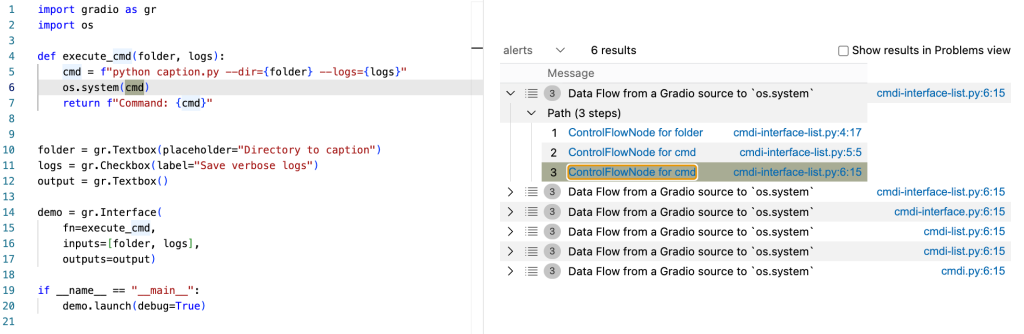
The same approach transfers to any Python project, not just Gradio itself. Once the source models are placed in library files — as shown in this pull request adding Gradio models — the queries work against other codebases. To scale beyond individual repositories, the Multi-Repository Variant Analysis (MRVA) tool runs a query on up to 1,000 projects at once.
Expanding the source set
Testing during the attack-surface identification phase surfaced other Gradio components that behave similarly. gr.LoginButton.click is an event listener that also accepts an inputs argument and qualifies as a source. These additional cases are modeled in the same pull request, following the pattern established for gr.Interface.
Adding a taint step for list inputs
There are two ways to model Gradio sources: extract the values passed to inputs and link them to the function in fn, or inspect the function parameters directly. Machine learning applications built with Gradio frequently pass a large number of input variables, and lists with ten or more elements are common. In these scenarios, pinpointing which component (such as gr.Textbox or gr.Checkbox) introduced a value gives a much clearer path visualization.
To connect the elements of an inputs list back to their component declarations, we introduce a taint step. Normally taint steps push analysis forward past a blocking code element; here we use one to move from a list element back to the source component. The complete model lives in Gradio.qll in the CodeQL upstream repository.
The first task is to capture the variables that populate inputs in a call like gr.Interface:
class GradioInputList extends RemoteFlowSource::Range {
    GradioInputList() {
      exists(GradioInput call |
        // limit only to lists of parameters given to `inputs`.
        (
          (
            call.getKeywordParameter("inputs").asSink().asCfgNode() instanceof ListNode
            or
            call.getParameter(1).asSink().asCfgNode() instanceof ListNode
          ) and
          (
            this = call.getKeywordParameter("inputs").getASubscript().getAValueReachingSink()
            or
            this = call.getParameter(1).getASubscript().getAValueReachingSink()
          )
        )
      )
    }

    override string getSourceType() { result = "Gradio untrusted input" }
  }
Next we need to associate each element of the inputs list with the corresponding parameter of the function referenced by fn:
class ListTaintStep extends TaintTracking::AdditionalTaintStep {
  override predicate step(DataFlow::Node nodeFrom, DataFlow::Node nodeTo) {
    exists(GradioInput node, ListNode inputList |
       inputList = node.getParameter(1, "inputs").asSink().asCfgNode() |
       exists(int i |
         nodeTo = node.getParameter(0, "fn").getParameter(i).asSource() |
         nodeFrom.asCfgNode() =
         inputList.getElement(i))
       )
    }
  }
Walking through the taint step mechanics:
exists(GradioInput node, Listnode inputList |
Two temporary variables are declared inside the exists block: node of type GradioInput and inputList of type ListNode.
inputList = node.getParameter(1, "inputs").asSink().asCfgNode() |
inputList is bound to the value of inputs, and because of its ListNode type, only actual lists are considered.
exists(int i |
nodeTo = node.getParameter(0, "fn").getParameter(i).asSource() |
nodeFrom.asCfgNode() = inputList.getElement(i))
Finally, the function in fn is resolved, and its parameters are linked positionally to the list elements via temporary variable i. The net effect is clearer results: alerts now display the path from the specific Gradio component to the vulnerable sink.
Running at scale with MRVA
Now that the models are ready, the obvious next step is a wider hunt. MRVA, covered in detail in CodeQL zero to hero part 3, executes a query against up to 1,000 GitHub-hosted projects at once. The VS Code CodeQL extension manages the setup, using GitHub Actions for execution. The controller repository determines the access level: a public controller runs queries for free, but only on public target repositories. Preconfigured dynamic lists of the top 10, 100, or 1,000 most popular repositories per language are included, and custom lists are supported. The official documentation walks through MRVA configuration, and this case study by @maikypedia demonstrates its use for finding SSTI and deserialization flaws.
The Gradio models have already proven themselves: MRVA runs across several Gradio projects have uncovered 11 vulnerabilities to date, with advisories published on the GitHub Security Lab website.
Share your findings
If this walkthrough leads you to a new vulnerability, the GitHub Security Lab team wants to hear about it. Reach them on the Security Lab Slack or mention @ghsecuritylab on X. Questions about CodeQL queries, modeling, or anything else are welcome on the same Slack server, or in the CodeQL and Security Lab discussion forums.



