

Tracing library-specific sinks with API graphs
Variant analysis—searching for all occurrences of a known vulnerable pattern—is one of the most powerful uses of CodeQL in security research. Often, this means finding a specific method call that is known to be dangerous, but only when it originates from a particular library. A naive search for a method by name alone can produce many false positives because different libraries frequently define methods with the same name.
For example, consider auditing a Django application for SQL injection. You want to focus on calls to execute() that are made on the cursor object obtained from django.db.connection.cursor(), not on any other execute() method that might exist in the codebase.
from django.conf.urls import url
from django.db import connection

def show_user(request, username):
    with connection.cursor() as cursor:
        cursor.execute("SELECT * FROM users WHERE username = %s" % username)
In Python, dynamic typing makes it difficult to trace variable types from their origin at import time to their use in a method call. To handle this, CodeQL provides the API graphs library (API::), which tracks the flow of external library classes and functions from their source. This lets you express a chain like from the django library, get the db member, get the connection member, get the cursor member as a single predicate path.
The following query finds all execute method calls originating from the django.db library:
/**
 * @id codeql-zero-to-hero/3-1
 * @severity error
 * @kind problem
 */

import python
import semmle.python.ApiGraphs

from API::CallNode node
where node =
    API::moduleImport("django").getMember("db").getMember("connection").getMember("cursor").getReturn().getMember("execute").getACall()
    and
    node.getLocation().getFile().getRelativePath().regexpMatch("2/challenge-1/.*")

select node, "Call to django.db execute"
Here's the logic:
- The query metadata declares it as a
problem, so results format neatly with file names and a message string. - The
fromclause declaresnodesasAPI::CallNode—representations of calls connected to the API graph. - The
whereclause starts by restricting candidates to those within thedjangomodule viaAPI::moduleImport("django"). - Subsequent predicates—
getMember("db").getMember("connection").getMember("cursor")—navigate from the module to the specificcursormember. getReturn()gets the node representing the result of callingcursor().- Finally,
getMember("execute").getACall()narrows results to actual invocations of that method.
While the syntax might look dense initially, the compositional nature of API graphs makes this style of query intuitive after some practice.
Practice: Exercise your query skills
Try the following challenges to cement these concepts. For instructions on setting up your environment and selecting a CodeQL database, refer to the CodeQL zero to hero part 2 material, using either the GitHubSecurityLab/codeql-zero-to-hero database or a different project of your choice. Make sure your view is set to alerts in the results interface.
Challenge 1: Verify library-specific matching. Run the query above to find all execute method calls coming from the django.db library.
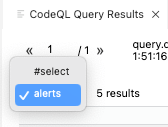
Challenge 2: Search for a command injection sink. Write a query to find all calls to os.system. If any of those calls pass user-controlled input, it could represent a command injection vector. Run it on your selected database.
Challenge 3: Identify an untrusted data source. Flask is a common web framework in Python, and its request object is a well-known input source for untrusted data. Write a query to find all references to request.args, similar to the pattern below:
username = request.args.get("username")
Challenge 4: Inspect query result types. Run the original django.db query and examine the types of results you see. You may notice classifications like MethodCallNode, ExecuteMethodCall, and SqlExecution. Observing these can give you insight into how CodeQL's library models refine your search results.
Solutions to these challenges are in the GitHubSecurityLab/codeql-zero-to-hero repository.
Local vs. global data flow
CodeQL distinguishes between local and global tracking for both data flow and taint flow. Local analysis confines itself to a single function, which makes it much cheaper to compute than global analysis. Local taint tracking extends local data flow with non-value-preserving steps, such as string concatenation or writes to object attributes, which plain data flow ignores.
One practical use of local data flow is refining a sink query. For example, an execute call from django.db is a SQL injection sink only when its argument can originate from user input. If the call passes a literal, it is not vulnerable:
cursor.execute("SELECT * FROM users WHERE username = 'johndoe'")
Or:
query = "SELECT * FROM users WHERE username = 'johndoe'"
cursor.execute(query)
You can exclude the safe calls with a query that finds every execute whose first argument has a flow path from some non-literal expression:
/**
 * @id codeql-zero-to-hero/3-5
 * @severity error
 * @kind problem
 */
import python
import semmle.python.ApiGraphs

class ExecuteCall extends DataFlow::CallCfgNode {
        ExecuteCall() {
        this = API::moduleImport("django").getMember("db").getMember("connection").getMember("cursor").getReturn().getMember("execute").getACall()
        }
}

predicate executeNotLiteral(DataFlow::CallCfgNode call) {
        exists(DataFlow::ExprNode expr |
                call instanceof ExecuteCall
                and DataFlow::localFlow(expr, call.getArg(0))
                and expr instanceof DataFlow::LocalSourceNode
                and not expr.getNode().isLiteral()
        )
}

from DataFlow::CallCfgNode call
where executeNotLiteral(call)
select call, "Call to django.db execute with an argument that is not a literal"
This query relies on a class named ExecuteCall to represent the relevant method calls and a predicate, executeNotLiteral, that captures the candidate arguments. Inside the predicate:
- The
exists()construct introduces local variables—here, an expression node namedexpr. - The predicate requires that
callbe an instance ofExecuteCall. - It then checks for local data flow from
exprto the call's first argument. - The expression is restricted to local source nodes, and
not expr.getNode().isLiteral()removes arguments that are string, integer, or other literal values. - The
from-where-selectclause iterates over all call CFG nodes and keeps only those satisfying the predicate.
CodeQL evaluates conditions declaratively, so the ordering of these filters does not affect the result. The isLiteral() check could just as well be the first condition listed.
Global taint tracking with configurations
Global analysis tracks flow across the entire codebase, which is what most security queries need. In CodeQL, you set up a taint tracking configuration that declares which nodes are sources and sinks; the engine finds all viable paths between them.
There are two APIs for writing such configurations. The new one, announced in August 2023, is preferred and the old one will eventually be deprecated. Older queries and articles, however, still use the legacy form, so you may see both in the wild.
New taint tracking API
A minimal new-style configuration looks like this:
/**
 * @kind path-problem
 */

import python
import semmle.python.dataflow.new.DataFlow
import semmle.python.dataflow.new.TaintTracking
import semmle.python.ApiGraphs
import MyFlow::PathGraph

private module MyConfig implements DataFlow::ConfigSig {
  predicate isSource(DataFlow::Node source) {
    // Define your source nodes here.
  }

  predicate isSink(DataFlow::Node sink) {
    // Define your sink nodes here.
  }
}

module MyFlow = TaintTracking::Global<MyConfig>; // or DataFlow::Global<..>

from MyFlow::PathNode source, MyFlow::PathNode sink
where MyFlow::flowPath(source, sink)
select sink.getNode(), source, sink, "Sample TaintTracking query"
Key points about this template:
- The
@kind path-problemmetadata tag marks the query as a path query, which enables the results view to show the full source-to-sink route. - The
selectstatement expects three nodes plus a message string, here written asselect sink.getNode(), source, sink, "Sample TaintTracking query". - The query imports the generated path graph module with
import MyFlow::PathGraph.
The mechanics are straightforward:
- Define a module
MyConfigthat implementsDataFlow::ConfigSig, meaning it must provide theisSourceandisSinkpredicates. Optional predicates such asisBarrierandisAdditionalFlowStepcan adjust the flow but are not needed here. - Instantiate the global taint engine with
module MyFlow = TaintTracking::Global<MyConfig>. - Use
where MyFlow::flowPath(source, sink)to select pairs that have a reachable path.
As an example, consider finding SQL injection from a Flask request object to the django.db execute sink modeled earlier:
/**
 * @kind path-problem
 * @problem.severity error
 * @id githubsecuritylab/3-6
 */

 import python
 import semmle.python.dataflow.new.DataFlow
 import semmle.python.dataflow.new.TaintTracking
 import semmle.python.ApiGraphs
 import semmle.python.dataflow.new.RemoteFlowSources
 import MyFlow::PathGraph

 class ExecuteCall extends DataFlow::CallCfgNode {
    ExecuteCall() {
    this = API::moduleImport("django").getMember("db").getMember("connection").getMember("cursor").getReturn().getMember("execute").getACall()
    }
}

 private module MyConfig implements DataFlow::ConfigSig {
   predicate isSource(DataFlow::Node source) {
     source = API::moduleImport("flask").getMember("request").asSource()
   }

   predicate isSink(DataFlow::Node sink) {
     exists(ExecuteCall ec |
         sink = ec.getArg(0)
        )
   }
 }

 module MyFlow = TaintTracking::Global<MyConfig>;

 from MyFlow::PathNode source, MyFlow::PathNode sink
 where MyFlow::flowPath(source, sink)
 select sink.getNode(), source, sink, "execute sink called with untrusted data"
In this query:
isSourcelocates the Flaskrequestreferences via the API graph and converts them into data flow nodes withasSource().isSinkselects the first argument of everyExecuteCallnode usingexists(ExecuteCall ec | sink = ec.getArg(0)).
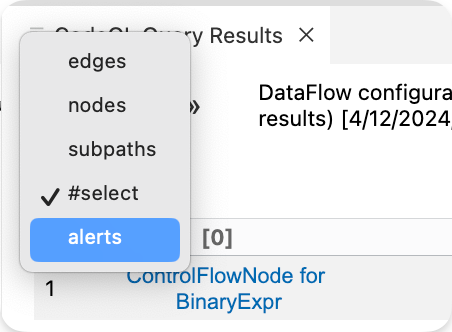
If you run the query and the path view does not render properly, switch the results view to alerts.
Legacy configuration
You will still encounter the older style in existing queries and education material. For reference, the legacy structure looks like this:
/*
 * @kind path-problem
 */

import python
import semmle.python.dataflow.new.TaintTracking

class MyConfig extends TaintTracking::Configuration {
  MyConfig() { this = "MyConfig" }

  override predicate isSource(DataFlow::Node source) {
    ...
  }

  override predicate isSink(DataFlow::Node sink) {
    ...
  }
}

from MyConfig config, DataFlow::PathNode source, DataFlow::PathNode sink
where
    config.hasFlowPath(source, sink)
select sink.getNode(), source, sink, "Sample Taint Tracking query"
The legacy configuration imports the taint tracking module and defines a class that extends it. Most older queries can be translated into the new API with a straightforward mapping of isSource, isSink, and optional predicates. If you work with partial path graphs—for debugging interrupted flows—check the official documentation for either API, as the behavior differs between the two versions.
Modeling Sources and Sinks
CodeQL, like many static analysis tools, relies on models that mark certain functions and parameters in libraries and frameworks as either sources or sinks. The more frameworks and libraries that are modeled, the more effective the tool becomes at detecting vulnerabilities. CodeQL's library and framework support is extensive, with hundreds of categorized sources and sinks for each vulnerability type. Specialized queries then check for data flow paths between these predefined sources and sinks, enabling the detection of most vulnerabilities that are reachable via static analysis.
Understanding Remote Flow Sources
For CodeQL to recognize a Flask HTTP request as a source, the framework must be modeled in CodeQL, with specific function calls defined as sources. These definitions live in qll files, as opposed to ql files which are used for queries. For example, the Flask framework models are in the CodeQL repository, where the request handling logic is defined.
API::Node request() { result =
API::moduleImport("flask").getMember("request") }
Since many vulnerability types share common sources but differ in their sinks, CodeQL for Python introduced a type called RemoteFlowSource, which aggregates all predefined sources into a single category. The Flask request introduced earlier is modeled as a remote flow source, meaning it is categorized as user-controlled input from an external source.
private class FlaskRequestSource extends RemoteFlowSource::Range {
  FlaskRequestSource() { this = request().asSource() }

  override string getSourceType() { result = "flask.request" }
}
For security researchers, this is particularly useful. You can query for all RemoteFlowSource instances in an application to quickly map its attack surface—every place where user input enters the system. This provides a comprehensive overview for planning deeper investigations or targeted hunting.
Sink Models and Vulnerability Coverage
When frameworks are modeled, the code they contain is also categorized into specific sink types. CodeQL for Python defines a type for sinks per vulnerability category—SQL injection, path injection, deserialization, and others. Sinks like SqlExecution are defined in the Concepts module of the CodeQL library.
class SqlExecution extends DataFlow::Node instanceof SqlExecution::Range {
  /** Gets the argument that specifies the SQL statements to be executed. */
  DataFlow::Node getSql() { result = super.getSql() }
}
Python database libraries commonly follow the PEP 249 specification (Python Database API Specification). Instead of modeling each library individually, the CodeQL for Python team implemented a single model for PEP 249 that all compliant libraries extend. For instance, the MySQLdb library is modeled by extending the PEP 249 module, meaning any library that conforms to this specification inherits the same source and sink definitions.
The cursor.execute method is modeled within the PEP 249 module, where it is defined to extend SqlExecution. This kind of shared modeling is less common for other categories, as many libraries do not follow a standardized API specification to the same degree.
private class ExecuteMethodCall extends SqlExecution::Range, API::CallNode {
  ExecuteMethodCall() {
    exists(API::Node start |
      start instanceof DatabaseCursor or start instanceof DatabaseConnection
    |
      this = start.getMember(getExecuteMethodName()).getACall()
    )
  }

  override DataFlow::Node getSql() {
    result in [this.getArg(0), this.getArgByName(getSqlKwargName()),]
  }
}
From a research perspective, understanding which sinks are modeled and how they map to specific libraries gives you visibility into what CodeQL can automatically detect. You can also combine this knowledge with a query for all sources to assess the practical coverage of a given vulnerability class in a target codebase.
A Practical Pipeline for Auditing New Codebases
CodeQL's real power for security research shows when you approach an unfamiliar target. Rather than reading thousands of lines of code to map the attack surface, you can use CodeQL to systematically enumerate entry points, dangerous calls, and interesting data flows. There’s no single methodology that fits every audit, but most engagements follow a similar arc: establish a baseline with automated scans, run targeted queries, then drill into the promising findings by hand.
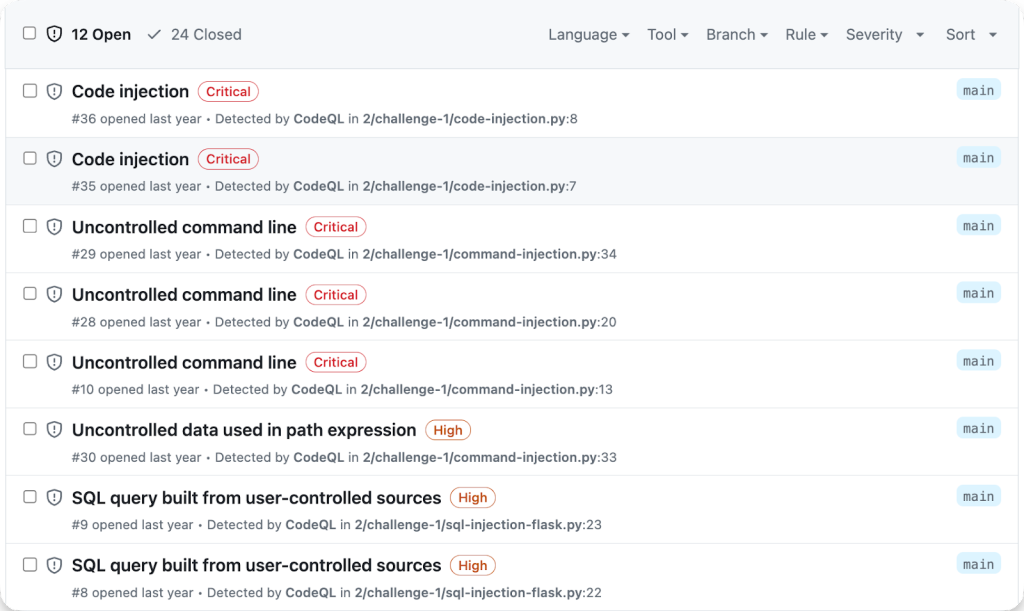
A common starting point is simply enabling code scanning on the repository. This runs the built-in default query suite, which covers most of the checks in the language-specific Security/ folder. If you want broader coverage, switch to the security-extended suite, which includes lower-precision and lower-severity rules. These results aren't always exploitable, but they act as signposts for areas worth manual review. The GitHub Security Lab also publishes a set of audit-focused queries in the CodeQL-Community-Packs repository that you can wire into your setup for additional signal.
Enumerating Attack Surface with Sources and Sinks
With an initial scan complete, the next step is moving to a local CodeQL setup to run and modify queries freely. Running the full set of queries from the Security/ folder is a good baseline; you can execute them all at once from the VS Code extension by right-clicking the folder and selecting “Run queries in selected files.” For Python, those rules live in python/ql/src/Security/, with experimental coverage in python/ql/src/experimental/Security. Other languages organize them differently—Ruby uses ruby/ql/src/queries/security and C# uses csharp/ql/src/Security Features—but the concept is the same.
The most direct way to understand a codebase's exposure is to find every source of untrusted data. CodeQL models these as the RemoteFlowSource type, which you can query directly to get a list of all entry points into your application:
/**
 * @kind problem
 * @problem.severity error
 * @id githubsecuritylab/3-8
 */
import python
import semmle.python.dataflow.new.RemoteFlowSources

from RemoteFlowSource rfs
select rfs, "A remote flow source"
To limit results to specific files or functions, filter with predicates like getLocation as you would in any other QL query. This gives you a practical map of where an attacker can inject input.
Sinks are equally important. For a specific vulnerability class like SQL injection, you can use the “Quick evaluation” feature inside the query file itself. Open python/ql/src/Security/CWE-089/SqlInjection.ql and hover over the SqlInjectionQuery module in its imports. Right-clicking it and selecting “Go to definition” jumps you to the implementation file. If you look above the isSink predicate, you'll see a “Quick evaluation: isSink” link that runs just that predicate and lists every SQL injection sink in your database.
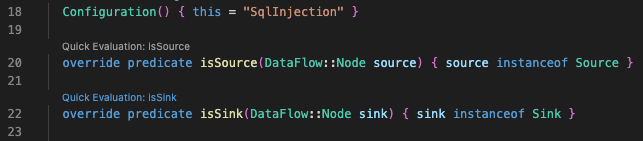
Another, more flexible approach is to query for the sink types directly. Many sinks for Python, including SqlExecution, CodeExecution, and XPathConstruction, are defined centrally in the Concepts module. Querying for them in your own file lets you add additional conditions without touching the library code:
/**
 * @kind problem
 * @problem.severity error
 * @id githubsecuritylab/3-9
 */

import python
import semmle.python.Concepts

from SqlExecution sink
select sink, "Potential SQL injection sink"
Not every query uses the Concepts model. For instance, cleartext logging detection in CleartextLogging.ql relies on a custom sink class, PrintedDataAsSink, defined within the query's customization files rather than in Concepts.qll. Most Python sinks follow the Concepts pattern, but you should still peek into the implementation when hunting for sinks in a specific query, since some classes may not be centrally defined.
Profiling Untrusted Data Flow and External Calls
The CWE-20 “Untrusted Data to External API” query is particularly valuable to security researchers because it catches a broad set of issues simultaneously. It identifies flows where untrusted input reaches any API defined outside the codebase—library calls and third-party functions that aren't part of the project's own source. From a security perspective, any external call is potentially a sink across many vulnerability classes.
Beyond finding bugs, running this query helps you locate external APIs that need their own CodeQL models. If taint analysis stops at an unmodeled third-party library, the analysis can't track the data beyond that boundary. Knowing where those gaps are helps you decide what to model next for deeper coverage.
The query has proven practical value in the field: security researcher @frycos documented using it to find a pre-authentication remote code execution in under 20 minutes.
Once you've identified paths worth verifying manually, you can decide whether to model a vulnerability class in QL for variant analysis. This lets you ask “does the same pattern exist elsewhere in this repo, or across other projects?” Before writing your own models, review how others have approached similar research with CodeQL in the security community—their query structures can save you significant time.
Running queries across thousands of repositories
Multi-repository variant analysis (MRVA) lets you execute any CodeQL query — whether prewritten or custom — against a thousand repositories simultaneously. This is a practical way to scale security research. For instance, you can take the built-in SQL injection query and run it against the top 1,000 Python projects, or adapt the scope to any language and query combination you care about.
The typical workflow starts with a newly written query that models a specific vulnerability class, such as Log4Shell. If your model captures something novel, running that query via MRVA can surface tens of real vulnerabilities across hundreds of open source projects in a few clicks. Because of this, CodeQL combined with MRVA has become a standard tool for security researchers.
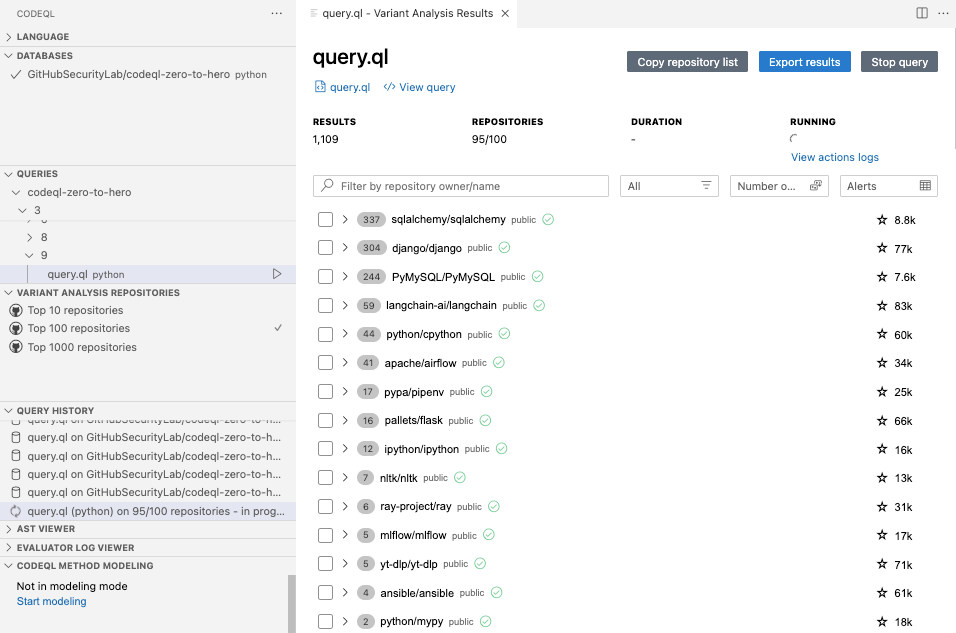
MRVA ships with predefined repository lists: the top 10, top 100, and top 1,000 GitHub projects for any language. You can also build a custom list using GitHub's code search functionality, which gives you finer control over the target set.
Challenge: run MRVA with a security query
To try it yourself, configure MRVA as described in the CodeQL documentation for a controller repository. Then pick a top-10 repository list in the CodeQL extension tab, open a prewritten query for your language of choice, and select CodeQL: Run Variant Analysis. If no results come back, the repository may already be hardened against that weakness; you can repeat the run with the 100- or 1,000-repository list if you want broader coverage.
If you do hit confirmed findings, verify each one and report it through coordinated disclosure. Guidance for reporting vulnerabilities to open source projects is available from GitHub.
Published research built on CodeQL
A substantial body of published security research relies on CodeQL. The examples below show the range of what is possible — from quick wins to deep architectural audits.
| Note: Many resources mention the LGTM platform, which was deprecated in 2022 after the launch of code scanning. You can use the VS Code Starter Workspace setup to run the same queries as in the articles, or use MRVA to run the query against multiple projects at once. |
Python
- A writeup by @frycos describes discovering a pre-authentication remote code execution in pgAdmin in under 20 minutes, using the CWE-20 Untrusted API query.
- @jorgectf published a hands-on introduction to CodeQL covering new QL queries for XXE, LDAP injection, and regular expression injection. Those queries were later accepted into the CodeQL repository through its bug bounty program.
Java
- @pwntester's deep dive into Apache Dubbo walks through the architecture, identifies sources, and models issues not automatically flagged by CodeQL. That research led to 13 new deserialization vulnerabilities. The accompanying workshop includes a step-by-step video and a repository with the query-writing process.
- @mtimo44 and @h0ng10 wrote up their approach to modeling a Java deserialization vulnerability using CodeQL.
C/C++
- @agustingianni provides a beginner-friendly, step-by-step account of hunting vulnerabilities in Rsyslog with CodeQL.
- Chloe Ong and Kar Wei Loh documented their collaboration on memory corruption bugs in Accel-PPP. Ong's article covers the thought process and challenges of writing CodeQL queries; Loh's follow-up explains how to refine those queries to produce more precise results.
- @pwningsystems and @fkaasan explored how static analysis tools, including CodeQL, can find useful gadgets for CPU side-channel exploitation.
Getting help and sharing results
If CodeQL helps you find a vulnerability, GitHub Security Lab wants to hear about it — via the Security Lab Slack server or by tagging @ghsecuritylab on X. For questions about queries, modeling, or any CodeQL-related issue, the Slack server is open to anyone and staffed with CodeQL engineers and security researchers. You can also ask in the CodeQL repository discussions or in the GitHub Security Lab repository discussions.



