Every re-render starts with state
There's one fundamental rule that underpins React's rendering model: every re-render starts with a state change. State is the only trigger that initializes a render in React. (The old forceUpdate() method used to be an exception, but it hasn't existed for quite some time.)
This framing often feels off to developers who are used to thinking in terms of props flowing down the tree. Don't components re-render when their props change? And doesn't context cause re-renders too? Well... no, not exactly.
Here's the key mechanic: when a component re-renders, all of its descendants re-render along with it.
import React from 'react';

function App() {
  return (
    <>
      <Counter />
      <footer>
        <p>Copyright 2022 Big Count Inc.</p>
      </footer>
    </>
  );
}

function Counter() {
  const [count, setCount] = React.useState(0);

  return (
    <main>
      <BigCountNumber count={count} />
      <button
        onClick={() => setCount(count + 1)}
      >
        Increment
      </button>
    </main>
  );
}

function BigCountNumber({ count }) {
  return (
    <p>
      <span className="prefix">
        Count:
      </span>
      {count}
    </p>
  );
}

export default App;
Each state variable in React belongs to a specific component instance. In this example, the count state is owned by the Counter component. When count changes, Counter re-renders — and because BigCountNumber is nested inside Counter's tree, it gets re-rendered, too.
Interactive graph: increment the counter, and watch the affected components flash green:
App
Counter
count: 0
BigCountNumber
Props: { count }
This clears up common Misconception #1: a state change does not force an application-wide re-render. Only the component that owns the state and its descendants are affected. In this example, App itself doesn't have to re-render when the counter state changes.
To understand why this works, it's helpful to remember React's core job: keep the UI in sync with application state. A re-render exists to determine what in the DOM actually needs to change.
When the app mounts, React produces an initial snapshot of the desired DOM:
<main>
  <p>
    <span class="prefix">Count:</span>
    0
  </p>
  <button>
    Increment
  </button>
</main>
<footer>
  <p>Copyright 2022 Big Count Inc.</p>
</footer>
Clicking the button updates count from 0 to 1. To learn how that state flip should affect the UI, React re-runs the component code for Counter and BigCountNumber, generating a second snapshot:
<main>
  <p>
    <span class="prefix">Count:</span>
    1
  </p>
  <button>
    Increment
  </button>
</main>
<footer>
  <p>Copyright 2022 Big Count Inc.</p>
</footer>
Each render is a snapshot of the world — what the UI should be, given the current state. React then compares the two snapshots, finds that the paragraph contains a text node that went from 0 to 1, and patches that one node. Once the DOM is in sync with the snapshot, React waits for the next state change.
This is the core React loop.
In our graph, count lives in Counter. Data can never flow "up" in React, so a change to this state can't influence App; that component doesn't need a re-render. But BigCountNumber is the leaf displaying the count — if we skip its re-render, we can't know whether the text node needs to update. React's job is to figure out how a state change impacts the UI, so it needs to re-render every component that might be affected to get an accurate snapshot.
Props don't cause re-renders
Let's clear up Misconception #2: a component does not re-render because its props change.
Consider this expanded take on the counter app with a new Decoration component added:
import React from 'react';

import Decoration from './Decoration';
import BigCountNumber from './BigCountNumber';

function Counter() {
  const [count, setCount] = React.useState(0);

  return (
    <main>
      <BigCountNumber count={count} />
      <button
        onClick={() => setCount(count + 1)}
      >
        Increment
      </button>

      {/* 👇 This fella is new 👇 */}
      <Decoration />
    </main>
  );
}

export default Counter;
Decoration renders a decorative sailboat. It doesn't depend on count. Logically, there's no reason it should re-render when the counter increments — right? Wrong.
App
Counter
count: 0
BigCountNumber
Props: { count }
Decoration
When a component re-renders, React attempts to re-render all descendants, whether or not they receive the changed state as a prop.
That sounds wasteful, but it's a safety choice. React cannot know with certainty whether a given component depends on a given piece of state. In an ideal world, components would be pure: identical props always produce identical output. In practice, it's trivially easy to write a component that isn't pure:
function CurrentTime() {
  const now = new Date();

  return (
    <p>It is currently {now.toString()}</p>
  );
}
This snippet renders a time-dependent value, so its output changes on every render even with the same props. A subtler case involves refs: if a ref is passed as a prop, React can't tell whether it was mutated since the last render.
React's design priority is keeping the user-visible UI consistent with application state, so it errs on the side of extra renders rather than risk showing a stale interface. Therefore, a state update in a parent cascades down the entire component tree, touching both the components that receive that state through props and those that don't.
Opting into purity with memoization
You can tweak this default cascade using React.memo or the class-equivalent React.PureComponent. Although its name is missing the "r," it's quite close to memorization in practice: React remembers the last produced snapshot. If none of a component's props changed since that snapshot, React reuses it rather than invoking the component fresh.
Calling React.memo on a component tells React: "I certify this is pure — only re-render it when a prop changes."
function Decoration() {
  return (
    <div className="decoration">
      ⛵️
    </div>
  );
}

export default React.memo(Decoration);
Imagine both BigCountNumber and Decoration are wrapped with React.memo. When count updates, Counter re-renders and tries to render both children normally. BigCountNumber, with its changed count prop, does re-render. But Decoration has no props, so the stored snapshot is replayed.
App
Counter
count: 1
BigCountNumber
Props: { count }
Pure Component
Decoration
Pure Component
Think of React.memo as an image processor: hand it five pictures of the same scene, and it gives you one original plus four copies. Trigger a real prop change, and the processor spins up a new original.
Here's a playable version — each memoized component logs to the console, so you can track render activity directly:
import React from 'react';

function Decoration() {
  console.info('Decoration render');

  return (
    <div className="decoration">
      ⛵️
    </div>
  );
}

export default React.memo(Decoration);
So why isn't this the default? Developers tend to exaggerate the expense of re-rendering. For many components the render function is quick — and, per prominent React contributors, comparing all props to see whether they changed can actually be more expensive than simply re-running the function, particularly for large prop counts with few descendants. Memoization shines for components with deep render trees or expensive bodies; coating every component in React.memo can be counterproductive.
How context plays into renders
Context doesn't alter the system model as much as you might think. By default, when a provider component's state changes, all descendants re-render anyway, regardless of which context they subscribe to. That means value changes through providers don't introduce a new type of re-render: the old cascade already covers them.
Viewed alongside memoization, context functions like "invisible props" — invisible or internal in the sense of a React dependency but not visible for a plain prop comparison.
Here's a pure component consuming a UserContext:
const GreetUser = React.memo(() => {
  const user = React.useContext(UserContext);

  if (!user) {
    return "Hi there!";
  }

  return `Hello ${user.name}!`;
});
GreetUser is pure, with no props. Yet it has an implicit dependency on the user stored in some remote state and retrieved through context. If that user state flips, the entire provider tree re-renders. Rather than playing back a stale cached picture, GreetUser executes its render to produce an updated snapshot. Only components that actually consume the context via React.useContext behave this way — pure components that skip the context hook stay cached as usual.
This example works exactly like if you were passing the user as a regular prop:
const GreetUser = React.memo(({ user }) => {
  if (!user) {
    return "Hi there!";
  }

  return `Hello ${user.name}!`;
});
Observe the difference live:
import React from 'react';

const UserContext = React.createContext();

function UserProvider({ children }) {
  const [user, setUser] = React.useState(null);

  React.useEffect(() => {
    // Pretend that this is a network request,
    // fetching user data from the backend.
    window.setTimeout(() => {
      setUser({ name: 'Kiara' });
    }, 1000)
  }, [])

  return (
    <UserContext.Provider value={user}>
      {children}
    </UserContext.Provider>
  );
}

function App() {
  return (
    <UserProvider>
      <GreetUser />
    </UserProvider>
  );
}

const GreetUser = React.memo(() => {
  const user = React.useContext(UserContext);
  console.log('Render with user', user);

  if (!user) {
    return "Hi there!";
  }

  return `Hello ${user.name}!`;
});

export default App;
Diagnosing Re-Renders in the Profiler
When a component updates unexpectedly, it’s rarely obvious what caused it. The React Devtools Profiler is the standard tool for answering that question.
The browser extension is available for Chrome and Firefox. After installing it, open the devtools with Ctrl + Shift + I (or ⌘ + Option + I on macOS). You’ll find two new tabs, one of which is "Profiler".
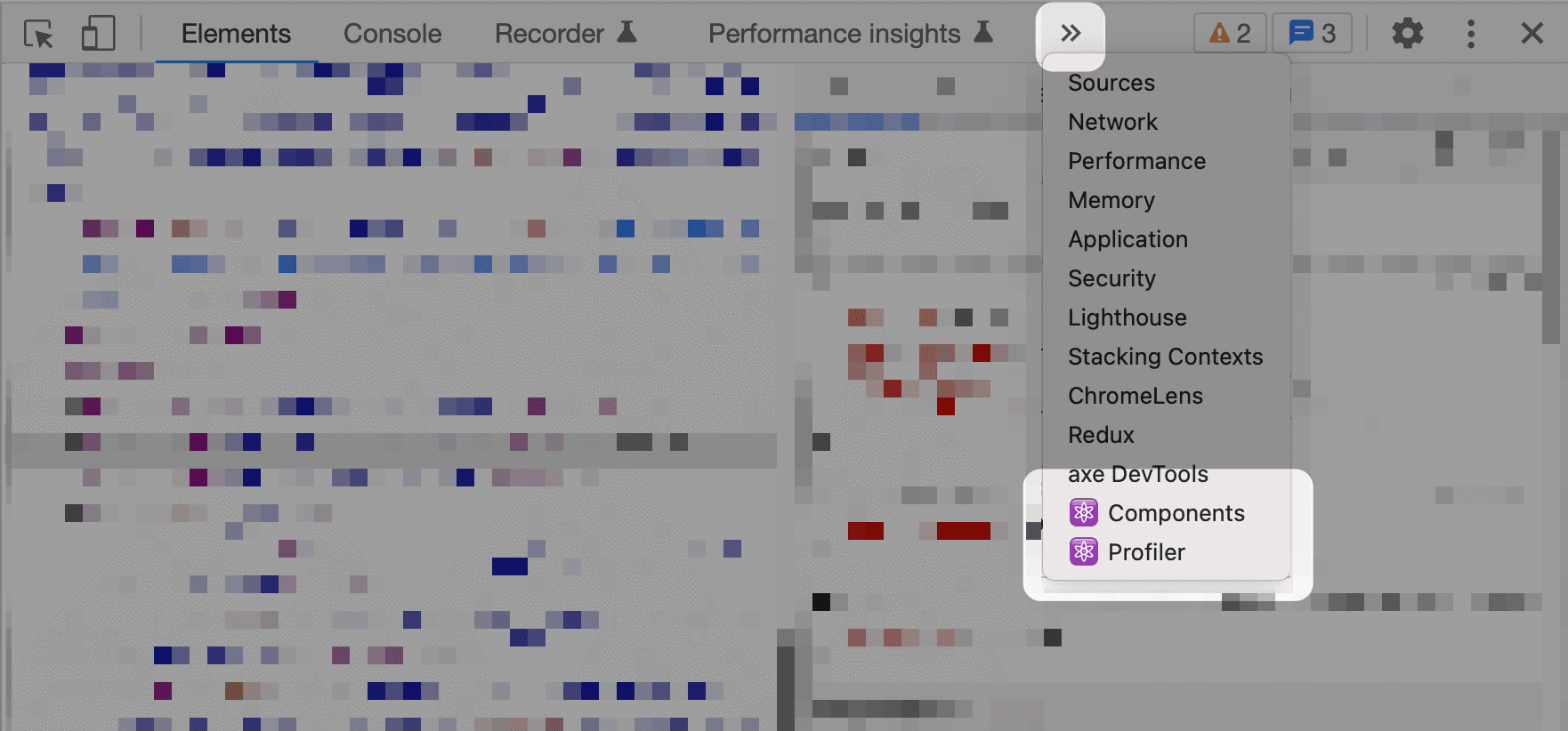
Before recording, open the settings (gear icon) and enable "Record why each component rendered while profiling". The workflow is short:
- Start recording with the blue record button.
- Interact with the app to trigger the suspect renders.
- Stop recording.
- Step through the captured snapshots with the arrow buttons.
Each snapshot corresponds to a single render. Clicking on a component in the snapshot opens the sidebar, which lists the exact reason for the re-render—for instance, which prop changed for a pure component.
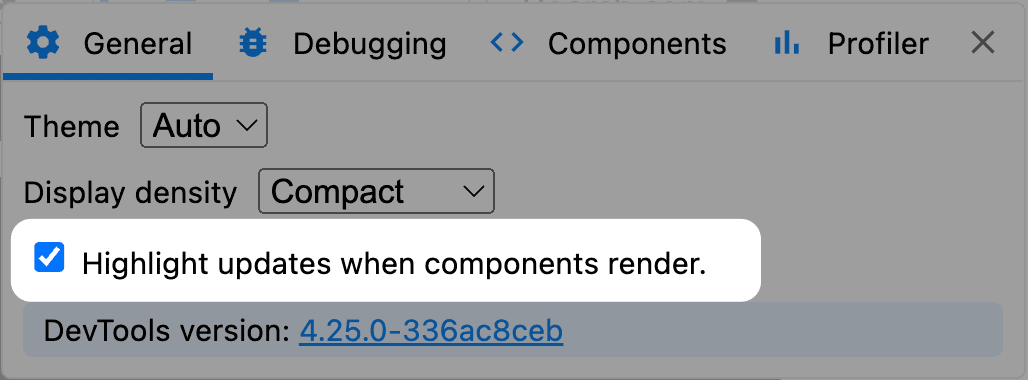
There’s also a visual aid available in the Profiler settings: a toggle that highlights components during a re-render. When enabled, you’ll see green rectangles flash around any component that updates. This is a quick way to gauge how far a state update propagates and whether your optimized components are actually skipping renders.
Why Pure Components Still Re-Render
A common finding when using the profiler is that a component wrapped in React.memo still re-renders even though nothing appears to have changed. The root cause usually isn’t the parent’s state—it’s that components are just functions.
When React renders a component, it calls that function (or the class’s render method). Any value defined inside the function body gets recreated on every call. Consider an App component that builds an object to pass down:
function App() {
  const dog = {
    name: 'Spot',
    breed: 'Jack Russell Terrier'
  };

  return (
    <DogProfile dog={dog} />
  );
}
Each render of App produces a brand new object instance. Even if the child’s props are semantically identical, they are referentially different, so DogProfile re-renders. Wrapping it with React.memo doesn’t help because memoization compares props by reference. The new object allocates on every parent render and will always break the equality check.
Practical Performance Notes
Profiling can expose more numbers than are useful. A few caveats worth keeping in mind:
- The Profiler’s milliseconds figure is not actionable. Profiling runs in development mode, where React is significantly slower than in production builds. Measure real performance against a deployed app using the browser’s Performance tab, which also accounts for layout and paint time.
- Lighthouse scores aren’t a reliable proxy for user experience. Qualitative testing on the actual device beats any synthetic metric. It helps to test on modest hardware—say, a low-end budget phone—to understand the experience for the slower tail of your audience.
- Don’t over-optimize. React is performant out of the box. Reaching for the profiler makes sense when you hit an actual sluggishness problem, not as a routine precaution.



