Measuring what a client-side framework actually costs
React's weight is a known complaint, and a defensible one: React plus ReactDOM come to roughly 120 KiB of minified JavaScript, which works against startup time. When client-side rendering carries the whole load, the result is heavy churn; server-rendering components and hydrating them on the client doesn't escape it either, because hydration is computationally expensive.
The argument here is not that React is bad. Its componentization model, JSX, and server rendering are genuinely useful for organizing code. The question is narrower: when does a framework belong on the client? The findings below come from an RSS feed app side project, bylines.fyi, which runs JavaScript on both back and front end.
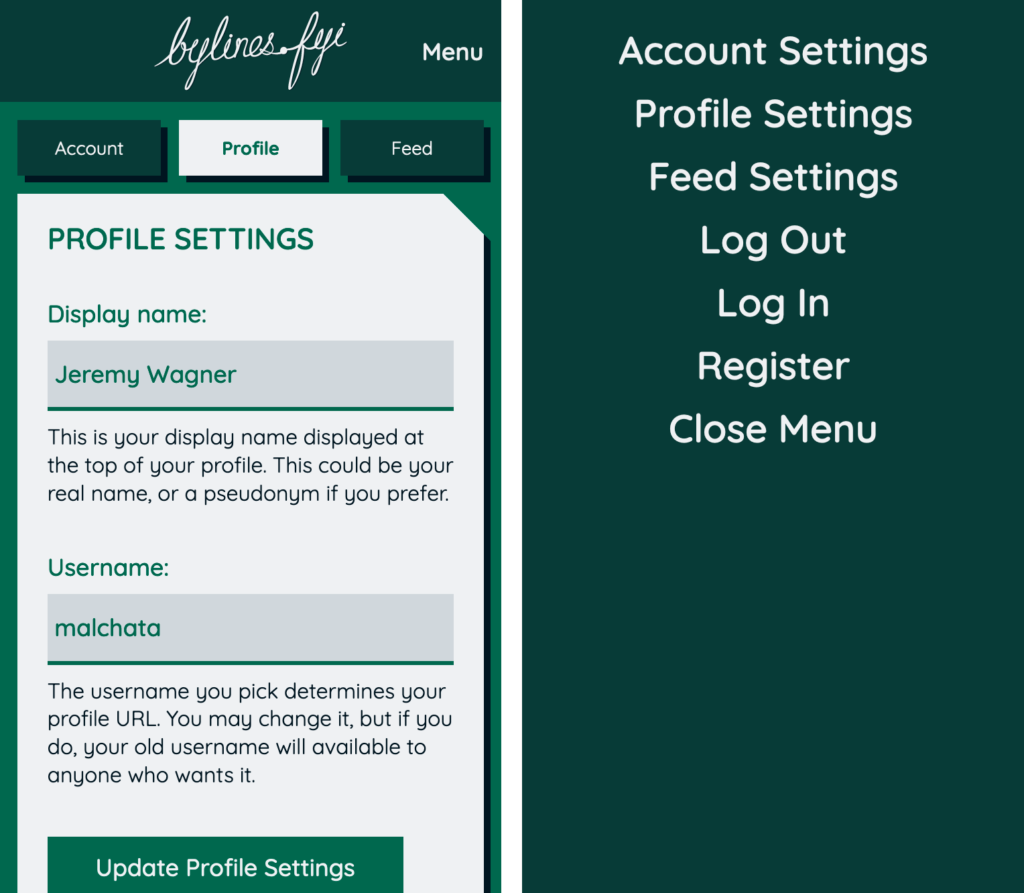
The app server-renders every component, on the view that producing markup is the server's burden rather than the device's. The one piece of client-side JavaScript needed is a toggleable mobile nav — what the author calls simple state: linear A-to-B interactions, toggled on, then off. Stateful React components are often used for these interactions, and that architectural choice is what the experiment interrogates. The single toggle is a canary: the point is how framework overhead scales as it is applied across an application.
Test setup
The app has no third-party code, so profiling ran in a quiet environment. Three implementations of the mobile nav toggle were compared:
- A stateful React component (
React.Component), server-rendered and hydrated on the client. - A stateful Preact component, also server-rendered and hydrated.
- A server-rendered stateless Preact component that was not hydrated; plain event listeners handle the nav on the client.
Each implementation ran on four devices:
- A Nokia 2 Android phone on Chrome 83.
- An ASUS X550CC laptop from 2013 running Windows 10 on Chrome 83.
- A first-generation iPhone SE on Safari 13.
- A second-generation iPhone SE on Safari 13.
What was recorded
Four behaviors were measured per implementation per device:
- Startup time — for React and Preact, loading and evaluating the framework code plus hydrating the component; for the event listener version, only the listener code.
- Hydration time — a subset of startup for the two framework scenarios; the event listener version incurs none. This could not be measured alone on iOS, because remote debugging crashed in Safari on macOS when traversing the call stack.
- Mobile nav open time — the overhead a framework adds when abstracting event handlers, compared against the frameworkless approach.
- Mobile nav close time — measured but consistently much cheaper than opening, and left out of the article.
All figures are scripting time only. Layout, paint, and compositing costs come on top and compete for the same main thread time.
Procedure
Chrome remote debugging from macOS was used for the Nokia 2; Safari's equivalent for the iPhones. The app ran on the local network, so network performance was not a factor. With no CPU or network throttling, the profiler started and the page reloaded; after load, the nav was opened and closed; the profiler stopped and CPU time for each behavior recorded. The timeline was then cleared, including the garbage collection button in Chrome to release memory held from the previous recording.
The procedure ran ten times per scenario per device — enough to expose outliers while keeping a reasonably accurate picture. Raw data is in this spreadsheet, and the mobile nav code for each implementation is published as a gist. Results are reported as minimum, maximum, median, and average CPU times rather than graphs, which would have been too cluttered.
Results by device
The Nokia 2 is a cheap, easily obtainable Android device built on an ARM Cortex-A7 — no powerhouse. Android accounts for roughly 40% of usage worldwide, and low-end devices are common there, a digital divide of both wealth and proximity to fast networks.
| React Component | Preact Component | addEventListener Code | |
|---|---|---|---|
| Min | 137.21 | 31.23 | 4.69 |
| Median | 147.76 | 42.06 | 5.99 |
| Avg | 162.73 | 43.16 | 6.81 |
| Max | 280.81 | 62.03 | 12.06 |
| React Component | Preact Component | |
|---|---|---|
| Min | 67.04 | 19.17 |
| Median | 70.33 | 26.91 |
| Avg | 74.87 | 26.77 |
| Max | 117.86 | 44.62 |
On average it takes over 160 ms to parse and compile React and hydrate one component. Hydration in particular contributes to the uncanny valley felt during startup. Preact needs about 73% less time, which fits its 10 KiB uncompressed footprint. For context, Chrome's frame budget is about 10 ms to avoid jank at 60 fps, and janky startup counts toward First Input Delay. The addEventListener version parses and compiles in unsurprisingly little time — even the sampled maximum of 12 ms is negligible.
A median hydration time of 70 ms for one component is not alarming on its own, but hydration cost scales with the number of components on the page. Preact hydrates much faster, consistent with its documentation that hydrate "skips most diffing while still attaching event listeners and setting up your component tree." No hydration figure applies to the listener version, since hydration is a VDOM concept.
| React Component | Preact Component | addEventListener Code | |
|---|---|---|---|
| Min | 30.89 | 11.94 | 3.94 |
| Median | 43.62 | 14.29 | 6.14 |
| Avg | 43.16 | 14.66 | 6.12 |
| Max | 53.19 | 20.46 | 8.60 |
React spends nearly seven times as much CPU time executing an event listener callback than a hand-registered listener. State management logic is necessary overhead, but worth questioning for linear interactions. Preact limits its event listener overhead to roughly twice the bare-listener cost. Closing the nav averaged about 16.5 ms in React, around 11 ms in Preact, and around 6 ms for bare listeners.
A note on JavaScript samples
Disabling JavaScript samples in Chrome DevTools on remote devices was tested to rule out call-stack capture skewing results. It had no significant impact, and with stacks truncated hydration time could not be measured. Average startup cost was 160.74 ms with samples disabled versus 162.73 ms enabled; medians were 157.81 ms and 147.76 ms — noise.
First-generation iPhone SE
Shipped with the Apple A9, this phone remains in devoted use for its size and is illustrative of the gap between low-end Android and older Apple hardware.
| React Component | Preact Component | addEventListener Code | |
|---|---|---|---|
| Min | 32.06 | 7.63 | 0.81 |
| Median | 35.60 | 9.42 | 1.02 |
| Avg | 35.76 | 10.15 | 1.07 |
| Max | 39.18 | 16.94 | 1.56 |
| React Component | Preact Component | addEventListener Code | |
|---|---|---|---|
| Min | 16.91 | 5.45 | 0.48 |
| Median | 21.11 | 8.62 | 0.50 |
| Avg | 21.09 | 11.07 | 0.56 |
| Max | 24.20 | 19.79 | 1.00 |
React is still not great, but noticeably improved over the Nokia 2; Preact lands within a typical Chrome frame budget; bare listeners are blazingly fast with plenty of frame budget left for other work. Hydration time could not be measured on iOS because Safari's DevTools crashed when traversing call stacks. Since hydration is a subset of startup, and the Nokia 2 trials are any indicator, it likely accounts for at least half of startup here.
Second-generation iPhone SE
The 2020 SE shares the iPhone 8's physical size but carries the Apple A13 from the iPhone 11 — very fast for a $400 USD device.
| React Component | Preact Component | addEventListener Code | |
|---|---|---|---|
| Min | 20.26 | 5.19 | 0.53 |
| Median | 22.20 | 6.48 | 0.69 |
| Avg | 22.02 | 6.36 | 0.68 |
| Max | 23.67 | 7.18 | 0.88 |
| React Component | Preact Component | addEventListener Code | |
|---|---|---|---|
| Min | 13.15 | 12.06 | 0.49 |
| Median | 16.41 | 12.57 | 0.53 |
| Avg | 16.11 | 12.63 | 0.56 |
| Max | 17.51 | 13.26 | 0.78 |
With such a small workload — one framework, one hydrated component — returns diminish: results are only a little faster than the first-generation SE in some cases, though this phone should handle larger, sustained workloads better. React improves slightly on opening the nav; Preact's average is oddly higher than on the older phone, likely outliers skewing a small dataset, and is no reason to call the first-generation SE the faster device.
Chrome on a 2013 Windows 10 laptop
The ASUS X550CC with an Ivy Bridge i5 of the day.
| React Component | Preact Component | addEventListener Code | |
|---|---|---|---|
| Min | 43.15 | 13.11 | 1.81 |
| Median | 45.95 | 14.54 | 2.03 |
| Avg | 45.92 | 14.47 | 2.39 |
| Max | 48.98 | 16.49 | 3.61 |
| React Component | Preact Component | |
|---|---|---|
| Min | 17.75 | 7.64 |
| Median | 23.55 | 8.73 |
| Avg | 23.12 | 8.72 |
| Max | 26.25 | 9.55 |
| Preact Component | addEventListener Code | ||
|---|---|---|---|
| Min | 6.06 | 2.50 | 0.88 |
| Median | 10.43 | 3.09 | 0.97 |
| Avg | 11.24 | 3.21 | 1.02 |
| Max | 14.44 | 4.34 | 1.49 |
The numbers are good for a seven-year-old machine. The actively cooled Ivy Bridge i5 likely avoids the thermal throttling that passively cooled mobile processors face. Preact hydration stays within Chrome's frame budget and is almost three times faster than React — though hydrating ten components at startup could change the picture, even in Preact. The isolated nav interaction is comparable to high-end mobile devices. The laptop's fan spins often while browsing, though; a passively cooled i5 would presumably fare worse.
Why the call stacks matter
The gap in startup time between frameworks and no framework has a simple cause: less work means less processing time. Trading some speed for developer experience is probably inevitable, but the trade too often favors developers over users. The bigger issue is what happens after the framework loads: hydration is frequently abused and sometimes entirely unnecessary. Hydrating a React component hands the main thread this:
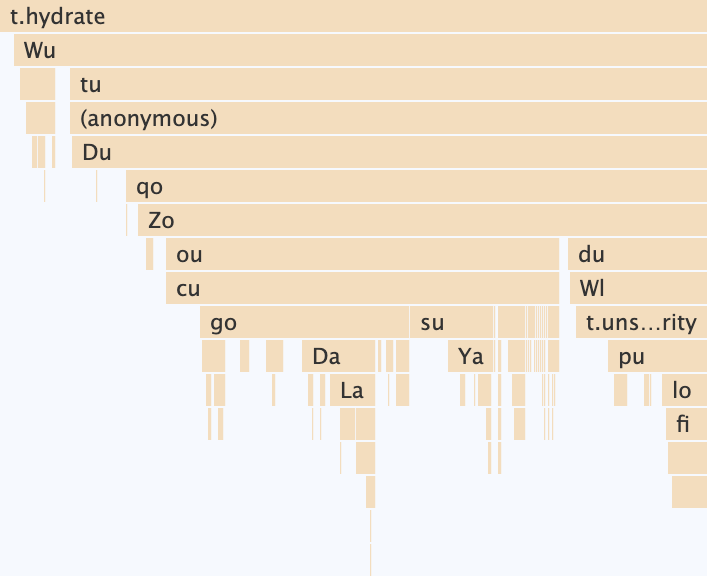
Recall the Nokia 2 minimum of about 67 ms to hydrate the mobile nav component in React, against about 20 ms in Preact:
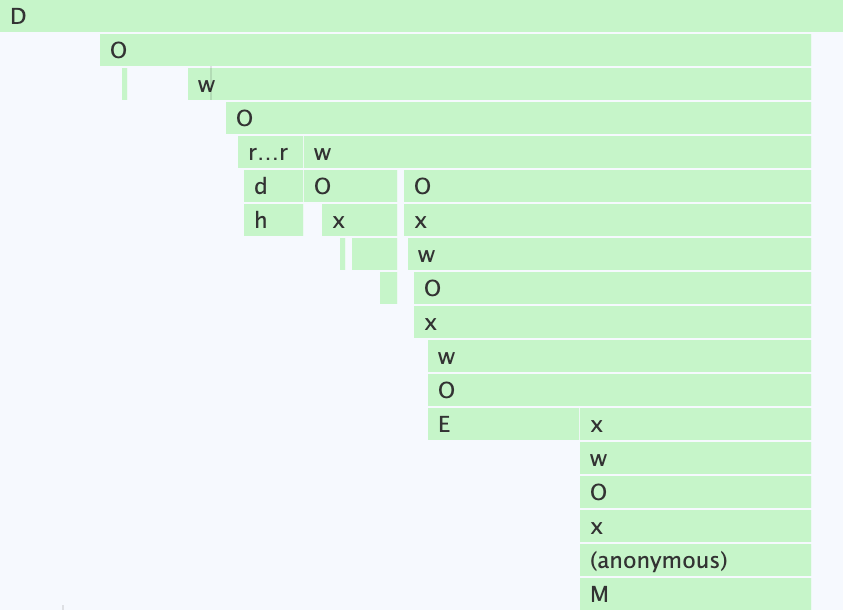
The two stacks aren't drawn to the same scale, but Preact's simpler hydration logic — "most diffing is skipped" — shows considerably less going on. Going closer to the metal with addEventListener is faster still:
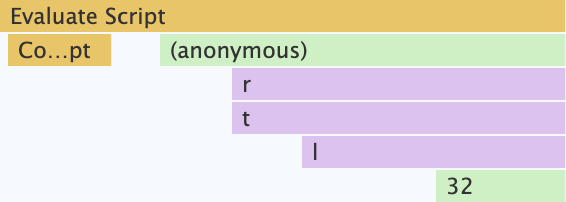
Not every situation suits this, but a surprising amount can be done with addEventListener, querySelector, classList, setAttribute/getAttribute — the same methods frameworks themselves rely on. The task is evaluating what functionality can safely live outside the framework.
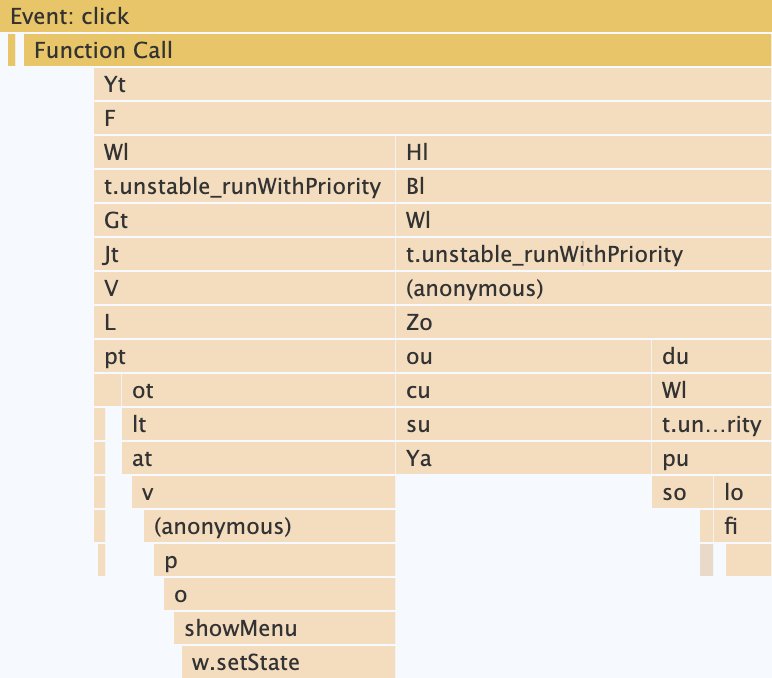
For fetching API data on the client and managing complex UI state, such a cost would be more acceptable. Here it is just making a nav appear when a button is tapped — a bulldozer where a shovel fits. Preact strikes the middle ground:
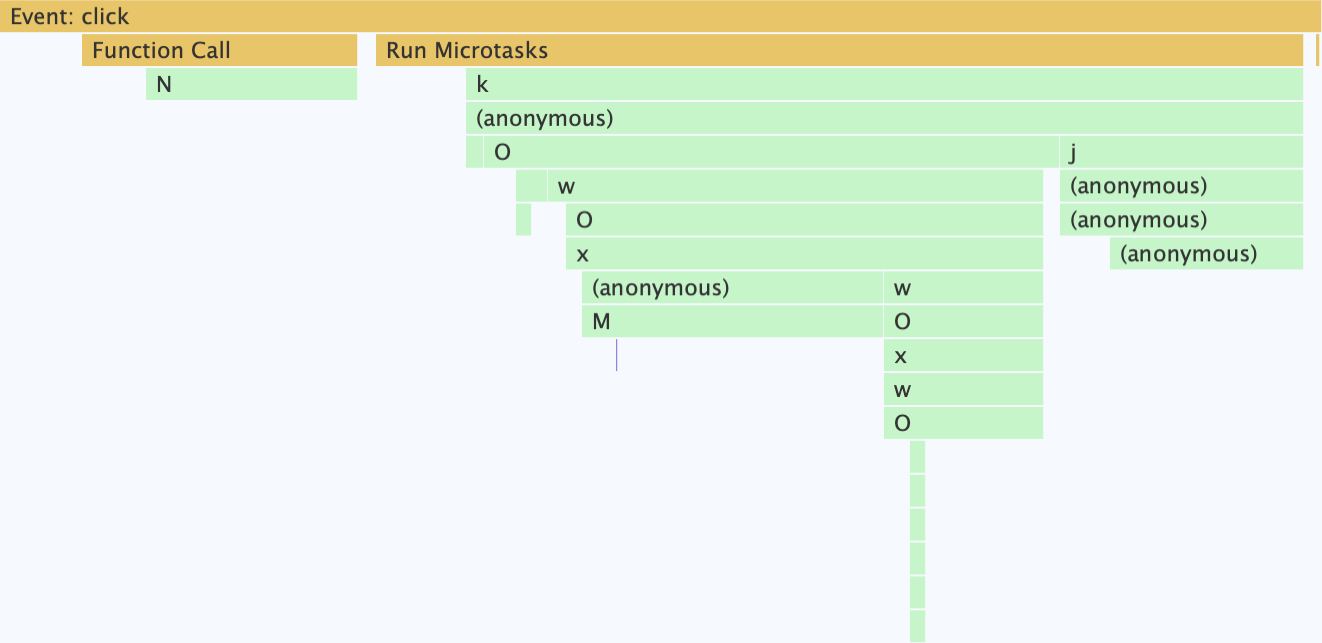

Preact does the same work in about a third of React's time, but on the budget device it exceeds the frame budget often, so the nav animation can turn sluggish when layout and paint lack time to finish without entering long task territory. The event listener solution finishes seven times faster than React there.
Practical guidance
These pitfalls are not unique to React; many VDOM frameworks add necessary overhead of this kind. If componentization is attractive but React is not required, keep everything on the server first, then decide if and when to extend functionality to the client, and how. In this RSS feed app, that means lightweight event listener code in the page's entry point, with an asset manifest placing only the minimal script each page needs.
For applications that genuinely need React's capabilities — complex interactivity with lots of state — these measures can help:
- Review stateful components (those extending
React.Component) for refactoring to stateless ones. A component that uses neither lifecycle methods nor state can be stateless. - Where possible, send no JavaScript for stateless components and skip hydrating them: render them only on the server, and prerender to minimize server response time, since server rendering has its own performance pitfalls.
- For stateful components with simple interactivity, prerender or server-render them and replace their interactivity with framework-independent event listeners — no hydration, and interactions bypass the framework's state management.
- Where client hydration is unavoidable, lazily hydrate components far from the top of the page, for example with an Intersection Observer callback, freeing main thread time for critical components.
- For lazily hydrated components, consider scheduling hydration during main thread idle time with
requestIdleCallback. - Consider switching from React to Preact, given its client-side speed. The latest Preact is close to 1:1 with React for most things, and
preact/compateases migration. It is no panacea, but it moves closer to where you need to be. - Adapt the experience for low device memory with
navigator.deviceMemory(Chrome and derived browsers); a low-memory device probably has a slow processor too.
The takeaway: if you use React or any VDOM library, investigate its impact across a range of devices. Get a cheap Android phone and see how the app feels, then compare with high-end hardware. Don't follow "best practices" when the result excludes audience members who can't afford high-end devices. Making the web faster makes it more accessible in more places; making it more accessible makes it more inclusive.