

Bulk loading is the fastest route for importing large volumes of data into PostgreSQL, and the techniques involved matter for data warehousing and any other write-intensive workload. The main levers are the choice between INSERT and COPY, checkpoint behaviour, logged versus unlogged tables, the timing of index creation, trigger state, and physical row layout on disk.
Why COPY beats INSERT
Every INSERT statement carries per-statement overhead: lock checks, verification that the table and its columns exist, permission checks, data type lookups and more. COPY performs that work once instead of once per row, which is why it is normally the right tool for writing large amounts of data.
The gap is easy to demonstrate. A simple four-column sample table serves as the target:
|
1 2 3 4 5 6 7 8 |
test=# CREATE TABLE t_sample ( a varchar(50), b int, c varchar(50), d int ); CREATE TABLE |
A script containing one million INSERT statements inside a single transaction takes roughly 81 seconds to run through psql:
|
1 2 3 4 5 6 |
BEGIN; INSERT INTO t_sample VALUES ('abcd', 1, 'abcd', 1); INSERT INTO t_sample VALUES ('abcd', 1, 'abcd', 1); INSERT INTO t_sample VALUES ('abcd', 1, 'abcd', 1); … COMMIT; |
|
1 2 3 4 5 |
iMac:~ hs$ time psql test < /tmp/sample.sql > /dev/null real 1m20.883s user 0m11.515s sys 0m10.070s |
Feeding the same data through COPY instead collapses that time to about 2.6 seconds.
|
1 2 3 4 5 6 7 |
COPY t_sample FROM stdin; abcd 1 abcd 1 abcd 1 abcd 1 abcd 1 abcd 1 abcd 1 abcd 1 … . |
|
1 2 3 4 5 |
iMac:~ hs$ time psql test < /tmp/bulk.sql > /dev/null real 0m2.646s user 0m0.110s sys 0m0.043s |
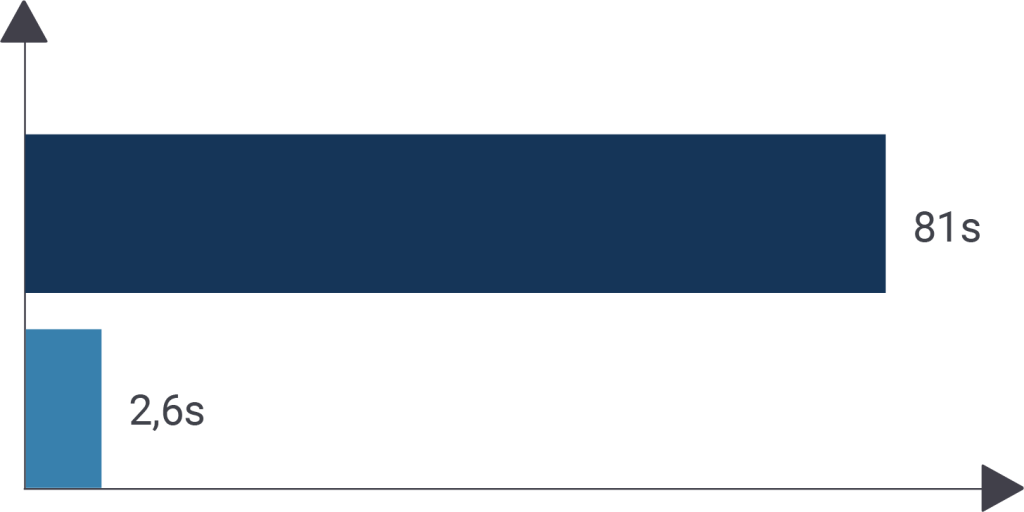
These figures come from an old, untuned machine; modern hardware and a current operating system can do considerably better. Loads of a million rows and beyond are routine in production, though the achievable rate depends heavily on record length. Response times also vary — many SSDs return noticeably unstable timings.
Checkpoints and WAL
For loads measured in billions of rows, I/O dominates, and the postgresql.conf settings that govern it deserve attention. Two parameters matter most here:
max_wal_size— soft limit on the amount of WAL generatedcheckpoint_completion_target— controls checkpoint behaviour
Stretching checkpoints aggressively is worthwhile; a value of 100 or 200 GB is not unreasonable for bulk-load-intensive workloads. Larger checkpoint distances do not put the server at risk — they only change how PostgreSQL writes data. The trade-offs are more disk consumption and longer crash recovery.
Unlogged tables as staging areas
The WAL can be bypassed entirely with an unlogged table. This suits the common staging pattern: load a large volume of data, run aggregations over it, then drop the import.
|
1 2 3 4 5 6 7 8 9 10 11 12 13 14 15 16 17 18 |
test=# DROP TABLE t_sample ; DROP TABLE test=# CREATE UNLOGGED TABLE t_sample ( a varchar(50), b int, c varchar(50), d int ); CREATE TABLE test=# d t_sample Unlogged table 'public.t_sample' Column | Type | Collation | Nullable | Default --------+-----------------------+-----------+----------+--------- a | character varying(50) | | | b | integer | | | c | character varying(50) | | | d | integer | | | |
The same load performed against an unlogged table is significantly faster — 81 seconds versus 59 seconds for the INSERT variant, and 2.6 versus 0.6 seconds for COPY. The reason is that no WAL has to be written.
|
1 2 3 4 5 6 7 8 9 10 11 |
iMac:~ hs$ time psql test < /tmp/sample.sql > /dev/null real 0m59.296s user 0m10.597s sys 0m9.417s iMac:~ hs$ time psql test < /tmp/bulk.sql > /dev/null real 0m0.618s user 0m0.107s sys 0m0.038s |
The trade-offs are strict:
- After a normal shutdown, an unlogged table behaves like a regular table
- After a crash, an unlogged table is guaranteed to be empty
- Its contents are not replicated
That makes unlogged tables unsuitable for ordinary data but ideal for staging and bulk loading. Note that switching a table between logged and unlogged is not a cheap operation. Setting the table back to LOGGED and measuring the WAL position shows a large amount of data written:
|
1 2 3 4 5 6 7 8 9 10 11 12 13 14 |
test=# SELECT pg_current_wal_lsn(); pg_current_wal_lsn -------------------- 5/3AC7CCD0 (1 row) test=# ALTER TABLE t_sample SET LOGGED; ALTER TABLE test=# SELECT pg_current_wal_lsn(); pg_current_wal_lsn -------------------- 5/3F9048A8 (1 row) |
|
1 2 3 4 5 6 7 |
test=# SELECT '5/3F9048A8'::pg_lsn - '5/3AC7CCD0'::pg_lsn; ?column? ----------- 80247768 (1 row) Time: 11.298 ms |
About 80 MB of WAL is produced for a single COPY into an empty table, and the volume rises with additional imports or mixed COPY/INSERT traffic. When a table is set back to LOGGED, its entire contents must be sent to the WAL so replicas can receive them, so the unlogged-load-relog cycle is often not the best plan.
Indexes, triggers and column order
Building indexes before a copy takes around 8 seconds for the data in the example. Creating them afterwards is faster overall:
|
1 2 3 4 5 6 7 8 9 10 11 12 13 14 15 16 17 18 19 |
test=# SELECT count(*) FROM t_sample; count --------- 1000001 (1 row) test=# CREATE TABLE t_index (LIKE t_sample); CREATE TABLE test=# CREATE INDEX idx_a ON t_index (a); CREATE INDEX test=# CREATE INDEX idx_b ON t_index (b); CREATE INDEX test=# timing Timing is on. test=# INSERT INTO t_index SELECT * FROM t_sample; INSERT 0 1000001 Time: 8396.210 ms (00:08.396) |
|
1 2 3 4 5 6 7 8 9 10 11 12 13 14 |
test=# CREATE TABLE t_noindex (LIKE t_sample); CREATE TABLE test=# INSERT INTO t_noindex SELECT * FROM t_sample; INSERT 0 1000001 Time: 4789.017 ms (00:04.789) test=# SET maintenance_work_mem TO '1 GB'; SET Time: 13.059 ms test=# CREATE INDEX idx_aa ON t_noindex (a); CREATE INDEX Time: 1151.521 ms (00:01.152) test=# CREATE INDEX idx_bb ON t_noindex (b); CREATE INDEX Time: 1086.972 ms (00:01.087) |
Create indexes after the data has been imported whenever possible. The gap widens with larger, more realistic data sets; the measurement above used synthetic data on macOS.
Triggers are equally hostile to load throughput. A trivial trigger that modifies two entries still adds a function call per row, and in the example the trigger variant ran about three times slower:
|
1 2 3 4 5 6 7 8 9 10 11 12 13 14 15 16 17 18 19 20 21 |
iMac:~ hs$ head -n 20 /tmp/bulk.sql BEGIN; CREATE FUNCTION dummy() RETURNS trigger AS $ BEGIN NEW.b := NEW.b + 1; NEW.d := NEW.d + 1; RETURN NEW; END; $ LANGUAGE 'plpgsql'; CREATE TRIGGER mytrig BEFORE INSERT ON t_sample FOR EACH ROW EXECUTE PROCEDURE dummy(); COPY t_sample FROM stdin; abcd 1 abcd 1 abcd 1 abcd 1 abcd 1 abcd 1 abcd 1 abcd 1 |
No universal multiplier applies — the cost depends on trigger complexity, row size and other factors, so the impact has to be measured case by case.
Column order also affects performance. Fixed-length types such as int8, int4 and timestamptz should come first, with variable-length types such as varchar and text at the end, because CPU alignment matters on disk. This holds for normal heap tables. Shrinking a table without changing its contents speeds loading up by reducing the I/O bottleneck.
When more throughput is still needed, PGLoader and pg_bulkload are two well-known, widely used tools for the job.



