
Average latency from iostat(1) reflects the sdb disk, where the r_await column — the average read time in milliseconds — shows 434 ms. That figure is awful on its own, and the small aqu-sz (queue size) points to the disk rather than the workload as the cause. Distribution data and per-event logs are needed to confirm this, but the disk itself deserves a closer look first.
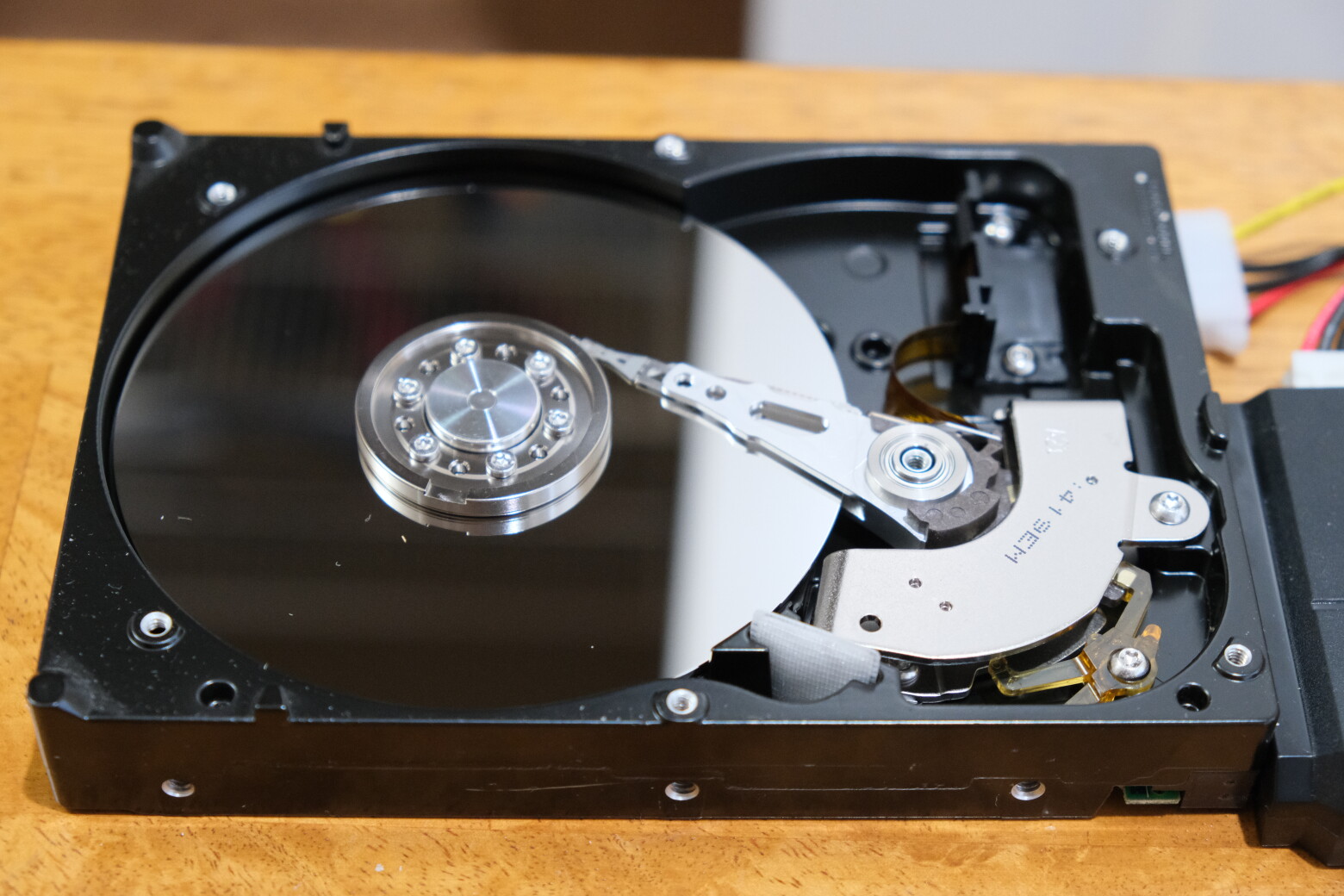
The dust visible on the platters matters because the disk head floats above the platter at what is called flying height or fly height — roughly 5 nanometers on 2011-era drives. A dust particle can be a thousand times larger. The head rides on a film of air, sometimes described as air lubrication, and the drive's air port and filter equalize internal pressure with the outside air. Some drives are not rated for operation above 7,000 feet, where the thinner air cannot float the heads. Since 2015, some drives have been sealed with helium instead of breathing outside air.
What the dusty drive did
This particular disk is an 80 Gbyte Western Digital IDE unit, found while packing to move, missing its lid and covered in dust. With a SATA/IDE-to-USB hub on hand, the obvious experiment was to see whether it was readable and what it held.
It failed immediately: the disk spun up, the head clicked, and it spun down with an error. The lid was located but no screws, so it was set on top — still errors. Pressing down on the lid to simulate screws produced a few spin-up and spin-down cycles before failure, and the harder the push, the less the vibration and the more the drive worked — eventually returning I/O, slowly. The opposite trick to suppressing disk latency by shouting at a drive.
Over 99.9999% of sectors were read successfully over several hours, with a bottle of apple juice left pressing the lid down. A single 8-Kbyte sequential chunk could not be read. Performance stayed poor, and the measurements below are from this disk, dust and all. Dust may be a factor, but vibration from the unscrewed lid looks like the dominant cause, judging by how much faster the drive ran when body weight held the lid down. It audibly spun faster, seemed to have several set speeds and would try a faster one for a couple of seconds, then a faster one still, until reaching the fastest speed it could sustain — presumably stepping up until sector-ECC errors appear, much like the behavior of 32x CD-ROM drives.
Reading the tool output
Tool output needs interpretation because "good" and "bad" are subjective: what is good for one user may be bad for another, and some results are only clues for further analysis. The outputs below move from the worst case to moderately poor performance. The workload is 128 Kbyte sequential reads via dd(1), which would normally take 1 to 2 ms on this disk. The analysis applies to rotational and flash drives alike, though rotational media add head-seek latency for random I/O and spin-up latency from idle.
Two causes are worth separating when latency is high:
- The workload — queueing, especially from file systems batching writes, large I/O sizes, or other disk commands slowing subsequent I/O.
- The disk — if the workload does not explain the latency, a bad disk may.
Worst case
The iostat(1) output at this point was already shown: 10-second summaries with massive r_await and little aqu-sz. The 128 Kbyte average read size is not excessive.
Distribution and event-level views add the detail that averages hide. The BPF-based tools from bcc — biolatency with a per-disk (-D) 60-second histogram, and biosnoop printing every disk event — show sdb latencies spanning 32 ms to over 2 seconds, with individual operations (LAT(ms)) above 100 ms and outliers beyond 2 seconds. There is no evidence of queueing in the biosnoop output. Stacked latency would appear as I/O latencies ramping — 10 ms, 20 ms, 30 ms, 40 ms — against steady completion times in the TIME(s) column as the disk works through its queue. Instead, completion times and latencies show no deep queue: the disk is simply slow.
Faster, but still poor
Pressing hard on the lid made the drive operate faster, though performance remained mediocre. Latencies were bimodal: about 1.9 ms on the fast side, 10 ms and slower on the other. On a 7,200 rpm disk a revolution takes about 8 ms, so sector retries would be expected to produce latency clusters near 2 ms, 10 ms, 18 ms, 26 ms, and so on. The biolatency histogram in this state is likewise bimodal — the fast mode is the sequential reads, the slow mode the retries. The iostat(1) average, r_await of 5.11 ms, misses the full picture that the histogram and per-event output provide.
Where the dust ends up
One question left open is the fate of the debris itself: does it adhere to the platter surface, or does it get flung around once the disk is spinning? The photograph was taken after a full read of the disk, so the dust had not been captured by the drive's internal air filters. It was still sitting on the platter.
How much dust is too much?
Whether a modern high-capacity drive would show the same tolerance as the 80 GB unit tested is unknown. An anecdote from the sysadmin years suggests far older hardware was even less sensitive: VAX drives that had stalled could be restarted by drilling holes in the enclosure, covering them with tape, and — when the drive stalled again — peeling the tape back and spin-starting the platters by finger. Drives of that generation must have tolerated dust far better still.
The threshold at which contamination becomes fatal is also undefined. A perspex lid would make it possible to observe how much dust a drive can keep working with, though this is not a procedure worth recommending to anyone else.
What the experiment settled
One question was answered: dust did not destroy the heads. They continued to read almost everything from a dusty disk, only slowly. More recent SMR disks, with their tighter tolerances, may behave differently — but given how unexpected the result was here, that would have to be tried rather than assumed.



