

Animating Without the Jank
When we set out to rebuild GitHub’s homepage, we knew the page would be heavy on product shots, animations, and video. The challenge was delivering all of that without sacrificing performance. We used the Core Web Vitals as our primary yardstick throughout development. Two optimizations had the biggest impact: how we trigger animations and how we serve images.
The homepage relies on scroll-triggered animations to draw attention to specific elements. A common approach is to listen for scroll events, compute each tracked element’s position with getBoundingClientRect(), and fire animations when elements enter the viewport. The problem is that getBoundingClientRect() forces reflows, and doing that repeatedly during a scroll can quickly become a bottleneck.
IntersectionObserver solves this cleanly. It’s supported in all modern browsers and notifies you when an element enters or leaves the viewport without any scroll listeners or layout thrashing. A simple observer can check each entry’s isIntersecting state and trigger the appropriate animation:
// Create an intersection observer with default options, that
// triggers a class on/off depending on an element’s visibility
// in the viewport
const animationObserver = new IntersectionObserver((entries, observer) => {
  for (const entry of entries) {
    entry.target.classList.toggle('build-in-animate', entry.isIntersecting)
  }
});

// Use that IntersectionObserver to observe the visibility
// of some elements
for (const element of querySelectorAll('.js-build-in')) {
  animationObserver.observe(element);
}
With animations now driven by IntersectionObserver, we audited every animation on the page to enforce a core rule: only animate transform and opacity. These properties are compositor-friendly and don’t trigger layout or paint. We thought we were already following this rule, but found that inadvertently, other properties were leaking into our transitions.
Consider a CSS transition that specifies transition: all 0.2s. You may only be changing opacity and transform, but the transition applies to every property that changes. A global hover style altering text color would suddenly be animated too, causing unnecessary style and layout recalculations.
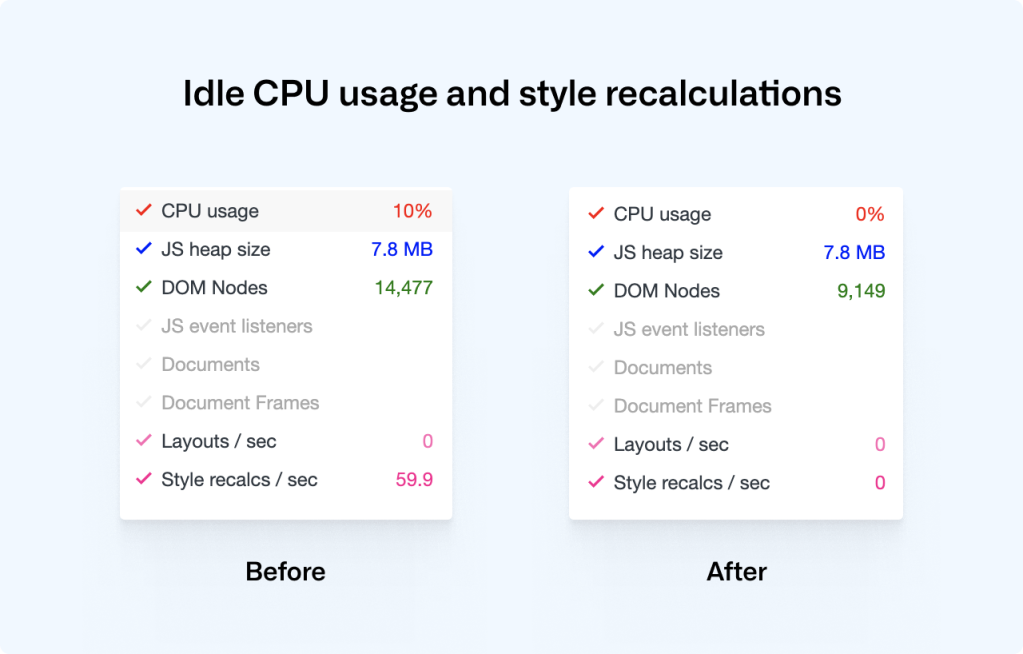
To prevent this “animation pollution,” we stopped using wildcard transitions and now explicitly declare only opacity and transform as animatable properties. The result was a significant drop in CPU usage and style recalculations, and improved Cumulative Layout Shift metrics.
Lazy Video Without the Lazy Attribute
The loading attribute for lazy loading works for images and iframes, but not for video elements. If you’re using video for animations, you typically want two things: the video only plays while on-screen, and it isn’t downloaded until needed. IntersectionObserver can give you both.
Setting preload="none" stops the browser from fetching video data at page load. Then, an observer starts playback only when the video scrolls into view:
<!-- HTML: A video that plays inline, muted, w/o autoplay & preload -->
<video loop muted playsinline preload="none" class="js-viewport-aware-video" poster="video-first-frame.jpg">
  <source type="video/mp4" src="video.h264.mp4">
</video>

// JS: Play videos while they are visible in the viewport
const videoObserver = new IntersectionObserver((entries, observer) => {
  for (const entry of entries) entry.isIntersecting ? video.play() : video.pause();
});

for (const element of querySelectorAll('.js-viewport-aware-video')) {
  videoObserver.observe(element);
}
This combination saved us several megabytes of network data on every page load.
Transparency Meets Compression
Images are harder to get right than they used to be, with so many devices, screen sizes, and browser capabilities in the wild. Our illustration style sits awkwardly between classic formats. Take the illustration used to transition into the footer. It needs a raster format for the detail, but also needs transparency. A plain PNG would weigh several megabytes.
WebP handles this well, combining lossy compression with an alpha channel. With Safari adding WebP support in iOS 14 and macOS Big Sur, browser coverage is now above 90%. That still leaves a gap, though: a user on the latest Safari on macOS Catalina can’t display WebP at all. We needed a fallback for those cases.
Our solution is a bit obscure: a transparent JPG. We embed two JPGs inside an SVG that supports masking, encode them as base64, and use the SVG as a regular image source. The result is an image with full transparency, decent compression, and a single HTTP request.
Here’s how it works. SVG has a <mask> element that can mask parts of an SVG. We can embed the mask and the image data together inside one SVG. The problem is that a standalone SVG file with external image references won’t load its images when set as an <img> src. Embedding the image data inside the SVG avoids that issue entirely.
Converting images to base64 is trivial on macOS with the built-in base64 Terminal command:
base64 -i <in-file> -o <outfile>After conversion, we paste the base64 string for both the illustration and its mask into the SVG. The mask uses black for completely transparent and white for fully opaque. The combined SVG renders as a single transparent JPG-like asset and works in every browser, while WebP remains the primary format where supported, with lazy loading applied:
<picture>
  <source type="image/webp">
  <img src="compressed-transparent-image.svg">
</picture>
This SVG-with-base64 fallback saves us hundreds of kilobytes on each page load, and lets us take advantage of modern image formats where they work. It’s one of many techniques across GitHub focused on making the site faster and more reliable.



