
Enforcing Performance Budgets in Your Build Pipeline
After you've established performance budgets, the next step is integrating checks into your build process to ensure those budgets are respected. Several tools let you define thresholds for metrics and alert you when you exceed them. The right choice depends on your existing setup and the type of budget you want to enforce.
Lighthouse: Resource Budgets from the CLI
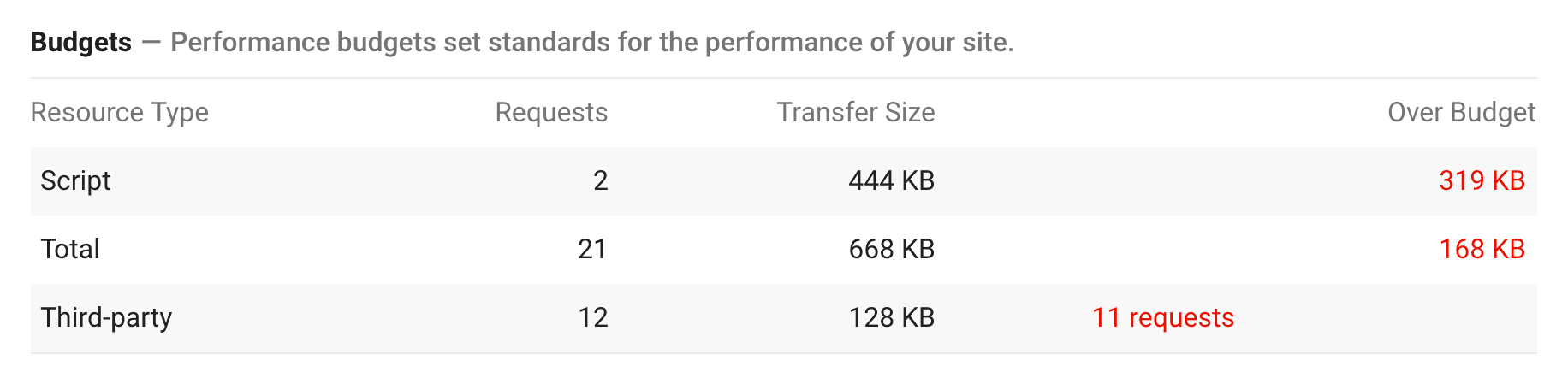
The command line version of Lighthouse (v5+) supports budgets based on two dimensions: resource size and resource count. You can apply these budgets to specific resource types including document, font, image, media, other, script, stylesheet, third-party, and total.
Budgets are defined in a JSON file. Once configured, the audit output includes an "Over Budget" column that flags any limits you've exceeded.
Webpack Performance Hints
Webpack supports asset-size budgets natively through its performance configuration. Enable performance hints in webpack.config.js to surface command line warnings or errors when a bundle grows past a defined limit. After each build, webpack prints a color-coded asset list where anything over budget is highlighted in yellow, which helps keep asset sizes front of mind during development.

The defaults are 250 KB for both assets and entry points, but you can customize these targets in the config file.

These budgets compare against uncompressed asset sizes. That choice is deliberate: uncompressed JavaScript size correlates with execution time, and large files can be slow to run, particularly on mobile.

Bundlesize: Lightweight Threshold Testing
Bundlesize is an npm package that tests asset size against thresholds you specify. It runs locally and in CI environments. A typical command line invocation names the file to test and the budget, producing a single line of color-coded results.
bundlesize -f "dist/bundle.js" -s 170kB

CI Enforcement with Bundlesize
The clearest value from bundlesize comes from wiring it into CI: when a test fails, the associated pull request is not merged. It works on GitHub with CI services such as Travis CI, CircleCI, Wercker, and Drone. Teams at Bootstrap, Tinder, and Trivago use it this way to avoid performance regressions as new code lands.
Bundlesize lets you configure thresholds independently for separate files, which is helpful when you're already code-splitting the application. By default it measures gzipped asset sizes; an option switches to brotli compression or disables compression entirely.
Lighthouse Bot: Score Gates for Pull Requests

Lighthouse Bot runs in Travis CI and enforces budgets derived from Lighthouse's five audit categories. You set a single target, like a performance score of 90 or 100. This approach is easier to track than many individual asset budgets because a Lighthouse score reflects many factors at once.
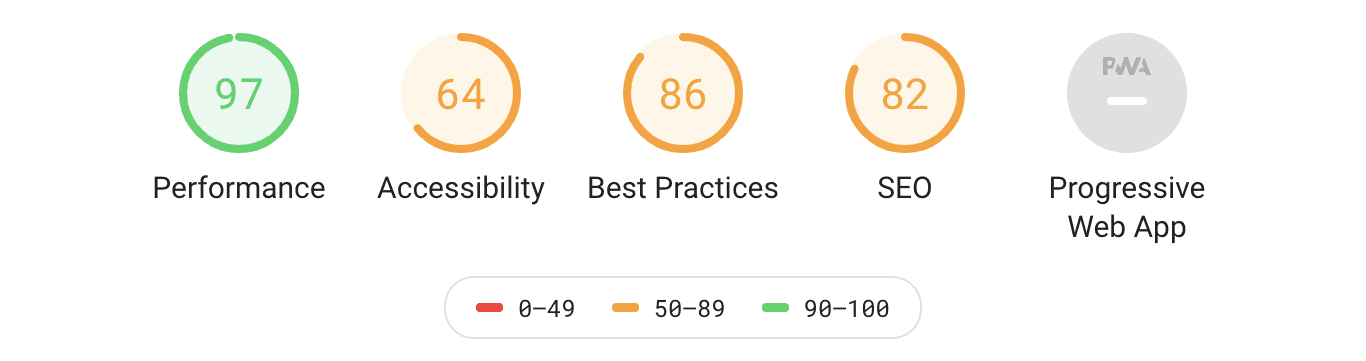
In .travis.yml, set per-category thresholds with the --perf, --a11y, --bp, --seo, and --pwa flags. The bot audits the site after it's deployed to a staging server and, for GitHub pull requests, blocks a merge when scores fall below the configured thresholds.
after_success:
  - ./deploy.sh # Deploy the PR changes to staging server
  - npm run lh -- --perf=96 https://staging.example.com # Run Lighthouse test
When that happens, the bot leaves a comment on the pull request with updated scores. That annotation aims to keep performance part of the discussion as code changes, rather than an afterthought.

If a poor Lighthouse score does block your pull request, run an audit with the Lighthouse CLI or in DevTools. The report details the bottlenecks and offers pointers for straightforward optimizations to bring score back in range.



