

Why monolithic bundles hurt
JavaScript frameworks have made it easy to forget what the build tooling actually produces. There is a common assumption that the output of Webpack or a framework’s build pipeline is already optimal, but minification and tree-shaking only do so much. In many projects, the entire application is still delivered as one file that contains code for every route, feature and user role — regardless of what the current page actually needs.
Consider a typical app with four public pages, one private dashboard page and one admin page containing analytics and user management. With a conventional single-bundle setup, a visitor landing on the homepage downloads and parses the code for the dashboard and the admin section too. The admin code is not just dead weight; it is also a section of the app that most users should never access. Even minified, that code can expose API endpoints intended only for privileged roles.
The fix is code-splitting: loading only the JavaScript necessary to render the current view, and deferring sizeable non-critical pieces until they are actually required.
Where the cost actually comes from
JavaScript affects performance in three phases: download, parse and execute. Download time depends on connection speed and file size, so smaller files are always better, especially for users on slow networks. But unlike images, which only need to be fetched and decoded, scripts also have to be parsed, compiled and executed. That is CPU-intensive work that blocks the main thread and makes the page unresponsive to user input, even if content already appears on screen.
If a script takes too long to parse and execute, users get the impression the site is broken and leave.
This is the problem captured by the First Input Delay (FID) and Total Blocking Time (TBT) metrics in Lighthouse and Core Web Vitals. Browsers treat scripts as render-blocking resources: without an async or defer attribute, page rendering halts until the script is fetched and run. Those attributes avoid blocking page processing, but they do not spare the CPU — the script still has to execute before the page can respond to interaction.
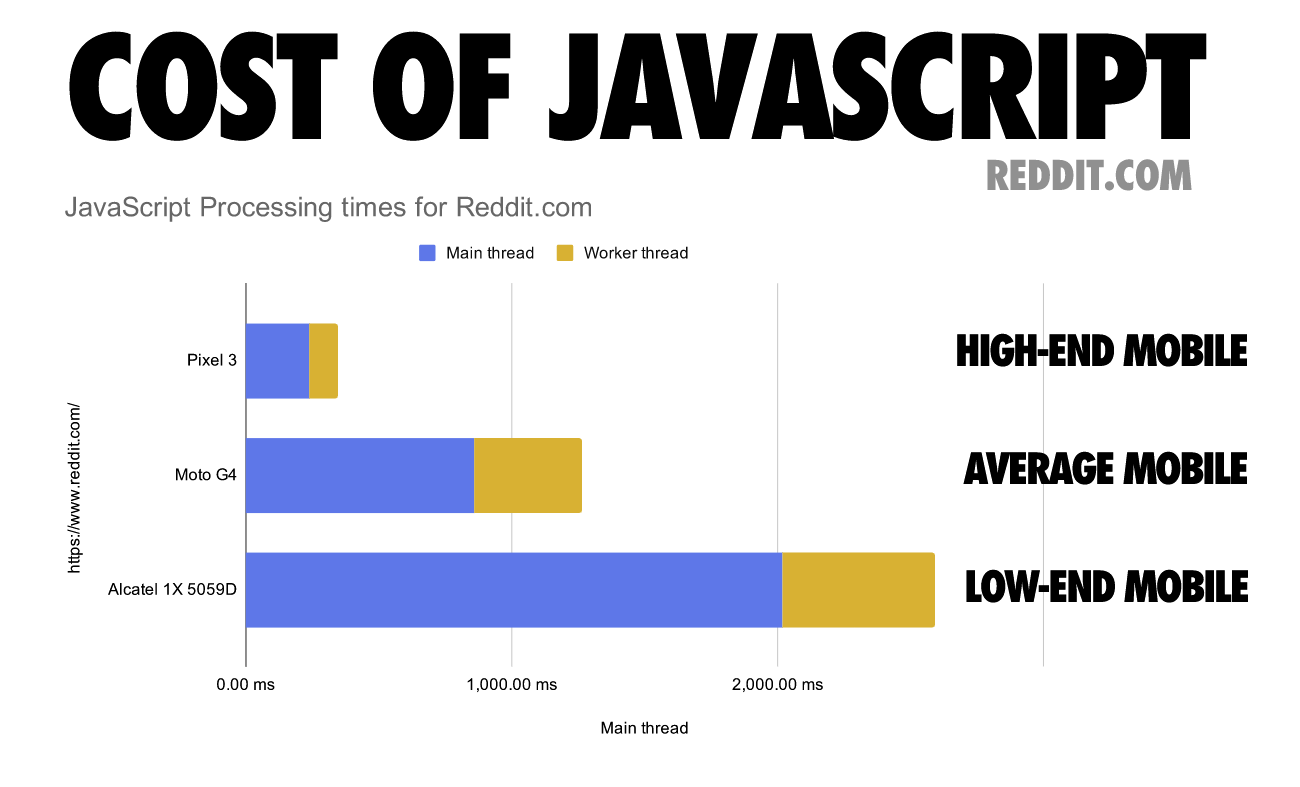
Execution time is also not uniform across hardware. The gap between flagship and budget devices, in terms of how long it takes to run the same JavaScript, is significant. To handle that spread in CPU capabilities and network quality, the practical approach is to ship only the critical code for each page rather than the whole app bundle in one request.
Splitting for Faster Initial Loads
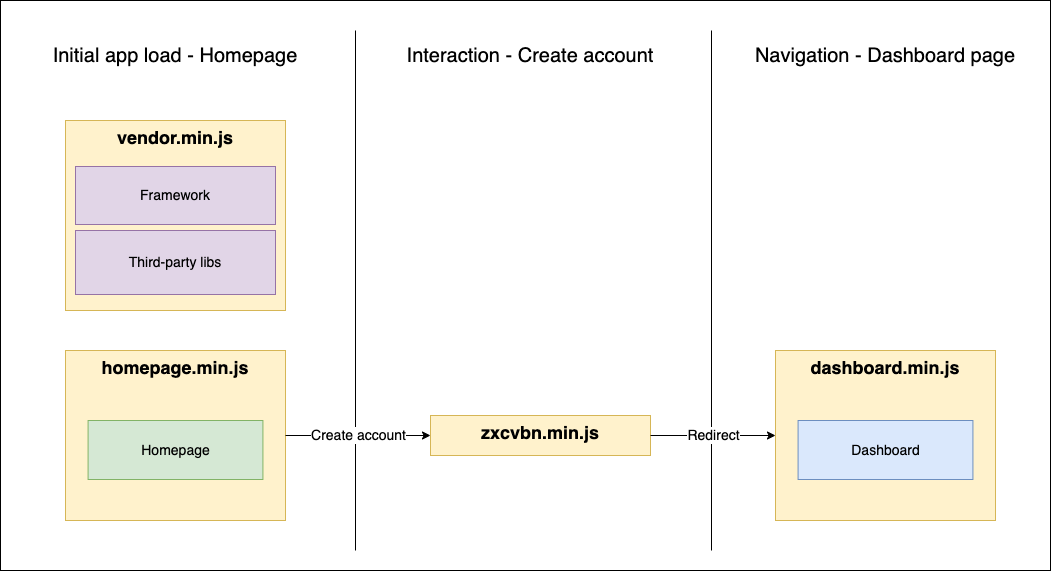
Code-splitting aims to defer the loading, parsing, and execution of JavaScript that isn't needed for the current page or state. Instead of shipping one monolithic bundle, individual pages get their own files — homepage.min.js, login.min.js, dashboard.min.js — alongside a shared vendor bundle.
Consider a typical flow: a user lands on the homepage, and the main vendor bundle loads alongside the homepage bundle. When they click a button to open an account creation modal, an expensive password strength library gets dynamically loaded as they interact with the inputs. After successful login and redirect to the dashboard, only then does the dashboard bundle load. If that user isn't an admin, the admin bundle remains unloaded.
Dynamic Imports in React
Code-splitting works out-of-the-box with Create React App and Webpack-based frameworks like Gatsby and Next.js. For manually configured setups, consult the documentation for your specific build tool.
Splitting Functions
Before tackling components, note that functions can also be code-split using vanilla JavaScript's dynamic import syntax. This approach works across all frameworks, though it's not supported by legacy browsers like Internet Explorer or Opera Mini.
import("path/to/myFunction.js").then((myFunction) => {
   /* ... */
});
Imagine a blog post with an inline account creation form for readers who want to leave comments. The form uses the sizable 800kB zxcvbn library for password strength checks — a clear performance hurdle and ideal candidate for code-splitting.
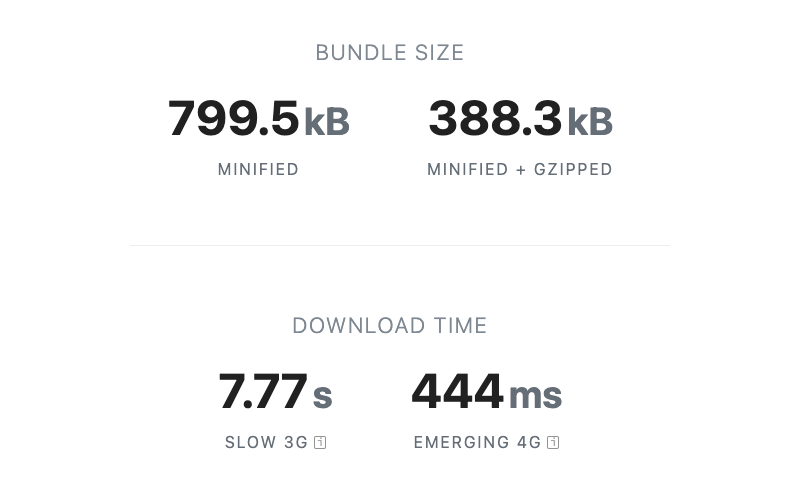
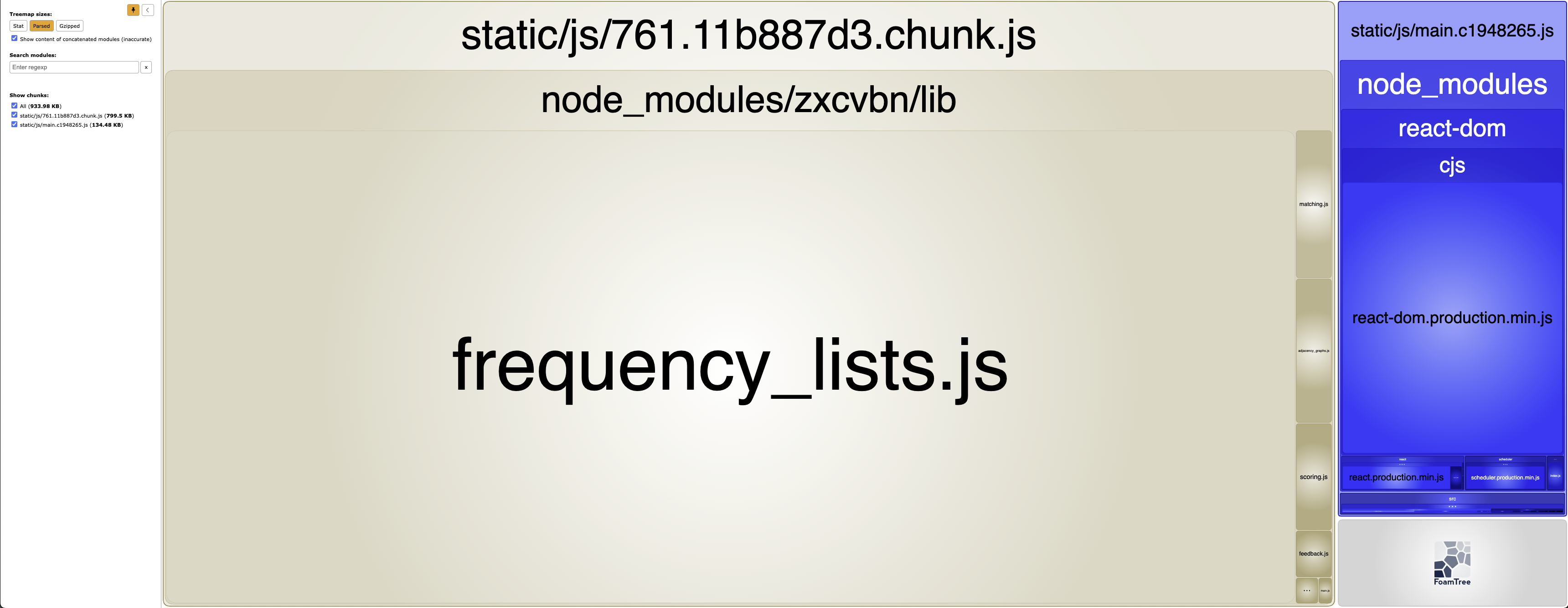
zxcvbn package. This estimation doesn’t include parsing and execution times which also affects website performance. (Large preview)The initial Comments.jsx component imports zxcvbn directly, pulling it into the main bundle. The resulting minified output for this small component weighs in at 442kB gzipped. The React library and the blog post page itself barely reach 45kB gzipped, meaning the password checker alone quadruples the page's initial payload.

Webpack Bundle Analyzer confirms the problem: the thin rectangle on the far right represents the blog component with its bloated dependency.
Password strength checking isn't critical for initial render — it's only needed once the user types into the password field. The fix is to remove the static import and instead dynamically import zxcvbn inside the password onChange handler.
import React, { useState } from "react";

export const Comments = () => {
  /* ... */
  const onPasswordChange = (event) => {
    const { value } = event.target;
    setPassword(value);

    /* Dynamic import - rename default import to lib name for clarity */
    import("zxcvbn").then(({default: zxcvbn}) => {
      const { score } = zxcvbn(value);
      setPasswordStrength(score);
    });
  };

  /* ... */
}
After the refactor, initial page load drops to around 45kB, covering only framework dependencies and the blog post components. The library bundle appears in the network tab only when the user starts typing. Even though the event fires on every keypress, the file is fetched just once and executes instantly once loaded. The bundle analyzer output confirms zxcvbn has been successfully split into its own chunk.
Splitting Third-Party Components
Code-splitting React components follows a straightforward four-step process:
- use a default export on the component to split;
- import it with
React.lazy; - render it inside
React.Suspense; - provide a fallback prop to
React.Suspense.
Consider a date-picking component that outgrows the default HTML input's capabilities, so we bring in react-calendar. The Calendar component renders conditionally only when the user focuses on the date input.
import React, { useState } from "react";
import Calendar from "react-calendar";

export const DatePicker = () => {
  const [showModal, setShowModal] = useState(false);

  const handleDateChange = (date) => {
    setShowModal(false);
  };

  const handleFocus = () => setShowModal(true);

  return (
    <div>
      <label htmlFor="dob">Date of birth</label>
      <input id="dob"
        onFocus={handleFocus}
        type="date"
        onChange={handleDateChange}
      />
      {showModal && <Calendar value={startDate} onChange={handleDateChange} />}
    </div>
  );
};
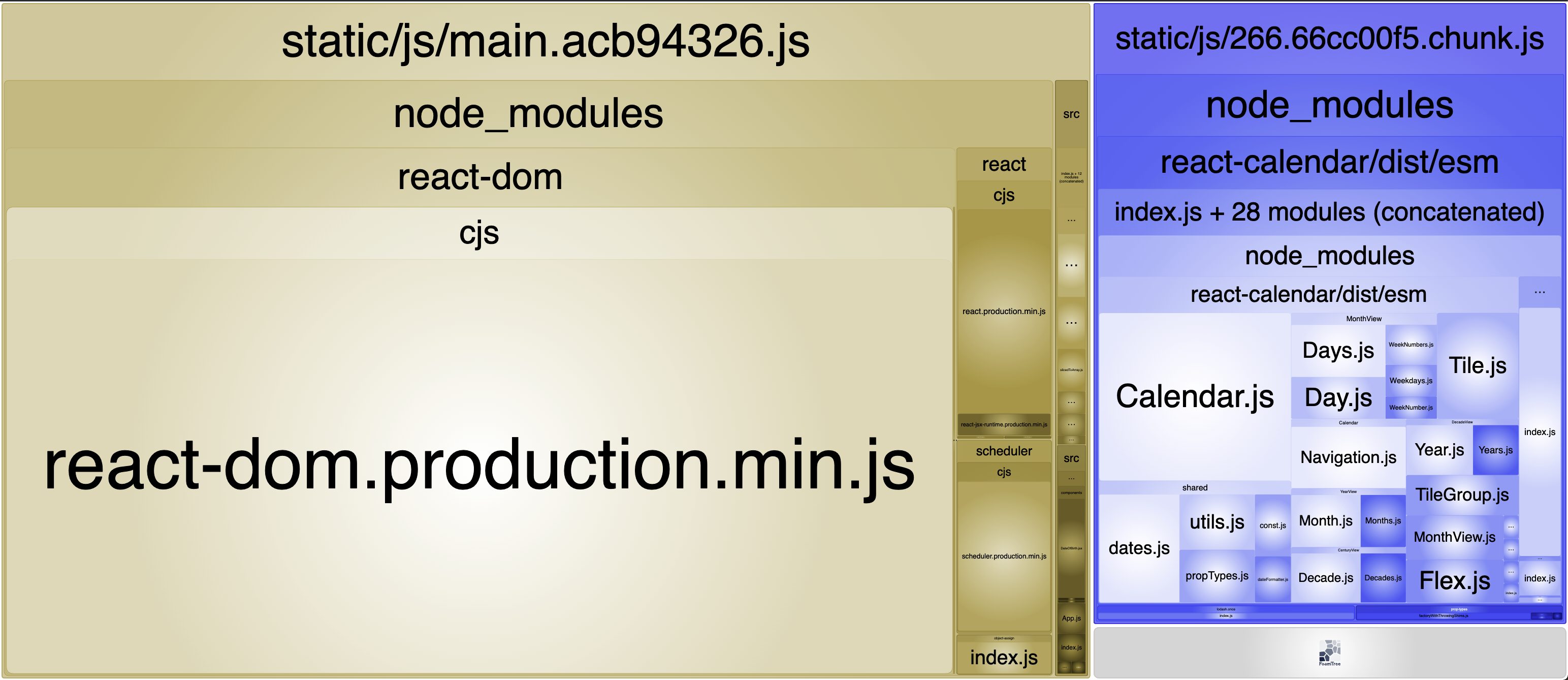
Bundle analysis shows the entire app crammed into a single JavaScript bundle, with react-calendar taking a substantial portion. Since the popup only appears when the showModal state becomes true, the component is a prime candidate for lazy loading — provided it has a default export, which it does.
import Calendar from "react-calendar"; /* Standard import */The refactor removes the static import and replaces it with a lazy import. The component then gets wrapped in a Suspense boundary with a fallback that renders until the lazy chunk arrives.
import React, { useState, lazy, Suspense } from "react";

const Calendar = lazy(() => import("react-calendar")); /* Dynamic import */

export const DateOfBirth = () => {
  const [showModal, setShowModal] = useState(false);

  const handleDateChange = (date) => {
    setShowModal(false);
  };

  const handleFocus = () => setShowModal(true);

  return (
    <div>
      <input
        id="dob"
        onFocus={handleFocus}
        type="date"
        onChange={handleDateChange}
      />
      {showModal && (
        <Suspense fallback={null}>
          <Calendar value={startDate} onChange={handleDateChange} />
        </Suspense>
      )}
    </div>
  );
};
Note that fallback is a required prop on Suspense. It accepts any valid React node:
null— render nothing during the loading phase.string— display a simple text message.- React component — such as skeleton loading elements, for richer feedback.
Webpack Bundle Analyzer output confirms react-calendar has been split away from the main bundle.
Splitting Project Components
Code-splitting isn't limited to third-party packages — any component in a project can be split. Route-level page components are a natural fit: each page becomes its own chunk, loaded only when that route is visited.
Consider an App.jsx with a React router and three page components. Each component currently uses a default export and gets statically imported, meaning all of them land in the main bundle regardless of the active route. The Dashboard and About components load even when the user never navigates away from the homepage.
import { Navigation } from "./Navigation";
import { Routes, Route } from "react-router-dom";
import React from "react";

import Dashboard from "./pages/Dashboard";
import Home from "./pages/Home";
import About from "./pages/About";

function App() {
  return (
    <Routes>
      <Route path="/" element={<Home />} />
      <Route path="/dashboard" element={<Dashboard />} />
      <Route path="/about" element={<About />} />
    </Routes>
  );
}

export default App;
The fix mirrors the previous example: swap static imports for lazy imports and nest the components under a single Suspense boundary. If each page needed a different fallback, they'd each get their own Suspense wrapper. Since the components already have default exports, no other changes are needed.
import { Routes, Route } from "react-router-dom";
import React, { lazy, Suspense } from "react";

const Dashboard = lazy(() => import("./pages/Dashboard"));
const Home = lazy(() => import("./pages/Home"));
const About = lazy(() => import("./pages/About"));

function App() {
  return (
    <Suspense fallback={null}>
      <Routes>
        <Route path="/" element={<Home />} />
        <Route path="/dashboard" element={<Dashboard />} />
        <Route path="/about" element={<About />} />
      </Routes>
    </Suspense>
  );
}

export default App;
The page components are now split into separate chunks, loaded on-demand as the user navigates. Adding a spinner or skeleton loader as the fallback improves the experience on slower connections and lower-end devices.
Choosing What to Split
Deciding early which functions and components warrant code-splitting avoids the pain of untangling an already-monolithic bundle later. A good baseline set of candidates:
- page components tied to specific routes;
- expensive or large conditionally-rendered components — modals, dropdowns, menus;
- expensive or large third-party functions and components.
At the same time, over-splitting is counterproductive. The goal is to dynamically load bundles that meaningfully impact load times. Creating micro-bundles of a few hundred bytes or a few kilobytes can actually hurt performance and UX, a topic covered later in this article.
Refactoring Existing Applications
When a project is already well into its lifecycle, code-splitting becomes a more delicate operation. A component used across dozens of other modules that looks like an ideal split candidate will require a large, hard-to-test pull request if there isn't solid automated coverage. The later in the cycle this happens, the higher the risk.
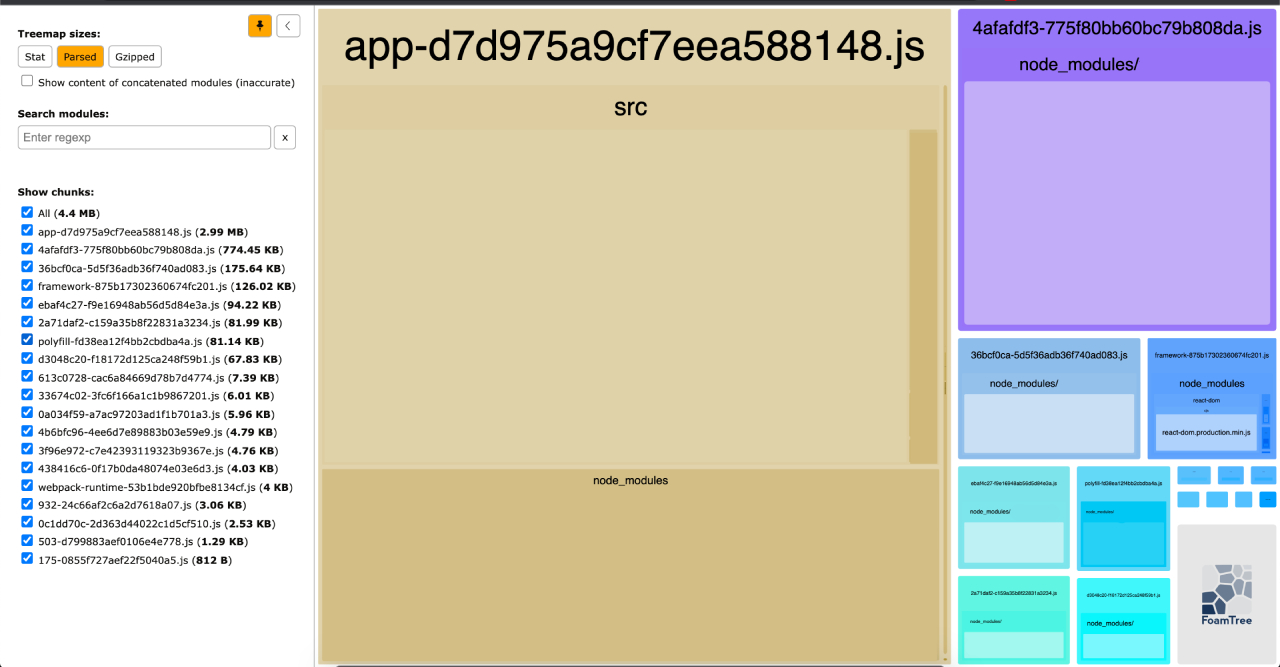
Start with an audit. Tools like Webpack Bundle Analyzer or Source Map Explorer will surface the largest bundles. A browser profiler or WebPageTest runs will show which of those bundles block the CPU main thread longest. From there, weigh the expected performance gain against the required development and testing effort—a calculation that is far less favorable mid-project than it is at the start.
Once a split is made, confirm the main bundle actually shrank and that the application still builds and runs cleanly. The full workflow follows this pattern:
- Profile the site with a bundle analyzer and a browser performance tool; single out large, slow-executing components.
- Decide whether the split's benefit justifies the implementation and testing cost.
- Convert named exports to default exports where necessary.
- Strip the component out of any barrel files.
- Swap static
importstatements forlazyimports. - Wrap the lazy components in
Suspensewith a fallback. - Measure the new bundle size and performance. If the gain is negligible, revert the split.
- Verify the production build and runtime behavior are issue-free.
Setting Performance Budgets
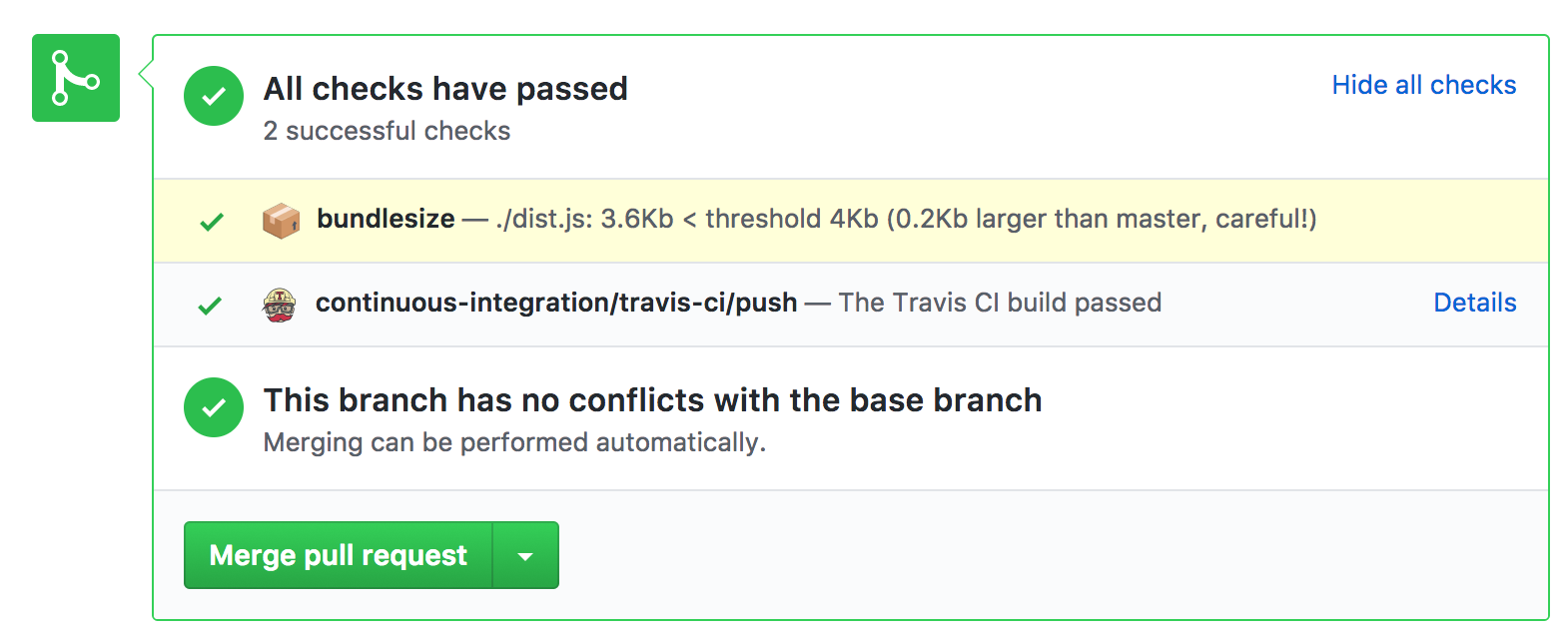
Performance budgets turn bundle bloat into a build failure instead of a surprise. Webpack, CI systems, and auditing tools like Lighthouse can all enforce predefined limits on asset sizes and flag bundles that exceed them. That gives reviewers immediate feedback on how a pull request affects the overall footprint, and it makes code-splitting a routine response to a warning rather than a post-release remediation.
The most useful budgets model the worst-case user: a low-end device on a slow, unreliable network. Planning for that scenario serves a much broader audience than optimizing for a broadband-connected desktop. Alex Russell's research on real-world performance budgets pegs the critical-path resource budget for that baseline at roughly 130–170KB.
“Performance budgets are an essential but under-appreciated part of product success and team health. Most partners we work with are not aware of the real-world operating environment and make inappropriate technology choices as a result. We set a budget in time of <= 5 seconds first-load Time-to-Interactive and <= 2s for subsequent loads. We constrain ourselves to a real-world baseline device + network configuration to measure progress. The default global baseline is a ~$200 Android device on a 400Kbps link with a 400ms round-trip-time (“RTT”). This translates into a budget of ~130-170KB of critical-path resources, depending on composition — the more JS you include, the smaller the bundle must be.”
— Alex Russell
Suspense and Server-Side Rendering
React's Suspense component is strictly client-side. Attempting to render it during server-side rendering (SSR) throws an error, regardless of the fallback provided. This limitation is addressed in React 18, but older projects need a workaround today.
A crude fix is to check whether the code is running in a browser before rendering the lazy component, but that approach prevents the content from being included in the server-rendered HTML. For non-essential UI like modals, skipping SSR is acceptable. For content you care about for SEO and initial paint, it defeats the purpose of SSR entirely.
const isBrowser = typeof window !== "undefined"

return (
  <>
    {isBrowser && componentLoadCondition && (
      <Suspense fallback={<Loading />}>
        <SomeComponent />
      <Suspense>
    )}
  </>
)
Until React 18 is available broadly, the React team recommends the Loadable Components library in this scenario. It builds on lazy and Suspense while adding SSR support, dynamic imports with dynamic props, and timeout handling. The basic React approach is enough for smaller applications; Loadable is the better fit for a larger, more complex codebase.
Weighing the Trade-offs
Code-splitting also improves cache efficiency. Since each split bundle receives a unique hash, a new deployment only forces clients to re-download the bundles whose content actually changed. The rest can be served from cache.
The technique, however, invites misuse. Splitting too aggressively creates a tangle of micro-bundles that can make the interface feel sluggish and unresponsive. The problems are amplified under HTTP 1.1, which lacks the multiplexing of HTTP/2 and handles numerous small requests poorly.
"Use performance budgets, bundle analyzers, performance monitoring tools to identify and evaluate each potential candidate for code splitting. Use code-splitting in a sensible and temperate way, only if it results in a significant bundle size reduction or noticeable performance improvement."
References
- Code-Splitting, React documentation
- “JavaScript Start-up Optimization”, Addy Osmani
- “Can You Afford It?: Real-world Web Performance Budgets”, Alex Russell
- “Incorporate Performance Budgets Into Your Build Process”, Milica Mihajlija
- “When JavaScript Bytes”, Tim Kadlec




