
Clone Types for Large Repositories
Git’s distributed design means a typical clone downloads every reachable object: all commits, trees, and blobs across the entire history. For large monorepos, that initial clone can be painfully slow. Partial clone and shallow clone reduce the download by omitting certain object types or truncating history, but each option changes what Git can do locally and when it must contact the server.
Three clone variants are relevant for repositories hosted on GitHub:
git clone --filter=blob:none <url>creates a blobless clone. It downloads all reachable commits and trees, fetching blobs on demand. This suits developers and build environments that persist across multiple builds.git clone --filter=tree:0 <url>creates a treeless clone. It downloads all reachable commits, fetching trees and blobs on demand. This fits one-shot build environments where the repository is discarded after a single build but commit history is still needed.git clone --depth=1 <url>creates a shallow clone. It truncates commit history to reduce clone size, but breaks some Git operations and adds load to later fetches. Shallow clones are discouraged for developers and only recommended for throwaway build environments.
Object Reachability
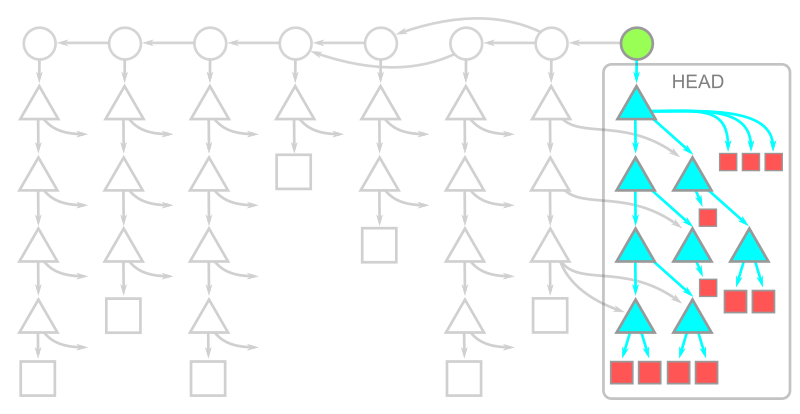
Git objects relate by pointers: blobs (file contents), trees (directories), and commits (snapshots). When an OID appears inside another object, the containing object points to that OID. Walking those pointers from a commit reaches all related objects. A full clone asks the server for the latest commits plus every object reachable from them — effectively the entire repository history.
In practice, historical blobs and trees often comprise the bulk of a large repository’s data. Developers typically have network access, so fetching missing objects on demand can be a reasonable tradeoff. Partial clone formalizes this approach.
Blobless Clones
With git clone --filter=blob:none, the initial clone downloads all reachable commits and trees. Blobs download only when a checkout requires them, including the checkout that runs as part of the clone itself. After the clone, you have every blob at HEAD but none from earlier history.
This layout keeps commit and tree data complete, so subsequent checkouts only fetch missing blobs, and Git batches those requests efficiently. A later git fetch sends only new commits and trees; new blobs download during the subsequent merge or checkout. For file contents, operations like git diff or git blame <path> trigger a one-time blob download for the paths involved. Once those blobs are local, repeat commands run at full speed.
Commands that inspect history, such as git merge-base, git log, and git log -- <path>, work without extra downloads since they only need commit and tree data. This makes blobless clones a strong default for developers, and they are the most widely used partial clone variant.
Treeless Clones
When tree data dominates repository size, git clone --filter=tree:0 downloads only reachable commits initially. Trees and blobs are fetched on demand. Completing the clone requires downloading the full tree and blob set for HEAD, but historical trees are absent.
Tthe initial treeless clone is faster than the blobless or full alternative, and updates via git fetch bring in only new commits. However, working inside a treeless clone is restrictive. A checkout that moves to another commit will need that commit’s root tree plus all reachable trees; the server may resend trees the client already has. Only after trees arrive can the client identify and batch the missing blobs.
History-only operations like git merge-base and plain git log avoid extra downloads. But a path-limited history command such as git log -- <path> forces root tree downloads for nearly every commit — an expensive operation in a large history. Treeless clones are therefore not recommended for interactive development. They are best for automated builds that clone, compile, and delete the repository, where minimizing clone time matters more than broad command availability.
A known issue affects treeless clones with submodules: running git fetch triggers a tree request for each new commit while looking for changed submodules. Set git config fetch.recurseSubmodules false in treeless clones to avoid this behavior until a fix lands in the Git client.
How shallow clones work
Before partial clones existed, Git already had a way to avoid downloading an entire repository: shallow clones. The --depth=<N> option of git clone truncates the commit history, with --depth=1 typically meaning only the most recent commit is kept. These clones are usually combined with --single-branch --branch=<branch> so that the repository only contains data for the branch and commit the user plans to work with.
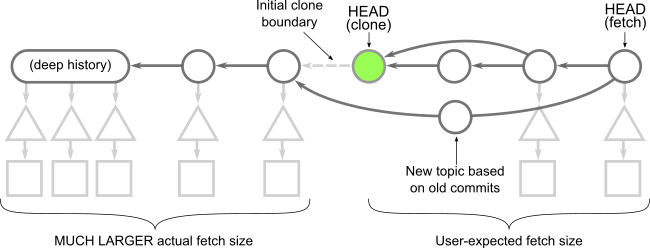
A shallow clone keeps the HEAD commit intact but severs its ancestry. The commits whose parents are missing are called shallow commits; together they form the shallow boundary. Metadata in the client repository tells Git to ignore those parent connections, but the commit objects themselves are unchanged. Every tree and blob reachable from the shallow commits is downloaded completely.
This truncation has real consequences. Commands like git merge-base and git log behave differently than they would in a full clone and generally cannot be relied upon. That is a key contrast with partial clones: even a blobless clone can run commands like git blame -- <path> correctly, just slower. In a shallow clone, that is not even an option.
Fetching into a shallow clone is also more expensive. The server must compute and send every tree and blob that is new relative to the shallow boundary. Because the client is asking for objects that are not reachable from a normal ref, the server cannot use reachability bitmaps effectively. Depending on how the remote repository evolves, a single git fetch can end up transferring nearly the entire commit history.
The shallow boundary also creates problems when fetching from other developers' work. If another user starts a topic branch below that boundary and the shallow client fetches it, or worse, that branch gets merged into the default branch, the server has to walk the full history to satisfy the request. This effectively turns into a near-full clone download computed without the usual performance optimizations.
For these reasons, shallow clones are not recommended except in scenarios where the repository is cloned, used once, and deleted immediately. Fetching from a shallow clone can cause far more work than it saves.
Comparing clone types by object category
Each clone option behaves differently when data is downloaded. Beyond the initial clone, it is worth considering what happens when time passes and the client runs git fetch followed by git checkout to move to a new commit.
A full clone downloads all reachable objects, with blobs usually accounting for the majority of the data.
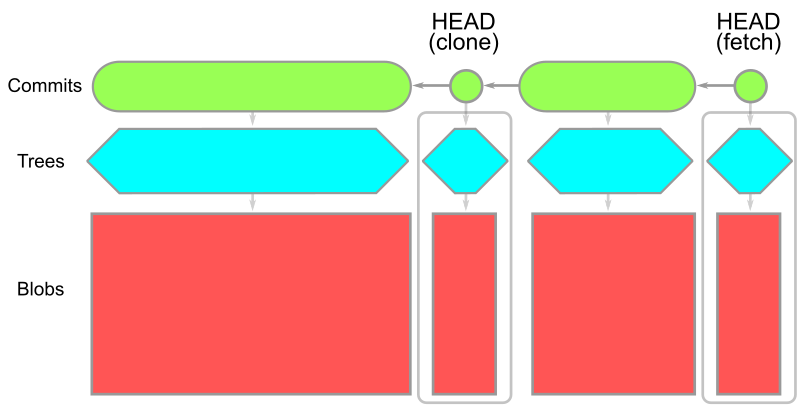
Partial clones defer some data until it is needed. Blobless clones skip blobs except those required for the current checkout. Treeless clones skip trees in the history, instead downloading a complete copy of each tree needed at checkout time.
| Blobless clone | Treeless clone |
|---|---|
 |
 |
git clone --depth=1,git fetch |
git clone --depth=1,git fetch --depth=1 |
|---|---|
 |
 |
What the experiments show
GitHub engineer @solmazabbaspour designed an experiment comparing these clone options across several open source repositories. A companion blog post will provide full data; the executive summary points to a few patterns that can help guide the choice of clone type:
- Full clones remain the right choice when a distributed workflow requires all data locally, and they are the best starting point for developers working in a reasonably-sized repository.
- Blobless partial clones help when a repository is very large primarily due to large blobs. The initial clone is faster, at the cost of occasional downloads when commands like
git checkoutorgit blameneed blob content. - Computing a shallow fetch is generally more expensive than a full fetch. Prefer full fetches in both full and shallow cloned repositories.
- Shallow clones are well-suited to CI builds that clone once and delete the repository immediately, since they are the fastest way to get a working directory at a single commit. For developers who need commit history in a build, a treeless partial clone beats a full clone in download size.
Results will vary by repository, but knowing the object model behind each option makes it easier to test what works. Some pitfalls are worth keeping in mind:
- Shallow clones lack commit history, so
git logandgit merge-basebehave unexpectedly. Never fetch from a shallow clone. - Treeless clones have commit history but fetching missing trees is very expensive.
git logwithout a path andgit merge-basework, butgit log -- <path>andgit blameare impractically slow. - Blobless clones retain all commits and trees, downloading blobs on demand. Commands such as
git log -- <path>work, andgit blameis only somewhat slower on first use. This is often the best entry point for very large repositories full of old, large blobs. - Full clones behave as documented, with the only drawbacks being initial download time and disk space.
Updating to the latest Git version ensures access to the most recent performance improvements.



