
Why ad latency is a business problem
Publishers run a simple exchange: users get content, advertisers get attention. When ads strain the browser's memory, CPU, or network budget, they delay the moment a page becomes fully interactive. That friction shows up in metrics publishers care about—session length and bounce rate—and it can also drag down primary business goals for e-commerce sites where display ads are secondary revenue.
From the advertiser's side, speed is equally critical. An ad that appears sooner stays visible longer, which raises the odds of a view or interaction. The charts below, drawn from an experiment that injected 100 ms to 1 s of delay before each ad response across 4 billion impressions on Google Publisher Tag sites in multi-request mode, quantify the damage. The dotted lines show extrapolated gains if delays were removed.
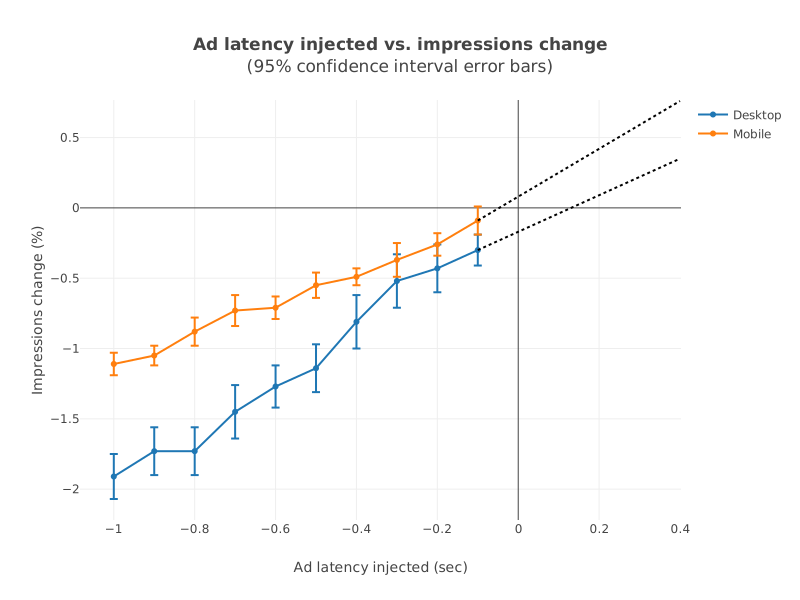
With one second of added delay, impressions fell 1.1% on mobile and 1.9% on desktop. The penalty to viewability was steeper:
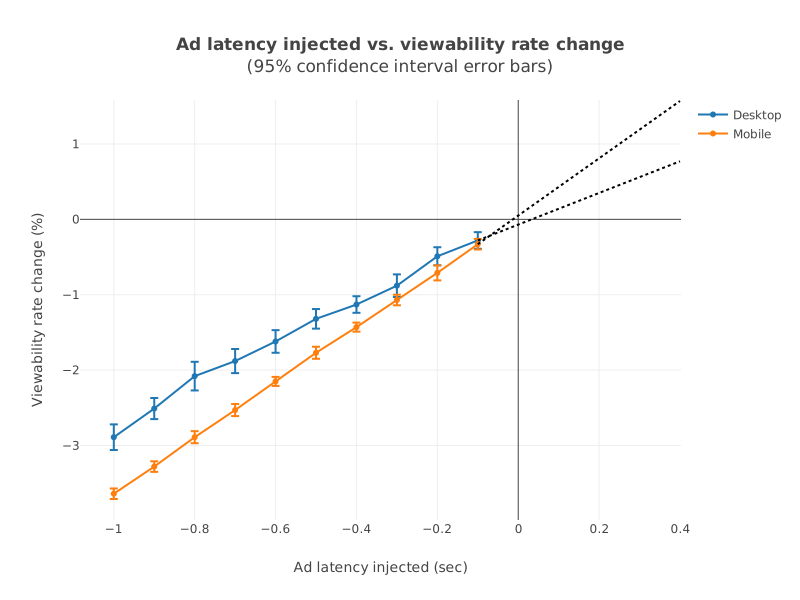
One second of delay reduced the viewability rate by 3.6% on mobile and 2.9% on desktop.
Building an ad speed improvement plan
No universal fix exists for ad speed; serving setups differ too much. The following framework applies broadly, though some details reference Google Ad Manager specifically.
Start with measurable goals
Decide whether you're optimizing for user experience, viewability, or both, then pick metrics that will track progress over time. Reliable metrics let you confirm whether a change helped and enable A/B tests. Configure a dashboard or scheduled reports so you can monitor results without manual effort.
Map your inventory and dependencies
Different ad slots often depend on different scripts in different orders. Start by building a flowchart for each inventory type. A desktop leaderboard might resolve through one straightforward path:

A mobile banner with more moving parts looks different:
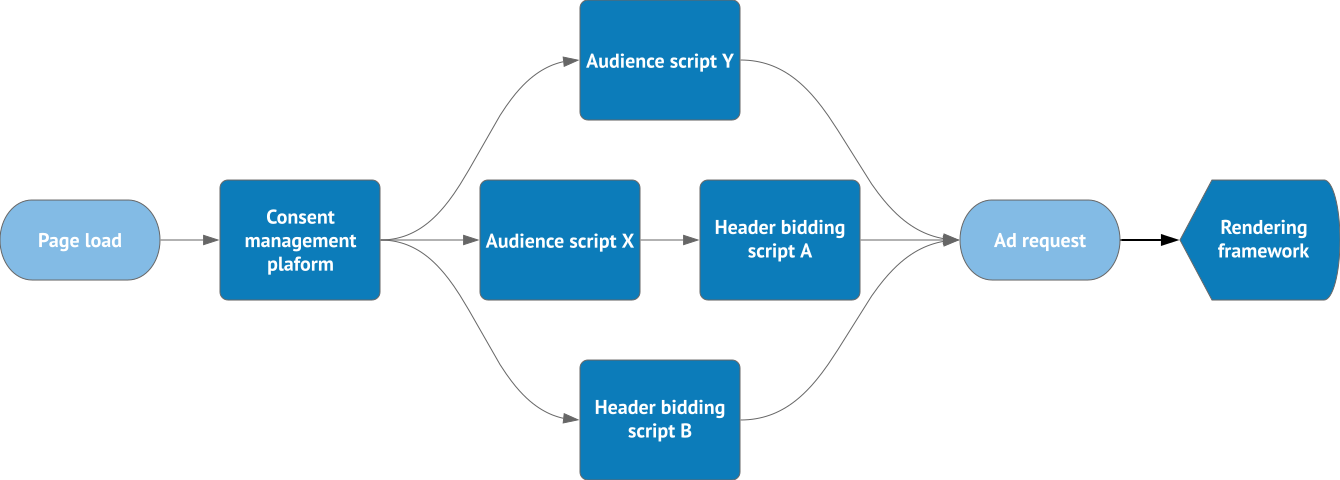
Consolidate these flowcharts into a table that maps each inventory type against its technical dependencies.
| Type of inventory | Consent management platform | Audience script | Header bidding script | Rendering framework |
|---|---|---|---|---|
| Desktop leaderboard | ✔ | ✔ (X) | ✔ (A) | - |
| Mobile banner | ✔ | ✔ (X and Y) | ✔ (A and B) | ✔ |
That overview reveals critical paths and exposes easy wins—for instance, a dependency that loaded on every page but only matters in certain cases. Keep this map handy during load-time analysis.
Target the three phases before the first ad renders
Break the time to first ad into three intervals and measure each one:
- Time to load ad libraries
- The interval needed to fetch every library required for the first ad request. Removing scripts unrelated to ad requests, or delaying their load, shortens this phase.
- Time to first ad request
- The gap between the library load completing and the first request being sent. Running header bidding requests in parallel and avoiding main-thread blocking work both help here.
- Time to render first ad
- The stretch from the first request to the first rendered creative. Reducing creative complexity and file size is the lever for this interval.
All three matter, but the degree of effort you apply to each depends on your setup. A tool like Publisher Ads Audits for Lighthouse can pinpoint your bottlenecks so you know where to concentrate.
Once you've identified those opportunities, implement the changes. For publishers creating their own creatives, the AMP format is worth considering: it's designed to produce consistently fast, lightweight ads.



