Where ads fit in a performance budget
Online advertising is the economic engine of much of the web, but it has a tendency to be heavy: large scripts, unpredictable layouts, and network requests that compete with content. Addressing this is not about removing ads but about loading them intelligently. The quality gates are the Core Web Vitals, and the key techniques are content visibility management, deliberate ad slot tiers, lazy loading, and in-place refreshes.

Tuning the quick-render metrics
The Core Web Vitals are the benchmark for user experience, and each has a specific failure mode when ads are handled poorly. All three deserve explicit attention in an ad-loading plan.
Largest Contentful Paint (LCP)
LCP measures when the largest contentful element becomes visible in the viewport. If that element is an ad or sits below one, a synchronous ad load delays it. The main lever is asynchronous ad loading: minimize the time any ad spends blocking render and ensure that ad scripts aren't in the critical path for initial paint.
Interaction to Next Paint (INP)
INP measures latency across clicks, taps, and keyboard interactions, reporting the slowest of those responses. Ads that wrap interactions in heavy JavaScript, or queue work on the main thread during user input, push this metric upward. Lazy loading ads and deferring non-critical scripts keeps both ad delivery and page responsiveness in a profitable balance.
Cumulative Layout Shift (CLS)
CLS tracks unexpected movement of content after it has been rendered. Dynamic ad loading is a canonical culprit: slots that appear without pre-allocated space, or reflow upon resize, shove content apart. The remedy is predictable — reserve space for every ad slot up front, and let ad containers stretch only within a fixed envelope rather than causing reflows.
Render regions instead of whole pages
Long pages loaded with media and ad placements trigger their fair share of rendering. The CSS content-visibility property gives browsers a way to skip unseen content regions. Apply it independently to text regions, image regions, and ad slots so that each only fully renders as its boundaries approach the viewport. Initial load gets quicker not because the content is removed, but because the browser does work on demand for what is actually visible.
Slots are not equal; treat them differently
Viewability largely is a waterfall: an above-the-fold ad captures attention before scroll, while the implied value of a below-the-fold slot is established only as a user gets engaged. Treating them the same wastes load budget on placements that rank lower in predicted revenue.
First viewport: prefer speed
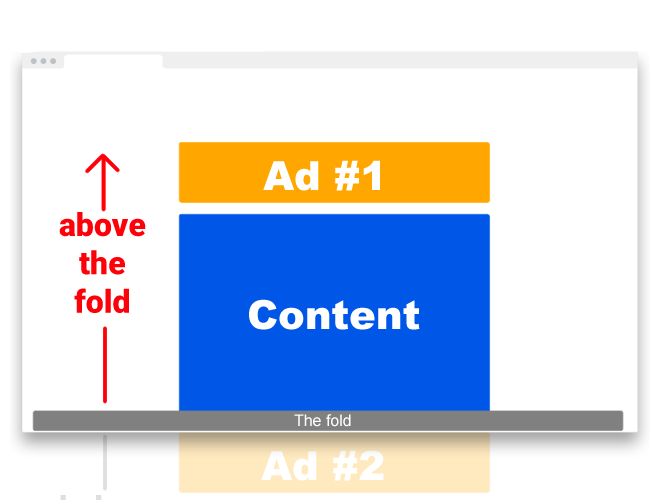
Above-the-fold placements trade the strongest visibility for premium rendering constraints. Users expect a responsive first screen, so their advantages come with necessary conditions:
- Ads need to load as fast as the hero content; sluggish ads in this position directly poison the sense of page speed.
- Keep count low. Heavy clutter in the first viewport raises banner blindness and buries the content itself.
- Responsive design remains mandatory: layout that works at desktop widths often breaks ad slots across phones, tablets, and foldables.
Below the fold: load late, integrate well
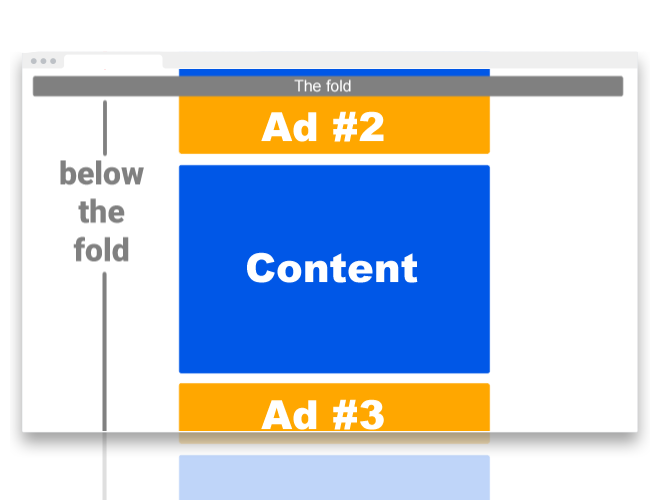
Lower placements have different worth: they capture engaged readers and offer format freedom. Their functional power comes from contextual proximity. Given that, they are best treated as candidates for lazy loading and align with the content:
- Placement should feel native to the adjacent material, reducing interruption and improving viewability.
- Formats get more latitude here — video embeds, interactive creatives, and wider canvases can be lazy-loaded without blocking the initial viewport.
- Encourage reaching them by pacing the page well, with visual cues and structured content that promotes continuous scrolling.
Managing the distance between the first impression and the below-the-fold message often depends on the ad manager itself. For Google Publisher Tag deployments, that means observed efficiency measures come first. See Google's current editorial direction:
general-best-practices— structure and hookup details that avoid wasteful duplication.ad-best-practices— slot definitions matched with page economics.minimize-layout-shift— pattern for creating stable placeholders for every placement.monitor-performance— tracking latency and custom events on a base timelinecommon_implementation_mistakes— duplicate calls, wrong collision strategies, and unused key-value building.
Delay work, not dollars next-best vs
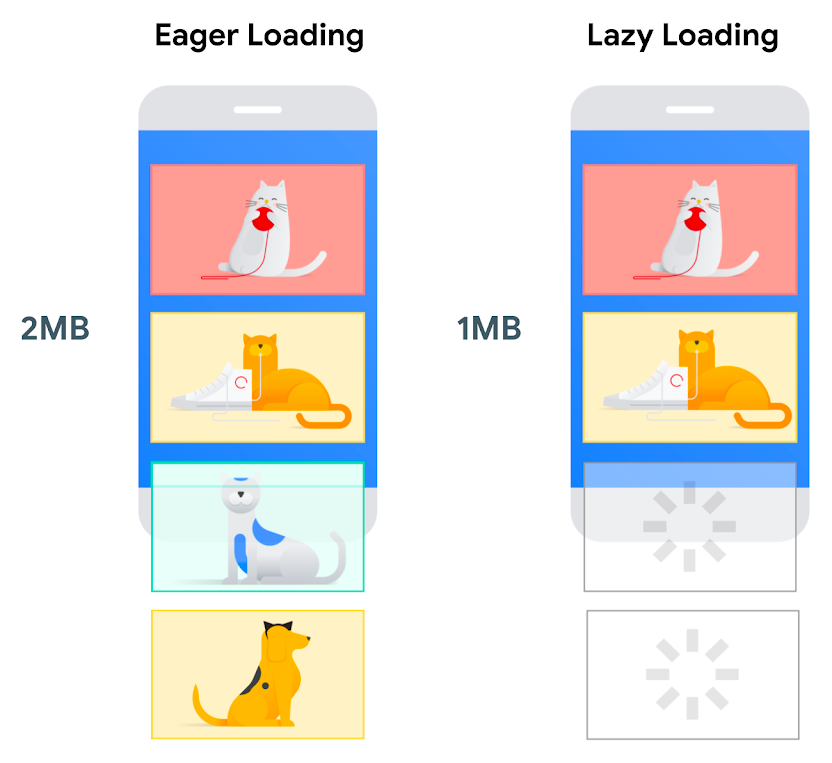
Lazy loading swaps upfront cost for proximity cost. Scripts and webfonts that are blocked by the ad itself never hurt the first load, only the threshold moment near scroll. Browser-native lazy loading via loading=lazy applies handlebars to this dynamically. Lazy loading also protects Total Blocking Time and INP: with these slots idle, the main thread carries less traffic while a page engages.
Refresh in place instead of reloading the frame

When users hold a tab open — recipe pages or DIY workshops invite it — the ad container could serve stale impressions for the whole visit. Refreshing the ad slot at an interval, 30-240 seconds out, renews the moat revenue without the side effects of page rel
Your browser dictates mobile app frameworks: doing a page reload in a WebView tears down and recreates the environment — exactly what doesn’t help performance. This way, keep the content intact and only the ad creative updates, giving constant relevance without heavy rework. Break heavy refresh paths at natural pauses across user behavior. Delaying during interaction respects the user flow; refreshing while silent (e.g., after reading) maintains some circulation. Focus placement where dwell time already exists; ad diversity + modest processing, that keeps monetization ticking without tangible friction.
Make ad delivery async-first
Forcing the browser to wait on ad scripts before it can finish rendering the page is one of the quickest ways to inflate load times. Asynchronous loading decouples ad requests from the main document flow, letting the page render and become interactive while ad units fill in the background. The simplest implementation is adding the async attribute to your ad script tags:
AdSense:
<script async src="https://pagead2.googlesyndication.com/pagead/js/adsbygoogle.js"></script>
AdSense (auto ads):
<script async src="https://pagead2.googlesyndication.com/pagead/js/adsbygoogle.js"></script>
Google Publisher Tag:
<script async src="https://securepubads.g.doubleclick.net/tag/js/gpt.js"></script>
Because ads no longer block parsing, perceived load time drops noticeably and users can interact with content sooner.
Audit ad size, placement, and creative weight
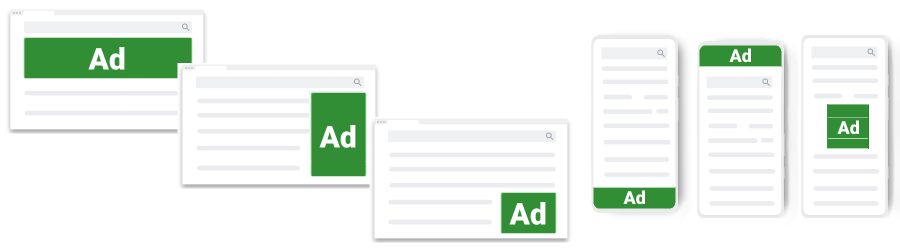
Heavy ad creatives are a hidden tax on performance. Larger file sizes mean longer downloads, which directly impacts how quickly a page finishes loading. Publishers should coordinate with advertisers to enforce compressed image formats and leaner creative designs. These adjustments cut file sizes without sacrificing visual quality, speed up pageloads, and reduce data usage for visitors on metered connections. Position and format choices matter here too; less intrusive placements tend to pair well with lighter ad units.
Follow the Better Ads Standards
Adherence to the Better Ads Standards isn't only about compliance—it's a performance lever. Standards-compliant formats avoid the pop-ups, interstitials, and sticky units that degrade user experience and slow rendering. These formats are typically less resource-intensive and placed where they won't obscure content, which supports faster load times and tends to improve click-through rates. In short, following these guidelines yields a double benefit: a cleaner page and better core Web Vitals.
Select networks and providers for speed
Performance varies substantially between ad networks and header bidding setups. Evaluating potential partners based on their delivery efficiency is another practical way to preserve speed. Look for providers with a proven ability to serve lightweight creative assets promptly. A provider that prioritizes performance directly affects your page's responsiveness, making careful selection of ad partners a core part of any performance strategy.
Balancing revenue and responsiveness
Monetization and user experience are often framed as opposing goals, but they don't have to be. The techniques above—asynchronous and lazy loading, format and size optimization, caching, and benchmarking of ad partners—let a site generate revenue without compromising the reading experience. Efficient ad delivery affects a site's engagement, retention, and long-term revenue, making speed a strategic asset rather than just a technical checklist.
Note on refresh intervals
- Ad servers may impose refresh limitations. Ad Manager, for instance, requires publishers to declare refreshed inventory in the UI. Many buyers prefer refresh declarations of 240 seconds or longer; longer intervals generally make inventory more attractive to buyers. read more



