
How the preload scanner works
Browsers have a primary HTML parser that tokenizes raw markup and builds the document object model. That parser stops when it encounters a blocking resource — a stylesheet via <link>, or a <script> without async or defer. CSS blocks rendering to prevent a flash of unstyled content (FOUC). Scripts block both parsing and rendering because the browser can't know whether they'll modify the DOM mid-parse.
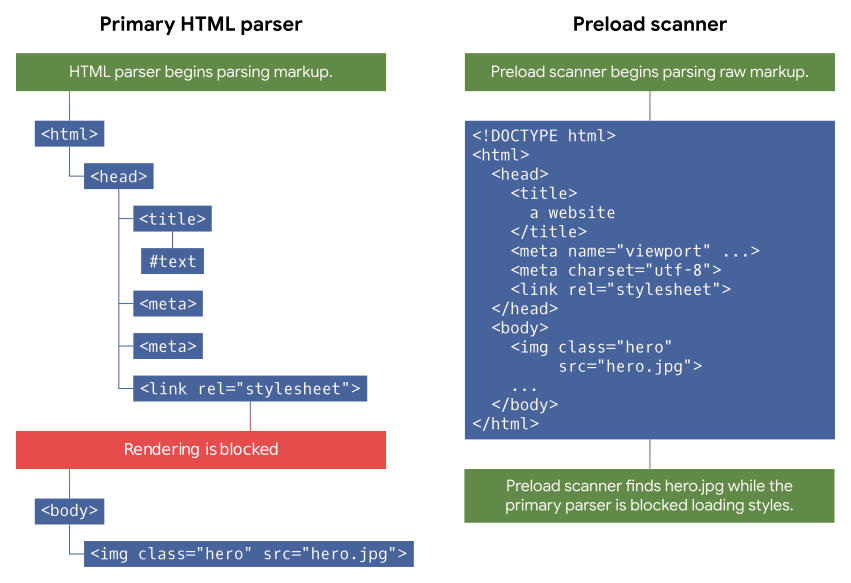
<body> element, but the preload scanner can look ahead in the raw markup to find that image resource and begin loading it before the primary HTML parser is unblocked.
The preload scanner is a secondary, speculative parser. It reads ahead in the raw markup to find fetchable resources before the primary parser would reach them. This lets the browser start downloads for images and other resources even while parsing and rendering are blocked by a stylesheet or script.
To see the preload scanner in action, you can artificially delay a blocking stylesheet and watch the network waterfall. With a two-second delay applied to a CSS file, image requests still fire during that window — the preload scanner detects the <img> element even though the primary parser hasn't reached it, and isn't stopped by the blocked render.
Injected async scripts
Injecting a script into the DOM from inline JavaScript is a common pattern, but it fights the preload scanner. Consider inline script in the <head> that creates a new <script> element:
<script>
  const scriptEl = document.createElement('script');
  scriptEl.src = '/yall.min.js';

  document.head.appendChild(scriptEl);
</script>
Injected scripts are async by default, so they run as soon as possible and don't block rendering. That sounds good — until you account for the order of operations. If that inline script comes after a <link> to an external stylesheet, the browser discovers the script only after the stylesheet blocks parsing and loads. The script request doesn't fire until after the CSS download completes.
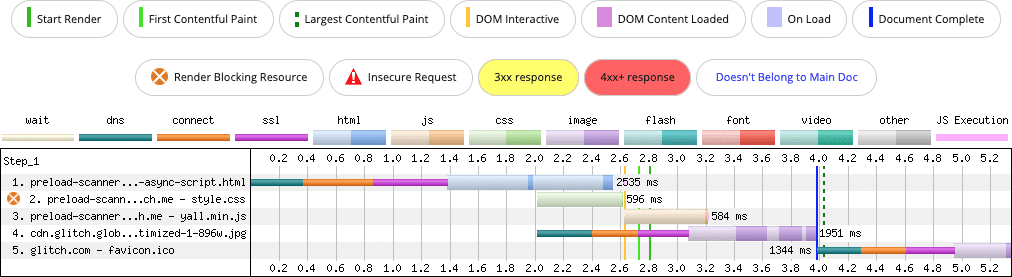
async script. The preload scanner can't discover the script during the render blocking phase, because it's injected on the client.
A regular <script async> tag in the markup, by contrast, is visible to the preload scanner, so the download starts immediately alongside the stylesheet:
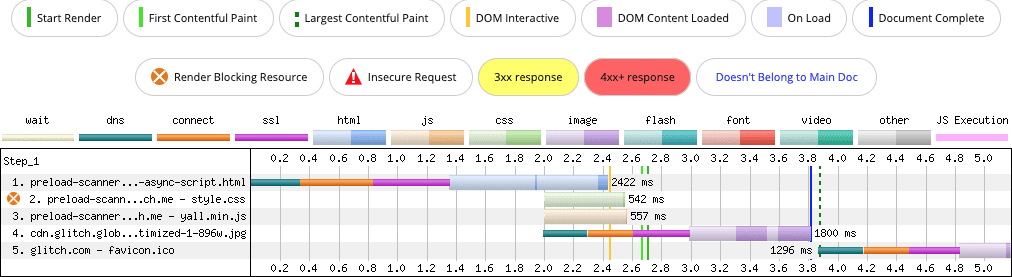
async <script> element. The preload scanner discovers the script during the render blocking phase, and loads it concurrently with the CSS.
Some might suggest using rel=preload to fix the injected-script case. It works, but it introduces a side effect: priority promotion. An async script is normally fetched at "Low" priority. Preloading raises it to "High," which can cause bandwidth contention with the stylesheet at "Highest" priority — a real concern on slow connections or with large resources.
The better fix is simpler: don't inject startup scripts. Use a plain <script> tag with async or defer as appropriate.
JavaScript-driven lazy loading of above-the-fold images
Lazy loading is valuable for conserving data, but it's often misapplied to images already in the viewport during startup. A typical pattern uses an attribute like data-src, which the lazy loader JavaScript converts to src when the image scrolls into view.
<img alt="Sand Wasp" width="384" height="255">
The preload scanner only reads src and srcset attributes. It doesn't recognize data-src, so the image reference isn't discovered until the lazy loader script downloads, compiles, and executes. If that image is an LCP candidate, the delay hurts Largest Contentful Paint.
The fix is to use standard attributes for images that should load during startup:
<img src="https://web.dev/sand-wasp.jpg" alt="Sand Wasp" width="384" height="255">
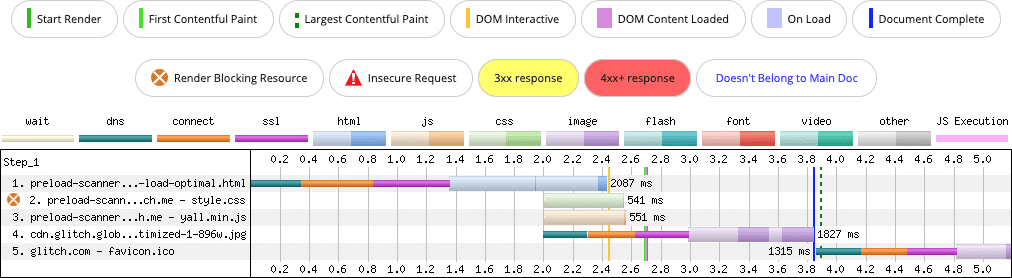
In a simple test on a slow connection, this markup change alone shaved 100 milliseconds off LCP. On more complex pages, where LCP candidates compete for bandwidth with many resources, the improvement scales.
CSS background images
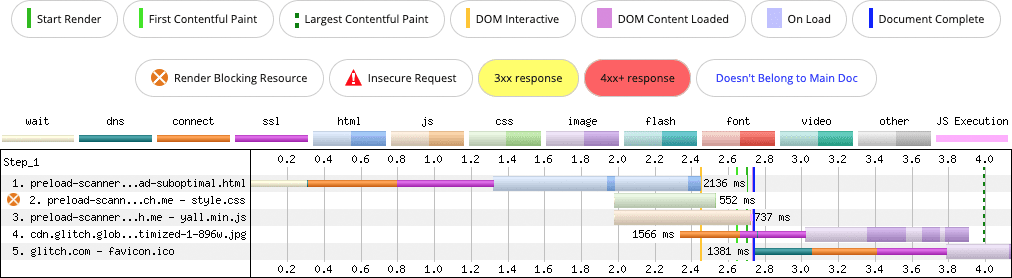
The preload scanner only sees HTML markup — not CSS. When the browser builds the CSSOM and encounters a background-image property, the image request fires at that point, not earlier via speculative parsing.
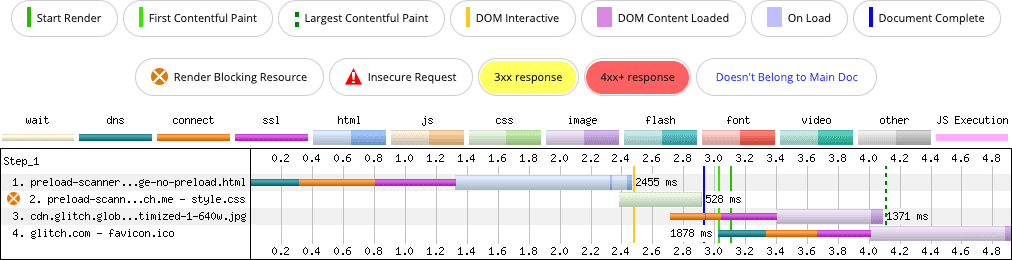
background-image property (row 3). The image it requests doesn't begin fetching until the CSS parser finds it.
If your LCP candidate is an element styled with background-image in CSS, the image is discovered late in the loading sequence. You can help the browser find it sooner with a preload hint:
<!-- Make sure this is in the <head> below any
     stylesheets, so as not to block them from loading -->
<link rel="preload" as="image" href="lcp-image.jpg">
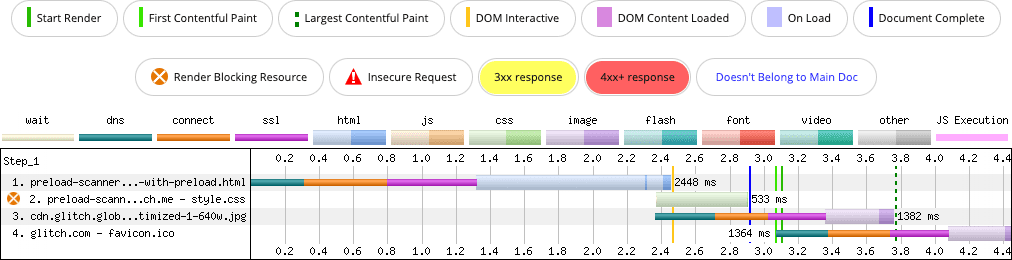
background-image property (row 3). The rel=preload hint helps the browser to discover the image around 250 milliseconds sooner than without the hint.
That hint is small, but it pulls the image discovery earlier and lowers LCP. Still, the more durable option is to ask whether an LCP candidate needs to be a CSS background at all. An <img> tag gives you responsive loading control and lets the preload scanner discover the resource naturally.
The cost of inlining too much
Inlining embeds a resource directly inside the HTML document, whether that's a stylesheet within a <style> tag, a script in a <script> tag, or any other file encoded as base64. The appeal is obvious: you skip a network round trip entirely, and the resource is available for rendering the moment HTML parsing begins.
But inlining comes with serious trade-offs that often outweigh that initial speed benefit.
- Unless your HTML itself is cached by the browser, any resource inlined within it is never cached either. This is particularly problematic for dynamic pages where the HTML response must be generated on each request.
- Even when HTML caching is viable, inlined assets don't get shared between documents. A single external stylesheet or script file can be reused across multiple pages on the same origin; an inlined copy cannot.
- Every extra byte you inline makes the HTML document longer to download. That delays the preload scanner from moving beyond the inlined content to discover resources referenced further along in the document.
Consider this test page, where the Largest Contentful Paint (LCP) candidate is a top-of-page image. The page loads its CSS via a separate <link> tag, and that stylesheet in turn references four web font files.
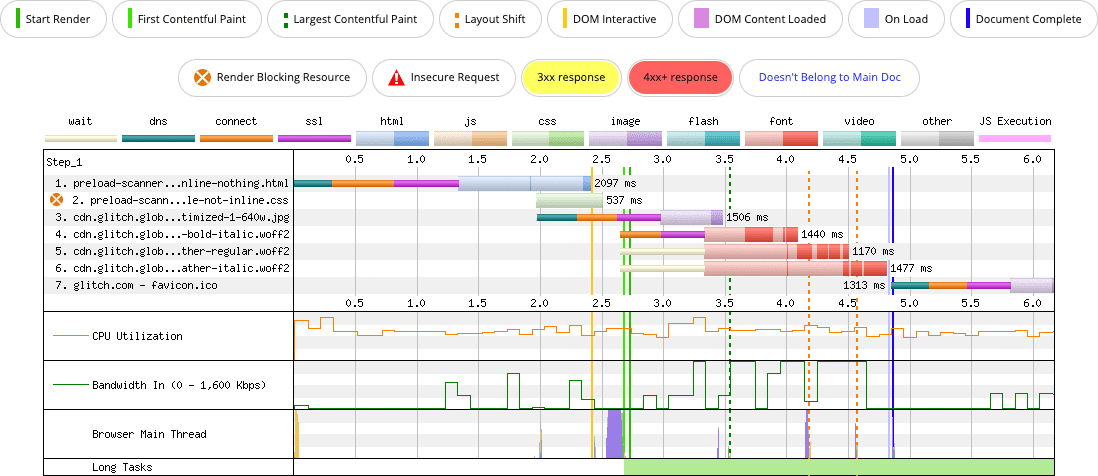
<img> element, but is discovered by the preload scanner because the CSS and the fonts required for the page load in separate resources, which doesn't delay the preload scanner from doing its job.
Now consider the same page with the CSS and all four fonts embedded directly as base64 strings inside the HTML.
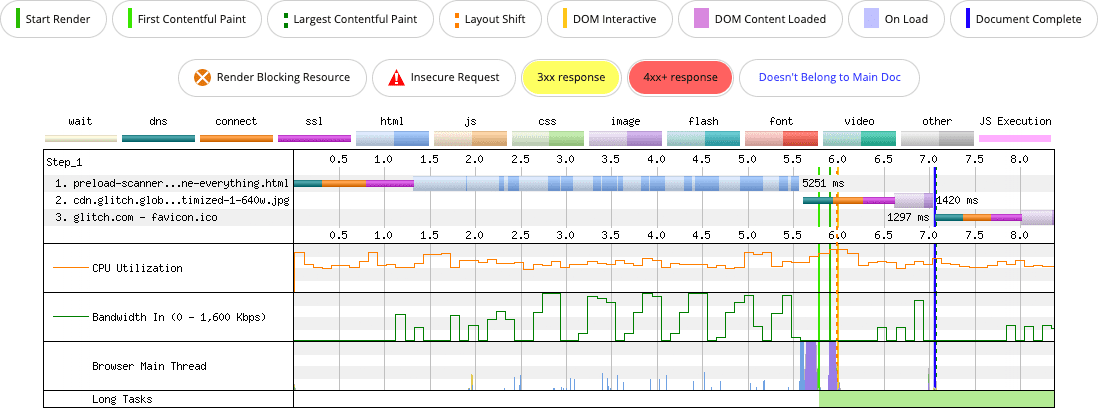
<img> element, but the inlining of the CSS and its four font resources in the `` delays the preload scanner from discovering the image until those resources are fully downloaded.
The results are stark. In the version with no inlining, the LCP image paints at roughly 3.5 seconds. In the fully inlined version, that same paint doesn't happen until just past the 7-second mark.
The preload scanner isn't the only culprit here. Base64 is not an efficient way to encode binary payloads, so the inlined files consume significantly more bytes. Additionally, external font files are only downloaded once the CSSOM determines they're actually required for the page. When those fonts are inlined, they are transmitted and decoded regardless of whether any visible text uses them.
Could adding a rel=preload hint for the image salvage this? It would reduce the LCP delay. Yet bloating HTML that may not be cacheable introduces other performance penalties. First Contentful Paint (FCP) shows the same trend in this test: roughly 2.7 seconds when nothing is inlined versus about 5.8 seconds in the fully inlined case.
The guideline here is straightforward: inline very small assets at most, and nothing else.
When markup is generated by JavaScript
Another common pattern defeats the preload scanner entirely. When application markup is shipped to the browser as raw JavaScript and rendered entirely on the client, the preload scanner can't see any resources that markup might reference.
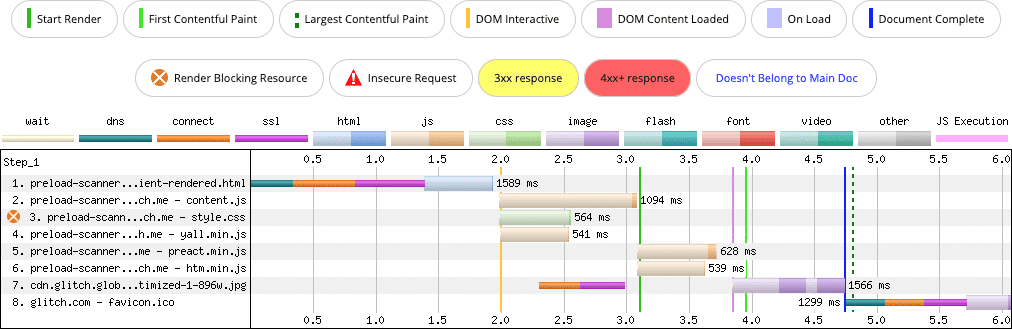
The impact is a significantly delayed request for the LCP image compared to the same page rendered by the server, where those same resource references exist in the initial HTML.
Beyond slowing LCP, client-side rendering creates other structural problems. A page that generates its entire DOM from JavaScript introduces scripting overhead that a server-provided equivalent would never have. Rendering a very large markup payload on the client tends to produce long tasks, which can degrade Interaction to Next Paint (INP). Server-streamed markup, by contrast, is parsed in chunks that keep individual tasks short.
The solution is to ask: Is there any real requirement for the server to send JavaScript to generate this markup? If the answer is no, the page should use server-side rendering (SSR) or static generation from the outset so the preload scanner can do its job. Pages that still need interactive behavior after that static, server-provided markup has rendered can attach the JavaScript afterward, either directly or via hydration.
Guidelines to follow
Key takeaways for avoiding fights with the preload scanner on your own pages:
- The preload scanner is a secondary HTML parser that runs ahead of the main one. While the primary parser is blocked, it scans for resources and initiates their download early.
- Any resource not referenced in the original HTML payload from the server is invisible to the scanner until the DOM connects it. Avoid these patterns that hide resources:
- Injecting any subresource — images, scripts, stylesheets — into the DOM with JavaScript when it could exist in the initial markup.
- Using JavaScript-based lazy loading for above-the-fold content like images or iframes.
- Rendering markup client-side so its subresource references are only in JavaScript, not in the served HTML.
- The preload scanner parses only HTML. It does not descend into CSS fetched by the page to find additional resources referenced there, including potential LCP candidates.
When you have no option but to embed a resource or lazy-load via JavaScript despite these concerns, the rel=preload hint can be a targeted remedy. If you reach for it, that signature must be measured in your lab testing to confirm it actually works as expected. And preload conservatively: prioritizing too many resources effectively de-prioritizes everything.



