
What @property costs at style-recalc time
Now that @property is in Baseline, it's worth quantifying what registering custom properties does to style invalidation and recalculation. The Chrome team's CSS selector benchmark suite, built on Chromium's PerfTestRunner, provides a clean way to measure exactly that. The runner's measureRunsPerSecond method reports how many style recalculations per second the browser can complete—higher is better.
The benchmarks need a realistic DOM to be meaningful, so each test builds a tree of 1000 elements with nested children before any measurement begins. Because the tests never mutate that tree, the setup cost is paid once up front.
const $container = document.querySelector('#container');

function makeTree(parentEl, numSiblings) {
  for (var i = 0; i <= numSiblings; i++) {
    $container.appendChild(
      createElement('div', {
        className: `tagDiv wrap${i}`,
        innerHTML: `<div class="tagDiv layer1">
          <div class="tagDiv layer2">
            <ul class="tagUl">
              <li class="tagLi"><b class="tagB"><a href="/" class="tagA link">Select</a></b></li>
            </ul>
          </div>
        </div>`,
      })
    );
  }
}

makeTree($container, 1000);
How the benchmarks work
A CSS property benchmark measures the cost of a style invalidation followed by the browser's style recalculation. Two factors determine what gets invalidated:
- Inheritance: Changing an inheriting property on an element invalidates styles across the entire subtree beneath it. Non-inheriting properties only invalidate the targeted element.
- Side effects: Many properties invalidate more than styles—for example,
writing-modealso triggers layout. The benchmark only uses properties that purely invalidate styles and are not marked asindependentin Blink's property list, since independent properties take a faster code path that skews comparisons.
Because inheriting and non-inheriting properties behave so differently, they get separate benchmark sets.
Inheriting properties: registration is nearly free
The first set compares three inheriting properties:
accent-color, a regular inheriting property--unregistered, an unregistered custom property (custom properties inherit by default)--registered, a custom property registered withinherits: true
Each benchmark changes the property's value, triggers invalidation, and measures the time until the resulting style recalculation completes. Styles are reset between runs so results don't leak across benchmarks.
On a 2021 MacBook Pro (Apple M1 Pro, 16GB RAM), averaged over 20 iterations:
accent-color: 163 runs/second (6.13ms per run)--unregistered: 256 runs/second (3.90ms per run)--registeredwithinherits: true: 252 runs/second (3.96ms per run)
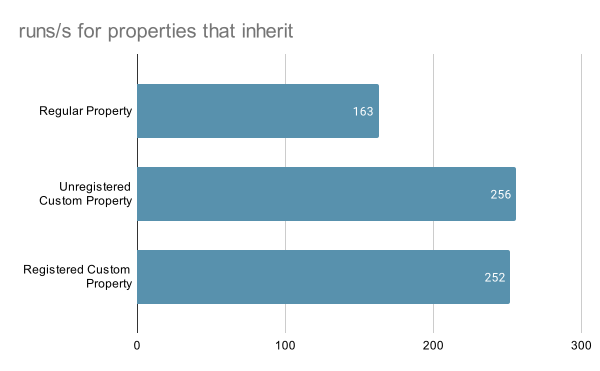
Registration adds roughly 0.06ms per recalculation—about a 2% slowdown. That's a negligible price for the typing and constraints @property provides. Whether you register via CSS @property or JavaScript CSS.registerProperty doesn't matter; registration itself isn't being measured here.
Non-inheriting properties: use inherits: false when you can
The second set covers non-inheriting properties. Only two candidates exist here, because unregistered custom properties always inherit:
z-index, a regular non-inheriting property--registered-no-inherit, registered withinherits: false
@property --registered-no-inherit {
  syntax: "<number>";
  initial-value: 0;
  inherits: false;
}
Results from the same machine and methodology:
z-index: 290,269 runs/second (3.44µs per run)--registered-no-inherit: 214,110 runs/second (4.67µs per run)
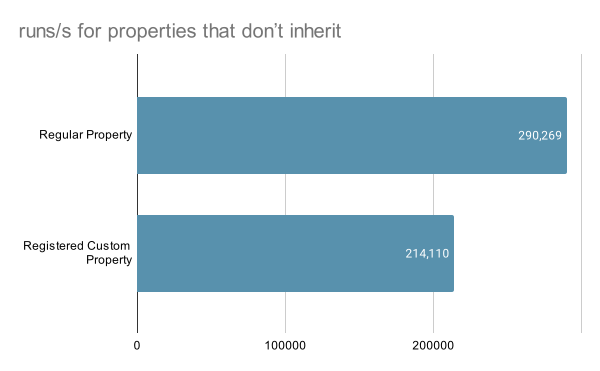
The contrast with inheriting properties is stark. Moving from an inheriting to a non-inheriting regular property yields a roughly 1780% increase in runs per second. For custom properties, the gain is about 848%. The reason is clear: a non-inheriting property change only invalidates the matched element's styles, not the whole subtree. If a custom property doesn't conceptually need to inherit, registering it with inherits: false is one of the cheapest performance wins available.
Many registrations: negligible ongoing cost
A final test asks whether flooding the document with registrations hurts later style recalculations. Rerunning the --registered-no-inherit benchmark with 25,000 additional custom property registrations on :root shows essentially no change: 213,158 runs/second versus 214,110 without the extra registrations.
setup: () => {
  const propertyRegistrations = [];
  const declarations = [];

  for (let i = 0; i < 25000; i++) {
    propertyRegistrations.push(`@property --custom-${i} { syntax: "<number>"; initial-value: 0; inherits: true; }`);
    declarations.push(`--custom-${i}: ${Math.random()}`);
  }

  setCSS(`${propertyRegistrations.join("\n")}
  :root {
    ${declarations.join("\n")}
  }`);
},
The only measurable cost is the upfront style recalculation when the registrations are first applied—a little over 30ms for 25,000 of them in DevTools' trace. After that, the registrations have no further impact on style recalculation performance.

32.42ms
Takeaways
- Registering custom properties costs almost nothing. The ~2% overhead buys you type checking and the ability to animate or transition the property—capabilities unregistered properties simply don't have.
- Prefer
inherits: false. It confines invalidation to the matched element, which translates to orders-of-magnitude faster style recalculation for property changes. - Registration count doesn't matter for ongoing performance. Thousands of
@propertyrules only add a small one-time cost at registration time.



