

Design Systems Need More Than Documentation
Design systems are often misunderstood as static style guides. In practice, they are living ecosystems built from workflows, design tokens, components, and documentation that teams use to keep products consistent. The real challenge emerges as projects scale: design tokens, components, and Docs drift out of sync. Updates made in Figma rarely make it to code automatically, which creates friction and inconsistency.
Automation is the mechanism for keeping these systems aligned. By connecting tokens and components to a shared source of truth, teams avoid the inefficiency of manual copying and pasting across multiple platforms. This is not about replacing design judgment; it is about removing the repetitive maintenance work that slows teams down.
Starting With Design Tokens
Design tokens—the raw values for color, typography, spacing, radii, shadows, and other visual primitives—are the foundation of any design system. When a color value is updated in Figma, it often does not propagate to the codebase. Teams outgrow manual syncing as they add members and release features, not because of carelessness, but because hand-managing synchronization quickly becomes impossible.
Token automation addresses this by creating a single source of truth that drives both design and development. When a token changes, the change flows through to wherever it is consumed, and teams spend less time reconciling discrepancies.
Several tools help with token management:
- Token Studio: A Figma plugin to manage tokens directly in the design file, with options to export to multiple formats and sync to code.
- Specify: Collects tokens from Figma and delivers them to GitHub repositories, CI pipelines, documentation, and other destinations.
- Design-tokens.dev: A reference for token structure, common formats like JSON and YAML, and different token types.
- NamedDesignTokens.guide: Offers token naming conventions, which become critical when managing large token sets. The site also provides downloadable token examples in formats like JSON.
While tokens define the raw values, components are what users interact with, such as buttons, inputs, and navigation. Without strict discipline, teams end up with multiple versions of the same component, and what exists in design lacks parity with production. When automation connects components to a unified library, everyone builds from the same elements instead of forking their own versions.
These tools and practices create real efficiency gains for larger systems. Naming conventions, though simple to overlook, become a practical necessity when component libraries grow beyond a few dozen items.
When Plugins Are Not Enough For Automation
For teams that outgrow code-free tools, the Figma API provides a path to full automation. Built on REST, it supports custom scripts to pull token values directly from files, monitor component variants, read metadata, and map which components are used across a design. Typical developer setups use Node.js or Python to fetch Figma styles and variables, convert them to JSON, and push them to a dedicated token repository or codebase.
Most projects will not require custom integration at this level. However, for large engineering teams, an automated request runs whenever a token changes. For more complex needs, platforms such as Supernova can handle much of the heavy lifting by connecting to Figma, extracting tokens, and managing the design-to-code pipeline without custom API code.
Establishing the token pipeline from the start is the most critical investment a design systems team can make. Once that pattern is clear, maintaining the workflow becomes a matter of managing the pipeline, not patching mismatches by hand.
Sourcing Tokens And Components In Figma
To begin, create an account and workspace at figma.com. For local use, the Figma desktop app performs well, though older devices may need checking against system requirements.
It is possible to build token values as design variables from the template gallery, which includes pre-built UI kits and app frameworks when the community options work for your use case. If reviewing token files directly is the starting point, remember that Figma does not accept direct JSON imports, so a middle tool like Specify is needed for importing prebuilt token values into the design file.
If using a single community template is simpler, the /Design-System-Template–Community file contains the necessary tokens and components you need to explore automation workflows.
Step 1: Extracting Tokens With Supernova
After registering at supernova.io, open the dashboard and navigate to Data Sources. Choose the Figma source option, click the Connect a new file button, paste the Figma file link, and click Import. Supernova loads the design system and centralizes the design tokens, which is where workflows can begin.
Generating Code From Design Tokens
The actual value of tokens comes at the moment they are converted into code for developers to use. Manually copying token values is, yet again, that original automation trap: by the time values are pasted back into the repo, a design tweak has changed to make them inaccurate. Rather than rebuilding the same styling infrastructure for every new launch, generate code from Tokens automatically.
The process is straightforward:
- In Supernova, open the Data Sources that stores the imported Figma template.
- Navigate to Code Automation, then click New Pipeline. Choose a target platform from the options such as CSS-in-JS, React Native, Flutter, or Godot.
- Review the tab with configuration. Set token naming conventions, such as using PascalCase for output variable names. Choose whether values for spacing, colors, or font styles need grouping.
- Select the output delivery method. The Build Only option downloads the newly generated code.
- Save the pipeline to run it manually or on future imports to regenerate code as Figma updates occur.
This setup cuts down on duplicated work across Web and mobile codebases while still keeping the token naming and component structures aligned with the design values. What used to be a manual transcription effort becomes a predictable workflow, returning consistency to design and development teams.
Documentation That Stays In Sync
Documentation serves as the operating manual for a design system. It answers three questions for every asset: what it is, why it exists, and how to use it. Done properly, it eliminates guesswork and status meetings, giving the whole team shared context.
If you are using Supernova as your token platform, the Documentation tab keeps this work in the same workspace as the tokens themselves. That is the core of the automation: you edit once, and the published docs stay aligned with the live design source. No secondary tooling or translation step is required.
From that tab you can:
- Attach explanations to individual tokens
- Clarify what each base token is for — and explicitly what it is not for
- Group documentation into color, typography, spacing, and component sections
- Embed images, code examples, and usage snippets
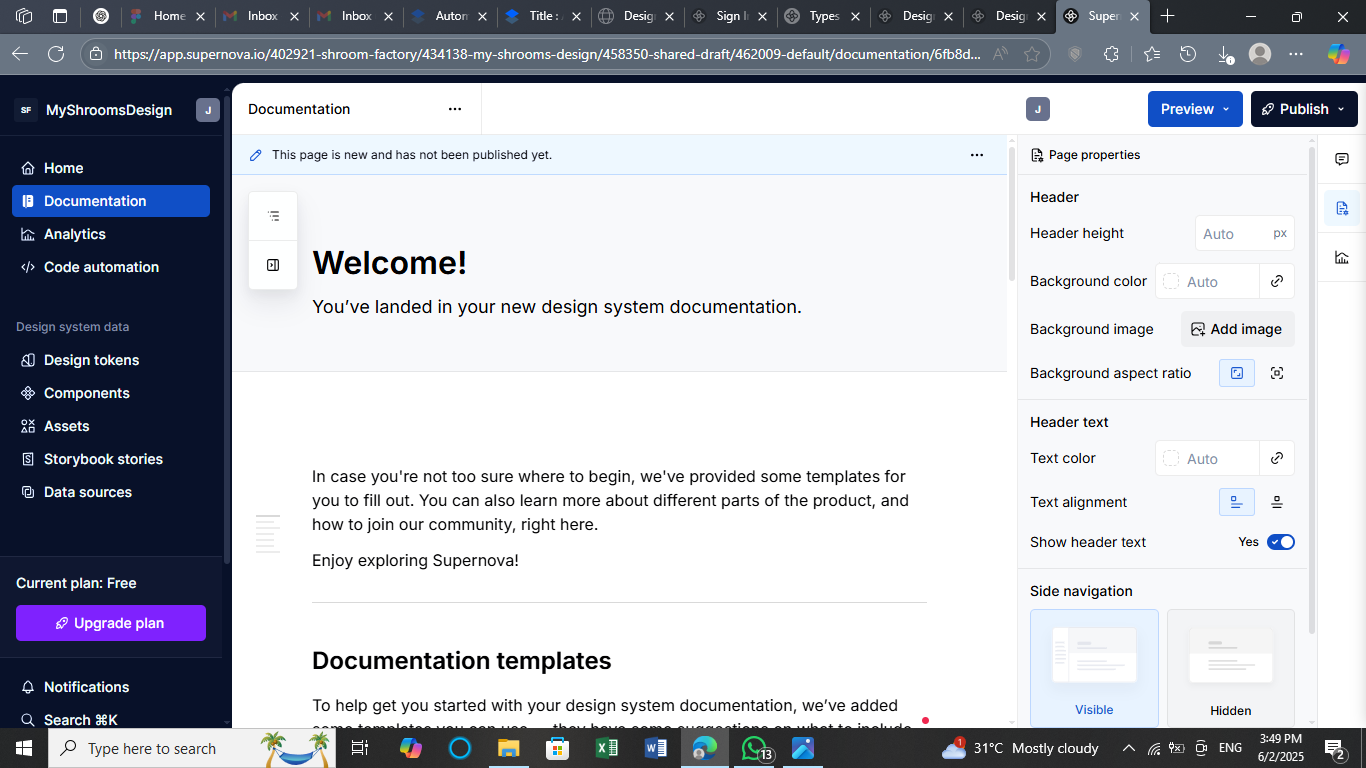
Hitting Publish prompts a sign-in, after which your documentation is live on its own hosted site.
Choosing What To Automate
Automation is only worth the effort when it removes genuine repetition. If the same processes keep recurring, consider offloading them. Typical triggers include:
- Styles that need to stay consistent across web and mobile platforms
- A design system that multiple teams depend on
- Frequently changing design tokens that should propagate to code without manual copying
- Exhaustion from hand-updating values every time brand guidelines shift
Watch For Tool And API Changes
Anything integrated into your pipeline is a moving target. Figma and Supernova both alter how variables and components are structured on a regular basis, and those changes can silently break exports or token mapping. Checking Figma's API changelog and Supernova's product updates periodically — particularly when something feels off — saves debugging time later. For open-source utilities such as Style Dictionary, the GitHub Issues tab is the first place to look for known anomalies.
Decompose The Pipeline
Attempting to automate tokens, themes, components, and docs in one monolithic run makes maintenance and debugging unnecessarily hard. Break the workflow into discrete jobs. Handle core tokens (colors, spacing, font sizes) in one pass, light and dark theme variants in another, and component-to-code mapping in a third. When a naming convention in Figma changes, adjustments stay localized to one stage rather than rippling through everything.
Validate The Output
Even a clean run deserves a quick inspection of what was produced. Effective triage checks cover:
- Token naming clarity. Generated names such as
PrimaryColorColorTextsignal sloppy patterns. - Unexpected omissions or renames. Typography and spacing tokens are particularly prone to vanishing after design edits.
- UI integrity. If the output feeds Tailwind, CSS variables, or custom themes, confirm the new values do not break the build or the visuals.
Running linters immediately after generation — ESLint for JavaScript, Stylelint for CSS — catches syntax or naming errors before they reach production.
Where AI Fits In
Once the pipeline is stable, AI can absorb some of the low-level chores without compromising human control over the system:
- Naming assistance. For large token sets, AI can propose consistent, readable naming conventions as a starting point for review.
- Pattern discovery. Recurring spacing, shadow, or typography clusters across files can be flagged so new components get proposed for systemization earlier rather than later.
- Doc generation. Draft documentation based on token definitions and usage, eliminating the blank page and giving reviewers something concrete to refine.
Several products already integrate this kind of assistance:
- Uizard transforms hand-drawn wireframes into working mockups automatically.
- Anima converts Figma layouts into responsive React code and assists with populating realistic content.
- Builder.io offers visual component editing augmented by AI, targeting marketers and non-developers building pages at speed.
Final Takeaway
The goal is not total automation of everything. It is the removal of tedium from the menial parts of design-system maintenance — exporting tokens, generating documentation, and synchronizing design with code. A well-scoped setup keeps everything consistent and current without demanding a full rebuild after every change.



