Why BGP is harder to learn than other protocols
Most networking protocols are something you can pick up by doing. You can issue your own TLS certificates, run your own HTTP server, or stand up an authoritative DNS server for a domain you control. BGP is different: unless you own an autonomous system number (ASN), you can't publish routes on the public internet. That makes it feel less approachable for hands-on experimentation.
Still, you don't need to be a network operator to explore BGP. There are publicly accessible tools that let you inspect routing tables, look at how autonomous systems (ASes) are connected, and even watch BGP history unfold. This post walks through several of them, using the October 2021 Facebook outage as a running example (I'm writing this the day after it happened).
Before diving in, here's a quick grounding in the terms you'll need. An AS is an organization-owned collection of IP blocks, identified by a number like 1403. My ISP (EBOX) owns AS 1403, and on BGPView you can see it controls roughly 247,808 IP addresses. IP addresses can be in more than one AS, and when they are, the more specific route wins — so if an IP is in both AS6130 and AS21581, packets go to the one advertising the longer prefix. A BGP route is a path to a particular subnet; when a Facebook subnet like 129.134.30.0/23 is announced, routers along the path record a next hop and a list of ASNs that traffic must traverse.
Tool 1: BGPView to inspect an AS
BGPView is a good starting point for looking at actual ASes. Find your own by searching your public IP address, then confirm which AS owns it. My computer's public IP lives in the 104.163.128.0/17 block, which belongs to my ISP. BGPView also renders a graph of how your AS peers with others — showing, for instance, that EBOX (AS 1403) connects directly to Facebook (AS 32934).
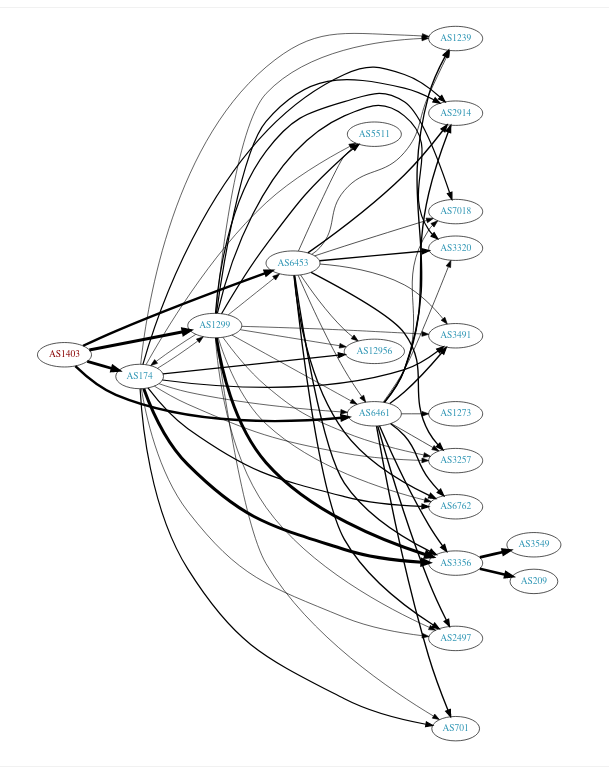
Notably, some companies don't own an AS at all. Patreon's main site runs on Cloudflare's AS; its IP isn't its own. Others have ASes with prefixes spread across many countries. Facebook's AS 32934 has routes in Singapore, Canada, Nigeria, Kenya, and the US, among others.
Tool 2: traceroute -A and mtr -z
Once you know your ASN, you can trace the path your traffic takes across ASes. Both traceroute and mtr have flags to show the ASN for each hop: traceroute -A and mtr -z. Running the latter toward facebook.com will reveal something like this, where the route jumps from your ISP's AS (1403) to Facebook's AS (32934) through an internet exchange point:
$ mtr -z facebook.com
 1. AS???    LEDE.lan
 2. AS1403   104-163-190-1.qc.cable.ebox.net
 3. AS???    10.170.192.58
 4. AS1403   0.et-5-2-0.er1.mtl7.yul.ebox.ca
 5. AS1403   0.ae17.er2.mtl3.yul.ebox.ca
 6. AS1403   0.ae0.er1.151fw.yyz.ebox.ca
 7. AS???    facebook-a.ip4.torontointernetxchange.net
 8. AS32934  po103.psw01.yyz1.tfbnw.net
 9. AS32934  157.240.38.75
10. AS32934  edge-star-mini-shv-01-yyz1.facebook.com
An internediate "internet exchange" is an important part of the internet's plumbing — a shared switch room where many companies connect to peer with each other. This is the kind of place where the actual BGP exchanges happen.
These tools are neat, but they don't just know the ASN by magic. An strace of mtr reveals it does DNS lookups. You can construct the same query yourself:
Finding the ASN via DNS
$ sudo dnspeep
...
TXT   1.190.163.104.origin.asn.cymru.com 192.168.1.1          TXT: 1403 | 104.163.176.0/20 | CA | arin | 2014-08-14, TXT: 1403 | 104.163.160.0/19 | CA | arin | 2014-08-14, TXT: 1403 | 104.163.128.0/17 | CA | arin | 2014-08-14
...
The lookup goes to a TXT record on the pattern 1.190.163.104.origin.asn.cymru.com (where the IP is reversed), which returns the ASN and the org that owns it. Running the lookup manually shows exactly what mtr queries:
$ dig txt 1.190.163.104.origin.asn.cymru.com
1.190.163.104.origin.asn.cymru.com. 13911 IN TXT "1403 | 104.163.160.0/19 | CA | arin | 2014-08-14"
1.190.163.104.origin.asn.cymru.com. 13911 IN TXT "1403 | 104.163.128.0/17 | CA | arin | 2014-08-14"
1.190.163.104.origin.asn.cymru.com. 13911 IN TXT "1403 | 104.163.176.0/20 | CA | arin | 2014-08-14"
That's convenient: you can get AS information using only standard DNS.
Tool 3: Looking glasses
A "looking glass" is a web form that lets you run networking commands from someone else's server. Many internet exchange points operate one, and the Packet Clearing House (PCH) runs a large number of them. If you use one, you can step outside your own network and ask a router at an IX what it sees.
Using PCH's looking glass I picked the Toronto IX (TORIX), because that's where my mtr trace showed the route to Facebook going. Looking up show ip bgp there for Facebook's IP 129.134.30.0 returns four distinct routes, summarizing the direct peering at that IX. For comparison, the Quebec exchange (QIX) — closer to me — returned "% Network not in table", explaining why my traffic went through Toronto instead.
PCH isn't the only one. RouteViews, routeservers.org, and Hurricane Electric's looking glass all expose the same sort of queries, often with a common show ip bgp syntax across all of them — presumably because they run similar routing software. Some can even be reached over telnet, like RouteViews' collector at route-views.routeviews.org:
$ telnet route-views.routeviews.org

route-views>show ip bgp 31.13.80.36

BGP routing table entry for 31.13.80.0/24, version 1053404087
Paths: (23 available, best #2, table default)
  Not advertised to any peer
  Refresh Epoch 1
  3267 1299 32934
    194.85.40.15 from 194.85.40.15 (185.141.126.1)
      Origin IGP, metric 0, localpref 100, valid, external
      path 7FE0C3340190 RPKI State valid
      rx pathid: 0, tx pathid: 0
  Refresh Epoch 1
  6939 32934
    64.71.137.241 from 64.71.137.241 (216.218.252.164)
      Origin IGP, localpref 100, valid, external, best
      path 7FE135DB6500 RPKI State valid
      rx pathid: 0, tx pathid: 0x0
  Refresh Epoch 1
  701 174 32934
    137.39.3.55 from 137.39.3.55 (137.39.3.55)
      Origin IGP, localpref 100, valid, external
      path 7FE1604D3AF0 RPKI State valid
      rx pathid: 0, tx pathid: 0
  Refresh Epoch 1
  20912 3257 1299 32934
    212.66.96.126 from 212.66.96.126 (212.66.96.126)
      Origin IGP, localpref 100, valid, external
      Community: 3257:8095 3257:30622 3257:50001 3257:53900 3257:53904 20912:65004
      path 7FE1195AF140 RPKI State valid
      rx pathid: 0, tx pathid: 0
  Refresh Epoch 1
  7660 2516 1299 32934
    203.181.248.168 from 203.181.248.168 (203.181.248.168)
      Origin IGP, localpref 100, valid, external
      Community: 2516:1030 7660:9001
      path 7FE0D195E7D0 RPKI State valid
      rx pathid: 0, tx pathid: 0
That output gives you the route options to reach Facebook from that server's vantage point:
3267 1299 329346939 32934701 174 3293420912 3257 1299 329347660 2516 1299 32934
Those ASN strings are the entire path: the source IP is in one AS, which forwards to the next, until it reaches Facebook's AS 32934. The presence of intermediate hops like 6939 (Hurricane Electric, a "global internet backbone") happens because the remote server isn't directly peered with Facebook and must route through others.
Tool 4: BGPlay for replaying BGP history
The COVID challenge: every tool above shows today's routing state, where Facebook recovered quickly. But if you want to see what happened during the outage, BGPlay runs a visualization of BGP route announcements and withdrawals over time.
Type in 129.134.30.12, and at 13:11 on Oct. 4 you'll see a view of healthy, plentiful routes — colors, connections, everything firing. Then click the timeline to right after 18:38 UTC, when the withdrawal happened, and the picture collapses: all BGP routes for that Facebook prefix disappear. The top of the view shows the last route exiting:
Type: W > withdrawal Involving: 129.134.30.0/24
Short description: The route 50869, 25091, 32934 has been withdrawn.
Date and time: 2021-10-04 16:02:33 Collected by: 20-91.206.53.12
Hit the "fast-forward" button and you watch recovery — routes slowly reappearing as networks re-advertise. The first one announced at 2021-10-04 21:00:40 is 137409 32934. Be careful: there are many announcements within the same second, and BGPlay's ordering within that moment is arbitrary. Subsequent fast-forwards rebuild more routes, until connectivity fully recovers.
Where to go from here
Having a pocket reference for BGP becomes genuinely useful when someone else's misconfiguration breaks your site. Remembering a 2016 or 2017 Telia routing issue that caused headaches at work bears this out: even if you can't fix a BGP problem you don't own, you can at least tell what's happening.
For those who want to actually publish routes as a hobbyist — options exist. You can work through a guide along the lines of getting your own ASN, or play on a non-public BGP sandbox like dn42, which simulates real inter-AS routing with actual other participants.
Away from live tools, PCH additionally publishes daily BGP routing table snapshots for offline analysis. However you dig in, the surprise — even to me after a long time in the field — is how openly accessible BGP data is. There are public machines all over the internet that you can telnet into and inspect the global routing table in real time, no wizardry required.



