
How a CDN improves delivery
A content delivery network (CDN) is a distributed network of servers optimized for quickly delivering content to users. While CDNs are best known for serving cached content, they can also speed up the delivery of uncacheable content. Generally, the more of your site that is served through a CDN, the better.
CDN performance gains come from three principles. CDN servers sit geographically closer to users than origin servers, reducing round-trip time (RTT). Many CDNs apply networking optimizations that deliver content faster than loading it directly from the origin. And CDN caches eliminate the need for requests to travel all the way to the origin server.
Delivering resources from the origin
Even for uncacheable resources, routing through a CDN is typically faster than having users connect to your servers directly. When a CDN is in play, a new connection is terminated at a nearby CDN server, and the remaining data transfer between that server and the origin runs over the CDN's own network, which often uses persistent, pre-warmed connections with the origin. Terminating the client connection close to the user removes costly connection setup round trips, and pre-warmed connections allow data transfer to start immediately at maximum throughput.
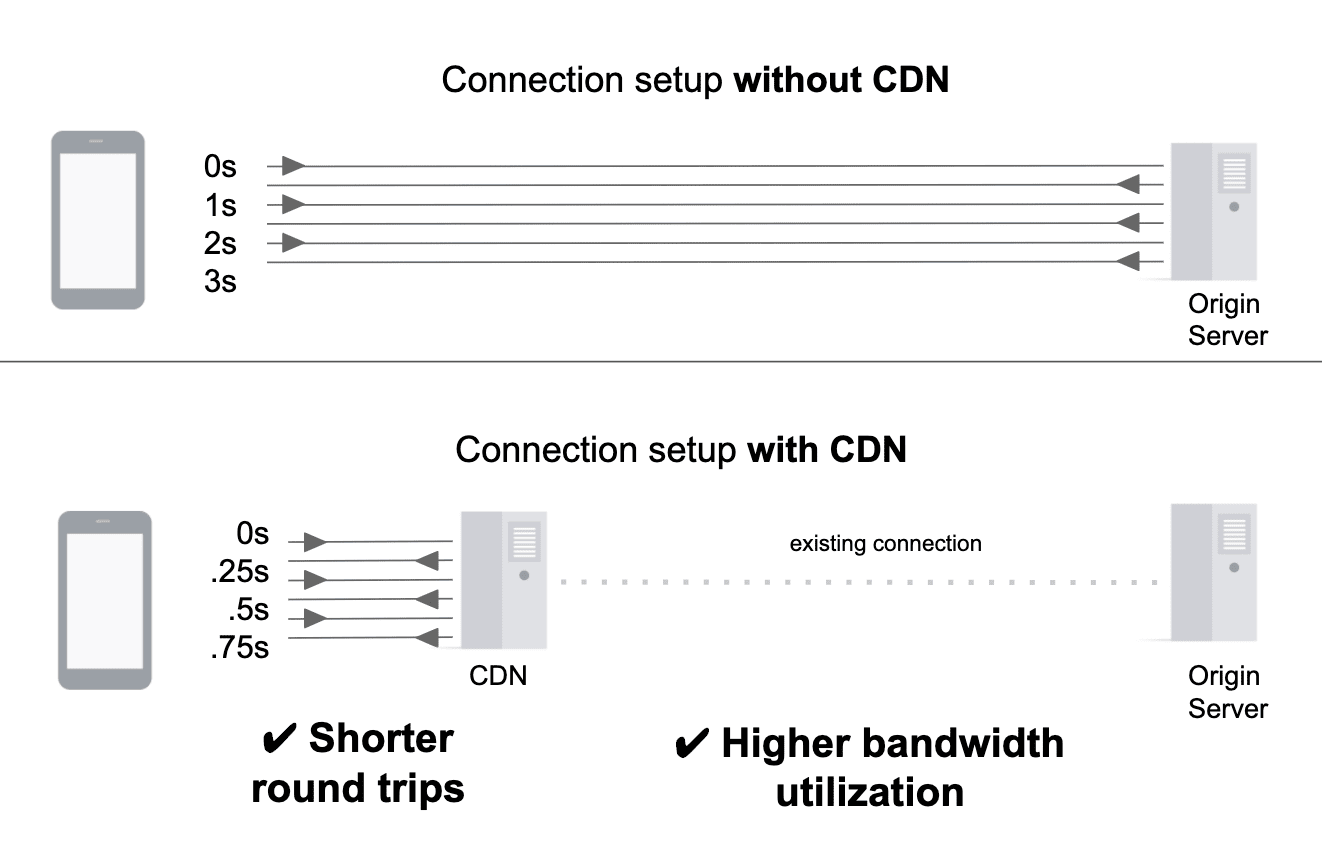
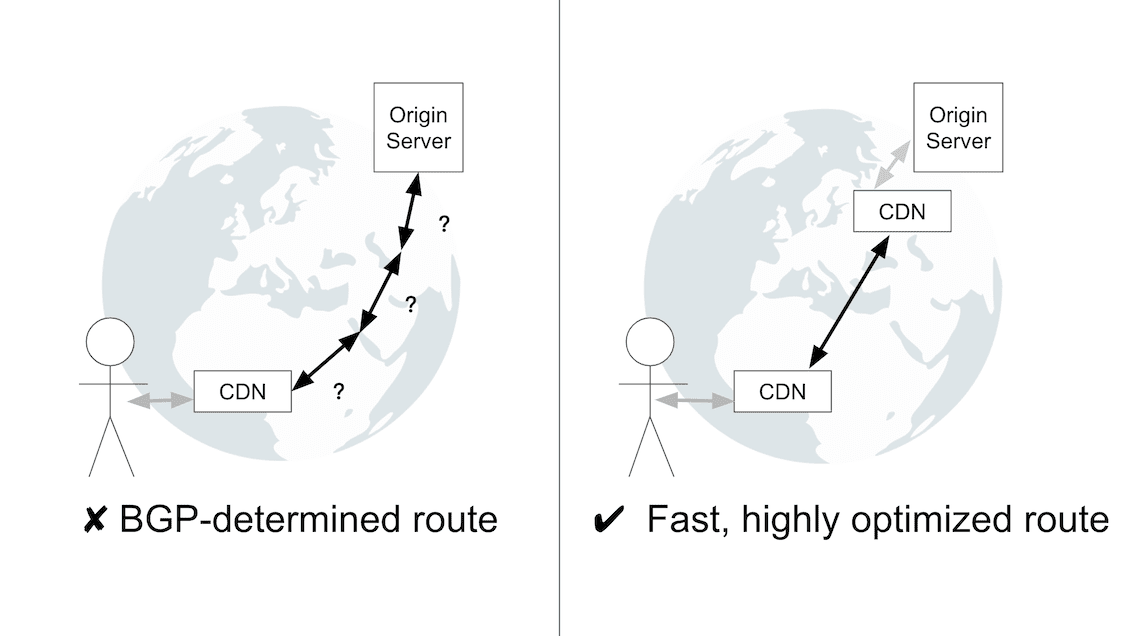
Some CDNs go further by routing traffic to the origin through multiple CDN servers spread across the internet. Connections between these servers traverse reliable, highly optimized routes rather than the paths chosen by the Border Gateway Protocol (BGP). Since BGP's routing decisions are not always performance-oriented, the tuned routes between CDN servers typically outperform BGP-determined paths.
How caching works
Caching resources on CDN servers means a request no longer needs to reach the origin to be served, which speeds up delivery and reduces load on the origin.
The most common way to populate a CDN cache is "origin pull": the first time a resource is requested, the CDN fetches it from the origin and caches the response, gradually building up the cache over time. Removing resources from the cache happens through two mechanisms:
- Cache eviction. Caches have finite capacity. When nearing that limit, they make room by evicting resources that haven't been accessed recently or that occupy significant space. Eviction from one cache does not mean the resource has been evicted from every cache in the CDN network.
- Purging. Also called cache invalidation, purging removes a resource without waiting for expiry or eviction. Usually executed through an API, purging is critical when content must be retracted—for example, correcting typos, pricing errors, or inaccurate articles. It also plays a role in caching strategy. If a CDN supports near-instant purging, you can cache dynamic content with a long time-to-live (TTL) and purge it whenever the content updates. This "hold-till-told" approach maximizes how long dynamic resources remain cached without knowing in advance when they'll change. At scale, purging commonly relies on cache tags (or surrogate cache keys), which let site owners attach extra identifiers to cached resources and then purge on a granular basis—for example, tagging all pages containing a site footer and purging just those resources when the footer changes.
What can be cached
Whether and how to cache a resource depends on if it's public or private, and static or dynamic.
Private and public resources. Private resources hold data intended for a single user and shouldn't be cached by a CDN; they're marked with the Cache-Control: private header. Public resources contain no user-specific information and are cacheable unless they carry a Cache-Control: no-store or Cache-Control: private header. How long a public resource can be cached depends on how frequently it changes.
Dynamic and static content. Dynamic content changes frequently—API responses and store homepages are examples. But frequent changes don't rule out caching: during heavy traffic, caching these responses for even a few seconds (say, 5 seconds) can cut origin load significantly while barely affecting freshness. Static content—images, videos, versioned libraries—changes rarely if ever, so it should be cached with a long TTL ranging from 6 months to a year.
Choosing a CDN
Performance is usually the first consideration when selecting a CDN, but security, analytics, pricing, support, and onboarding experience all matter too.
The latency-versus-hit-ratio tradeoff
A CDN's performance strategy balances minimizing latency against maximizing cache hit ratio. CDNs with many points of presence (PoPs) deliver lower latency, but splitting traffic across more caches can lower hit ratios. Conversely, fewer PoPs increase geographic distance from users while improving hit ratios. Some CDNs address this with a tiered caching approach: edge caches close to users are backed by central PoPs with higher hit ratios. When an edge cache misses, it looks to a central PoP for the resource, trading slight latency for a greater chance the resource is served from a CDN cache. Neither approach is universally better; the right choice depends on your site and audience. CDN performance also varies by geography, time of day, and current events, so published benchmarks can only predict your experience up to a point.
Effect on LCP
A CDN's principal benefit is improving loading performance. Delivery of a page's resource—particularly its Time to First Byte (TTFB)—improves significantly when the CDN sits between users and the origin. While TTFB is not a user-centric metric, it's important for diagnosing Largest Contentful Paint (LCP) issues. CDNs improve LCP in two ways: speeding up document delivery through lower TTFB and document caching, and improving delivery of static resources needed to render the LCP element.
Additional capabilities
Beyond core delivery, CDNs commonly bundle load balancing, image optimization, video streaming, edge computing, and security products.
Setting up a CDN
The ideal setup serves the entire site through a CDN. This starts with signing up for a provider and updating your CNAME DNS record to point at the CDN—for example, www.example.com might point to example.my-cdn.com. After this change, site traffic routes through the CDN.
If serving everything through the CDN isn't an option, you can configure a CDN for a subset of resources, such as static content only. Create a separate CNAME record for those resources—for instance, a static.example.com record pointing at example.my-cdn.com—then rewrite the URLs of CDN-served resources to use that subdomain.
Once the CDN is running, configuration inefficiencies will remain. The next step is to maximize cache hit ratio and enable performance features in your CDN's settings.
Fine-Tune Your Cache for Better Hit Ratios
The core metric for CDN efficiency is cache hit ratio (CHR), defined as the number of cache hits divided by total requests in a given interval. A fresh cache starts at 0 CHR and climbs as resources are populated, with 90% a realistic goal for most sites. Providers typically expose CHR reporting in their analytics dashboards.
The first optimization step is confirming all cacheable assets are cached with an appropriate TTL. Beyond that, the bigger win is eliminating redundant cache entries created by query params, cookies, and headers that cause logically identical responses to be stored separately.
Audit Cache Headers
Beyond your provider's analytics, tools like WebPageTest and Lighthouse can quickly flag static resources with insufficient TTLs by inspecting their HTTP Cache-Control and Expires headers. For a CDN to cache a response, at minimum one of these is required:
Cache-Control: max-age=Cache-Control: s-maxage=Expires
While it doesn't affect CDN behavior, adding Cache-Control: immutable is good practice for static assets. This directive tells the browser not to revalidate the resource during its freshness lifetime, eliminating extra server requests. Note the directive is currently only supported by Firefox and Safari; Chromium support is tracked as an open issue.
For a deeper reference on HTTP caching semantics, see Google's guide on preventing unnecessary network requests.
Refine Cache Keys
CDN caches use a resource's URL as the cache key, but request headers and query params complicate that model. The objective is to balance granularity: too fine leads to poor CHR; too coarse risks serving incorrect responses. Normalizing request URLs is the most direct way to improve CHR.
Query Parameter Handling
- Ignore unnecessary params. CDNs cache
example.com/blogseparately fromexample.com/blog?referral_id=2zjkby default. Configure the CDN to ignore such tracking params when they don't affect the response. - Sort param order. The URLs
example.com/blog?id=123&query=dogsandexample.com/blog?query=dogs&id=123would be cached independently although they represent the same resource. Enabling query param sorting normalizes the URL used for the cache key.
The Vary Header
The Vary response header tells caches that the response can differ based on request headers such as Accept-Language or Accept-Encoding, forcing separate cache entries per header value. This header is not broadly supported by CDNs and can cause cacheable responses to bypass the cache entirely.
If Vary is necessary, normalize request headers to keep cache entries consolidated. For instance, Accept-Language: en-US and Accept-Language: en-US,en;q=0.9 would otherwise produce two distinct cache entries for effectively the same content.
Cookie Headers
Cookies are sent with requests via the Cookie header and returned via Set-Cookie. Avoid setting Set-Cookie on responses whenever possible, since caches typically refuse to store any response that carries this header, regardless of its TTL.
Compression
All text-based responses should be compressed with either gzip or Brotli, with Brotli being the preferred option when available. Brotli is a newer compression algorithm that can achieve higher compression ratios than gzip. CDNs typically offer two types of Brotli support: "Brotli from origin" and "automatic Brotli compression".
Brotli from origin
Brotli from origin refers to a CDN serving resources that were already Brotli-compressed by the origin server. For this to work, the CDN must support caching multiple versions of a resource (one gzip-compressed and one Brotli-compressed) for a given URL.
Automatic Brotli compression
With automatic Brotli compression, the CDN itself compresses resources — whether they are cacheable or not. On the first request, a resource is served with a fast but "good enough" compression level, such as Brotli-5. For cacheable resources, the CDN then performs offline processing to recompress the resource at a much slower but more powerful level (for example, Brotli-11). Once completed, the more aggressively compressed version is cached and served for subsequent requests.
Compression recommendations
To maximize performance, apply Brotli compression at both the origin server and the CDN. Compressing at the origin minimizes the transfer size of uncacheable resources. To avoid adding latency, use a conservative compression level like Brotli-4 for dynamic resources and Brotli-11 for static ones. If the origin does not support Brotli, gzip-6 and gzip-9 are reasonable equivalents for dynamic and static resources, respectively.
TLS 1.3
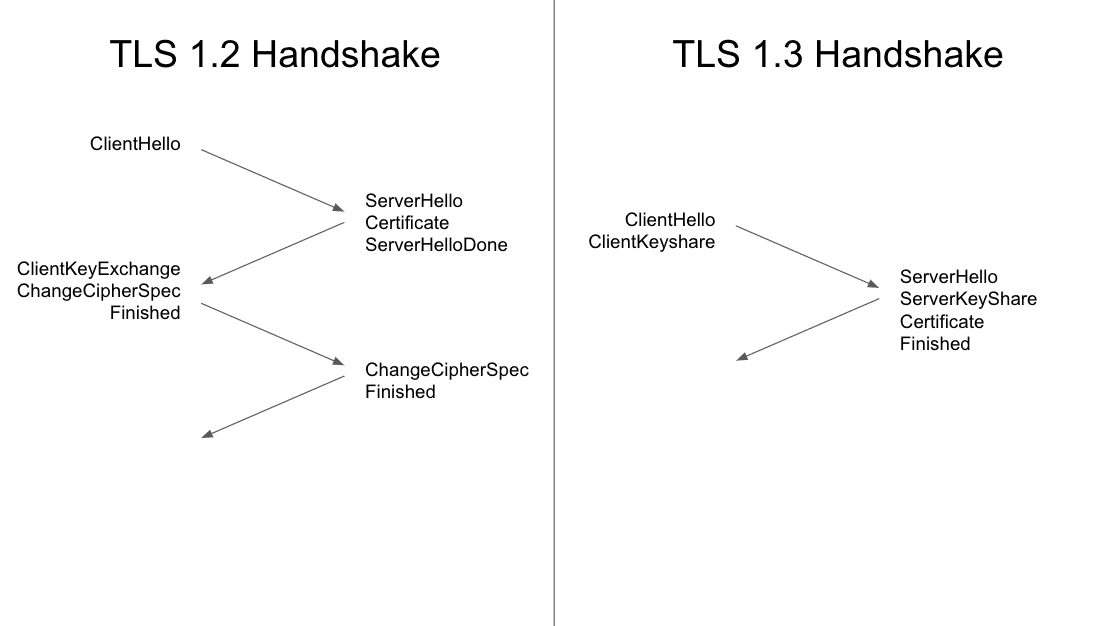
TLS 1.3 is the latest version of the Transport Layer Security cryptographic protocol used by HTTPS. It improves on TLS 1.2 in both privacy and performance. The handshake is reduced from two roundtrips to one, which cuts connection setup time by about 33% for HTTP/1 and HTTP/2 connections.
HTTP/2 and HTTP/3
HTTP/2 and HTTP/3 both offer performance gains over HTTP/1, but HTTP/3 provides the greater potential benefit — particularly for users on lossy or high-latency networks.
HTTP/2
HTTP/2 is enabled by default in most modern CDN setups, and it is supported by all major browsers. Its main advantages are multiplexing, stream prioritization, and header compression.
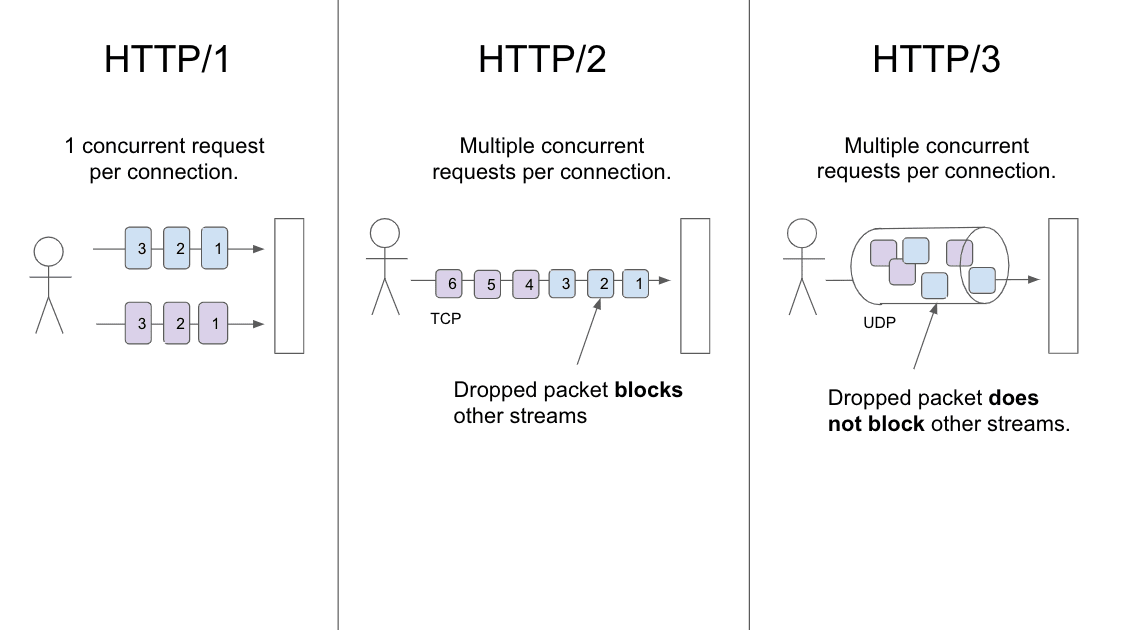
- Multiplexing: Multiple request-response pairs can be transmitted concurrently over a single TCP connection, avoiding unnecessary connection setup overhead. Since browsers limit the number of simultaneous connections, multiplexing also lets the browser fetch more page resources in parallel. While this theoretically eliminates the need for HTTP/1 optimization techniques like concatenation and sprite sheets, larger files compress better in practice, so those techniques remain relevant.
- Stream prioritization: Browsers communicate stream priority via a dependency tree, allowing the server to send the most important resources first — even if they were requested later. This is only a statement of preference, however: the server is not obligated to honor the browser's priorities. The effectiveness of stream prioritization improves when more of a site is served through a CDN, though CDN implementations vary widely. Resources like Is HTTP/2 Fast Yet? can help you assess whether a CDN supports HTTP/2 prioritization properly.
Enabling HTTP/2 is largely a configuration change, but it deserves thorough testing before going to production. HTTP/1 and HTTP/2 share header conventions, but HTTP/2 is stricter about spec compliance. Non-ASCII or uppercase header characters, for instance, may start causing errors once HTTP/2 is active. If that happens, resource downloads fail, which shows up in the Network tab of DevTools along with the ERR_HTTP2_PROTOCOL_ERROR message in the console.
HTTP/3
HTTP/3 is the successor to HTTP/2. As of September 2020, all major browsers offered experimental support, and some CDNs already support it. Its main advantages over HTTP/2 are the elimination of connection-level head-of-line blocking and reduced connection setup time.
- No head-of-line blocking: HTTP/2's multiplexing shares a single connection, which means one dropped packet blocks all streams on that connection. HTTP/3 avoids that by running over QUIC, which uses UDP instead of TCP. In HTTP/3, a packet loss only affects the individual stream it belongs to, which makes HTTP/3 especially effective over congested networks.
- Faster connection setup: HTTP/3 uses TLS 1.3, so a new connection requires a single roundtrip and resuming an existing connection requires zero roundtrips.
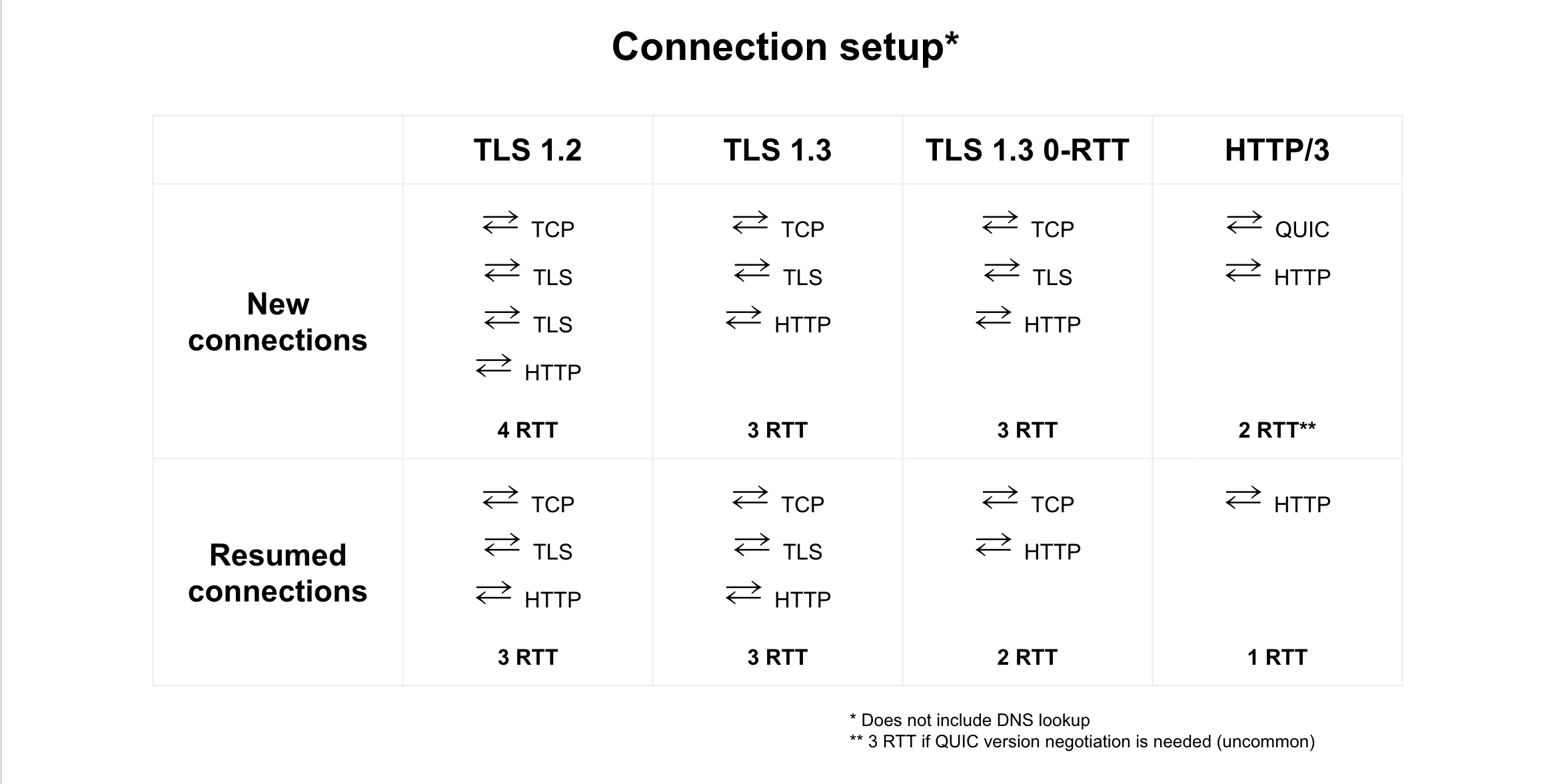
Users on poor network connections will see the biggest improvements from HTTP/3 — it handles packet loss better, and the absolute time saved by 0-RTT or 1-RTT setup is larger on high-latency links.
Image optimization
CDN image optimization services typically automate the removal of EXIF data, apply lossless compression, and convert images to modern formats like WebP. Since images make up roughly half of the transfer bytes on the median web page, these optimizations can meaningfully cut page size.
Minification
Minification strips unnecessary characters from JavaScript, CSS, and HTML. It is preferable to minify at the origin, not the CDN, since site owners have the necessary context to apply more aggressive minification techniques. CDN-based minification is still a reasonable fallback when origin-side minification is not possible.
Key takeaways
- Use a CDN to deliver resources more quickly, reduce origin load, and absorb traffic spikes.
- Cache content as aggressively as the situation allows, with appropriate durations, for both static and dynamic resources.
- Enable CDN features like Brotli, TLS 1.3, HTTP/2, and HTTP/3 to make the most of your CDN's performance potential.



