
A simpler way to look up DNS records
Julia Evans has released a small web-based DNS lookup tool at https://dns-lookup.jvns.ca/, designed to make DNS queries more approachable for people who don't live in dig output. The project started as part of research for a zine about owning a domain name, with the goal of helping readers understand what DNS responses actually look like.
Most existing tools aren't exactly beginner-friendly. Standard dig output is dense with information that doesn't matter for casual users — the meaning of flags like qr rd ra, the QUERY, ANSWER, AUTHORITY section counts, the MSG SIZE rcvd line, and the IN class field are all technically correct but practically noisy. Even Google's otherwise clean DNS lookup tool wraps the same kind of raw dig output underneath its simple query form.
Table-based output
The new tool borrows the query form design from Google's interface — type a domain, pick a record type — but presents the answers in a clean table. Flags, IN, and other metadata are stripped out entirely. Responses are a simple mapping of name, record type, TTL, and value.
There's also a "GET ME ALL THE RECORDS" button. Rather than issuing a single ANY query, which many servers like Cloudflare no longer support, the tool fires off individual queries for each record type it knows about. This turns out to be a more reliable approach for fetching everything at once.
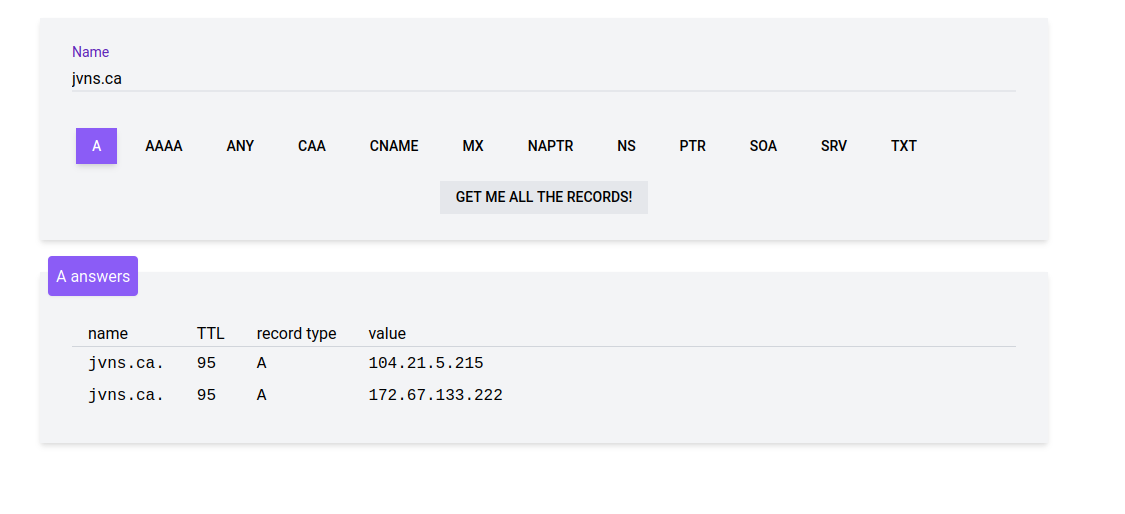
Why the record type column stays
One field that might look redundant is actually kept for a reason. Even if you're making an explicit A query, the response isn't guaranteed to contain only A records. A query for A records on www.twitter.com returns a CNAME record first, because that hostname is an alias for twitter.com. The tool doesn't assume the response type matches the query type.
The layout also adapts for smaller screens; the table was too wide for phones in its original form, so a responsive version handles narrow viewports.
Under the hood
The implementation is deliberately small. The backend is a Go HTTP handler running on Netlify Functions, using the miekg/dns library rather than the Go standard library's DNS support, which the author found simpler. A JavaScript frontend with Vue.js handles the query form and rendering, with most of the code living in three files: dns.js, index.html, and dns.go. Source code is on GitHub.
An early attempt to write the backend in Node.js was abandoned because Node's DNS library couldn't return TTL values for queries. The serverless-function model made deployment straightforward — no server management required.
Roadmap and alternatives
Several similar tools exist already. zone.vision queries authoritative nameservers directly, while mxtoolbox.com leans more toward MX and SPF diagnostics. Planned features for this tool include reverse DNS queries that don't require manually typing in-addr.arpa suffixes, support for a wider range of query types without cluttering the UI, and tooltips explaining what TTL means.



