A Go-Powered FAAS Server Built on WASM and WASI
WebAssembly's role as a portable compilation target is well established, but its potential as a plugin system for server-side applications is growing. This demonstration combines a web server written in Go with user-defined modules compiled to WASM, powered by the WASI (WebAssembly System Interface) standard. The result is a simple FaaS (Function as a Service) server that can load and execute code written in Go, Rust, or even raw WebAssembly Text (WAT).
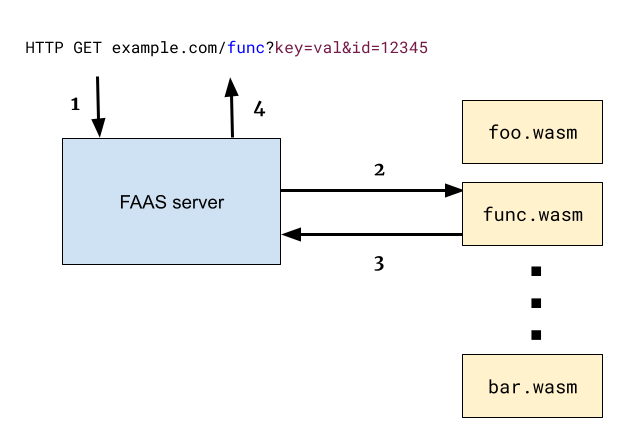
The flow is straightforward. The FAAS server receives an HTTP GET request in the format /[module-name]?[query]. It then locates the corresponding .wasm file, loads it, and passes the request's query parameters in as environment variables. The module writes its output to stdout, which is captured and returned as the HTTP response body.
Server Implementation with wazero
While there are several WASM runtimes with Go bindings, this example uses wazero, a pure-Go runtime with no external dependencies. The core of the server's logic is in the invokeWasmModule function, which handles module instantiation and execution.
func httpHandler(w http.ResponseWriter, req *http.Request) {
  parts := strings.Split(strings.Trim(req.URL.Path, "/"), "/")
  if len(parts) < 1 {
    http.Error(w, "want /{modulename} prefix", http.StatusBadRequest)
    return
  }
  mod := parts[0]
  log.Printf("module %v requested with query %v", mod, req.URL.Query())

  env := map[string]string{
    "http_path":   req.URL.Path,
    "http_method": req.Method,
    "http_host":   req.Host,
    "http_query":  req.URL.Query().Encode(),
    "remote_addr": req.RemoteAddr,
  }

  modpath := fmt.Sprintf("target/%v.wasm", mod)
  log.Printf("loading module %v", modpath)
  out, err := invokeWasmModule(mod, modpath, env)
  if err != nil {
    log.Printf("error loading module %v", modpath)
    http.Error(w, "unable to find module "+modpath, http.StatusNotFound)
    return
  }

  // The module's stdout is written into the response.
  fmt.Fprint(w, out)
}

func main() {
  mux := http.NewServeMux()
  mux.HandleFunc("/", httpHandler)
  log.Fatal(http.ListenAndServe(":8080", mux))
}
The server handler extracts the module name from the URL path, searches a target/ directory for the corresponding .wasm file, and prepares a map of environment variables to pass along. This env map is used to communicate the HTTP request details to the module.
// invokeWasmModule invokes the given WASM module (given as a file path),
// setting its env vars according to env. Returns the module's stdout.
func invokeWasmModule(modname string, wasmPath string, env map[string]string) (string, error) {
  ctx := context.Background()

  r := wazero.NewRuntime(ctx)
  defer r.Close(ctx)
  wasi_snapshot_preview1.MustInstantiate(ctx, r)

  // Instantiate the wasm runtime, setting up exported functions from the host
  // that the wasm module can use for logging purposes.
  _, err := r.NewHostModuleBuilder("env").
    NewFunctionBuilder().
    WithFunc(func(v uint32) {
      log.Printf("[%v]: %v", modname, v)
    }).
    Export("log_i32").
    NewFunctionBuilder().
    WithFunc(func(ctx context.Context, mod api.Module, ptr uint32, len uint32) {
      // Read the string from the module's exported memory.
      if bytes, ok := mod.Memory().Read(ptr, len); ok {
        log.Printf("[%v]: %v", modname, string(bytes))
      } else {
        log.Printf("[%v]: log_string: unable to read wasm memory", modname)
      }
    }).
    Export("log_string").
    Instantiate(ctx)
  if err != nil {
    return "", err
  }

  wasmObj, err := os.ReadFile(wasmPath)
  if err != nil {
    return "", err
  }

  // Set up stdout redirection and env vars for the module.
  var stdoutBuf bytes.Buffer
  config := wazero.NewModuleConfig().WithStdout(&stdoutBuf)

  for k, v := range env {
    config = config.WithEnv(k, v)
  }

  // Instantiate the module. This invokes the _start function by default.
  _, err = r.InstantiateWithConfig(ctx, wasmObj, config)
  if err != nil {
    return "", err
  }

  return stdoutBuf.String(), nil
}
Key implementation details in the wazero code include explicit instantiation of WASI support, a logging function exported from the host to the guest, and redirecting the guest module's stdout to an in-memory buffer. Communication solely through environment variables and stdout is a pragmatic choice given the current limitations of WASI's API.
Writing Modules in Go
The Go toolchain has natively supported compiling to the WASI target named wasip1 for several releases. With that target specified, a standard Go program can become a FAAS module.
package main

import (
  "fmt"
  "os"
)

func main() {
  fmt.Println("goenv environment:")

  for _, e := range os.Environ() {
    fmt.Println(" ", e)
  }
}
Building the module with the standard toolchain is a single command:
$ GOOS=wasip1 GOARCH=wasm gotip build -o target/goenv.wasm examples/goenv/goenv.go
Alternatively, the TinyGo compiler can be used to produce similar results, though it was a more critical path before native WASI support was added to the Go standard library.
A simple example module reads its environment variables and prints a greeting:
$ curl "localhost:8080/goenv?foo=bar&id=1234"
goenv environment:
  http_method=GET
  http_host=localhost:8080
  http_query=foo=bar&id=1234
  remote_addr=127.0.0.1:59268
  http_path=/goenv
After placing the compiled goenv.wasm file into the target/ directory and starting the server, a request to that module's endpoint yields the expected output.
2023/04/29 06:35:59 module goenv requested with query map[foo:[bar] id:[1234]]
2023/04/29 06:35:59 loading module target/goenv.wasm
Rust and the WASI Target
Rust's build system also offers first-class support for WASI. After adding the wasm32-wasi target via rustup, a Rust module can be compiled with a simple cargo invocation:
$ tinygo build -o target/goenv.wasm -target=wasi examples/goenv/goenv.go
The Rust module's source code resembles its Go counterpart, focusing on printing the provided environment data.
$ cargo build --target wasm32-wasi --release
Getting to the Base Level with WAT
Compilers abstract away the underlying mechanisms of WASI, but writing directly in WAT exposes the raw API and ABI. This approach is educational and yields incredibly compact binaries, but requires manual work to interact with the host environment.
To write to stdout, the module must import the fd_write system call from the wasi_snapshot_preview1 module. This function, which takes four i32 parameters and returns an i32, requires careful attention to the WASI ABI for its arguments and memory layout.
A custom println helper in WAT uses fd_write to output a string and a newline. Another helper handles printing zero-terminated strings. This reveals a common pattern in manual WAT code, where both C-style (null-terminated) and classic WASM (pointer-plus-length) string representations are used.
use std::env;

fn main() {
    println!("rustenv environment:");

    for (key, value) in env::vars() {
        println!("  {key}: {value}");
    }
}
The module also needs to handle retrieving its environment variables through the environ_sizes_get and environ_get system calls. Finally, a _start function acts as the module's main entry point, orchestrating the calls to print output.
(import "wasi_snapshot_preview1" "fd_write" (func $fd_write (param i32 i32 i32 i32) (result i32)))
To make this a valid WASI module, the WAT source must export its linear memory. This is a fundamental part of the WASI ABI, as the host needs to be able to access the guest's memory to pass data through pointers.
Understanding a Call's ABI
The term "ABI" is less common than "API" but is critical here. WASI defines an API (the set of functions like fd_write) and an ABI (the runtime contract). In practice, the WASI ABI manifests in two key ways for the module author: the _start function must be exported and automatically executed by the host, and the linear memory (memory) must be exported so the host can access strings and data structures. Compilers like Go's and Rust's handle all of this for the programmer automatically.
Plugins and Communication Patterns
This model is a clear example of a plugin architecture. Current WASI limitations constrain communication to stdin, stdout, and environment variables. While effective for demonstrating the concept, projects that use this pattern are already exploring more advanced options.
The WASM standards committee is working on enhancing WASI with support for sockets and richer data-passing mechanisms to improve host-to-module communication. In the meantime, real-world projects find workarounds. For instance, the sqlc package uses a protocol where the host encodes requests to a plugin's stdin and reads responses from stdout. The Envoy proxy takes a more maverick approach by defining its own custom API and ABI between the host and its WASM extensions. This space is quickly evolving, with different projects settling on distinct strategies for these low-level interactions.


