

Next.js 13: What’s Actually Stable And What’s Not
Next.js 13 shipped in October with a mix of stable enhancements, incremental upgrades, and experimental architectural shifts. Because the experimental items got the most attention, there’s been confusion about whether the release is production-ready. It is. If you’re running Next.js 12, the core upgrade path is smooth, and most changes can be adopted bit by bit rather than all at once.
The Experimental Features
Three announcements dominate this release, and all three are still labeled experimental:
- The new App Directory, a major architectural rewrite centered on React Server Components.
- Turbopack, a new Rust-based bundler—but only for
next dev, not production builds. - Font optimization via
@next/font, which despite being in beta is stable enough for production use.
The Stable Features
Everything else is stable and safe to adopt immediately:
- A new default
Imagecomponent (replacing the legacy one). - ES Module support for
next.config.mjs. - A revised
Linkcomponent that no longer requires an<a>child.
The App Directory: A New Mental Model
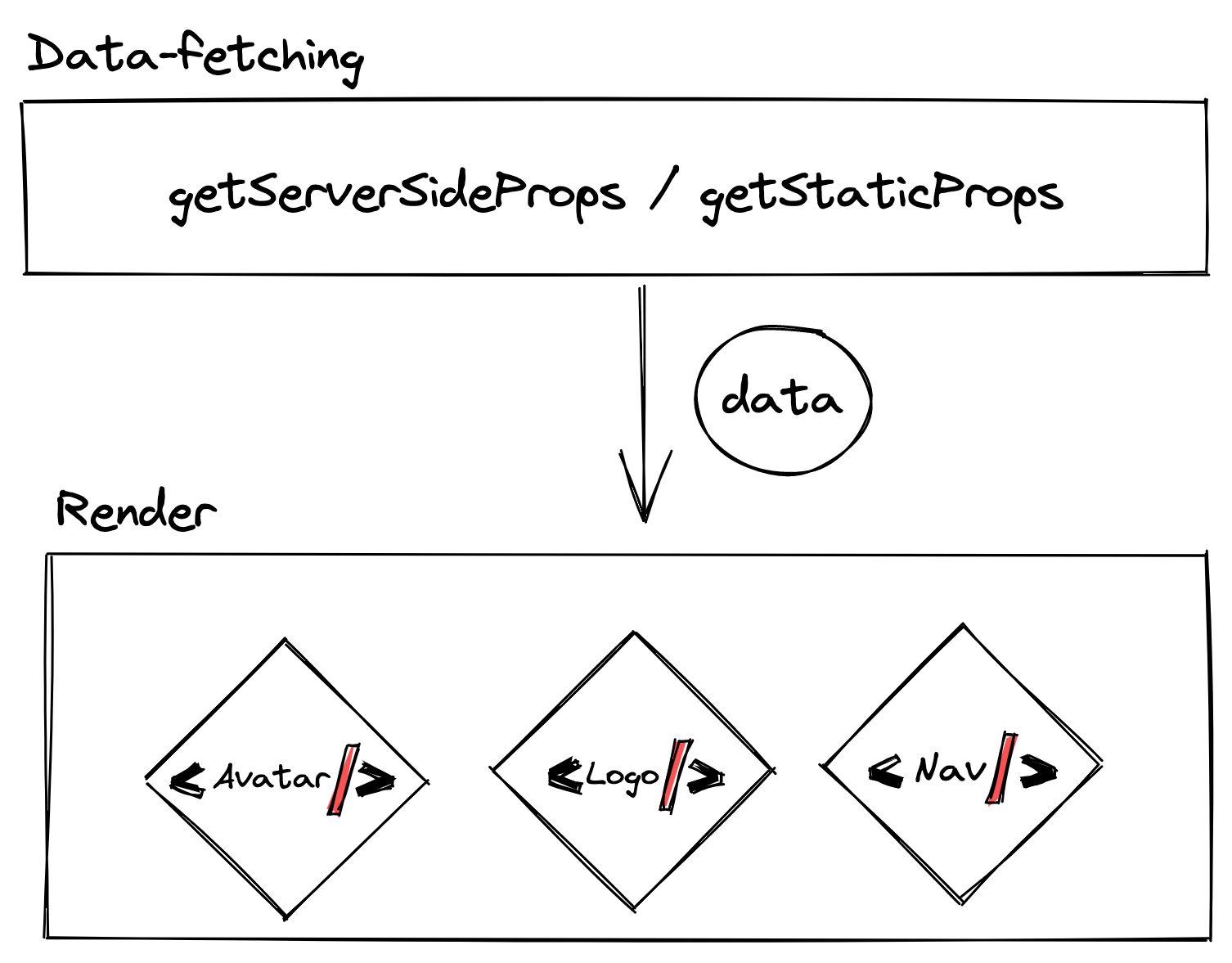
The App Directory is the biggest change, introducing a new routing system with hooks under next/navigation (instead of next/router) and flipping the data-fetching paradigm. Under the old /pages model, data was fetched at the page level and cascaded down to leaf components:
With Server Components in the App Directory, each component is responsible for its own data. That enables fetch-then-render per component, with individual caching and granular Incremental Static Regeneration (ISR):
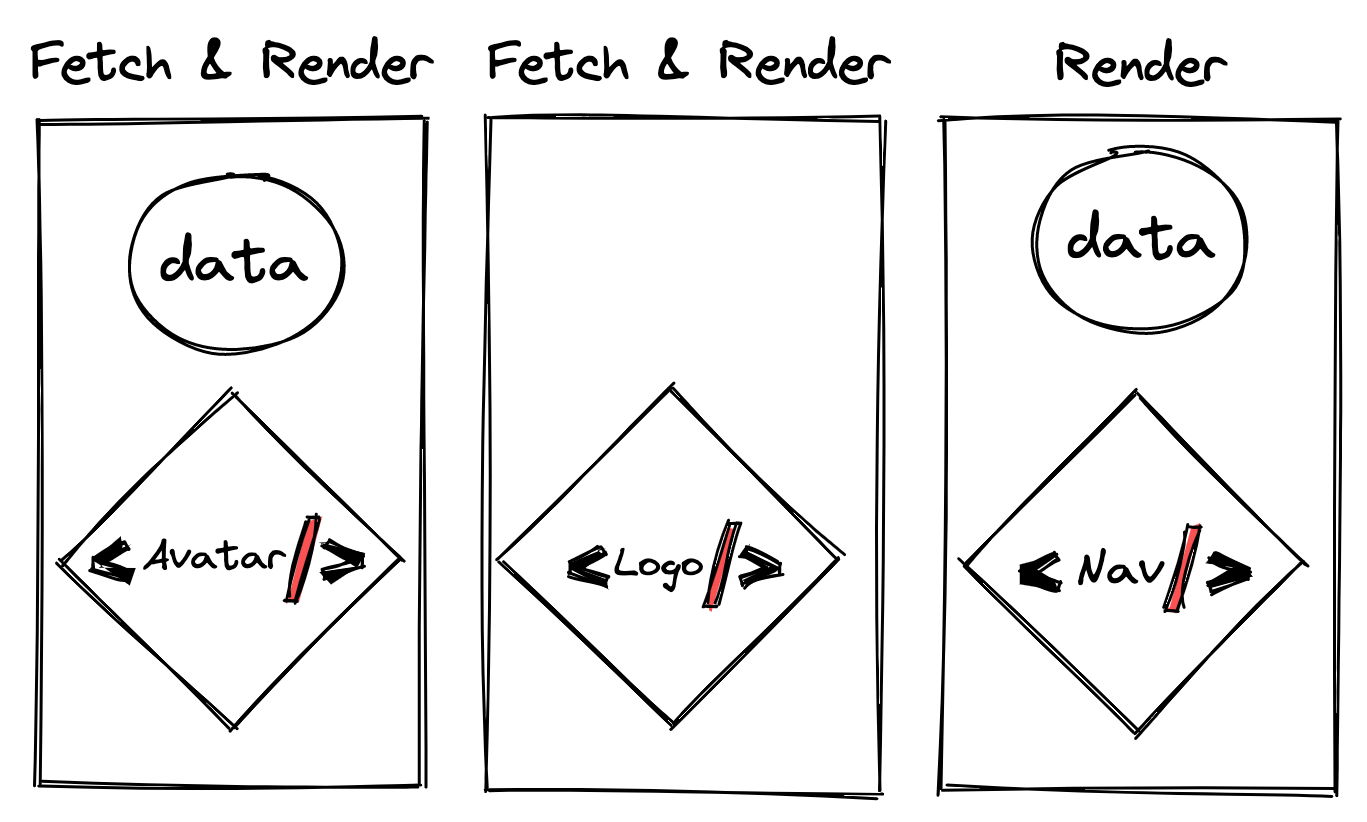
Next.js also changes the default behavior of the runtime fetch method, deduplicating requests so identical parallel fetches don't hit the server twice. By default, all requests use strong cache heuristics (force-cache), which can be opted out via configuration. Both Next.js and React Server Components intentionally modify the standard fetch API to enable these resource optimizations.
You don’t need to migrate everything at once. The /pages and /app architectures can coexist as long as routes don’t overlap, and there’s no current plan to deprecate /pages.
Turbopack: Impressive, But Only For Development
Next.js has historically relied on webpack, but version 13 introduces Turbopack, a bundler written in Rust designed to significantly speed up next dev. While there has been public debate about benchmark methodology, the tooling advantages for large projects are clear—especially given built-in configuration. However, note that Turbopack is experimental and only works with next dev; it cannot be used for production builds yet.
Font Optimization: Build-Time Web Fonts
The new @next/font module downloads font assets during build time and hosts them in your /public folder. That avoids extra round-trips, eliminates additional handshakes, and lets fonts be cached alongside your other resources. A special module is available for Google Web Fonts, which are used widely enough to have a dedicated import path:
import { Jost } from '@next/font/google';
// get an object with font styles:
const jost = Jost();
// define them in your component:
<html className={jost.className}>
Custom fonts are also supported through the module:
import localFont from '@next/font/local';
One caveat: you need a working internet connection during your first development build so fonts can be fetched and cached properly. Otherwise, the module falls back to system fonts unless adjustFontFallback is set.
Revised Image And Link Components
Both core components got meaningful updates, and codemods help automate the migration.
Image Component Transition
The new Image was previously living in @next/future/image since Next.js 12. In v13, the default is switched:
next/imagebecomesnext/legacy/image.next/future/imagebecomesnext/image.
A codemod attempts to automigrate existing code:
npx @next/codemod next-image-to-legacy-image ./pages
If you don't have visual regression tests in place, manually review your pages across major browsers after the migration to catch styling differences.
Link Component Changes
The <Link> component now no longer requires—or recommends—an inner <a> element. The codemod will either remove it or add a legacyBehavior prop. If the codemod fails, you'll see a linting warning during development, so monitor your terminal output:
npx @next/codemod new-link ./pages
Under-The-Radar Upgrades For Monorepos
Two changes are particularly useful for teams working in monorepos or sharing configuration files. First, Next.js now supports ES Modules. By setting type: "module" in your package.json and renaming next.config.js to next.config.mjs, you can import from ESM files directly—something impossible under the previous CommonJS-only config format.
Second, internal packages (modules not published to NPM but consumed from source within a monorepo) previously required a special transpilation plugin. Now, an experimental property passed to next.config.mjs handles transpilation automatically:
const nextConfig = {
  experimental: {
    transpilePackages: ['@my-org/internal-package'],
  },
};
That lets you develop the dependency component and your app side-by-side without publishing or workarounds. Video tutorials and community templates (such as Apex-Monorepo) provide concrete examples of this setup.
For most teams, upgrading Next.js 12 to 13 is safe. The experimental features are worth exploring, but production code shouldn't rely on them—adopt the codemod-driven stable changes first, and only then start experimenting with App Directory patterns in non-critical routes.


