
RSC Decisions: Shared, Client, or Server Components
Building Hydrogen, Shopify’s React framework for custom storefronts, meant working with React Server Components (RSC) before most of the ecosystem had settled on conventions. The paradigm shift was real: early attempts produced too many oversized client components carrying logic that belonged on the server. After months of refactoring, the right approach became clear. These are the patterns that stuck.

Start in the Middle
When building a component from scratch in an RSC app, make it a shared component first. Shared components run without issue in both server and client contexts, making them the natural starting point. From there, the important questions surface: does this code need to run on the client, and should it?
The alternative default—jumping straight to a client component—works at first but costs you later. Your bundle grows with components that never needed client execution in the first place.
When to Extract a Client Component
Most components in an RSC application should stay on the server. Client components are for specific, narrow cases:
- Client-side interactivity
useStateoruseReducer- Lifecycle rendering logic, such as
useEffect - Third-party libraries that don’t support RSC
- Browser APIs unavailable on the server
When one of these applies, resist converting the entire shared component. Extract only the functionality that genuinely needs the client into a separate client component. Keep the rest server-side to minimize the client bundle.
When to Move to a Server Component
If a component has none of the client-only requirements, push it to the server when it fits these patterns:
- Contains code that shouldn’t ship to the client—proprietary logic or secrets
- Will never be imported by a client component
- Never executes on the client
- Needs filesystem or database access
- Fetches from the storefront API (in Hydrogen)
One nuance: if a client component wants to use your component, pass it through as a child rather than letting the client component import it. Client components can render server components passed to them as children without forcing a conversion.
Example: Newsletter Sign-up
Starting with a shared NewsletterSignup.jsx, the form has two interactive pieces—an input field and a submit button. Those belong in a client component:

The original component now only composes the extracted NewsletterSignupForm.client.jsx. Since this sign-up lives in the footer, and the footer is a server component, there’s no reason for NewsletterSignup to stay shared. Renaming it to NewsletterSignup.server.jsx keeps it out of the client bundle entirely.
Example: Product FAQs
A product FAQ section serves static content the same on every product page, with expand/collapse interaction on the buyer’s side:
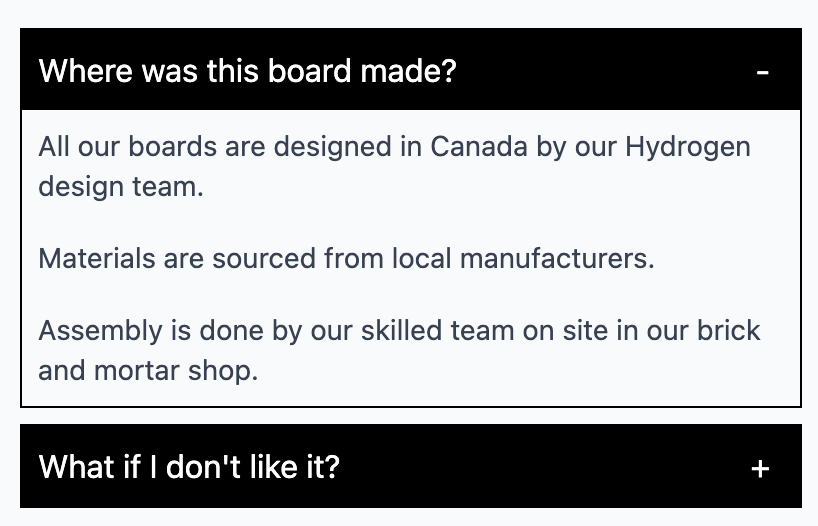
The temptation is to make ProductFAQs a client component so ProductDetails.client can use it directly. Instead, the FAQ content stays server-side and gets passed into the client component as children from the product/[handle].server.jsx page. The client component simply renders its children.
For the interactivity, build an Accordion.client.jsx that handles only expand and collapse. The FAQ text stays out of the client bundle. With the client logic extracted and the component never used by a client component directly, ProductFAQs becomes ProductFAQs.server.jsx, the import in product/[handle].server.jsx updates, and styling finishes the job.
The workflow that works:
- Begin with a shared component
- Extract client-specific functionality only when needed
- Convert to a server component whenever code doesn’t need client execution


