
Cypress is an automated test runner for browser-based applications, long used for end-to-end testing, and individual component testing has now arrived in the tool. A team maintaining a large enterprise Vue application—already running Cypress for end-to-end tests and Jest with Vue Test Utils for unit and component tests—moved to try it out. This covers what component tests look like, how they fit into a broader testing strategy, and the Vue-specific helpers and gotchas that came up along the way.
All the examples here are valid at the time of writing using Cypress 8. The feature is still in alpha, so details may change in future updates.
Anatomy of a component test
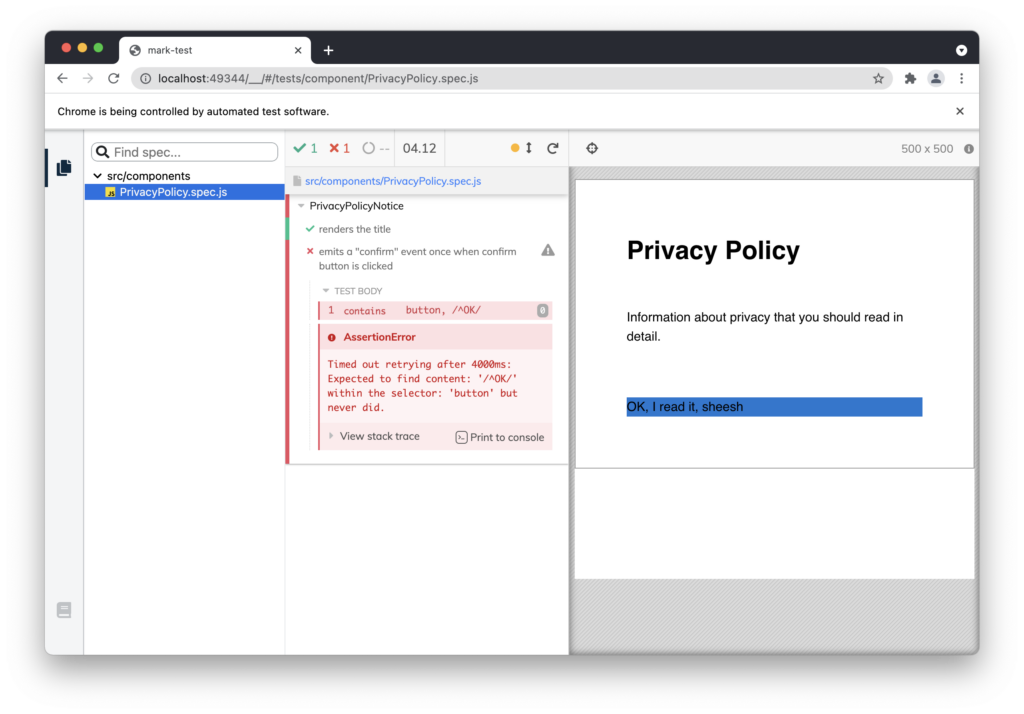
A simplified project contains a "Privacy Policy" component with a title, body, and an acknowledgment button. Clicking the button emits an event so the parent component knows the policy was acknowledged.
import { mount } from '@cypress/vue'; // import the vue-test-utils mount function
import PrivacyPolicyNotice from './PrivacyPolicyNotice.vue'; // import the component to test

describe('PrivacyPolicyNotice', () => {

 it('renders the title', () => {
    // mount the component by itself in the browser 🏗
    mount(PrivacyPolicyNotice);

    // assert some text is present in the correct heading level 🕵️
    cy.contains('h1', 'Privacy Policy').should('be.visible');
  });

  it('emits a "confirm" event once when confirm button is clicked', () => {
    // mount the component by itself in the browser 🏗
    mount(PrivacyPolicyNotice);

    // this time let's chain some commands together
    cy.contains('button', '/^OK/') // find a button element starting with text 'OK' 🕵️
    .click() // click the button 🤞
    .vue() // use a custom command to go get the vue-test-utils wrapper 🧐
    .then((wrapper) => {
      // verify the component emitted a confirm event after the click 🤯
      expect(wrapper.emitted('confirm')).to.have.length(1)
      // `emitted` is a helper from vue-test-utils to simplify accessing
      // events that have been emitted
    });
  });

});
The test makes assertions about two interfaces: the user interface and the developer interface. For the UI, it targets specific elements by their expected text content. For developers, it tests which events are emitted. Mounting successfully implicitly confirms the component is correctly formed—otherwise every later step would fail. Asserting specific kinds of elements for specific purposes also tests accessibility: if the accessible button ever becomes a non-focusable div, the test reports it.
Where component tests sit
Working definitions for the codebase in question:
- Unit tests confirm single functions behave as expected when used by a developer.
- Component tests mount single UI components in isolation and confirm they behave as expected when used by an end-user and a developer.
- End-to-end tests visit the application, perform actions, and confirm the app as a whole behaves correctly when used by an end-user only.
Integration testing is a broader term spanning any level—a unit importing other functions, a component importing other components, or an "end-to-end" test that mocks API responses and never reaches the database—where more than one part works together but not the entire app. Its usefulness as a category is debatable, but the terminology varies across people and organizations.
Each layer is defined by who uses a piece of code and what the contract is with that person. A time-formatting function must return the right result for a valid Date and throw clear errors otherwise, which can be tested without any UI. A component's contract is really two contracts:
- To the developer, the component behaves correctly when expected events are emitted based on user input or other activity. Prop types and validation rules arguably belong here too, though they can be tested at the unit level. What matters most from a component test is knowing the component mounts and sends the signals it should based on interactions.
- To the user, the component behaves correctly when the UI reflects the component's state at all times. That goes beyond visuals: the HTML a component generates is the foundation of its accessibility tree, which supplies the API for tools like screen readers. Correct rendering of the right HTML is part of correct behavior.
Component testing therefore needs two kinds of assertions—Vue-specific checks such as how many events of a type were emitted, and user-facing checks such as whether a visible success message appeared on screen.
Component-level tests also work as documentation. They should assert all critical, depended-upon behavior and ignore non-critical details, so the tests explain (and years later, remind) what a component is expected to do. Anything not explicitly asserted can be changed without rewriting the test: design changes, animation changes, DOM improvements. A failure then signals something that matters, not an element that moved elsewhere on screen. This requires care when designing tests and especially when choosing element selectors.
Cypress versus Jest and Vue Test Utils
Jest combined with Vue Test Utils has become more or less the standard way to run component tests. Vue Test Utils provides helpers to mount a component, pass its options, and mock its dependencies, plus a wrapper object around the mounted component for assertions. Jest is a solid runner and stands up the mounted component using jsdom to simulate a browser.
Cypress's component test runner also uses Vue Test Utils to mount Vue components, so the main difference is context. Cypress runs end-to-end tests in a browser and component tests the same way, which means tests can be watched as they run, paused mid-test, and inspected after earlier steps, with genuine browser behavior for any browser API the application depends on rather than jsdom mocks.
Once a component is mounted, all the usual Cypress patterns apply, and some element-selection pain points disappear. Cypress handles simulating user interactions and asserting the application's response, which covers the user-facing half of the contract. The developer-facing half—events, props, and the rest—comes back to Vue Test Utils: inside Cypress, the wrapper Vue Test Utils creates around the mounted component can be accessed for assertions. Each tool does what it is good at. Behavior is tested as a user would see it with no framework-specific code, and Vue Test Utils handles mounting and framework-specific checks only where needed. There is never a need to await a Vue-specific $nextTick after a Vue-specific state update—historically the trickiest thing to explain to team members without Vue experience, namely when and why to await in a Vue component test.
Making an enterprise Vuetify app mount
The application is a large enterprise SPA built with Vue 2 and the Vuetify component library, heavily using Vuetify's components and styles. Testing components in isolation sounded appealing, but the key lesson was that components need context: Vuetify and global styles must be present in the mount environment or nothing works. Help came from the Cypress Discord, where community members and Cypress team members pointed to example repos, snippets, and ideas.
The requirements that surfaced were: importing and using Vuetify, adding attributes Vuetify depends on to the __cy_root element, placing .spec files alongside component files instead of in a separate test folder, resolving a custom command import conflict between component and end-to-end tests, and accessing the Vue Test Utils wrapper easily in a Cypress context.
Mounting with Vuetify via a custom command
A Vuetify component test example repo by Bart Ledoux organized code in a common pattern with a plugins folder whose plugin exports a Vuetify instance. The application imports it, and the test setup can too, passing it when mounting. That repo adds a Cypress command which replaces the default mount function with one that mounts a component together with Vuetify. The code below assumes everything lives in commands.js with nothing imported from the plugins folder, and uses a custom command, so tests call cy.mount instead of the Vue Test Utils mount directly:
// the Cypress mount function, which wraps the vue-test-utils mount function
import { mount } from "@cypress/vue";
import Vue from 'vue';
import Vuetify from 'vuetify/lib/framework';

Vue.use(Vuetify);

// add a new command with the name "mount" to run the Vue Test Utils
// mount and add Vuetify
Cypress.Commands.add("mount", (MountedComponent, options) => {
  return mount(MountedComponent, {
    vuetify: new Vuetify({});, // the new Vuetify instance
    ...options, // To override/add Vue options for specific tests
  });
});
Components now always mount alongside Vuetify, and other component-specific options still pass through—Vuetify no longer needs adding manually each time.
Giving Vuetify the DOM context it expects
Vuetify components expect to render inside a certain DOM context; apps built with Vuetify wrap everything in a <v-app> root component. The simplest fix is setup inside the command before mounting:
Cypress.Commands.add("mount", (MountedComponent, options) => {
  // get the element that our mounted component will be injected into
  const root = document.getElementById("__cy_root");

  // add the v-application class that allows Vuetify styles to work
  if (!root.classList.contains("v-application")) {
    root.classList.add("v-application");
  }

  // add the data-attribute — Vuetify selector used for popup elements to attach to the DOM
  root.setAttribute('data-app', 'true');

return mount(MountedComponent, {
    vuetify: new Vuetify({}),
    ...options,
  });
});
This exploits the fact that Cypress must create a root element to mount the component into: it is the component's parent with the ID __cy_root, a convenient place to add the classes and attributes Vuetify expects. One more issue appeared after testing—the required v-application class has a display property of flex, which makes sense in a full app using Vuetify's container system but caused unwanted visual side effects when mounting single components. One more line overrode that style before mounting:
root.setAttribute('style', 'display: block');That cleared up occasional layout issues and completed the surrounding-context tweaks.
Spec file placement
Many examples show a cypress.json like this for component testing:
{
  "fixturesFolder": false,
  "componentFolder": "src/components",
  "testFiles": "**/*.spec.js"
}
The testFiles property accepts a glob pattern, and this one matches .spec.js files in any folder. The project's node_modules folder held some irrelevant spec.js files, excluded by prefixing !(node_modules):
"testFiles": "!(node_modules)**/*.spec.js"Earlier experimentation had pointed this at one specific folder instead of a glob. Tests live right alongside components, but the project has two independent components folders because part of the app is packaged and published for use in other company projects. Having changed the setting early, forgetting it had originally been a glob nearly sent things off course until a reminder on Discord. Having a place to quickly check whether an approach is right proved helpful many times.
Separating the command files
Piling the Vuetify setup into the same commands.js used for end-to-end tests produced a problem: a couple of component tests ran, but the end-to-end tests did not start at all, failing early on an import needed only for component testing. Several solutions were suggested; the chosen one was extracting the mounting command and its dependencies into a separate file imported only in component tests. That removed the problem from the end-to-end context, and the command works fine standalone. Next time cleanup happens, or if other issues appear, the main recommendation—two separate command files sharing common pieces—is probably the path.
Reaching the Vue Test Utils wrapper
Inside a component test, the wrapper lives at Cypress.vueWrapper. Wrapping it with cy.wrap makes the result chainable like other cy commands; Jessica Sachs's example repo adds a short command in commands.js to do this:
Cypress.Commands.add('vue', () => {
  return cy.wrap(Cypress.vueWrapper);
});
Used in a test, it reads naturally and clearly splits UI work from inspection through the wrapper:
mount(SomeComponent)
  .contains('button', 'Do the thing once')
  .click()
  .should('be.disabled')
  .vue()
  .then((wrapper) => {
    // the Vue Test Utils `wrapper` has an API specifically setup for testing:
    // https://vue-test-utils.vuejs.org/api/wrapper/#properties
    expect(wrapper.emitted('the-thing')).to.have.length(1);
  });
It also underlines that getting the most out of Cypress means understanding the tools it leverages, not just Cypress: it wraps Mocha, Chai, and various other libraries. Vue Test Utils is a third-party open source solution with its own documentation, and inside the then callback above you are in Vue Test Utils territory, not Cypress territory—which is where to look for help and docs.
What proved awkward
The Cypress component tests are not yet in CI/CD pipelines; failures do not block a pull requests, and reporting has not been examined. No surprises are expected there, but the full workflow integration is incomplete.
The component test runner is also young. At first, roughly every second run seemed to show a linter error and require a manual refresh; that was never diagnosed and later resolved itself, or was fixed in a newer Cypress release. Issues like this are expected from a new tool.
A broader stumbling block: depending on how a component works, mounting it can require substantial mocking of other system parts. Components touching multiple Vuex modules or fetching their own data via API calls need all of that simulated at mount time. End-to-end tests are almost absurdly easy to start on any project that runs in the browser; component tests on existing components are far more sensitive to component design. This applies equally to anything that mounts components in isolation, Storybook and Jest included. Attempting isolated mounts often reveals just how many dependencies components actually have, and the context needed can require a lot of effort—pressure that nudges toward better component design over time, with components that are easier to test and touch fewer parts of the codebase. Where component tests don't yet exist and mock requirements are unknown, choose the first ones carefully to limit the factors that must be right before a component appears in the runner. A small, presentational component rendering content from props or slots is the best way to see a component test in action before wading into dependencies.
What the team gained
Overall the component test runner has worked well. The team already had extensive Cypress end-to-end tests and was familiar with writing new tests and user interactions, and had used Vue Test Utils for component testing, so there was little new to learn. Initial setup problems could have been frustrating, but plenty of friendly help was available for working through them.
Two main benefits stood out. The first is a consistent approach to test code across testing levels, eliminating the mental shift between subtle Jest-versus-Cypress differences, browser DOM versus jsdom, and similar issues. The second is developing components in isolation with visual feedback along the way. Setting up all the variations of a component for development yields the outline of the UI test, and maybe a few assertions. The testing process delivers value up front, less like a task bolted on at the end of a ticket. This is not quite test-driven development, though it can drift that way—it is often "demo-driven": showcasing the states of new UI, with Cypress a good vehicle for it, using cy.pause() to freeze a running test after specific interactions and discuss component state. Developing with that demo in mind organizes the tests meaningfully and encourages covering all scenarios at development time rather than after.
Finally, the mental model of what Cypress as a whole does is tricky at first precisely because it wraps so many open source testing tools; getting up and running quickly does not require deep knowledge of them. When problems arose, it was not always obvious which layer was at fault—Mocha, Chai, a bad jQuery selector in test code, a misused Sinon spy. Eventually, learning those individual pieces and their exact roles became necessary. Component testing adds another layer with framework-specific mounting and test libraries—more overhead and more to learn. On the other hand, Cypress integrates these tools coherently and manages their setup, so a whole unrelated testing setup for component tests is avoided. This team already wanted to mount components independently for Jest and Storybook, so much of the required mocking had been figured out beforehand, and well-separated components with simple props-and-events interfaces were favored for that reason. On balance, working with the runner has been positive, and more tests—and more readable test code—are showing up in reviewed pull requests, which is a sign of a good direction.




