
Where Form Controls Came From, And Why They Are Hard To Style
Form controls have been part of the web from its early days. The HTML 2.0 specification, completed in 1995, introduced the first standard for data entry on the web, covering elements like form, input (with types text, password, radio, and others), select, option, and textarea. That specification settled how users would submit data and how it would be processed, but it deliberately left out any definition of the internal parts or rendering of those controls. Browsers were given full freedom to construct them as they saw fit.
That decision, made to avoid breaking the fledgling web by standardizing features no browser could agree on, created the constraints developers have struggled with ever since.
At the time, there was no styling language at all. Early browsers rendered form controls by relying on the operating system, so appearance was entirely outside developer reach. When CSS did arrive, it was initially no help: the CSS 2.1 specification did not define which properties applied to form controls and recommended treating any support as experimental.
“CSS 2.1 does not define which properties apply to form controls and frames, or how CSS can be used to style them. User agents may apply CSS properties to these elements. Authors are recommended to treat such support as experimental. A future level of CSS may specify this further.”
UA Conformance, CSS 2.1 Specification, W3C
An appearance property was proposed for the CSS Basic User Interface Module Level 3 standard to try to address this, but it was ultimately dropped. Developers who adopted appearance: none; as a workaround found that browser support and behavior were inconsistent, leaving core controls like <select> still resistant to styling.
The Modern Catch-22
Even today, with browsers no longer deferring rendering to the operating system, the legacy of that original underspecified standard remains. Some controls, like button, style easily. Most do not, and require hacky CSS or are even impossible to style at all.
Because the specification never defined the parts that make up each control, browsers each built them differently. Attempts to open those internal structures to CSS now run into a cross-browser wall: if only one browser lets you restyle the options in a select, achieving consistent rendering across browsers is still impossible.
Styling limits are only half of the problem. Native controls are not extensible. Developers cannot add functionality to them or alter what they expose. The <video> element illustrates this well: the controls attribute turns a complete set of playback controls on or off, with no option to customize or extend them. You get everything or nothing.
The Cost Of Rebuilding Native Controls
These constraints have pushed developers to abandon native elements and mimic them from scratch. A custom control starts with a significant feature gap to recover: native controls ship with accessibility, keyboard navigation, performance characteristics, and security already woven in. For a custom element, those features must be recreated manually.
ARIA attributes alone are not enough. They can plug into accessibility APIs, but keyboard interaction — tabbing through options, focusing parts of the control — has to be written and maintained by hand. JavaScript is often required for that, which brings new performance overhead and necessitates decisions about what happens when scripting is disabled.
The burden continues after the initial build. Custom controls must be maintained as platform APIs change, accessibility expectations evolve, and new security issues surface. The long-term cost of recreating one control can far exceed what a native solution would have demanded.
The Push For A Better Solution
Given how widespread these elements are across the web, losing thousands of developer hours to recreating them is a significant drain on the platform. Recognition of that gap is finally bringing focused work to the problem, including proposals like openable and select extensibility improvements, signaling that change may finally be on the horizon for these essential pieces of web infrastructure.
Why Developers Rebuild Native Controls
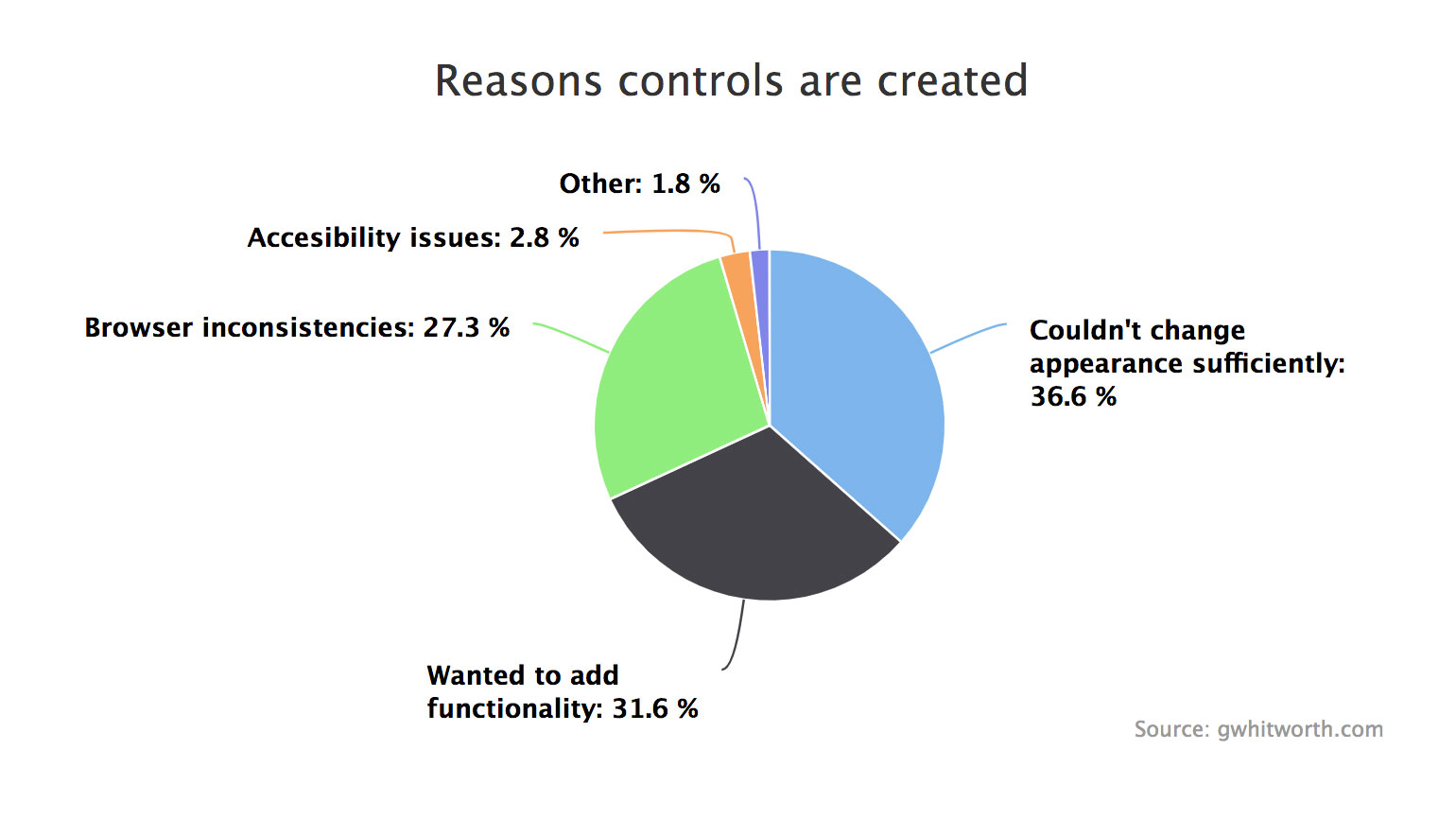
Greg Whitworth’s research, conducted while on the Microsoft Edge web platform team, confirmed what developers have long said informally: native form controls are a pain point. A survey of 1,400 respondents found that the most re-created controls are <select> (10.7%), checkboxes (10.2%), and date pickers (9.5%).
The reasons given for rebuilding were consistent:
- 36.6% could not change the appearance sufficiently.
- 31.6% wanted to add functionality.
- 27.3% cited browser inconsistencies.
Because browser inconsistencies are largely appearance-related, grouping those responses puts more than 60% of developers sacrificing native accessibility and performance purely for visual control. The gap is clear: developers need a standards-based path to style and extend controls without abandoning them.
Open UI: Naming and Behavior Before Looks
Open UI is a Web Incubator Community Group initiative that intends to close that gap. The group is not trying to dictate what controls should look like. Instead, it is documenting and standardizing the names, parts, states, and behaviors of form controls.
Browser vendors, framework authors, and design system maintainers are all involved. The work is highly research-driven: for each control, the group explores use cases, functionality, and the features developers add to custom components. A key question is when added functionality warrants a new control entirely—<select> versus a combobox is one example. Recommendations and issues are then routed to the relevant standards groups.
Anyone can participate via the Open UI GitHub repository. Designers who work with components and design systems are especially encouraged to contribute, since the research maps real-world design system patterns to potential native implementations.
Customization Without Breaking Existing UI
One concern with any proposal to enhance native controls is backward compatibility. Already-shipped native controls will keep working. The current proposal adds developer-facing capabilities rather than changing defaults: the ability to style arbitrary parts of a native control, insert content into parts of it (subject to restrictions, e.g., no iframes), and customize the UI without rebuilding everything from scratch.
The initial explainer on enabling custom control UI is now public for review. It is the first concrete step toward standardization, and feedback on its open questions is driving the process.
Where the Work Goes Next
Controls like <select> illustrate just how broad the use-case space is. Years of custom implementations demonstrate that style flexibility alone does not suffice—developer solutions often layer in functionality that native controls lack. Yet native controls remain foundational, handling logins and order submissions across the web.
Browser teams are investing in this area because the feedback has been loud and consistent. The immediate ask for developers and designers is participation: contribute research or feedback to Open UI, or review the explainer on GitHub. The goal is that standards account for real-world needs before they are finalized.
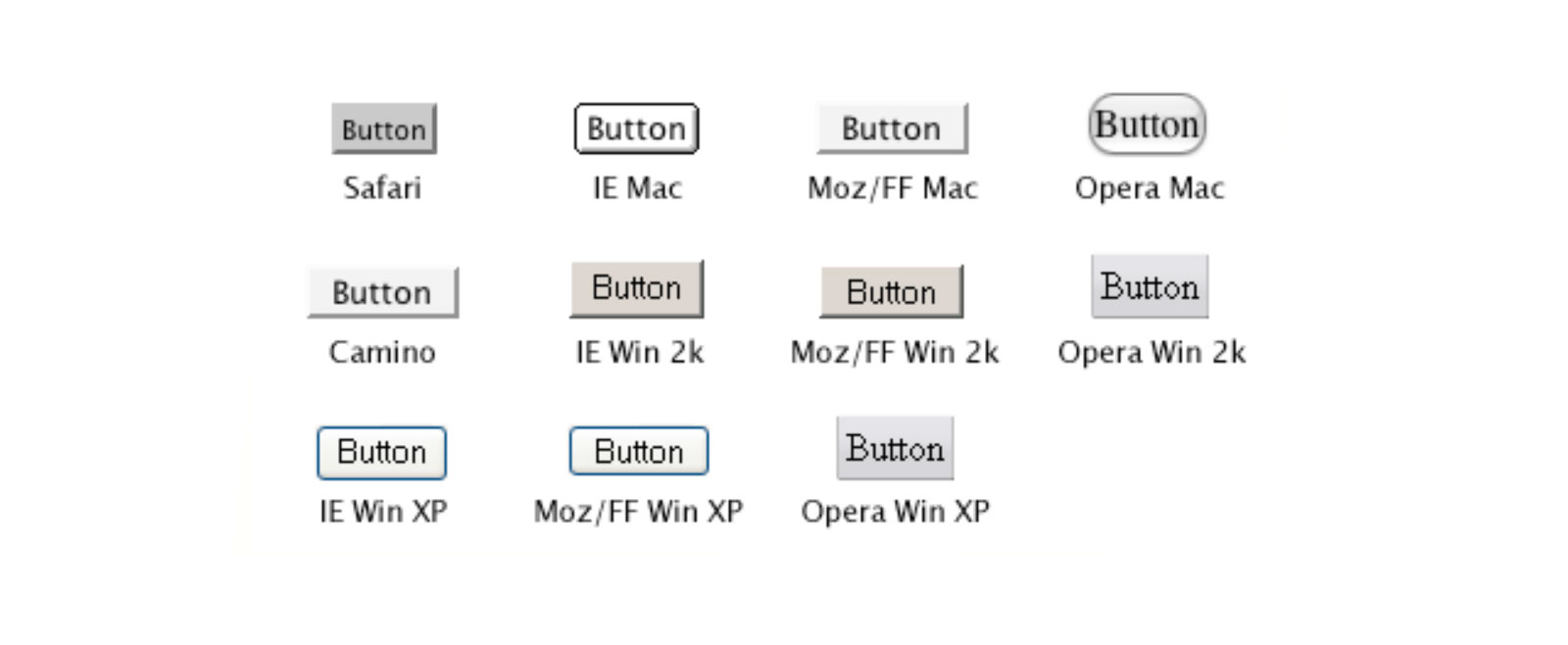 controls from different browsers and operating systems that highlights the varying native styles between the same component.">
<video controls width="1080"></video>