
Why static apps need a data layer
For small and medium-sized applications, running entirely in the browser is an attractive option. All files are static, so any plain file server — nginx, most Web hosting services, or even a Dropbox folder — can serve them. Deployment becomes a simple cp command, and rolling back a bad deployment is as easy as reverting a synced file.
The catch has always been per-user data. Storing it required a database, an application server to mediate access, and an authentication system to keep users from stepping on each other's data. Deploying a new version meant pulling code, migrating schemas, and restarting services — a process that often demanded complex scripts just to avoid mistakes. For many small apps, the data-handling code dwarfed the application logic itself.
Dropbox as the data backend
The dropbox.js library addresses this by letting JavaScript applications use Dropbox for per-user storage. The demo application, Checkbox, is a To Do manager hosted entirely in a Dropbox folder. Its UI and controller logic fit in less than 70 lines of HTML and less than 300 lines of CoffeeScript; the application's data model is the file system itself.
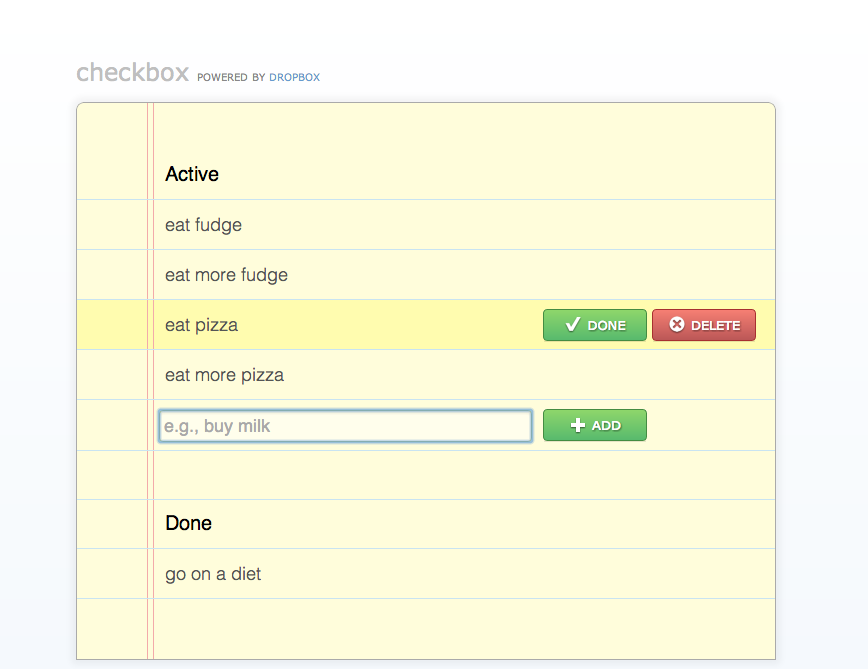
The data model maps operations directly to Dropbox file operations, and each operation is a single line of code in the model layer's implementation:
- Initialize by creating two folders,
activeanddone. - Create a task by writing an empty file named after the task.
- Complete a task by moving its file between folders.
- Delete a task by removing the file.
- List tasks by reading both folders' contents.
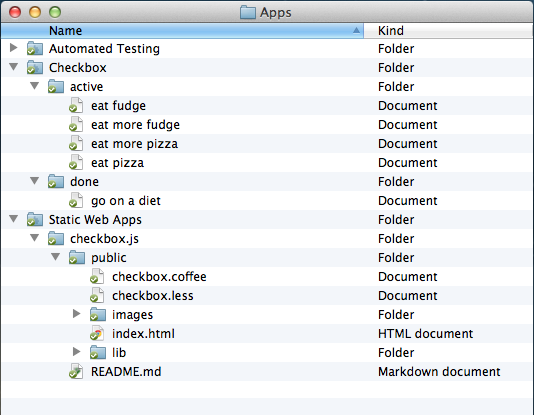
Because the app uses the "App folder" access level, Dropbox automatically provisions a private directory inside each user's account. Data is transmitted securely, stored redundantly, and backed up — properties that many applications would normally have to build themselves. The developer never touches a server or writes a SQL query; debugging can be done with a file manager.
A filesystem-inspired API
Two design goals shaped dropbox.js: it should stay out of your way, and it should be easy to hack. For the first goal, the library borrows heavily from node.js's file system module. Reading and writing files uses the familiar readFile and writeFile signatures, with callbacks that match fs.readFile and fs.writeFile.
// Inefficient way of copying a file.
client.readFile(“source.txt”, function(error, data) {
    client.writeFile(“destination.txt”, data, function (error) {
        console.log(“Done copying.”);
    });
});
Dropbox-specific features, such as revision history, are reachable via an optional options object passed to the same method — retrieving an old file revision is done without a separate API. Defaults aim to match the common case, so fetching the most recent revision requires no options at all.
client.readFile(“source.txt”, { versionTag: “0400000a” },
            function(error, data) {
    console.log(“Done copying.”);
});
Developers familiar with Dropbox's REST API aren't left behind. Folder listings are available both through a readdir method, mirroring fs.readdir, and through a metadata method that closer resembles the /metadata endpoint.
Open internals for extension
No small library can anticipate every use case, so dropbox.js deliberately exposes internals. Methods that make AJAX calls, such as readFile and writeFile, return the underlying XmlHttpRequest object. This allows attaching listeners for progress events or other low-level behavior. Internal methods are documented with JSDoc, just like the public API, so understanding the internals requires no extra effort.
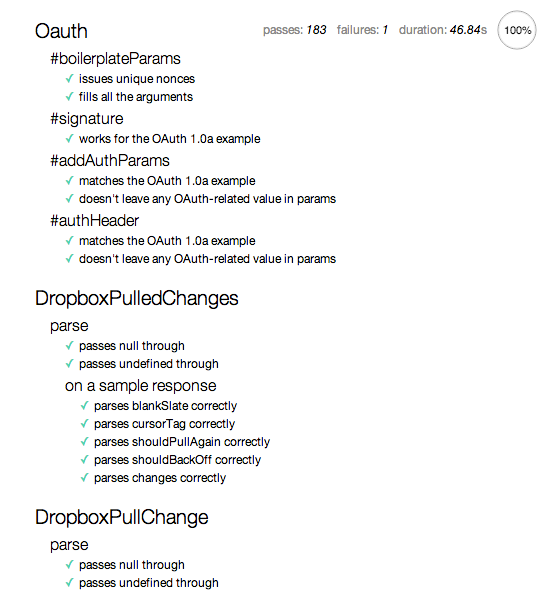
The project ships with an automated build script and a test suite with solid coverage. The README explains how to verify changes and produce a minified build or an npm package. The code is hosted on GitHub, making it easy to submit patches upstream rather than maintaining a fork.
Authentication without the pain
Dropbox's authentication flow bounces the user between the application and Dropbox servers in four steps. dropbox.js defines an authentication driver interface for the code that manages this process, along with three built-in drivers that cover prototype development. The example below shows both initialization and authentication.
var appKey = { key: “api-key”, secret: “api-secret”, sandbox: true };
var client = new Dropbox.Client(appKey);
client.authDriver(new Dropbox.Drivers.Redirect());
client.authenticate(function(error, data) {
    if (error) { return showError(error); }
    doSomethingUseful(client);  // The user is now authenticated.
});
Two naming decisions were deliberate. The library refers to file metadata as a stat, matching filesystem conventions, rather than the REST API's metadata. The rev parameter is surfaced as revisionTag, to avoid implying that revision identifiers are sequential integers. A planned high-level API, offering File and Directory classes with automatic caching in IndexedDb, did not make it into this release; the current version ships an empty Dropbox object, and applications use Dropbox.Client.
Building dropbox.js during Hack Week
dropbox.js came out of Dropbox's hack week, a five-day hackathon where engineers set aside regular work to build experimental projects. The author's motivation was simple: when brainstorming ideas for the week, every promising concept was best prototyped as a JavaScript application. That observation led to the question of whether a proper JavaScript client for the Dropbox API could be built — and whether anyone would use it.
Initial doubts gave way to momentum once the idea was shared internally. Before the hackathon even began, Dropbox engineer Chris Varenhorst added CORS headers to Dropbox API responses so the library could work directly in the browser. That single change removed a fundamental barrier to browser-based Dropbox applications.
Collaboration speeds development
The project quickly became a group effort. During hack week, Aakanksha Sarda implemented the file operations, solved binary file handling (such as images), got the automated test suite running in the browser, and built Dropstagram, a photo-editing app powered by WebGL shaders. Other Dropboxers picked up the library and provided immediate feedback. Rich Chan built a JavaScript-based Internet Terminal running on Dropbox, plus a visualizer for revision history of text files. Franklin Ta prototyped a Chrome extension for direct uploads and downloads to and from Dropbox. David Goldstein used the library to create a browser-based .zip unpacker.
The hack week environment played a major role in the project's success. Graham Abbott set up a dedicated workspace for everyone working on dropbox.js, making collaboration straightforward. Jon Ying provided design support for the demo applications. Even Dropbox founders Drew and Arash stopped by to check on progress.
After the hackathon
Post-hack week, Chris Varenhorst, Dima Ryazanov, and Brian Smith helped resolve last-minute technical issues, while Jon Ying redesigned the Checkbox sample application.
The library was released as open source, and the author's hope is that developers will build on it. The author also plans to use the library when teaching web programming at MIT, seeing Dropbox-powered web apps as a promising tool for students learning web development. The next hack week count, the author expects, will include a number of dropbox.js projects.


