Home/Frontend/Rebuilding A Large E-Commerce Website With Next.js (Case Study) — Smas
Frontend
Rebuilding A Large E-Commerce Website With Next.js (Case Study) — Smashing Magazine
Developing with Next.js is amazing, but there are definitely some challenges. The developer experience with Next.js is something you just need to experience. We made the switch from a more traditional integrated e-commerce platform to a headless platform with Next.js. Here are the most important lessons learned while rebuilding a large e-commerce site with Next.js.
JK
Jonne KatsSmashing Magazine
·September 24, 2021
From ASP.NET Pain to a Next.js Rethink
Our e-commerce projects originally ran on ASP.NET, with React layered on top as client expectations grew. That hybrid approach worked reasonably well—until we took our highest-traffic customer live. Performance collapsed. Core Web Vitals matter enormously in e-commerce, and the numbers back that up: a Deloitte study analyzing mobile data from 37 brands found that a 0.1-second improvement can lift conversion by 10%.
Our remedy was ugly: we threw unbudgeted servers at the problem, cached aggressively behind a reverse proxy, and even disabled site features. The result was a complicated, costly infrastructure that in some cases simply served static pages. Next.js changed that picture fundamentally. As a React framework, it supports both static generation and server-side rendering, which suits e-commerce well. Hosting on a CDN such as Vercel or Netlify lowers latency, and their serverless functions handle SSR with efficient scaling.
That said, Next.js development is not without friction. The instant visual feedback in the browser is fantastic for productivity, but it can tempt you to neglect maintainability. JavaScript's lack of types compounds the problem over time, leading to more bugs and slowing the team down. Runtime performance is also delicate; small code changes can hurt Core Web Vitals, and careless SSR usage can inflate service bills. Here is what we learned managing those trade-offs.
Structure Code by Function, Not by Type
Running npx create-next-app gives you a conventional folder layout—components, pages, and so on—which is fine for small projects. As our codebase grew, that structure became a liability. With most components piled into a root folder, it was hard to tell where things were used, and we found dead components we'd forgotten about. The lack of guidance on dependency direction invited a big ball of mud.
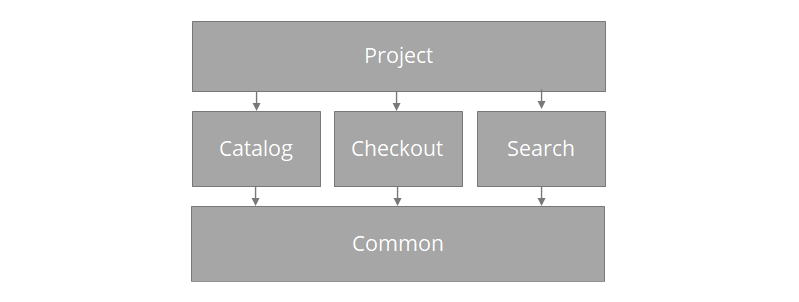
We refactored, grouping code into functional modules that behave like internal NPM packages rather than technical buckets. A checkout module and a catalog module, for example, make the project's purpose visible at a glance. Traversing the folder structure immediately shows what the site can do and where the implementation lives. Dependencies between modules became far easier to reason about—previously, a checkout pull request could touch catalog components, causing merge conflicts and slowing changes. Our rule now is to keep inter-module dependencies to an absolute minimum, and where they are truly necessary, make them strictly uni-directional. A separate "project" level holds layouts and page templates, tying modules together. These page templates combine components from different modules, like a product detail page that uses catalog components for product data and a checkout component for the add-to-cart button. A shared "common" module remains, containing simple presentational atoms and infrastructure code like generic hooks or the GraphQL client. Treat that common code as inherently stable—adding too much to it risks entangling your whole architecture.
A visual overview of the module dependency structure:
An overview of an modularized project example (Large preview)
Multi-Zones for Micro-Frontends
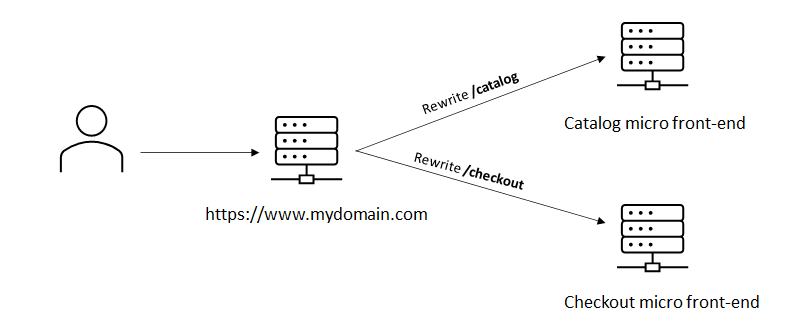
For larger solutions or multiple teams, splitting the application into physically separate apps—micro-frontends—can pay off. Hosting them on distinct URLs like checkout.mydomain.com and proxying via a main application is a pattern Next.js calls Multi Zones. Its rewrite functionality supports this cleanly.
The advantage of separate zones is independence. Each zone manages its own dependencies. When a new major version of Next.js or React arrives, you can upgrade zones incrementally instead of coordinating a monolithic release. In multi-team organizations, that materially reduces cross-team friction and greatly eases incremental evolution.
Enforce Consistency with Linters and Formatters
Working on one codebase with several developers, without a formatter, breeds inconsistent code despite best intentions. Code reviews and conventions don't prevent the gradual drift of individual styles. Linters catch potential logic errors, and formatters ensure a uniform appearance, reducing mental overhead during development. We rely on ESLint and Prettier. Next.js 11 added built-in ESLint support, configured out of the box when you run npx next lint. Beyond React-specific rules, its Next.js-specific extension flags code patterns that could harm Core Web Vitals. That's a huge advantage: catching performance pitfalls at edit time rather than after a production release, which makes it a powerful quality gate in itself.
Adopt TypeScript Incrementally
Initially, TypeScript struck us as an unnecessary abstraction. A colleague's positive experience convinced us to try it, and Next.js has great out-of-the-box TypeScript support, including incremental adoption. You don't rewrite everything at once; you convert components progressively while new code is written in TypeScript. Almost immediately we found real bugs—wrong values and types flowing into components and functions. The feedback loop shortened: issues surface before you ever run the app in the browser. Refactoring also became more straightforward, not just finding unused props but revealing precisely where code is consumed. In brief, TypeScript gives us three things: fewer bugs, safer refactoring, and clearer code.
Rendering Strategy Is a Per-Page Decision
Next.js offers several pre-rendering modes, and choosing the right one per page is a key technical decision. Static generation at build time delivers the best performance, but it isn't always feasible—product detail pages with live stock information are a classic counterexample, since a rebuild every time inventory changes doesn't scale.
Incremental Static Regeneration (ISR) bridges that gap: pages are still statically generated, but a fresh version is produced in the background on a set interval. In our experience, ISR is the right model for most pages in a large application. It keeps response times fast, uses less CPU than server-side rendering, and trims build time because pages are only generated on first request.
The recommended decision order is: prefer static generation, fall back to ISR, and use server-side rendering only when neither works. Next.js infers the rendering mode automatically from the presence or absence of getServerSideProps and getInitialProps on a page. A mistake here silently switches a page from static to server-rendered, so check the build output—it shows exactly which mode each page uses. Monitoring production CPU time is also worthwhile, since most hosting providers bill on it.
Keep the Client Bundle Lean
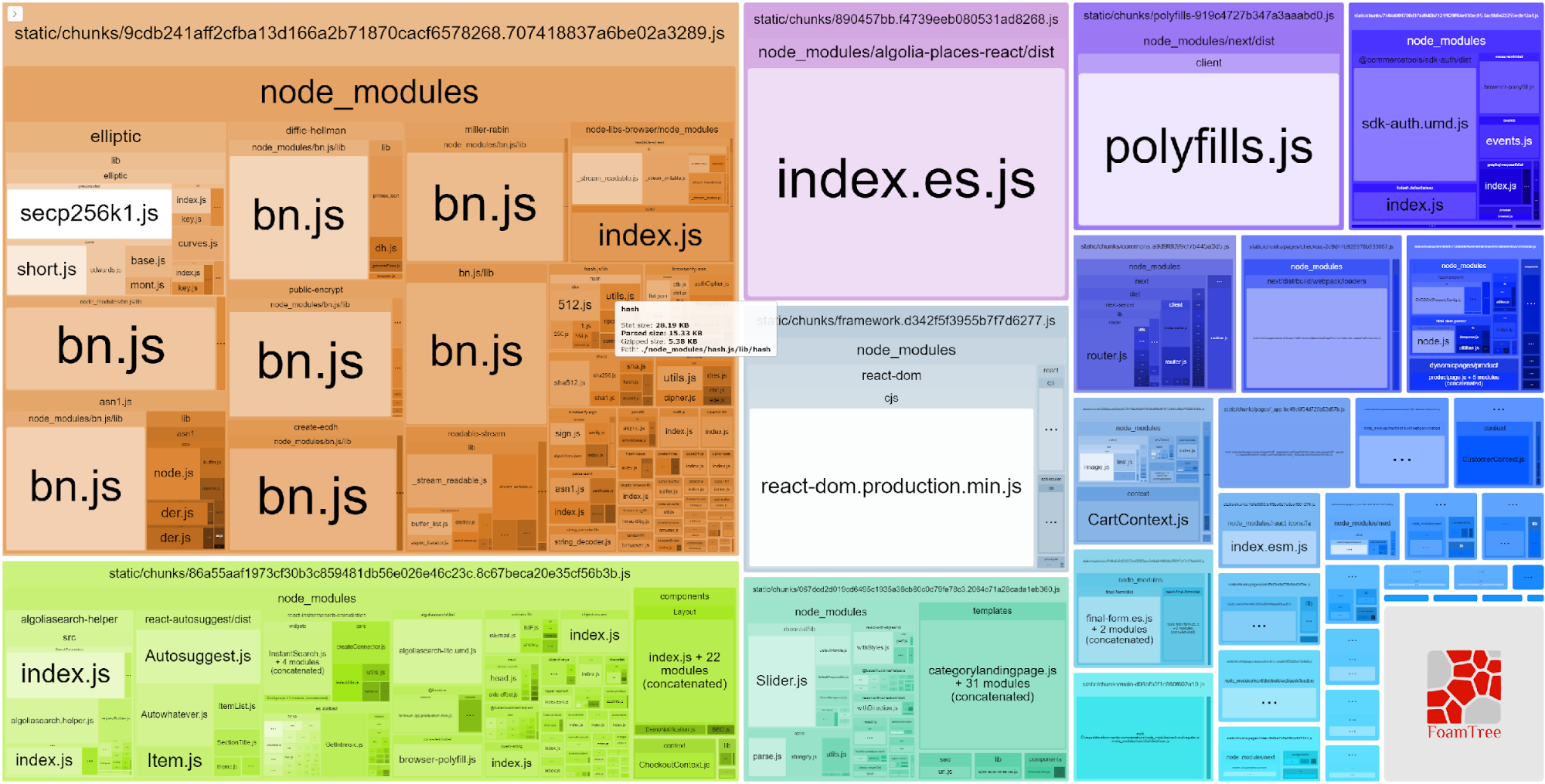
Bundle size is the main performance lever, and Next.js provides several safeguards: automatic code splitting ensures only the JavaScript and CSS needed for the current page are loaded, with separate client and server bundles. But these safeguards don't absolve you from vigilance. Importing a JavaScript module the wrong way can pull server code into the client bundle, and even a single NPM dependency can noticeably inflate it.
Next.js ships with a bundle analyzer that breaks down exactly which code occupies each part of the bundle.
The webpack bundle analyzer shows you the size of the packages in your bundle (Large preview)
Make Performance a Hard Gate
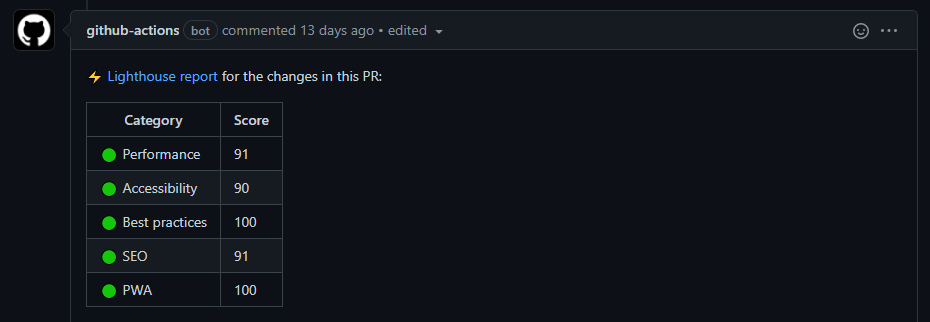
Static generation plus CDN edge deployment ought to yield excellent Web Vitals, but in practice, maintaining a high Lighthouse score is difficult. We saw scores drop significantly after seemingly routine production changes. To regain control, we added automatic Lighthouse tests to our quality gate. A GitHub Action can run these tests against Vercel preview deployments whenever a pull request is created.
An example of the lighthouse results on a Github Pull Request (Large preview)
If you prefer not to assemble the GitHub Action yourself, third-party monitoring like DebugBear is an option. Vercel's own Analytics feature measures core Web Vitals from production visitors' devices, giving you scores that reflect real user experience. Note that at the time of writing, Vercel Analytics only works on production deployments.
Automated Tests Are Your Safety Net
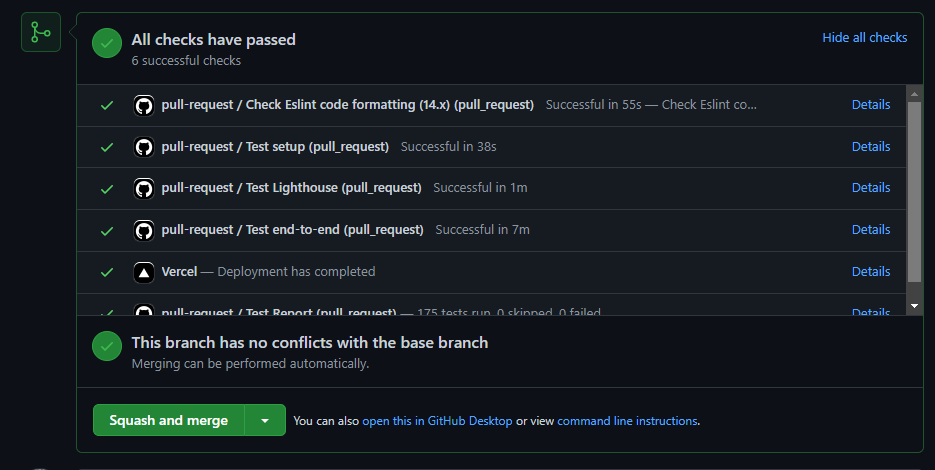
As the codebase grows, determining whether a change broke something becomes harder. A solid suite of end-to-end tests is essential, and even a small project benefits from basic smoke tests. We use Cypress extensively. Combined with Netlify or Vercel automatically deploying each pull request to a temporary environment, running E2E tests against that URL is both simple and highly effective.
We run Cypress via the cypress-io/GitHub-action against every pull request. More granular tests with Enzyme or JEST can be valuable depending on the project, but they are more tightly coupled to the implementation and demand more maintenance.
An example of automated checks on a Github Pull Request (Large preview)
Treat Dependencies as a Liability
Dependency management becomes a significant time sink in a large Next.js codebase, and with good reason: many of the bugs and performance regressions we encountered traced back to a new or updated NPM package. Before installing anything, consider:
What is the quality of this package?
How will it affect my bundle size?
Is it genuinely necessary, or are there alternatives?
Is it still actively maintained?
Fewer dependencies mean less to audit, less to update, and a smaller bundle. The Import Cost VSCode extension shows the size of imported packages inline, which helps during development.
Stay Current With Next.js and Related Packages
Keeping Next.js and React up to date matters for both new features and security fixes. Next.js provides Codemods that automate code transformations to ease upgrades, and GitHub's dependabot can be configured to open pull requests for dependency updates automatically. Since updates can break things, a robust end-to-end test suite becomes a crucial ally when applying those dependabot PRs.
Log Aggregation Catches What Streaming Misses
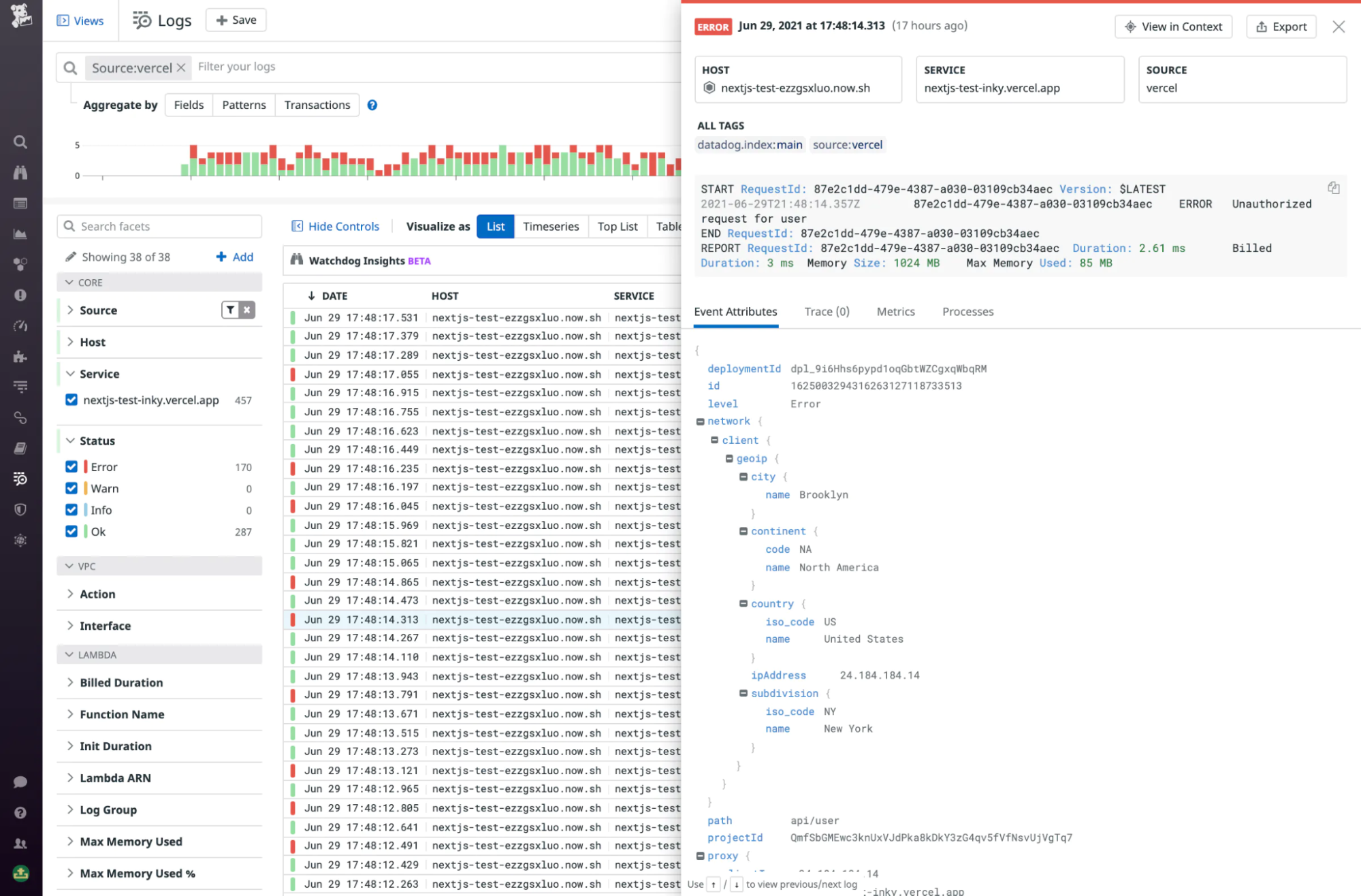
Vercel's built-in log viewer streams logs in real time but does not persist them, and it lacks alerting capabilities. For a production application, a proper log aggregation service is a must. Some issues take a long time to surface. We once misconfigured Stale-While-Revalidate and only later noticed pages serving stale data; the root cause—an exception during background rendering—was buried in the logs. An aggregation service with exception alerts would have flagged it immediately.
Log aggregation also helps you stay ahead of Vercel's pricing-plan limits. The usage page shows your numbers, but aggregation services let you set notifications for thresholds before they become billing surprises. Vercel integrates with several services out of the box, including Datadog, Logtail, Logalert, and Sentry.
Viewing the Next.js request log in Datadog (Large preview)
Rewrites Enable a Phased Migration
Few customers are eager to fund a full-site rewrite, but many are receptive to rebuilding only the pages that matter most for SEO and conversion. For one client, we rebuilt product detail and category pages in Next.js while leaving the rest of the legacy site untouched. The performance gains on those pages were dramatic.
Next.js rewrites make this incremental approach straightforward: the new Next.js front-end handles catalog pages and is deployed to the CDN, while every other route is rewritten to the existing site. It's a low-risk way to capture the benefits of Next.js without a big-bang release.
Results and Road Ahead
The first production release exceeded expectations. Response times and Web Vitals improved substantially, and operational costs dropped to a fraction of the previous architecture—JAMStack's scalable model is genuinely cost-efficient. The move from a back-end-centric stack to Next.js is a significant shift, and some team members felt out of their comfort zone at first. The adjustments described above, plus Next.js's fast developer feedback loop, helped the team adapt and ultimately boosted productivity considerably.
Jonne is solution architect at Unplatform . At Unplatform, his mission is to go beyond just building functionally great e-commerce websites. This means helping … More about Jonne ↬
Meta’s newest app, Forum, is for anyone who wants to go deeper into the conversations in their Facebook groups. To build Forum, Meta engineers adopted a whole new way of working by bringing an AI agent into the development cycle. We’re sharing insights into what it took to build Forum with agentic AI: how we [...] Read More... The post How Meta Built Forum With AI-Native Engineering appeared first
Meta has begun deploying Media over QUIC (MoQ), an emerging open protocol for real-time video streaming at scale. MoQ will help simplify our protocol stack for live streaming video and enhance overall user experience for live video. We’re sharing how we shipped MoQ on Instagram Live ingest, and what the future looks like from here. [...] Read More... The post Shipping Media Over QUIC at Meta Scale