Why IMDSv2 matters
Slack runs approximately 60,000 EC2 instances across 17 AWS regions and hundreds of AWS accounts. Instance Metadata Service (IMDS) is heavily used for provisioning and runtime environment discovery. The metadata it exposes — IAM credentials, security group IDs, instance metrics — is sensitive, and the original IMDSv1 design made it accessible via simple GET requests, which can amplify Server Side Request Forgery (SSRF) vulnerabilities.
With IMDSv2, AWS introduced session-oriented authentication. Instead of a plain GET, clients must first make a PUT request with an X-aws-ec2-metadata-token-ttl-seconds header to receive a token, then include that token in the X-aws-ec2-metadata-token header on subsequent requests. This forces an attacker exploiting SSRF to chain PUT requests with headers — a much harder path than a straightforward GET.
Finding IMDSv1 users
Before migrating, Slack needed to quantify IMDSv1 usage across the fleet. The team built an application called imds-cw-metric-collector that pulled the EC2 CloudWatch MetadataNoToken metric, which counts IMDSv1 requests per instance. It mapped instance IDs to owners and Chef roles via internal account discovery APIs, then fed the data into Prometheus dashboards for tracking and follow-up with service teams.
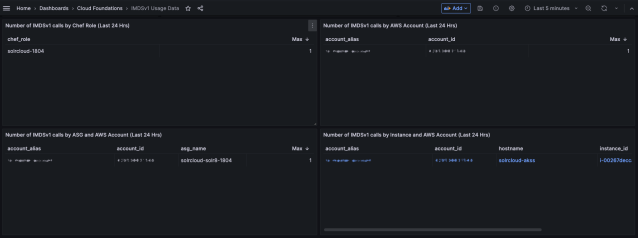
Instance IDs alone weren't enough — the team needed to identify which processes were making the calls. AWS provides the ImdsPacketAnalyzer tool, which Slack packaged as a Debian package in its APT repository. That worked for Ubuntu 22.04 and Amazon Linux instances, but not for legacy Ubuntu 18.04, where the team fell back to lsof and nethogs. On some dev instances, they simply disabled IMDSv1 and observed what broke.
Migrating applications and launch paths
Updating bash scripts to the two-step IMDSv2 flow was straightforward following AWS's published guidance. Slack also upgraded the AWS CLI fleet-wide. For applications in other languages, teams updated to SDK versions that enforce IMDSv2, using AWS's compatibility list as a reference. After those rollouts, IMDSv1 usage dropped sharply.
To prevent new instances from shipping with IMDSv1, Slack turned to its shared Terraform modules. These standard modules are used by service teams to create AutoScaling groups and other resources, which lets a single change propagate broadly. But the rollout needed guardrails — some teams were still migrating. Slack created a custom accounts_using_imdsv1 module to exclude specific accounts during the transition:
module "accounts_using_imdsv1" {
  source = "../slack/accounts_using_imdsv"
}

resource "aws_instance" "example" {
  ami           = data.aws_ami.amzn-linux-2023-ami.id
  instance_type = "c6a.2xlarge"
  subnet_id     = aws_subnet.example.id

  metadata_options {
    http_endpoint  = "enabled"
    http_tokens    = module.accounts_using_imdsv1.is_my_account_using_imdsv1 ? "optional" : "required"
  }
}
Service Control Policies (SCPs) were the next layer. Slack updated SCPs to block both launching instances with IMDSv1 enabled and enabling IMDSv1 on existing instances in child accounts, again using the exclusion module to allow teams time to finish migrating.
 # Block launching instances with IMDSv1 enabled
  statement {
    effect = "Deny"

    actions = [
      "ec2:RunInstances",
    ]

    resources = [
      "arn:aws:ec2:*:*:instance/*",
    ]

    condition {
      test     = "StringNotEquals"
      variable = "ec2:MetadataHttpTokens"
      values     = ["required"]
    }

    condition {
      test          = "StringNotEquals"
      variable = "aws:PrincipalAccount"
      values     = module.accounts_using_imdsv1.accounts_list_using_imdsv1
    }
  }

  # Block turning on IMDSv1 if it's already turned off
  statement {
    effect = "Deny"

    actions = [
      "ec2:ModifyInstanceMetadataOptions",
    ]

    resources = [
      "arn:aws:ec2:*:*:instance/*",
    ]

    condition {
      test          = "StringNotEquals"
      variable = "ec2:Attribute/HttpTokens"
      values     = ["required"]
    }

    condition {
      test          = "StringNotEquals"
      variable = "aws:PrincipalAccount"
      values     = module.accounts_using_imdsv1.accounts_list_using_imdsv1
    }
  }
}
Limits of SCPs
SCPs aren't a complete solution. They don't apply to the root AWS organization account. They also don't constrain service-linked roles — for example, when AutoScaling launches an instance in response to a scaling event.
Slack also investigated enforcing IMDSv2 at the Launch Template level with IAM condition keys, but AWS does not currently support ec2:Attribute/HttpTokens as a condition key for EC2 actions.
Alerting on IMDSv1 launches
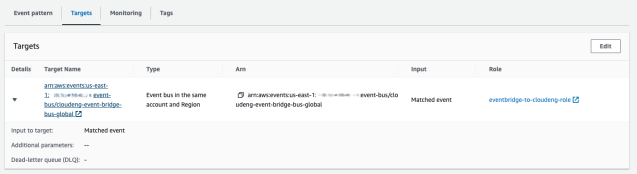
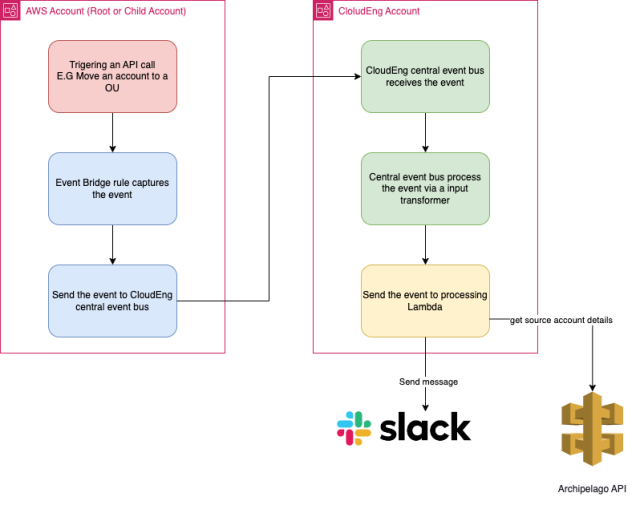
Since SCPs can't guarantee that no instance launches with IMDSv1, Slack added a notification pipeline using AWS EventBridge and Lambda. Two EventBridge rules per child account watch CloudTrail events: one for EC2 RunInstances requests, the other for responses.
{
  "detail": {
    "eventName": ["RunInstances"],
    "eventSource": ["ec2.amazonaws.com"],
    "requestParameters": {
      "metadataOptions": {
        "httpTokens": ["optional"]
      }
    }
  },
  "detail-type": ["AWS API Call via CloudTrail"],
  "source": ["aws.ec2"]
}
{
"detail": {
"eventName": ["RunInstances"],
"eventSource": ["ec2.amazonaws.com"],
"responseElements": {
"instancesSet": {
"items": {
"metadataOptions": {
"httpTokens": ["optional"]
}
}
}
}
},
"detail-type": ["AWS API Call via CloudTrail"],
"source": ["aws.ec2"]
}The rules target a central event bus in a team-managed account.
Events are transformed via an Input Transformer to extract and reshape the relevant fields.
{
  "account": "$.account",
  "instanceid": "$.detail.responseElements.instancesSet.items[0].instanceId",
  "region": "$.region",
  "time": "$.time"
}
{
"source" : "slack",
"detail-type": "slack.api.postMessage",
"version": 1,
"account_id": "<account>",
"channel_tag": "event_alerts_channel_imdsv1",
"detail": {
"text": ":importantred: :provisioning: instance `<instanceid> (<region>)` in the AWS account `<account>` was launched with `IMDSv1` support"
}
}The transformed event invokes a Lambda function that resolves the account to its owning team via the internal Archipelago API and posts a Slack alert.
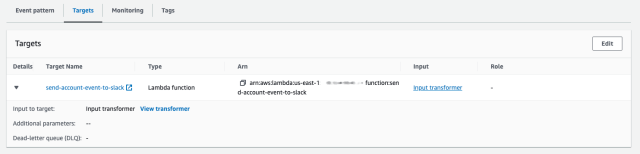
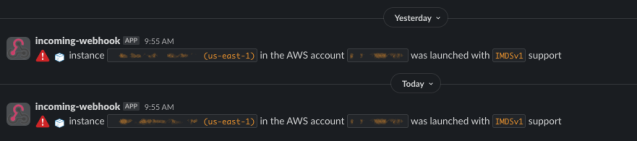
The full flow:
A similar watch alerts when someone enables IMDSv1 on an existing instance.

Remediating running instances
SCPs and launch-time guardrails don't address instances already running with IMDSv1. Slack built the IMDSv1 Terminator, an EKS-deployed service that uses an IAM OIDC provider to assume a restricted role in each child account. That role's policy allows it to inspect and modify instance metadata settings.
{
    "Statement": [
        {
            "Action": "ec2:ModifyInstanceMetadataOptions",
            "Condition": {
                "StringEquals": {
                    "ec2:Attribute/HttpTokens": "required"
                }
            },
            "Effect": "Allow",
            "Resource": "arn:aws:ec2:*:*:instance/*",
            "Sid": ""
        },
        {
            "Action": [
                "ec2:DescribeRegions",
                "ec2:DescribeInstances"
            ],
            "Effect": "Allow",
            "Resource": "*",
            "Sid": ""
        }
    ],
    "Version": "2012-10-17"
}
The service lists instances in batches, checks whether IMDSv1 is enabled, and if so, enforces IMDSv2. Each remediation triggers a Slack notification.

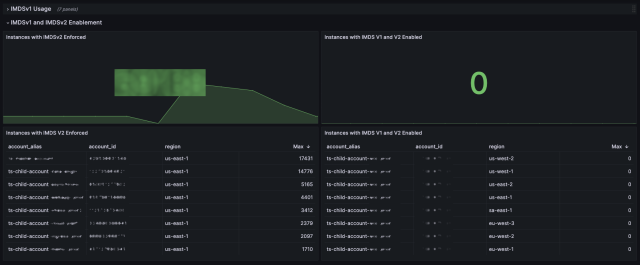
Initially hundreds of alerts fired, but volumes dropped to near zero as existing instances were remediated and new instances launched with IMDSv2. The service also exports metrics to Prometheus, letting the team track which AWS accounts and regions, if any, still contain IMDSv1-enabled instances.
What the rollout taught us
Forcing IMDSv2 across Slack’s sprawling infrastructure was no small feat, but the Cloud Foundations team learned a lot along the way. The migration required close coordination with dozens of service teams, and our SecOps colleagues were instrumental in pushing it over the finish line.
The main takeaway: enforcing a security standard at scale is as much about communication and sequencing as it is about the technical change itself. A phased rollout with clear checkpoints gave teams time to adapt, while automated scanning caught stragglers early enough to avoid last-minute surprises.
For anyone planning a similar migration, here’s the short version of what worked for us:
- Start with a complete inventory of every instance and the IMDS mode it currently uses.
- Communicate deadlines early and often; make it easy for service teams to know exactly which of their resources are non-compliant.
- Automate the enforcement step rather than relying on manual changes, so the final toggle is quick and reversible if something breaks.
- Keep a rollback plan ready for the first few days after enforcement, just in case a workload depended on IMDSv1 behavior you didn’t anticipate.
With the migration behind us, Slack’s cloud footprint now has a consistent, stronger baseline for instance metadata security. It also leaves us with a proven playbook for future cross-team infrastructure initiatives.


