

Watching Elements With The Intersection Observer API
The Intersection Observer API lets you asynchronously watch for when a target element intersects an ancestor element or the viewport. It’s a native browser API that can replace scroll-event hacks for use cases like infinite scroll and image lazy loading.
You create an observer with its constructor, passing a callback and an options object. The callback fires whenever a target element intersects the specified root (which defaults to the viewport). The callback receives a list of IntersectionObserverEntry objects, one per observed target. Keep the callback lightweight, since it runs on the main thread.
let observer = new IntersectionObserver(callback, options);Here is the basic pattern for observing an element:
var intObserver = new IntersectionObserver(entries => {
    entries.forEach(entry => {
      console.log(entry)
      console.log(entry.isIntersecting) // returns true if the target intersects the root element
    })
  },
  {
    // default options
  }
);
let target = document.querySelector('#targetId');
intObserver.observe(target); // start observation
The API has broad browser support and can be applied directly in a React functional component. The example app here fetches photos from the Lorem Picsum public API and displays them in a responsive grid. The same observer logic powers both paging and lazy images.
Starting With Data Fetching
A starter project is available on GitHub, with Bootstrap linked in public/index.html and basic styles already in place. If you’re following the repository, have yarn installed.
The app uses the endpoint https://picsum.photos/v2/list?page=0&limit=10, which returns an array of picture objects. Changing the page query parameter to 1, 2, and so on returns the next set of ten images.
State management begins with a reducer called imgReducer, which handles two actions:
STACK_IMAGES— appends incoming images to the existingimagesarray.FETCHING_IMAGES— toggles afetchingboolean.
import React, { useEffect, useReducer } from 'react';

import './index.css';

function App() {
  const imgReducer = (state, action) => {
    switch (action.type) {
      case 'STACK_IMAGES':
        return { ...state, images: state.images.concat(action.images) }
      case 'FETCHING_IMAGES':
        return { ...state, fetching: action.fetching }
      default:
        return state;
    }
  }
  const [imgData, imgDispatch] = useReducer(imgReducer,{ images:[], fetching: true})
  // next code block goes here
}
The reducer plugs into a useReducer hook. That returns imgData, holding the images array and the fetching flag, plus an imgDispatch function for dispatching actions.
Data fetching lives inside a useEffect hook. When the component mounts, it calls the API with fetch, then dispatches STACK_IMAGES with the returned array and FETCHING_IMAGES once the request completes.
// make API calls
useEffect(() => {
  imgDispatch({ type: 'FETCHING_IMAGES', fetching: true })
  fetch('https://picsum.photos/v2/list?page=0&limit=10')
    .then(data => data.json())
    .then(images => {
      imgDispatch({ type: 'STACK_IMAGES', images })
      imgDispatch({ type: 'FETCHING_IMAGES', fetching: false })
    })
    .catch(e => {
      // handle error
      imgDispatch({ type: 'FETCHING_IMAGES', fetching: false })
      return e
    })
}, [ imgDispatch ])

// next code block goes here
The render maps over imgData.images to produce the gallery. With the component exported, the page shows the first ten photos in a responsive grid.
return (
  <div className="">
    <nav className="navbar bg-light">
      <div className="container">
        <a className="navbar-brand" href="https://www.smashingmagazine.com/#">
          <h2>Infinite scroll + image lazy loading</h2>
        </a>
      </div>
    </navv
    <div id='images' className="container">
      <div className="row">
        {imgData.images.map((image, index) => {
          const { author, download_url } = image
          return (
            <div key={index} className="card">
              <div className="card-body ">
                <img
                  alt={author}
                  className="card-img-top"
                  src={download_url}
                />
              </div>
              <div className="card-footer">
                <p className="card-text text-center text-capitalize text-primary">Shot by: {author}</p>
              </div>
            </div>
          )
        })}
      </div>
    </div>
  </div>
);
export default App;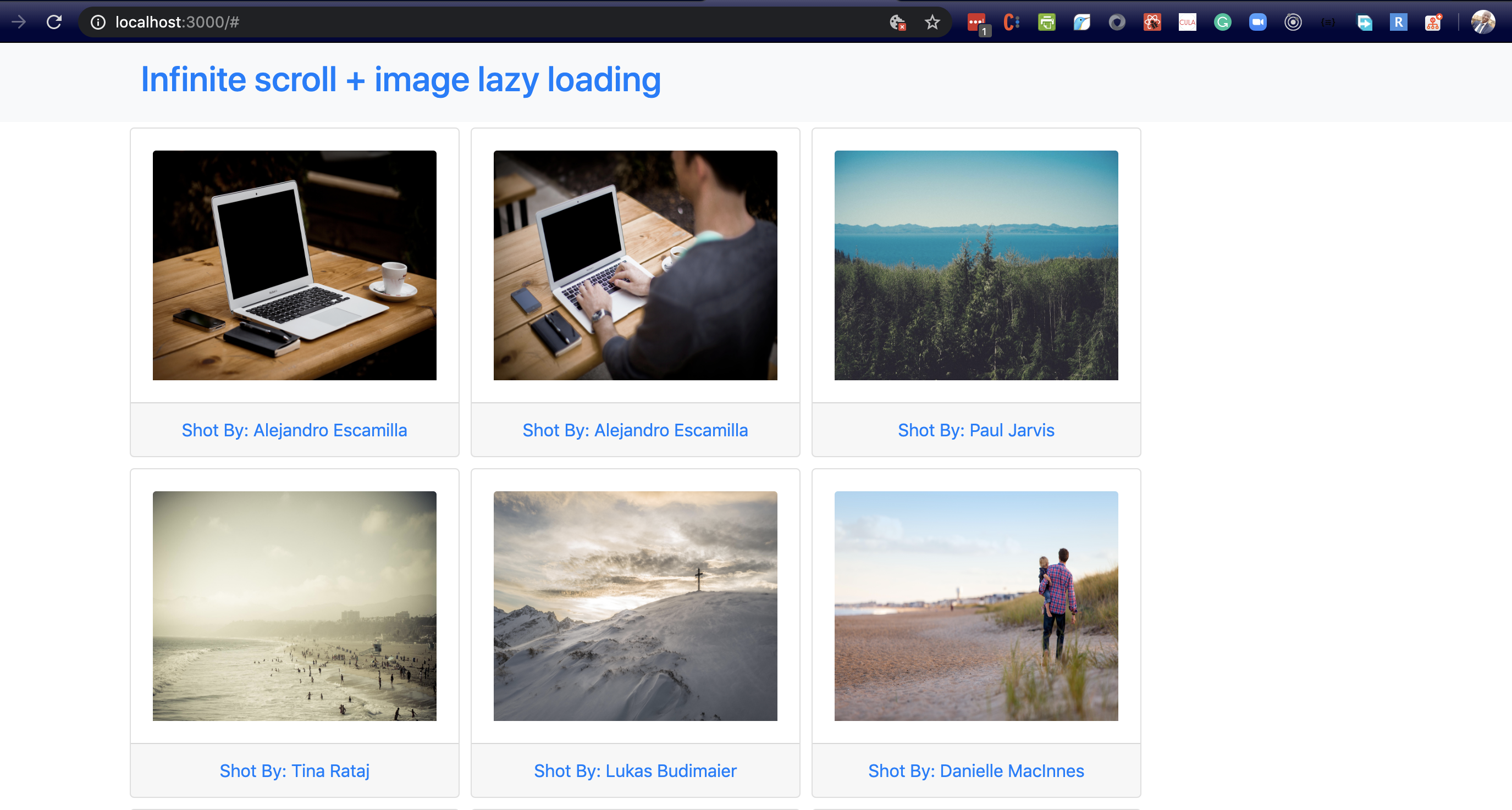
Wiring Up Infinite Scroll
To load more pictures as the user scrolls, the app needs to increment the page parameter and fetch again when the page bottom is reached. A second reducer, pageReducer, tracks the current page.
// App.js
const imgReducer = (state, action) => {
  ...
}
const pageReducer = (state, action) => {
  switch (action.type) {
    case 'ADVANCE_PAGE':
      return { ...state, page: state.page + 1 }
    default:
      return state;
  }
}
const [ pager, pagerDispatch ] = useReducer(pageReducer, { page: 0 })
There is a single action type: ADVANCE_PAGE increments page by one. The fetch URL now interpolates that page value dynamically, and the useEffect dependency array includes pager.page so the request runs whenever the page changes.
fetch(`https://picsum.photos/v2/list?page=${pager.page}&limit=10`)useEffect(() => {
...
}, [ imgDispatch, pager.page ])Observing the page boundary requires a ref. A bottomBoundaryRef is created with useRef(null). During rendering, React assigns the .current property to the DOM node attached via the ref attribute — a sentinel <div id='page-bottom-boundary'> placed after the image grid.
// App.js
import React, { useEffect, useReducer, useCallback, useRef } from 'react';
useEffect(() => {
...
}, [ imgDispatch, pager.page ])
// implement infinite scrolling with intersection observer
let bottomBoundaryRef = useRef(null);
const scrollObserver = useCallback(
node => {
new IntersectionObserver(entries => {
entries.forEach(en => {
if (en.intersectionRatio > 0) {
pagerDispatch({ type: 'ADVANCE_PAGE' });
}
});
}).observe(node);
},
[pagerDispatch]
);
useEffect(() => {
if (bottomBoundaryRef.current) {
scrollObserver(bottomBoundaryRef.current);
}
}, [scrollObserver, bottomBoundaryRef]);bottomBoundaryRef.current = nullbottomBoundaryRef.current = <div id="page-bottom-boundary" style="border: 1px solid red;"></div>A scrollObserver function takes that DOM node and constructs an IntersectionObserver on it. When the intersection is hit, the observer dispatches ADVANCE_PAGE, incrementing pager.page. The effect chain flows like this:
Intersection observed →ADVANCE_PAGEdispatched → page increments →useEffectfor fetch runs → new images arrive and are appended to the grid.
The observer is instantiated inside its own useEffect so it only runs when dependencies change, not on every render. That hook calls scrollObserver only when bottomBoundaryRef.current is not null, avoiding an error from the constructor. The observer creation is wrapped in useCallback to keep the effect stable and prevent repeated re-renders.
// App.js
<div id='image'>
...
</div>
{imgData.fetching && (
  <div className="text-center bg-secondary m-auto p-3">
    <p className="m-0 text-white">Getting images</p>
  </div>
)}
<div id='page-bottom-boundary' style={{ border: '1px solid red' }} ref={bottomBoundaryRef}></div>
While a fetch is in progress, the fetching flag is true, showing the text “Getting images.” When the request finishes, the flag flips back and the text disappears. Adjusting the observer’s threshold option could trigger the fetch before the exact boundary. A red border on the boundary div makes the trigger point visible during testing.
The complete infinite-scroll implementation is available in the 02-infinite-scroll branch of the starter repository.
Lazy Loading Images With a Second Observer
If you open the network tab and scroll, you’ll notice a problem: every image in the fetched page starts downloading as soon as the API call returns, even if it’s far below the viewport. For users on constrained connections that’s wasted bandwidth. The fix is to defer each image until it actually enters the viewport using a second IntersectionObserver.
In src/App.js, below the infinite scroll functions, add a new observer function:
// App.js

// lazy loads images with intersection observer
// only swap out the image source if the new url exists
const imagesRef = useRef(null);
const imgObserver = useCallback(node => {
  const intObs = new IntersectionObserver(entries => {
    entries.forEach(en => {
      if (en.intersectionRatio > 0) {
        const currentImg = en.target;
        const newImgSrc = currentImg.dataset.src;
        // only swap out the image source if the new url exists
        if (!newImgSrc) {
          console.error('Image source is invalid');
        } else {
          currentImg.src = newImgSrc;
        }
        intObs.unobserve(node); // detach the observer when done
      }
    });
  })
  intObs.observe(node);
}, []);
useEffect(() => {
  imagesRef.current = document.querySelectorAll('.card-img-top');
  if (imagesRef.current) {
    imagesRef.current.forEach(img => imgObserver(img));
  }
}, [imgObserver, imagesRef, imgData.images]);
Like scrollObserver, imgObserver takes a DOM node to watch. When the intersection callback fires and en.intersectionRatio > 0, it swaps the real image URL onto the element. The code first checks that the target source exists before assigning it. Wrapping the function in useCallback avoids unnecessary re-renders, and after a successful swap the observer is removed with unobserve so it doesn’t fire again.
Next, a useEffect hook selects every element with the .card-img-top class via document.querySelectorAll and attaches an observer to each one. Because imgData.images is listed as a dependency, the effect re-runs whenever new data arrives, calling imgObserver on all freshly rendered images.
Update the image element itself:
<img
  alt={author}
  data-src={download_url}
  className="card-img-top"
  src={'https://picsum.photos/id/870/300/300?grayscale&blur=2'}
/>
Each image now has a lightweight placeholder as its default src, while the real URL lives in a data-src attribute. When the element scrolls into view, the observer replaces the placeholder with the value from data-src. Keeping the placeholder small minimizes the initial download cost.
In practice you’ll see the small default image (a lighthouse in the demo) still filling some cells until you scroll them into the viewport, at which point the full-resolution picture loads in.
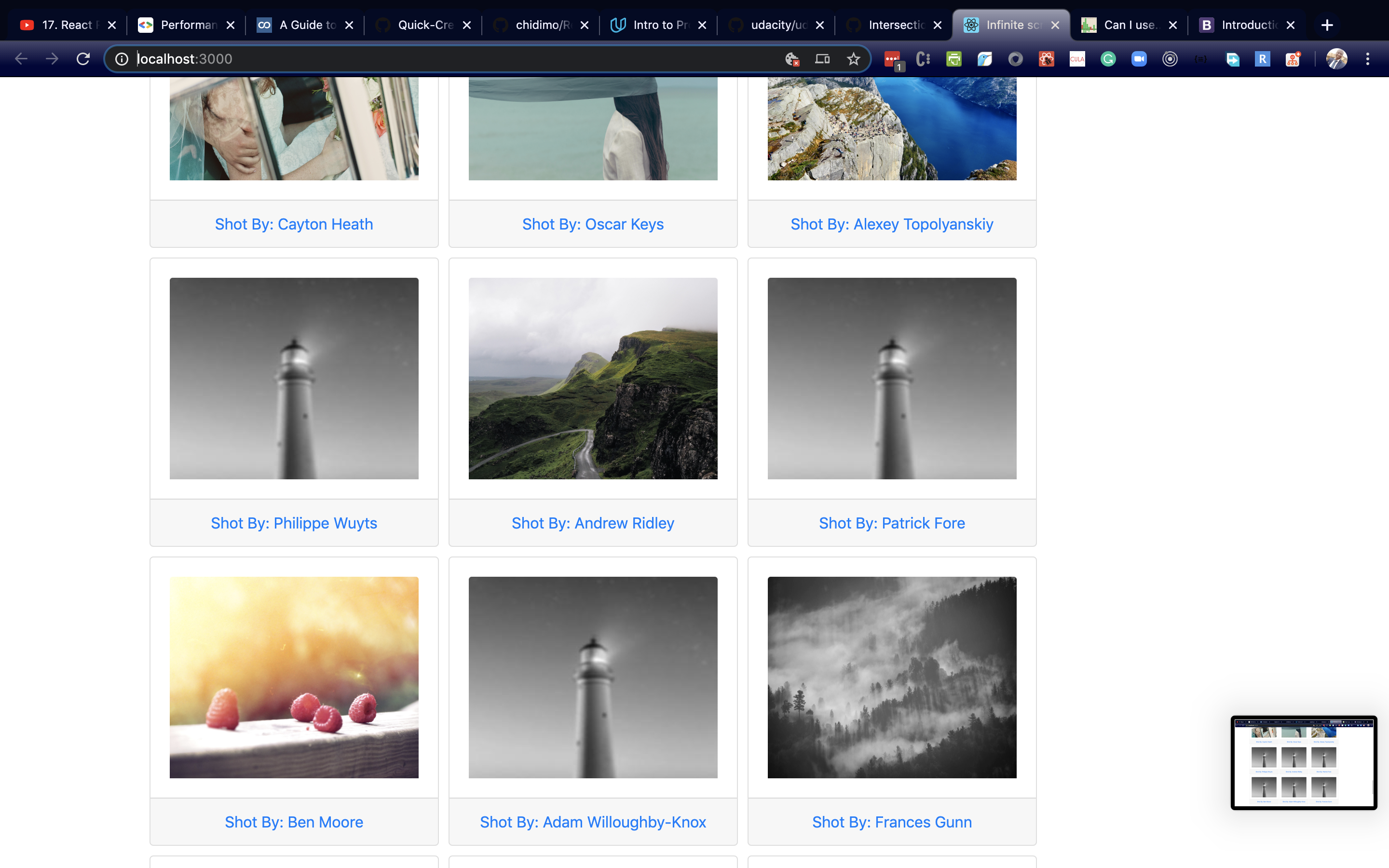
The complete implementation for this stage is available in the 03-lazy-loading branch of the project repository.
Reusable Custom Hooks
Fetching, infinite scrolling, and lazy loading are all useful patterns beyond this one demo. To reuse them elsewhere, you can extract them into custom hooks, which the article’s project names useFetch, useInfiniteScroll, and useLazyLoading. The resulting logic is identical to what you already wrote in App.js, but isolated in its own module.
Create a new file, src/customHooks.js, and move the three functions into it:
// customHooks.js

import { useEffect, useCallback, useRef } from 'react';
// make API calls and pass the returned data via dispatch
export const useFetch = (data, dispatch) => {
  useEffect(() => {
    dispatch({ type: 'FETCHING_IMAGES', fetching: true });
    fetch(`https://picsum.photos/v2/list?page=${data.page}&limit=10`)
      .then(data => data.json())
      .then(images => {
        dispatch({ type: 'STACK_IMAGES', images });
        dispatch({ type: 'FETCHING_IMAGES', fetching: false });
      })
      .catch(e => {
        dispatch({ type: 'FETCHING_IMAGES', fetching: false });
        return e;
      })
  }, [dispatch, data.page])
}

// next code block here
The key difference from the original code is that the hooks now accept arguments instead of relying on closures in the component. useFetch takes a dispatch function and a data object; the dispatch updates state in the parent component, while the data object contains the API endpoint parameters. useInfiniteScroll accepts a scrollRef and a dispatch callback, where the ref is the sentinel element being watched and the dispatch handles incrementing the page counter. useLazyLoading takes a CSS selector string (used to locate images) and an array; when the array changes, its internal useEffect runs and wires up observers on all currently matching nodes.
Back in src/App.js, import the hooks, remove the local function definitions (fetch, scroll observer, lazy loading), and keep the reducers and their usage. Then instantiate the hooks:
// App.js

// import custom hooks
import { useFetch, useInfiniteScroll, useLazyLoading } from './customHooks'

  const imgReducer = (state, action) => { ... } // retain this
  const pageReducer = (state, action) => { ... } // retain this
  const [pager, pagerDispatch] = useReducer(pageReducer, { page: 0 }) // retain this
  const [imgData, imgDispatch] = useReducer(imgReducer,{ images:[], fetching: true }) // retain this

let bottomBoundaryRef = useRef(null);
useFetch(pager, imgDispatch);
useLazyLoading('.card-img-top', imgData.images)
useInfiniteScroll(bottomBoundaryRef, pagerDispatch);

// retain the return block
return (
  ...
)
bottomBoundaryRef is the same reference you built for the infinite scroll sentinel. Note that useLazyLoading receives '.card-img-top', the class name with the leading dot included — this simplifies the internal querySelectorAll call. useFetch wires the pager state to the API URL, and useInfiniteScroll connects the shared ref to the action that bumps the page count.
The final state is available in the 04-custom-hooks branch of the repository.
Why This Approach Works
The entire setup relies on the native IntersectionObserver API, which the browser increasingly supports out of the box. Combined with React’s useEffect and useCallback hooks for lifecycle management, and useReducer for state transitions, this gives you a clean, performant pattern for paginated content. When you extract the logic into custom hooks, you can drop the whole infinite scroll and lazy loading system into any other component with just a few lines of setup.
References and Further Reading
- Project repository: Infinite Scroll + Image Lazy Loading
- Usability findings on pagination vs. infinite scroll vs. load-more buttons
- Lorem Picsum image service
- IntersectionObserver explainer on Web Fundamentals
- Can I Use — browser support lookup
- Intersection Observer API on MDN
- React components and props
- React
useCallbackreference - React
useReducerreference
For more on the underlying web platform APIs and React patterns, see the collection of related articles on performance measurement, React Server Components, and leveraging lesser-known JavaScript APIs.



