
Establishing Trust in Digital Identities
Determining who is who online remains one of the hardest problems in application security. Improper identity verification can expose user data in ways that are difficult to recover from. The OWASP Top 10 Proactive Controls breaks the core approaches down into three categories—passwords, MFA, and cryptographic authentication—plus a common addition: federated identity via SSO. Choosing the right approach depends on your users and your risk model, so it helps to understand what each method requires.
Letting a Trusted Third Party Handle Authentication
The simplest way to verify identity is to delegate it. With single sign-on, your users sign in to a platform that already has a solid authentication system, and that platform tells your application who they are. You won’t store passwords or manage authentication infrastructure, which removes a significant chunk of security liability from your codebase.

SSO does require you to trust the identity provider (often GitHub, Google, or Apple). That trust is usually reasonable: major providers have extensive security resources dedicated to protecting credentials. In most cases, it is safer to rely on such a provider than to write your own authentication from scratch.
For web applications, the most common SSO implementations rely on OAuth or SAML. Your application can also use an existing identity protocol by following a provider’s documentation—for example, GitHub's OAuth flow. The support for different user bases, compliance needs, and legacy systems will determine whether OAuth or SAML is more appropriate for your context.
Structuring a Secure Password Lifecycle
When users aren’t authenticated with SSO, the traditional route is to ask for a password. This is still the most broadly recognized way to create an account, but there are specific points in a password’s lifecycle where security commonly breaks down.
Onboarding Realistic Strength Requirements
Setting rules that push users toward long but memorably passphrases yields better security than imposing complex character requirements. Complexity mandates often have mixed results.
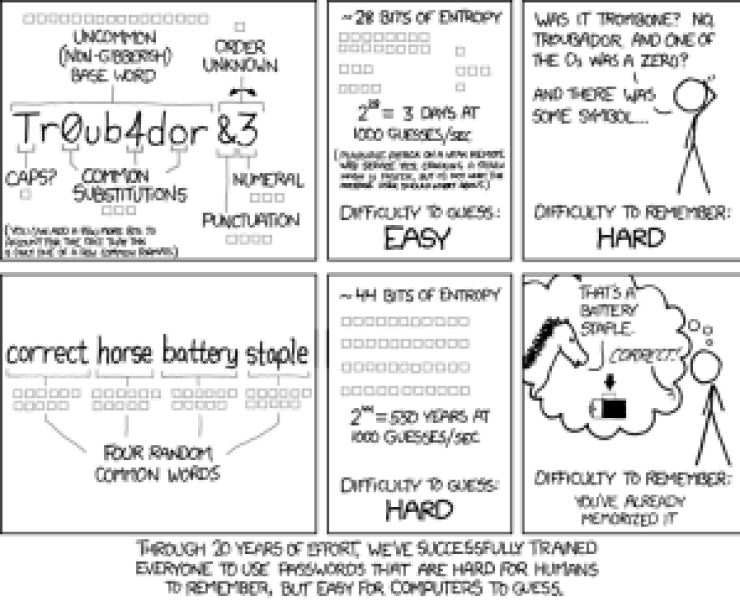
OWASP’s guidance suggests three guardrails: enforcing a minimum length of ten characters, allowing all printable ASCII characters, and specifically blocking widely used or previously compromised passwords. Blocking common passwords makes brute force attempts far more costly. Length-focused rules also improve usability—and your users will be more likely to remember their credentials without needing to rotate them against a forced-character mix.
Recovering Accounts Securely
When users forget a password, they should be able to prove their identity through an alternate path. A secure recovery flow should require a combination of factors: something the user knows (such as a security question) and something they own (such as a device that can receive a reset token). OWASP’s cheat sheets on forgotten passwords provide deeper protocols for edge cases.
Recovery flows should also be predictable. If the user receives a password reset request they didn’t initiate, the page should present clear instructions to change the password immediately and investigate who may have triggered the request.
Hashing Passwords Correctly
Passwords stored in plaintext are an existential risk; any database reader instantly gains account access. Properly hashed passwords, by contrast, force an attacker to invest enormous time and computing power in reversing each credential. Two principles are critical: choosing a vetted, slow algorithm, and salting each hash with a random string to defeat rainbow table lookup.
Prominent, battle-tested options include Argon2 and Bcrypt. Both are designed to be computationally expensive from a CPU and GPU perspective, which directly works against rapid brute force attempts.
Limiting Guess Attempts
Given unlimited attempts, any password is guessable. Rate limiting is how you avoid an asymptotic approach to “unlimited.” A common pattern: certain failed attempts per hour locks the account temporarily, and the user is notified of the failed attempts via email. You can track failure counts in a tool like Redis and apply the limit at the application layer.
Rate limiting also serves as a defense against credential stuffing, when attackers replay usernames and password pairs leaked from other services. Monitoring your login endpoints can provide early signals that an organized attack is in progress.
Layering on Multi-Factor Authentication
A strong password alone isn’t always enough. When a user has MFA enabled, an attacker with a leaked password still fails to gain access without the second factor. MFA relies on users producing two different kinds of credentials: one they know (password, PIN) and one they own (phone, hardware key).
For developers, supporting MFA means integrating with a proven protocol like TOTP or WebAuthn; push-based notifications can also have a solid security posture if carefully implemented. SMS-based tokens pose real interruption and attacker manipulation risks, from SIM-swapping to phishing middlemen. Around the industry, high-trust platforms have begun making 2FA a hard requirement for contributions—pressuring software around key repositories to use at least one secure second factor.
The goal across all of these patterns is to have your app lean on as many independent checks as possible before treating a user as authenticated. That keeps risk concentrated on systems designed to defend against compromise, rather than on a single hand-coded gate. For a deep dive, consult the OWASP Top 10 Proactive Controls series on hardening your application’s identity boundaries.
Putting Cryptography to Work in Authentication
With your security guardrails in place and your users' keychain habits established, the final pillar is ensuring the application itself manages identity through cryptographic authentication. The two prevailing approaches each come with distinct trade-offs and implementation pitfalls.
Session-Based Authentication
A session is a server-side object holding details about who the user is, when they logged in, and other identity attributes. To identify a user, the server typically places a cookie in the browser containing a session identifier that maps back to that server-side record.
When implementing sessions, these requirements are non-negotiable:
- Set secure cookie flags: In nearly every case, this means
httpOnly,secure, andsamesite=lax. PHP and other frameworks offer these settings by default now; enable them explicitly regardless. - Ensure the session ID is long, unique, and cryptographically random.
- Rotate the session identifier on every re-authentication. For example, PHP's
session_regenerate_id()should be called on login.
A common pattern is to issue a new session whenever a user moves from anonymous status to authenticated. Never simply modify the existing anonymous session.
Token Authentication
Tokens invert the pattern: nothing is stored on the server. Instead, the server cryptographically signs a payload and hands it to the client. The client later presents that signed data, and the server verifies authenticity without looking up any stored state.
That inversion makes token schemes easy to get wrong. Implement them carefully, following these baseline rules:
- Use a long, random secret key. The entire security model hinges on that key. If you choose a weak secret, an attacker can brute-force it and mint valid tokens for every user simultaneously. Built-in secrets like the framework bootstrap key are the most common source of this flaw.
- Deploy a trusted asymmetric algorithm like
ES256. Avoid storing user-identifying data in plaintext on the token unless it's been vetted for that purpose. - Set an expiration that matches your application's usage pattern — short-lived tokens for sensitive systems, longer-lived for less sensitive contexts.
- Store tokens securely in the client. Choose per platform:
- For mobile that means
KeyStore(Android) orKeychain(iOS). - For web, recommend cookie storage with the same
httpOnly,SecureandSameSite=Laxflags applied.
- For mobile that means
Web-based token authentication deserves caution beyond this list. Best practices vary greatly by framework, so put time into deeper research before rolling your own.
Correctly verifying identity is notoriously tricky, even when a library handles the heavy lifting. Avoid the common shortfalls above and you spare your application — and your users — some of the most frequent security failures.


