

Shipping Less JavaScript: A Dependency Audit With the Platform in Mind
The gap between “you need a library for this” and “the browser does this” keeps closing. Most teams install a dependency once and rarely revisit that decision, but the web platform continues to evolve. In a typical mid-sized JavaScript application, you can often find 60–90KB (minified and gzipped) of dependencies that the browser can now handle natively. Date and number formatting, HTTP requests, modals, and deep cloning were real gaps a few years ago—many aren't anymore.
The libraries linger not out of laziness, but because teams rarely re-audit dependencies on a baseline cadence. npm audit checks for security vulnerabilities, but the question “is this library still doing something the browser can’t?” seldom gets asked. This article runs that audit in clusters, since the wins tend to come in groups. We'll examine the bundle math, build a reusable decision framework, and address cases where the platform still falls short.
Baseline: A Quick Primer
Baseline is a project from the WebDX Community Group that indicates how safe a web feature is to use across Chrome, Edge, Firefox, and Safari. A feature has one of three states:
- Limited availability: Not shipped in all major engines yet; not safe without a fallback.
- Baseline Newly available: Just landed in all major engines; works on up-to-date browsers but may not be present on older devices.
- Baseline Widely available: Has been in all major engines for 30 months; safe to use without much thought.
The 30-month gap between “Newly” and “Widely” matters for this audit. A Widely available feature usually means you can drop a library today. A Newly available feature is droppable if you check your audience first or are comfortable with a feature check. These two cases require different treatment.
You can check any feature on webstatus.dev, MDN reference pages (which show a Baseline badge), or programmatically via the web-features npm package.
Three Questions Before Deleting Anything
Reading “the browser does this now” and immediately ripping libraries out is tempting but risky. A swap that looks free on paper can break things for some users or cost a feature you rely on. Before dropping any library, ask three questions, which we'll reuse across every cluster:
1. Is the replacement Baseline-safe for my audience?
Not abstractly “is it Baseline,” but “is it safe for the people who use my app.” A Widely available native feature usually means yes. If only Newly available, check your analytics or browserslist config to see how many users would miss out. A B2B dashboard on latest browsers differs drastically from a public site with an old-Android long tail.
2. What does the swap actually cost?
Dropping a library isn't always free. If the native feature needs a polyfill, and that polyfill is heavier than the library you're removing, your bundle gets bigger unless you load the polyfill conditionally.
3. Does the platform feature cover my real use case?
Libraries often do more than the platform feature they resemble. axios isn't just fetch with automatic JSON parsing—it has interceptors, request cancellation, and retries. Using those features means a straight swap leaves you reimplementing them. Check what you actually use before assuming a drop-in replacement exists.
Cluster 1: Internationalization
This is usually where the most kilobytes sit on top of Widely available features. The browser ships formatting tools under the Intl namespace, making many small libraries unnecessary:
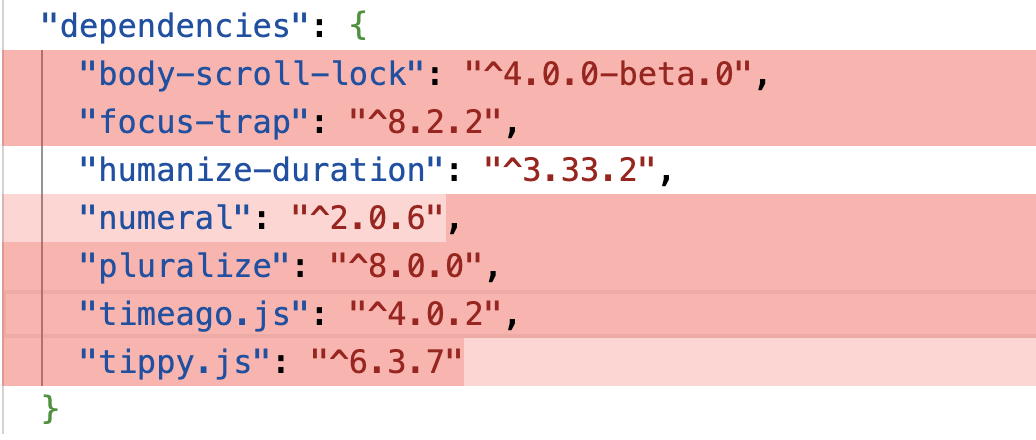
timeago.js(1 KB gz) →Intl.RelativeTimeFormatpluralize(2.3 KB gz) →Intl.PluralRulesnumeral(3.9 KB gz) →Intl.NumberFormathumanize-duration(6.6 KB gz) →Intl.DurationFormat- List-joining helpers →
Intl.ListFormat
Relative Time
The Intl.RelativeTimeFormat API is Widely available and converts timestamps to phrases like “3 hours ago.”
const rtf = new Intl.RelativeTimeFormat("en", { numeric: "auto" });

rtf.format(-1, "day"); // "yesterday"
rtf.format(3, "hour"); // "in 3 hours"
rtf.format(-2, "week"); // "2 weeks ago"
The numeric: "auto" option produces “yesterday” rather than “1 day ago” where the language supports it. What timeago.js adds beyond this snippet is unit selection—given a date, it decides whether to say “seconds” or “days.” With the native API, you calculate the difference and find the largest fitting unit yourself. It's a few lines of arithmetic, and once written, the library becomes unnecessary.
Numbers, Currency, and Lists
Intl.NumberFormat handles thousands separators, currency, percentages, and compact notation—most of what number-formatting libraries do.
new Intl.NumberFormat("en-US").format(1234567.89);
// "1,234,567.89"

new Intl.NumberFormat("en-US", { style: "currency", currency: "USD" }).format(
  1234.5,
);
// "$1,234.50"

new Intl.NumberFormat("en", { notation: "compact" }).format(1200000);
// "1.2M"
Intl.ListFormat, also Widely available, handles joining arrays into sentences, including Oxford comma logic that developers often hand-roll:
const lf = new Intl.ListFormat("en", { style: "long", type: "conjunction" });

lf.format(["Alice", "Bob", "Carol"]);
// "Alice, Bob, and Carol"
The Duration Caveat
Intl.DurationFormat is the platform equivalent of humanize-duration, turning milliseconds into “1 hour, 30 minutes.”
const df = new Intl.DurationFormat("en", { style: "long" });

df.format({ hours: 1, minutes: 30 });
// "1 hour, 30 minutes"
However, Intl.DurationFormat is Baseline Newly available, not Widely. It shipped in all major engines in March 2025 and won't be Widely available until 2027. This fails question 1 for broad-audience apps unless you check traffic or add a fallback. For internal tools on modern browsers, it works today. For public sites with old devices, wait another year or use a feature check.
The Bundle Math
An app using the full set—humanize-duration, timeago.js, pluralize, and numeral—carries roughly 14 KB gzipped of dependencies, most replaceable with Widely available APIs. This cluster is typically the easiest win in an audit.
Cluster 2: HTTP Clients
HTTP libraries require more nuance. Common choices include axios (17 KB gz) and superagent (19 KB gz). For most requests, fetch plus AbortController is sufficient, and both are Widely available.
// axios
const { data } = await axios.get("/api/users");

// fetch
const res = await fetch("/api/users");
const data = await res.json();
The extra line (res.json()) reflects fetch's explicitness versus axios's implicitness. This pattern holds across the cluster: fetch does less by default, and you decide what to add back.
Timeouts
Where axios offers a timeout option, fetch uses AbortSignal.timeout():
const res = await fetch("/api/users", {
  signal: AbortSignal.timeout(5000), // abort after 5 seconds
});
Where fetch Doesn't Replace axios
Question 3 does the heavy lifting here. The specific gaps:
fetchdoesn't reject on HTTP errors. A404or500resolves the promise; you must checkres.ok.axiosrejects on any non-2xx status.- No interceptors.
fetchhas no built-in way to attach auth tokens or handle 401s centrally. You'd write a custom wrapper to replicate this. - No automatic retries.
axios(with a plugin) can retry failed requests. This is your code to write withfetch. - No upload progress.
fetchlacks first-class upload progress reporting. File uploaders with progress bars remain a valid reason to keep a library.
None of these are hard to rebuild, and most apps only use one or two. But this isn't a blind find-and-replace situation. Examine how your HTTP client is actually used first. For plain GETs and POSTs, dropping axios for a thin fetch wrapper saves about 17 KB gzipped.
Modal Dialogs: The <dialog> Element and More
The modal dialog is a classic case of a problem that the platform has now solved more robustly than most libraries. Packages like a11y-dialog (1.8 KB gz), focus-trap (6.6 KB gz), and body-scroll-lock (1.3 KB gz) exist primarily to handle accessibility: trapping focus inside the dialog, closing on Escape, returning focus to the trigger element, and ensuring the dialog renders on top of everything else.
The native <dialog> element, Widely available in all Baseline browsers, handles all of these concerns through showModal(). The browser moves focus into the dialog, makes the rest of the page inert so tabbing is contained, processes Escape to close, and restores focus to the originating element. Dialogs rendered this way live in the browser's Top layer, so z-index conflicts disappear, and a ::backdrop pseudo-element is available for styling the overlay.
<dialog id="confirm">
  <form method="dialog">
    <p>Delete this file?</p>
    <button value="cancel">Cancel</button>
    <button value="delete">Delete</button>
  </form>
</dialog>

const dialog = document.querySelector("#confirm");

dialog.showModal(); // focus moves in, background goes inert, Escape closes it

dialog.addEventListener("close", () => {
  console.log(dialog.returnValue); // "cancel" or "delete"
});
That single element replaces both your modal library and focus-trap. The one gap is locking background scroll, previously the job of body-scroll-lock. That is now a one-line CSS rule:
body:has(dialog:modal) {
  overflow: hidden;
}
The selector uses dialog:modal rather than dialog[open] because the open attribute fires with both show() and showModal(); the :modal pseudo-class is only true for a genuinely modal dialog, so the scroll lock applies only when showModal() was called.
Three libraries thus collapse into one element and one rule.
Popovers and Positioning
For lighter UI, the Popover API covers dropdown menus, tooltips, and floating panels, the territory of tippy.js (14 KB gz) plus its bundled Popper positioning engine. The Popover API is Baseline Newly available since January 2025.
<button popovertarget="menu" id="options">Options</button>

<div id="menu" popover>
  <!-- menu content -->
</div>
With no JavaScript, the popovertarget attribute toggles the popover on click, clicking outside closes it, and Escape dismisses it. The element also renders in the Top layer.
The other half of a tooltip library is positioning: pinning the floating element to a trigger and avoiding viewport overflow. That responsibility is now the CSS anchor positioning feature:
#options {
  anchor-name: --trigger;
}

.tooltip {
  position-anchor: --trigger;
  position-area: top;
  margin: 0;
}
Anchor positioning is the newest feature discussed. It became Baseline Newly available in January 2026 with Firefox 147 support, after shipping in Chrome 125 and Safari 26. Being this fresh, it is a question-1 feature for modern-audience projects only, and the more advanced aspects like position-try fallbacks have patchy support. Keep a fallback for older browsers.
Combining <dialog>, the Popover API, and anchor positioning, this cluster (tooltips, modals, focus-trap, and body-scroll-lock) saves roughly 24 KB gzipped. The result typically ships with better accessibility defaults than hand-written solutions.
Lodash Functions With Native Equivalents
Lodash is rarely imported wholesale today, but individual functions remain common, either from the lodash package (25 KB gz) or standalone packages like lodash.clonedeep and lodash.groupby. Several of these now map directly onto platform features.
Grouping and Cloning
lodash.groupby reorganizes an array into an object keyed by a property. The native Object.groupBy is identical in purpose:
const products = [
  { name: "Apple", category: "fruit" },
  { name: "Carrot", category: "vegetable" },
  { name: "Banana", category: "fruit" },
];

const grouped = Object.groupBy(products, (product) => product.category);
// {
//   fruit: [{ name: "Apple", ... }, { name: "Banana", ... }],
//   vegetable: [{ name: "Carrot", ... }],
// }
There is also Map.groupBy for when a Map is preferable to a plain object, such as for non-string keys. Both are Baseline Newly available since March 2024 and on track for Widely available status in late 2026.
For lodash.clonedeep, the platform counterpart is structuredClone, which is Widely available:
const original = { user: { name: "Sam", roles: ["admin"] } };

const copy = structuredClone(original);
copy.user.roles.push("editor");

original.user.roles; // ["admin"] (unchanged)
structuredClone handles the cases that break JSON.parse(JSON.stringify(...)): it correctly clones Date, Map, Set, ArrayBuffer instances, and circular references. The limitation is that it throws on functions and DOM nodes, and it drops prototypes on class instances. For plain data, which covers most deep-clone usage, it is a seamless substitute.
Set Methods
The Set object now includes the operations that previously came from Lodash helpers like union and intersection. These are Baseline Newly available, since June 2024:
const admins = new Set(["sam", "alex", "jo"]);
const editors = new Set(["alex", "kim"]);

admins.intersection(editors); // Set { "alex" }
admins.union(editors); // Set { "sam", "alex", "jo", "kim" }
admins.difference(editors); // Set { "sam", "jo" }
The full list comprises union, intersection, difference, symmetricDifference, isSubsetOf, isSupersetOf, and isDisjointFrom.
What To Keep
Not everything in Lodash has a native replacement. debounce and throttle remain without platform equivalents and are genuinely useful, so keeping lodash.debounce alone is reasonable; this is not a recommendation to delete all of Lodash but to stop shipping parts the browser already has. Removing lodash.clonedeep and lodash.groupby alone saves about 8 KB gzipped, and if the full lodash package came in for a few utilities, replacing the platform-covered ones may allow dropping the entire dependency.
Temporal: A Reason To Hold Off
Every cluster above ends in switching ship for drop-the-library. Temporal is the deliberate counterexample: a framework that says wait. The soon-to-ship Temporal API fixes Date with immutable objects, sane time zones, and no zero-indexed months. It reached TC39 Stage 4 in March 2026 and is in the ES2026 specification. Firefox shipped it in version 139 (2025), and Chrome in 144 (January 2026). Safari has it only in Technology Preview so far, with stable release expected later in 2026.
Temporal is not Baseline; it remains in limited availability because of Safari. Using it everywhere today requires a polyfill, and the economics fail. The official @js-temporal/polyfill is about 44 KB gzipped, and even the smaller implementation without an internal BigInt dependency weighs 19 KB gzipped. A lean date library like dayjs is about 3 KB gzipped. Swapping dayjs for Temporal plus the lightweight polyfill adds roughly 41 KB to the bundle, absent conditional loading.
That fails the framework on two counts: Temporal isn't Baseline-safe for broad audiences, and the polyfill costs ten times more than the library to be removed. Its feature advantages do not overcome those obstacles yet.
The practical verdict: keep dayjs or date-fns for now. Revisit when Safari ships Temporal in a stable release and the API reaches Baseline; then the polyfill can be loaded only for old-browser users. This is a future win, not a current one.
Auditing A package.json For Platform Replacements
These clusters are a map, not the terrain. To locate your own opportunities:
- Inventory production dependencies. Identify what ships to the browser.
- Measure real costs. Bundlephobia gives per-package gzipped sizes. For the accurate picture after tree-shaking, run a tool such as
npx source-map-explorerornpx vite-bundle-visualizerfor Vite because what matters is cost in your bundle, not in isolation. - Check Baseline status of each candidate replacement at webstatus.dev or via the MDN Baseline badge.
- Apply the three questions to each candidate: audience safety via your
browserslist; net byte cost of the swap; coverage of your actual usage patterns. - Swap progressively. Widely available features can replace dependencies outright. Newly available ones warrant a feature check and fallback:
if (typeof Intl.DurationFormat === "function") {
  // use the platform feature
} else {
  // fall back to the library, or a simpler format
}
This pattern cuts code for the users who can run modern features without breaking those who cannot.
The Aggregate And The Habit
The savings stack up: roughly 14 KB gzipped for internationalization, 17 KB for HTTP, 24 KB for UI primitives, and 8 KB or more for Lodash functions. For a typical mid-sized app, that's 60-90 KB gzipped returned to the platform (with uncompressed figures two to three times higher), plus more if the entire lodash package shipped. Among the lean examples above, a single dialog library alone could weigh as much as 50 KB in some projects.
The dynamic is not static. Three features deserve watching:
- Temporal reaching native release in Safari. At that point the date library and the polyfill both become optional, and today's regression turns into a significant savings.
- CSS anchor positioning maturing: as it moves from Baseline Newly available (January 2026) toward Widely available, dropping popover and tooltip positioning libraries safely broadens.
- The 2024 API batch becoming Widely available:
Object.groupBy, the Set methods, and companions move from audience-dependent to simply usable, expected in late 2026.
None of this cleanups operate once. The platform adds features continually, closing the distance between "a library is needed" and "the browser handles it." The durable practice is quarterly: list dependencies, check what reached Baseline, and return to the platform what it can now handle. Pick one cluster, open package.json, and measure how much of it the browser already understands.



