

Detecting Outside Clicks: The DOM Approach
For years, the go-to answer for detecting clicks outside a specific element has been the Node.contains DOM API. As MDN describes it, this method "returns a Boolean value indicating whether a node is a descendant of a given node."
<section>
  <div class="click-text">
    click inside and outside me
  </div>
</section>
const concernedElement = document.querySelector(".click-text");
document.addEventListener("mousedown", (event) => {
if (concernedElement.contains(event.target)) {
console.log("Clicked Inside");
} else {
console.log("Clicked Outside / Elsewhere");
}
});The approach is straightforward: attach a mousedown listener to document, and in the handler check whether the event.target is contained within your monitored element. If it isn't, the click was outside.
Wrapping the Logic in a React Component
We can port this detection into a reusable React class component called OutsideClickHandler. It accepts two props: children (any valid React children) and onOutsideClick (a callback invoked when a click occurs anywhere outside the wrapped content).
<OutsideClickHandler
  onOutsideClick={() => {
    console.log("I am called whenever click happens outside of 'AnyOtherReactComponent' component")
  }}
>
  <AnyOtherReactComponent />
</OutsideClickHandler>
import React from 'react';
class OutsideClickHandler extends React.Component {
render() {
return this.props.children;
}
}The initial implementation is intentionally minimal—we simply render the children as-is. The real work begins when we wrap those children in a container element, say a div, and assign a React ref to it:
import React, { createRef } from 'react';

class OutsideClickHandler extends React.Component {
  wrapperRef = createRef();

  render() {
    return (
      <div ref={this.wrapperRef}>
        {this.props.children}
      </div>
    )
  }
}
That ref gives us direct access to the container's DOM node, which we use to attach the event listener inside componentDidMount and clean it up in componentWillUnmount:
class OutsideClickHandler extends React.Component {
  componentDidMount() {
    document
      .addEventListener('mousedown', this.handleClickOutside);
  }

  componentWillUnmount(){
    document
      .removeEventListener('mousedown', this.handleClickOutside);
  }

  handleClickOutside = (event) => {
    // Here, we'll write the same outside click
    // detection logic as we used before.
  }
}
The logic in the handler is clear:
class OutsideClickHandler extends React.Component {
  componentDidMount() {
    document
      .addEventListener('mousedown', this.handleClickOutside);
  }

  componentWillUnmount(){
    document
      .removeEventListener('mousedown', this.handleClickOutside);
  }

  handleClickOutside = (event) => {
    if (
      this.wrapperRef.current &&
      !this.wrapperRef.current.contains(event.target)
    ) {
      this.props.onOutsideClick();
    }
  }
}- The element that triggered
mousedownis neither our container (this.wrapperRef.current) nor any node inside it (!this.wrapperRef.current.contains(event.target)) - If both conditions hold, we fire
onOutsideClick
The Portal Problem
This approach works beautifully—as long as your UI structure stays flat. The moment you introduce React portals, everything breaks. Portals render children into a DOM node that lives entirely outside the parent component's DOM hierarchy. The React component tree and the actual DOM tree diverge.
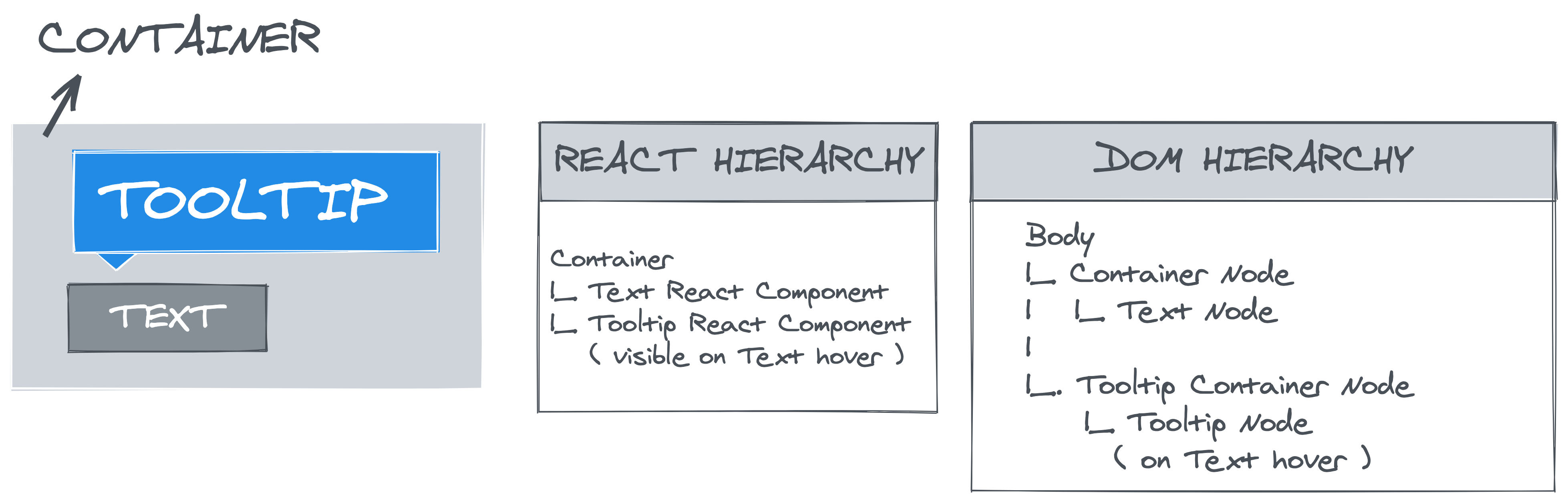
Imagine a Tooltip React component nested inside a Container React component. Inspect the DOM and you'll find the Tooltip's DOM node sitting in a completely separate structure. When our OutsideClickHandler wraps that tooltip, the Node.contains check fails: clicking on the tooltip itself registers as an outside click because the tooltip's DOM node isn't a descendant of our container. The dropdown closes when you interact with it—obviously wrong behavior. Try it:
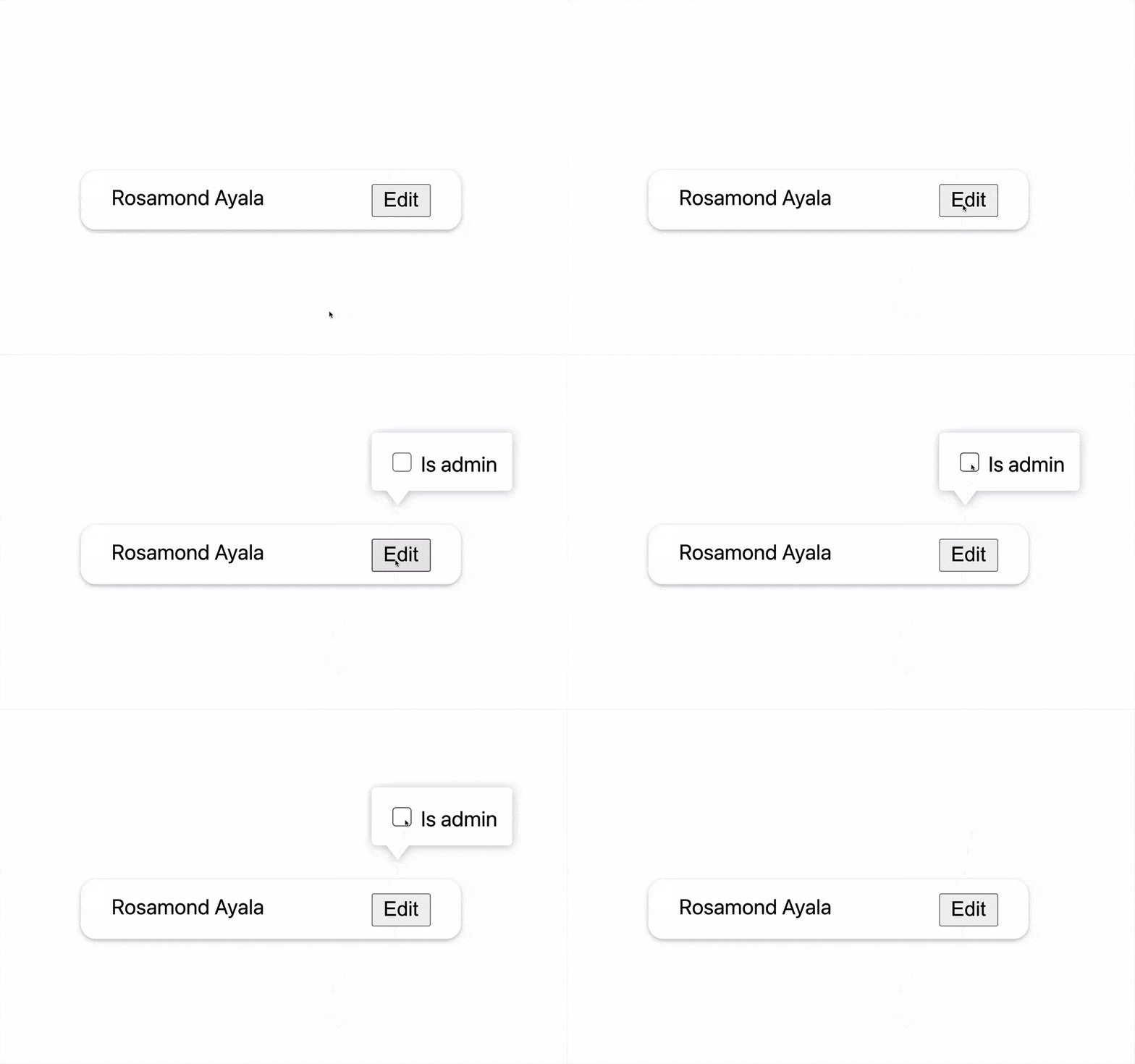
Node.contains to detect outside click of React component gives wrong result for children rendered in a React portal. (Large preview)A JavaScript-Only Solution
To escape this limitation, we must abandon DOM-hierarchy checks entirely. Instead of asking the DOM where a click occurred, we store that state in JavaScript itself.
The intuition is simple. Our component has a set of children—say, a button and its portal-rendered popover. Each child receives a mousedown prop that flips a flag, clickCaptured, to true. When any event bubbles up to the document, we examine that flag: if it's true, the click landed on one of our tracked children; if it's false, the click occurred elsewhere, and we should trigger onOutsideClick.
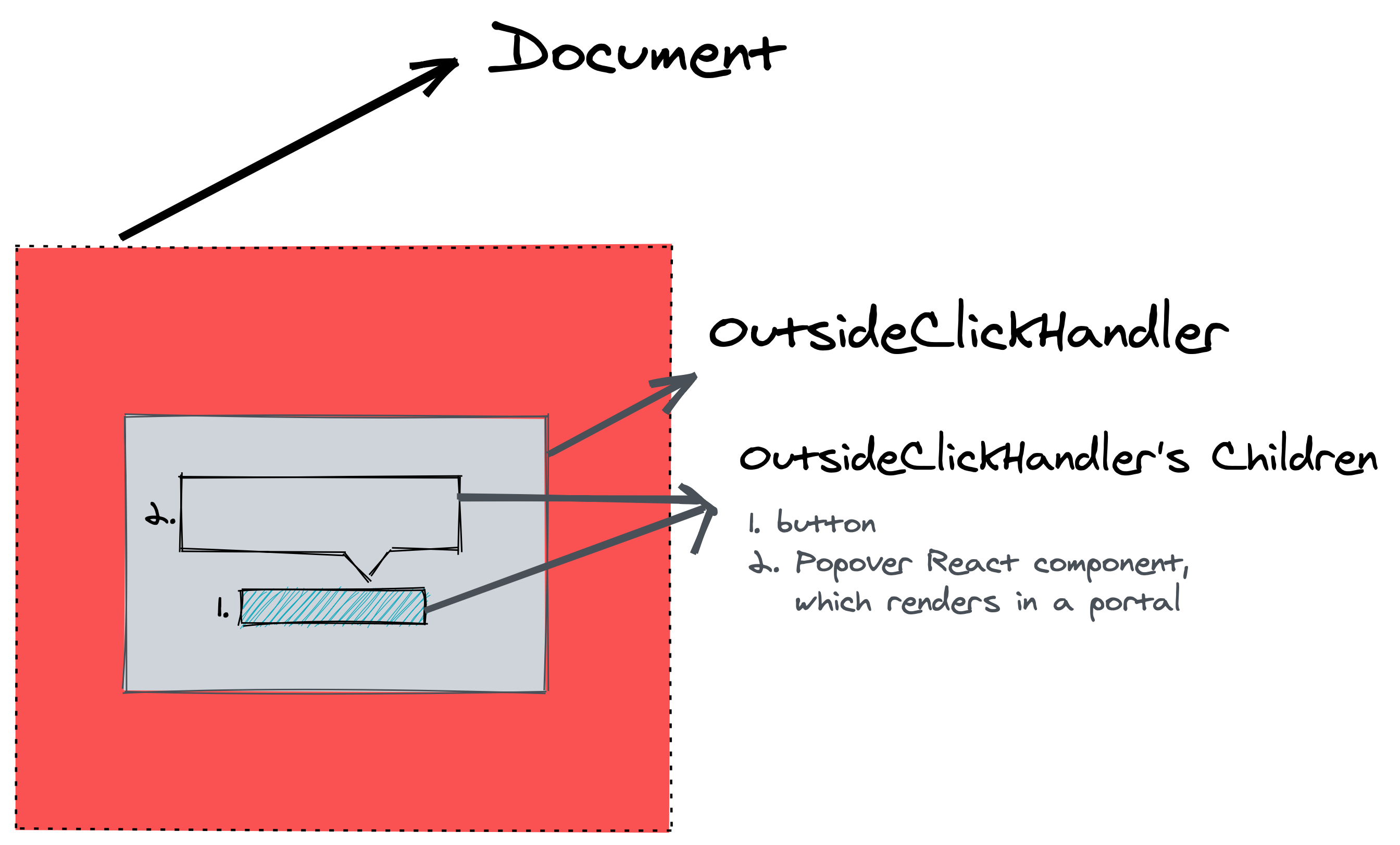
document, the OutsideClickHandler component, and its children rendered in React portal. (Large preview)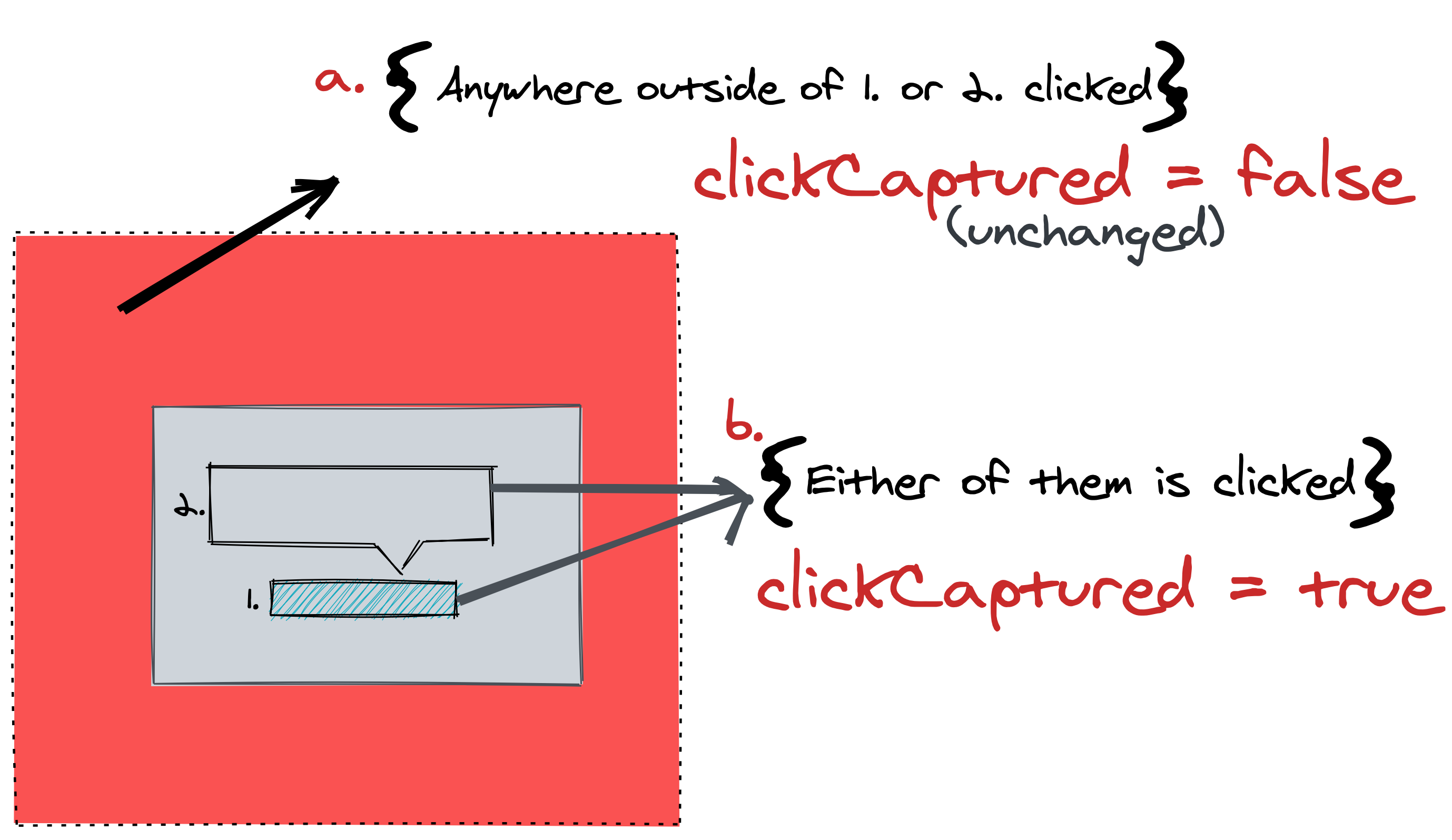
OutsideClickHandler component are clicked, we set clickCaptured to true. (Large preview)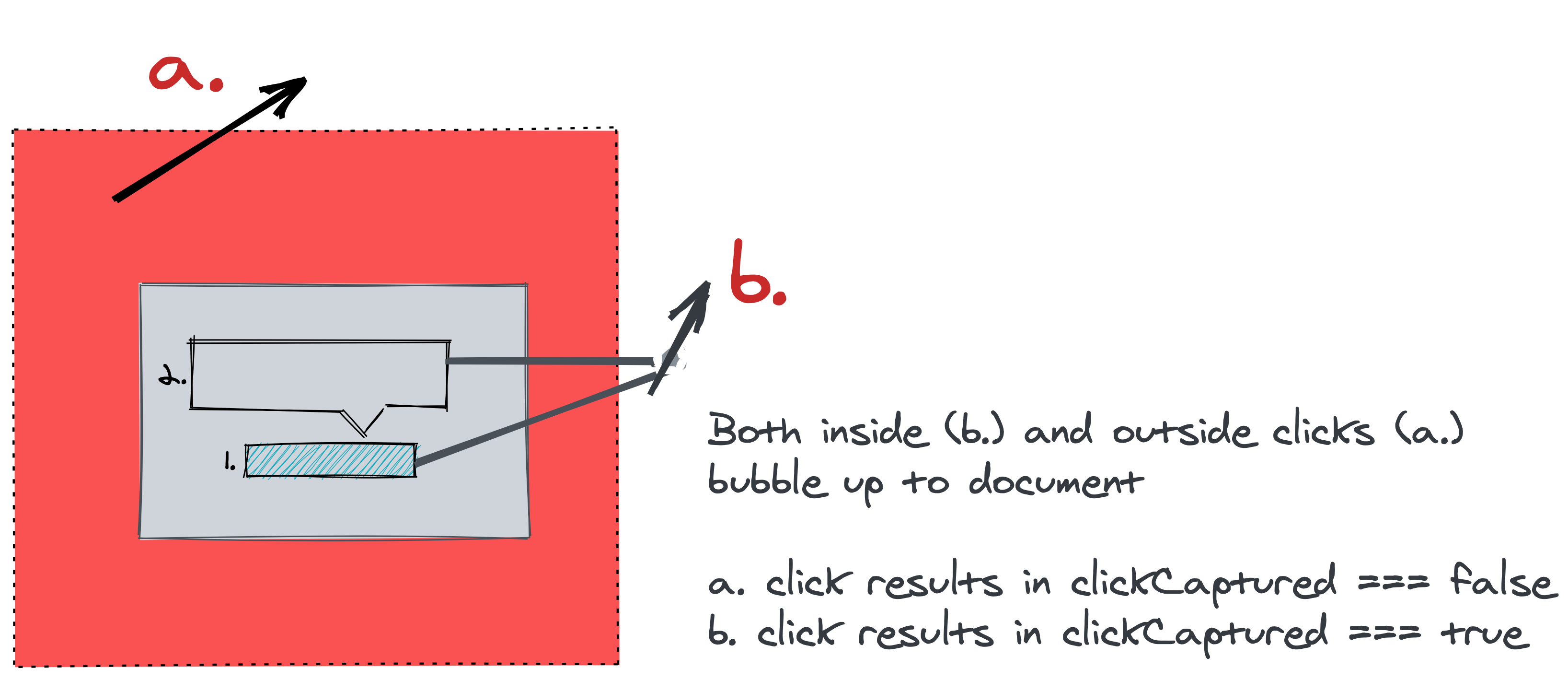
Because every DOM event bubbles to the document by default, this scheme catches all clicks. The clickCaptured flag lives in a class instance property (or a ref in functional components) precisely because it's transient state—we never render based on it, so React's state machinery is both unnecessary and expensive.
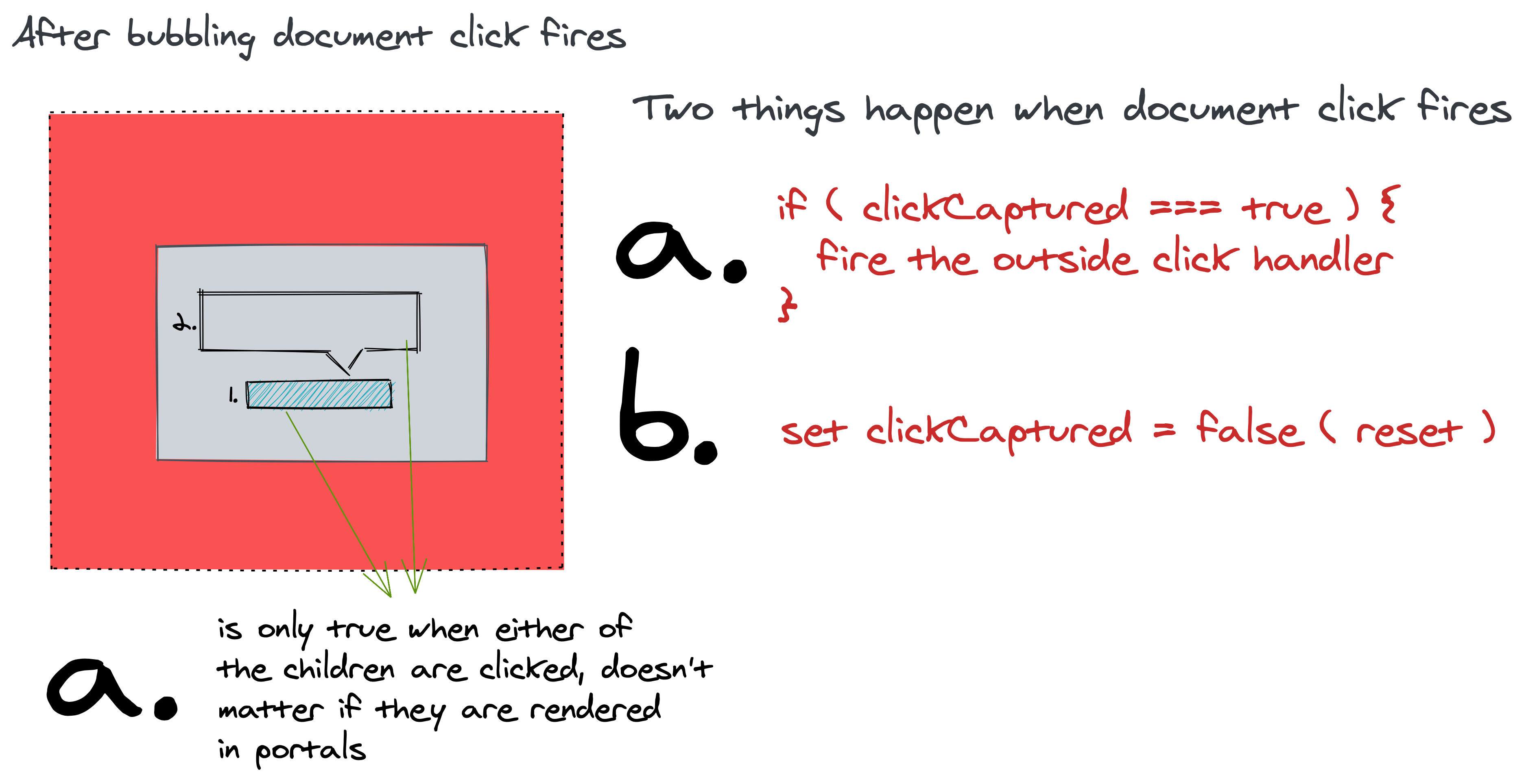
clickCapture’s value when mousedown event reaches document. (Large preview)Let's build the implementation. Our component sets up the flag, renders children either directly or through a function-as-children pattern, depending on the props:
import React from 'react'

class OutsideClickHandler extends React.Component {
  clickCaptured = false;

  render() {
    if ( typeof this.props.children === 'function' ) {
      return this.props.children(this.getProps())
    }

    return this.renderComponent()
  }
}
Since the component doesn't rely on JSX internally, it uses createElement directly. Each rendered element—whether a custom component or a standard HTML tag—receives the same event props:
class OutsideClickHandler extends React.Component {
  renderComponent() {
    return React.createElement(
      this.props.component || 'span',
      this.getProps(),
      this.props.children
    )
  }
}
The getProps method folds the necessary handlers into every child element. Crucially, we listen for both mousedown and touchstart events to support touch devices:
class OutsideClickHandler extends React.Component {
  getProps() {
    return {
      onMouseDown: this.innerClick,
      onTouchStart: this.innerClick
    };
  }
}
class OutsideClickHandler extends React.Component {
innerClick = () => {
this.clickCaptured = true;
}
}In the componentDidMount, we attach document-level mousedown and touchstart listeners. When those fire, we check the captured flag; if it's false, we call the user-supplied outside click handler, then reset the flag for the next interaction:
class OutsideClickHandler extends React.Component {
  componentDidMount(){
    document.addEventListener('mousedown', this.documentClick);
    document.addEventListener('touchstart', this.documentClick);
  }

  componentWillUnmount(){
    document.removeEventListener('mousedown', this.documentClick);
    document.removeEventListener('touchstart', this.documentClick);
  }

  documentClick = (event) => {
    if (!this.clickCaptured && this.props.onClickOutside) {
      this.props.onClickOutside(event);
    }
    this.clickCaptured = false;
  };
}
This design sidesteps the portal problem entirely. Now, clicking on the portal-rendered popover flips clickCaptured to true, so the document-level handler never fires the outside click callback. Try the corrected example:
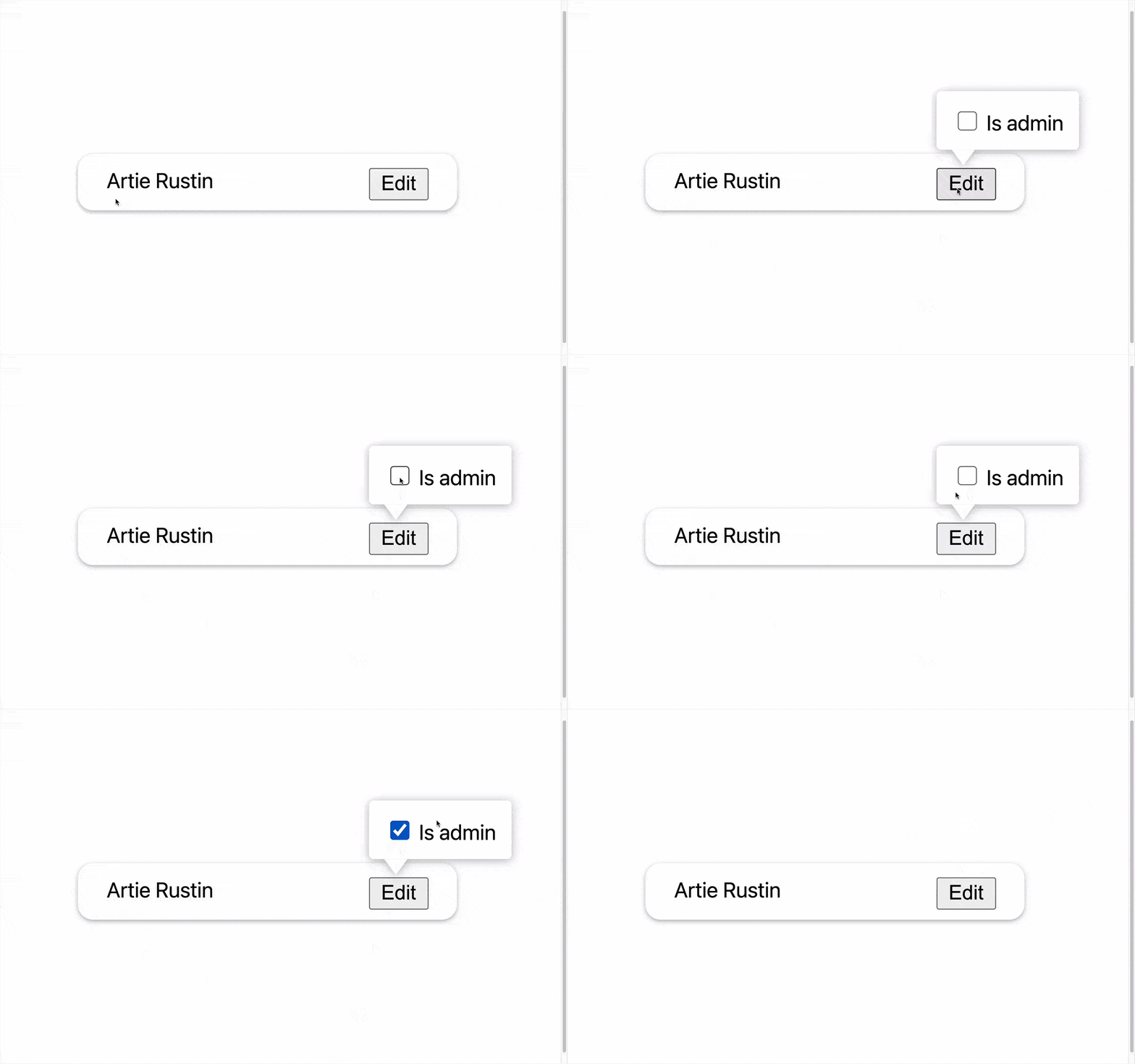
Extending to Focus Detection
Detecting when focus leaves a component follows nearly the same pattern. We wrap children in a getFocusProps method that attaches an onFocus React event handler:
class OutsideClickHandler extends React.Component {
  focusCaptured = false

  innerFocus = () => {
    this.focusCaptured = true;
  }

componentDidMount(){
    document.addEventListener('mousedown', this.documentClick);
    document.addEventListener('touchstart', this.documentClick);
    document.addEventListener('focusin', this.documentFocus);
  }

componentWillUnmount(){
    document.removeEventListener('mousedown', this.documentClick);
    document.removeEventListener('touchstart', this.documentClick);
    document.removeEventListener('focusin', this.documentFocus);
  }

documentFocus = (event) => {
    if (!this.focusCaptured && this.props.onFocusOutside) {
      this.props.onFocusOutside(event);
    }
    this.focusCaptured = false;
  };

getProps() { return { onMouseDown: this.innerClick, onTouchStart: this.innerClick, onFocus: this.innerFocus }; }
There's a subtle wrinkle, though. From React v17 onward, React maps the onFocus event to the native focusin event internally. Since focusin bubbles, we can attach a single document-level listener. For React v16 and earlier, however, focus does not bubble at all, so you must attach a focus listener in the capture phase instead:
document.addEventListener('focus', this.documentFocus, true);Our document-level focusin listener performs the same checks—was focus captured by any element inside our React tree? If not, and the focus shifted outside, we invoke onOutsideFocus:
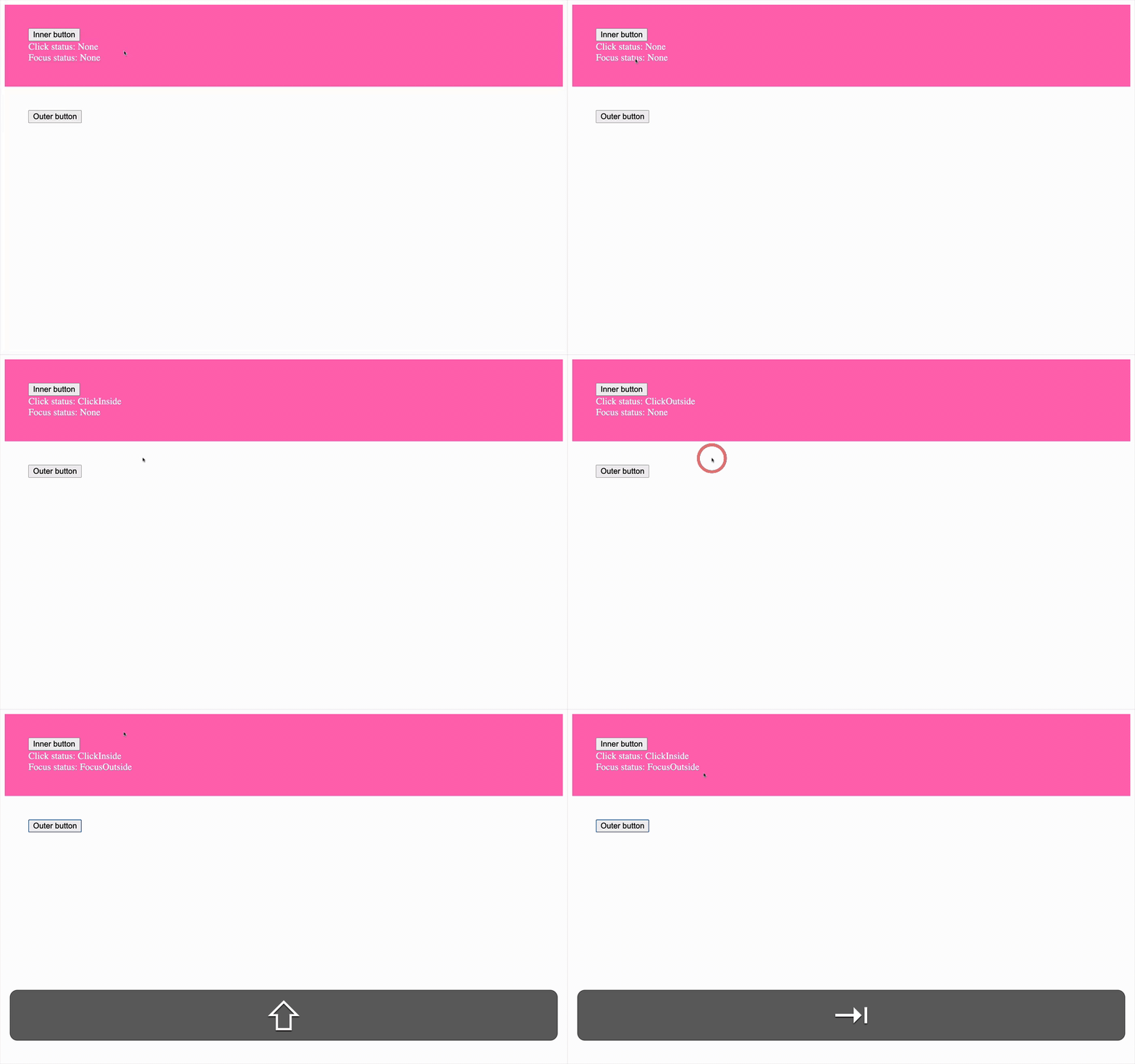
The final behavior lets you toggle focus between internal and external buttons using Tab and Shift+Tab in Chrome, Firefox, and Edge, or Opt/Alt+Tab and Opt/Alt+Shift+Tab in Safari, observing the updated focus status.
This combination of event delegation and JavaScript-owned state, rather than DOM-structure queries, makes for a dependable outside-click and outside-focus handler that plays nicely with portals—and it's exactly the pattern behind the open-source react-foco component.
Handling Outside Interactions in React
The simplest and most reliable way to detect a click outside a DOM node in plain JavaScript is the Node.contains API. In React, however, the same approach fails when the component tree includes children rendered through a React portal, because those children exist outside the parent DOM node in the actual DOM hierarchy.
To correctly detect an outside click for a React component, you can combine a class instance property with event delegation. The property tracks the root DOM node of the component, while an event listener at the document level checks whether the click target is contained within that node. This avoids the portal pitfall without relying on the DOM structure matching the React component tree.
The same detection technique extends to outside focus events, with one caveat. The focusin event bubbles, which allows you to listen for it at the document level, but the behavior of focus events can differ from click events—particularly around whether the focus change is caused by user interaction. You’ll need to account for that when handling focus loss outside the component.
References and Further Reading
- React Foco GitHub repository
- MDN:
Node.contains - React documentation on portals
- React
createElementAPI - React GitHub PR that maps
onFocusandonBlurto nativefocusinandfocusout - Delegating
focusandblurevents


