
Browser tests return a lot of coverage for very little code. A script that loads a homepage, clicks a button and asserts that something changed already proves several things at once: the page renders without error, the JavaScript executed and the element is present and reachable. When it passes, a good deal went right; when it fails, it has caught a real problem.
The pieces of the stack
- Selenium is the open source suite that automates browsers — go here, click this. It can run tests against different browsers and platforms on virtual machines, in parallel, using Selenium Grid, which is a self-hosted tool that builds a network of testing machines. Each node provides an environment to test against, and they run simultaneously.
- Jest is the testing framework: declare that
thisshould equalthatand let it report pass or failure. It also reports code coverage, so you can see which code influences which tests. Built by the Facebook team originally for React, it is general enough to test any JavaScript, including browser tests. - LambdaTest is the cloud cross-browser platform the tests run on, with 2,000+ real browsers for manual and Selenium automation testing. It integrates with tools such as Slack, Trello, Jira, Asana, GitHub and Bitbucket.
Selenium supplies the automated browser environments; Jest supplies the test runner and assertions. Combining the two gives a workable cross-browser testing setup.
Setup and prerequisites
Create a new project (or use an existing one) and cd into it. You will need Node and npm available.
## Run this or download the package yourself at: https://nodejs.org/brew install node

## Then we'll install the latest version of npm
npm install npm@latest -g
## Yarn is also supported
npm install --save-dev jestIf the project was created with create-react-app, Jest is already included and nothing further is required.
Scaling out with LambdaTest
Selenium Grid works, but it is hosted wherever you put it, so a large, complex site with thousands of tests can outgrow it. That is the point at which a cloud platform becomes useful. Jest on its own does not support running tests in parallel, which matters once you have many tests across multiple browsers. On LambdaTest you can run concurrent sessions, so different Jest scripts execute on different sessions at the same time; this cuts total run time substantially compared with running tests sequentially.
Connecting the account
Assuming Selenium is already set up, sign up for LambdaTest and take the account credentials. Store them as environment variables in the project:
## Mac/Linuxexport LT_USERNAME=<your lambdatest username> export LT_ACCESS_KEY=<your lambdatest access_key>

## Windowsset LT_ACCESS_KEY=<your lambdatest access_key>set LT_ACCESS_KEY=<your lambdatest access_key>
LambdaTest publishes a repo containing a sample of the setup, which can be cloned as a starting point when trying things out.
Writing and running a test
The LambdaTest docs use the following as a sample test script:
const webdriver = require('selenium-webdriver');
const { until } = require('selenium-webdriver');
const { By } = require('selenium-webdriver');
const LambdaTestRestClient = require('@lambdatest/node-rest-client');

const username = process.env.LT_USERNAME || '<your username>';
const accessKey = process.env.LT_ACCESS_KEY || '<your accessKey>';

const AutomationClient = LambdaTestRestClient.AutomationClient({
  username,
  accessKey
});
const capabilities = {
  build: 'jest-LambdaTest-Single',
  browserName: 'chrome',
  version: '72.0',
  platform: 'WIN10',
  video: true,
  network: true,
  console: true,
  visual: true
};

const getElementById = async (driver, id, timeout = 2000) => {
  const el = await driver.wait(until.elementLocated(By.id(id)), timeout);
  return await driver.wait(until.elementIsVisible(el), timeout);
};

const getElementByName = async (driver, name, timeout = 2000) => {
  const el = await driver.wait(until.elementLocated(By.name(name)), timeout);
  return await driver.wait(until.elementIsVisible(el), timeout);
};

const getElementByXpath = async (driver, xpath, timeout = 2000) => {
  const el = await driver.wait(until.elementLocated(By.xpath(xpath)), timeout);
  return await driver.wait(until.elementIsVisible(el), timeout);
};

let sessionId = null;

describe('webdriver', () => {
  let driver;
  beforeAll(async () => {
    driver = new webdriver.Builder()
      .usingServer(
        'https://' + username + ':' + accessKey + '@hub.lambdatest.com/wd/hub'
      )
      .withCapabilities(capabilities)
      .build();
    await driver.getSession().then(function(session) {
      sessionId = session.id_;
    });
    // eslint-disable-next-line no-undef
    await driver.get(`https://lambdatest.github.io/sample-todo-app/`);
  }, 30000);

  afterAll(async () => {
    await driver.quit();
  }, 40000);

  test('test', async () => {
    try {
      const lnk = await getElementByName(driver, 'li1');
      await lnk.click();

      const lnk1 = await getElementByName(driver, 'li2');
      await lnk1.click();

      const inpf = await getElementById(driver, 'sampletodotext');
      await inpf.clear();
      await inpf.sendKeys("Yey, Let's add it to list");

      const btn = await getElementById(driver, 'addbutton');
      await btn.click();

      const output = await getElementByXpath(
        driver,
        '//html/body/div/div/div/ul/li[6]/span'
      );
      const outputVal = await output.getText();
      expect(outputVal).toEqual("Yey, Let's add it to list");
      await updateJob(sessionId, 'passed');
    } catch (err) {
      await webdriverErrorHandler(err, driver);
      throw err;
    }
  }, 35000);
});

async function webdriverErrorHandler(err, driver) {
  console.error('Unhandled exception! ' + err.message);
  if (driver && sessionId) {
    try {
      await driver.quit();
    } catch (_) {}
    await updateJob(sessionId, 'failed');
  }
}
function updateJob(sessionId, status) {
  return new Promise((resolve, reject) => {
    AutomationClient.updateSessionById(
      sessionId,
      { status_ind: status },
      err => {
        if (err) return reject(err);
        return resolve();
      }
    );
  });
}
The capabilities object is easier to write with the Selenium Desired Capabilities Generator that LambdaTest provides. The sample script defines tests to run on a cloud machine configured with Chrome 72 and Windows 10. Run it from the command line with:
npm test .single.test.jsThe same sample also includes an example for running the tests on your local machine:
npm test .local.test.jsResults and reporting
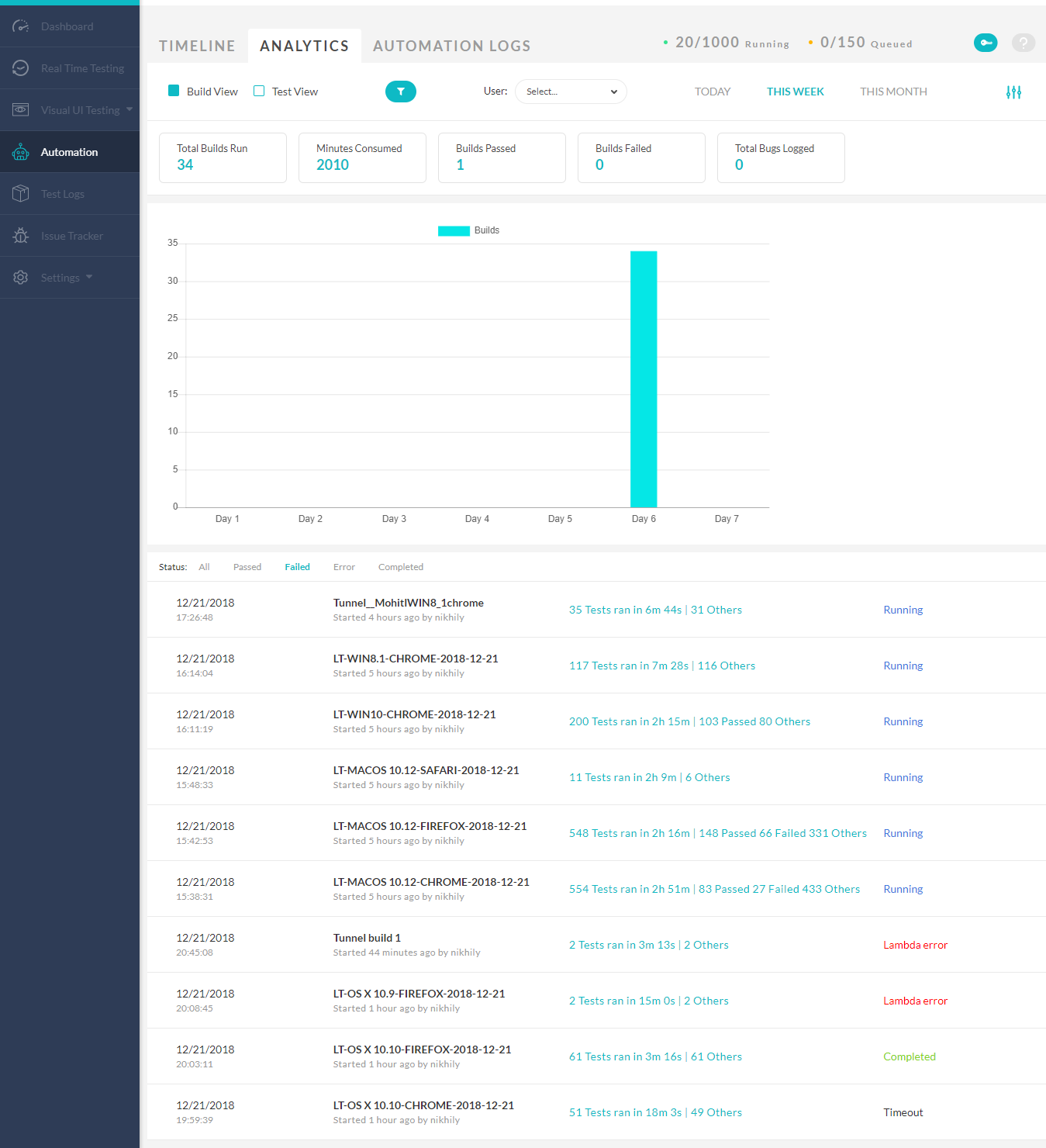
The automation dashboard records which tests are running, logs of when they ran, and their results. Its analytics show how many builds ran on a given day, how long they took, and which passed or failed. Also documented is the Selenium Automation API, which can extract test execution data for use in a custom reporting framework.

The resulting stack is Selenium for virtual machines, Jest for unit tests, and LambdaTest for automation, hosting and reporting — broad coverage from only a few moving pieces. LambdaTest is free to try.




