

Moving a legacy webpack build to Vite
Vite is a JavaScript bundler that ships with useful defaults and needs very little configuration to be productive. The path below follows one real migration: a large, old booklist app that leaned heavily on webpack. The same steps apply to any existing project being moved off its current bundler. For new projects, scaffolding a fresh Vite app (framework choice plus TypeScript or not) is the better starting point — and it's still worth scaffolding one even when migrating, since much of the setup code comes straight from the default template.
What Vite already handles
Rather than listing setup requirements, it's more useful to list the common webpack concerns that disappear.
Static assets and styles
Webpack typically needs a rule to copy fonts, images and SVGs into the dist folder so bundles can reference them:
{
  test: /\.(png|jpg|gif|svg|eot|woff|woff2|ttf)$/,
  use: [
    {
      loader: "file-loader"
    }
  ]
}
Vite does this by default. The same is true of styles: where webpack needs a rule allowing imports of CSS or SCSS, Vite supports both out of the box — just install Sass and Vite handles the rest.
{
  test: /\.s?css$/,
  use: [MiniCssExtractPlugin.loader, "css-loader", "sass-loader"]
},

// later

new MiniCssExtractPlugin({ filename: "[name]-[contenthash].css" }),
TypeScript, JSX and Babel
Transpiling non-standard JavaScript is normally a loader plus a Babel configuration:
{
  test: /\.(t|j)sx?$/,
  exclude: /node_modules/,
  loader: "babel-loader"
},
{
"presets": ["@babel/preset-typescript"],
"plugins": [
"@babel/plugin-proposal-class-properties",
"@babel/plugin-syntax-dynamic-import",
"@babel/plugin-proposal-optional-chaining",
"@babel/plugin-proposal-nullish-coalescing-operator"
]
}Vite strips TypeScript and JSX and emits code supported by modern browsers, no Babel config required. Supporting older browsers is possible through the legacy plugin, though it isn't necessarily advisable.
Resolution, modes and extensions
Webpack must be told to resolve imports from node_modules; Vite resolves them automatically.
resolve: {
  modules: [path.resolve("./node_modules")]
}
Webpack also distinguishes environments by passing a mode property:
mode: isProd ? "production" : "development",…and then reading it back:
const isProd = process.env.NODE_ENV == "production";Vite instead provides separate commands for development and production builds. It also does not require every file extension to be declared:
resolve: {
  extensions: [".ts", ".tsx", ".js"],
}
Pick the right kind of Vite project and this works as-is.
Plugins
Any remaining webpack plugins should generally be replaced with the Rollup equivalent — Rollup plugins are usually compatible with Vite. Some Rollup plugins do things incompatible with how Vite works, but in general they just work.
Bootstrapping the migration
The HTML entry point
Vite is HTML-first: instead of handling HTML through a plugin, it expects an index.html containing a script tag pointing at the JavaScript entry point, and generates everything from there. The <script> tag below points at /reactStartup.tsx; adjust it to your own entry.
<!DOCTYPE html>
<html lang="en">
  <head>
    <meta charset="UTF-8" />
    <title>The GOAT of web apps</title>
  </head>
  <body>
    <div id="home"></div>
    <script type="module" src="https://css-tricks.com/reactStartup.tsx"></script>
  </body>
</html>
Next, install the framework plugin (a React plugin here):
npm i vite @vitejs/plugin-react @types/nodeCreate vite.config.ts next to index.html in the project directory:
import { defineConfig } from "vite";
import react from "@vitejs/plugin-react";

export default defineConfig({
  plugins: [react()]
});
And add the npm scripts:
"dev": "vite",
"build": "vite build",
"preview": "vite preview",
npm run dev starts the development server, which builds incrementally based on what is requested. Initially it fails:
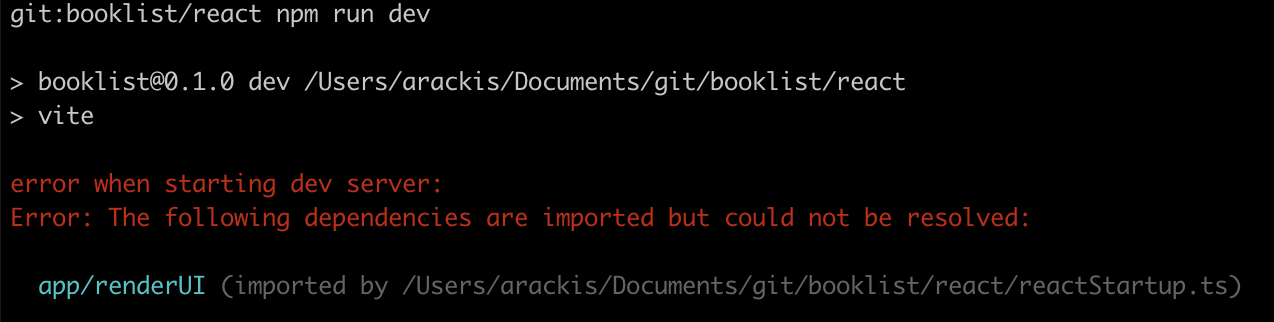
Aliases are covered shortly, so for now simplify the entry file:
import React from "react";
import { render } from "react-dom";

render(
  <div>
    <h1>Hi there</h1>
  </div>,
  document.getElementById("home")
);
Running npm run dev and browsing to localhost:3000 then succeeds.
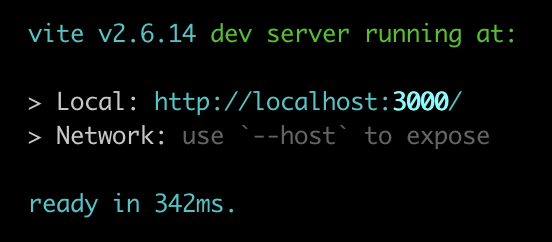

With the server up, editing source should update the output almost immediately via hot module reloading — one of Vite's strongest features.
Configuration for real projects
Aliases
Webpack projects often configure a jscolor alias plus root resolution with ./ and node_modules, enabling imports like this anywhere in the component tree (given a top-level util folder):
resolve: {
  alias: {
    jscolor: "util/jscolor.js"
  },
  modules: [path.resolve("./"), path.resolve("./node_modules")]
}
import { thing } from "util/helpers/foo"Vite doesn't accept a folder for resolution, but it supports aliases following the same rules as @rollup/plugin-alias:
import { defineConfig } from "vite";
import react from "@vitejs/plugin-react";

import path from "path";

export default defineConfig({
  resolve: {
    alias: {
      jscolor: path.resolve("./util/jscolor.js"),
      app: path.resolve("./app"),
      css: path.resolve("./css"),
      util: path.resolve("./util")
    }
  },
  plugins: [react()]
});
The resolve.alias section maps jscolor to its module and gives aliases for the top-level directories, so app/, css*/* and util/ can be imported from anywhere. Aliases apply only at the root of an import, such as util/foo; a deeper reference like this is unaffected:
import { thing } from "./helpers/util";This distinction is not well documented, but it is visible in the Rollup alias plugin, and Vite matches that behavior.
Environment variables
Vite reads values from .env files in development or from process.env, but replaces import.meta.env.FOO rather than process.env.FOO, and only for variables prefixed with VITE_. The prefix is configurable but cannot be set to an empty string. A legacy project could rewrite all variables to import.meta.env.VITE_*, update the .env files and CI/CD variables — or restore classic behavior: replace process.env.ANYTHING with values from .env in development and the real process.env in production. Vite's define feature (global registration in development, raw text replacement in production) enables this. Run npm i dotenv, then build a plugin:
import dotenv from "dotenv";

const isProd = process.env.NODE_ENV === "production";
const envVarSource = isProd ? process.env : dotenv.config().parsed;

export const dotEnvReplacement = () => {
  const replacements = Object.entries(envVarSource).reduce((obj, [key, val]) => {
    obj[`process.env.${key}`] = `"${val}"`;
    return obj;
  }, {});

  return {
    name: "dotenv-replacement",
    config(obj) {
      obj.define = obj.define || {};
      Object.assign(obj.define, replacements);
    }
  };
};
Vite sets process.env.NODE_ENV, so the plugin checks it to determine the mode: in production it takes process.env itself, in development it has dotenv parse the .env file into an object. The returned plugin object uses only the config hook to modify the current config, adding a define entry if none exists and then all the values.
The limitations being worked around exist for a reason: this configuration is common, but it means any matching key in process.env is embedded in your source code. Keep the potential security implications in mind.
Server proxy
Applications that serve only JavaScript/CSS/HTML with everything else on separate services are effectively done — Vite's dev server serves assets and calls the services as before. For apps with services on the same web server, such as a GraphQL endpoint, the old setup ran an Express server serving webpack output alongside a webpack watch task. With Vite's own dev server, start Express on a separate port and proxy to it:
server: {
  proxy: {
    "/graphql": "http://localhost:3001"
  }
}
Requests for /graphql go to http://localhost:3001/graphql. Note the proxy targets http://localhost:3001, not the full path — Vite appends the /graphql part, plus any query arguments.
Building a library
For a JavaScript library like Redux there is no HTML file, so Vite must be told what to produce:
build: {
  outDir: "./public",
  lib: {
    entry: "./src/index.ts",
    formats: ["cjs"],
    fileName: "my-bundle.js"
  }
}
This sets the output location, the bundle name and the formats. CommonJS is used instead of ES modules because ES modules are not minified as of this writing, for fear of breaking tree-shaking. Build with vite build; rebuild on change with vite build --watch.




