
Why PKCE replaces the implicit flow
PKCE (Proof Key for Code Exchange) is an extension to OAuth 2.0's authorization code flow. It adds a dynamically generated client secret so apps without a backend—mobile apps, single-page apps, and serverless apps—can keep their credentials secure. These are public clients, meaning they cannot reliably protect a static client_secret during the token exchange. Historically, that limitation forced such apps into the implicit flow, which exposes the access token in the redirect URI and leaves it vulnerable to network interception.
The implicit flow was a necessary compromise before cross-origin requests were widely supported, making the full authorization code flow impossible from browsers. With CORS now standard, apps can POST directly to the token endpoint. PKCE removes the need for the implicit flow entirely: instead of a static secret, the app generates a one-time verifier string, letting the authorization server confirm the token request comes from the same client that started the authorization, without any secret ever being stored or transmitted in advance.
How PKCE works
PKCE adds three parameters to the standard authorization code flow:
code_verifier— a cryptographically random string the client generates. It correlates the final token request with the original authorization request.code_challenge— derived from thecode_verifierusing either theplainorS256transformation.S256is a base64-encoded SHA-256 hash of the verifier and should be used unless it's impossible to compute. The server decrypts this to verify both requests originate from the same client.code_challenge_method— tells the server which transformation was applied. If empty, it defaults toplain.
The exchange proceeds in six steps (RFC 7636):
- The client creates the
code_verifier(Section 4.1). - The client derives the
code_challengeusing theS256transformation (Section 4.2). - The client sends the
code_challengeandcode_challenge_methodwith the initial authorization request (Section 4.3). - The server responds with an
authorization_code(Section 4.4). - The client sends the
authorization_codeand the originalcode_verifierto the token endpoint (Section 4.5). - The server transforms the verifier using the recorded method and compares the result to the challenge. Only if both match does it issue an
access_token(Section 4.6).
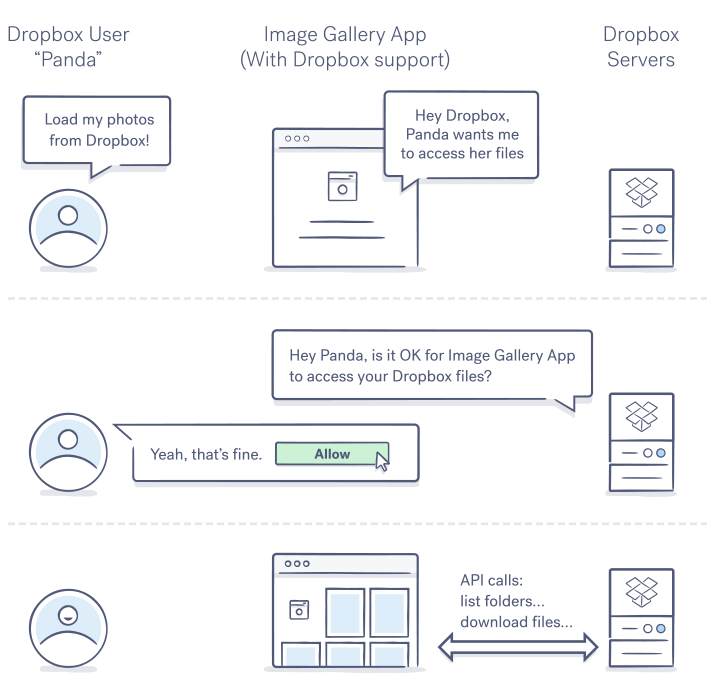
Basic authorization flow from a User's POV
Walking through a PKCE request
The following examples use Node.js to generate the required strings and curl to talk to the Dropbox API. In a production app, both happen in the same client. You'll need a Dropbox app to test the flow yourself.
Start by creating a JavaScript file that imports Node's built-in crypto module for the SHA-256 hash:
const crypto = require("crypto")
Step 1: Generate the verifier and challenge. Running this script outputs both strings to the console:
const base64Encode = (str) => {
    return str.toString('base64')
        .replace(/\+/g, '-')
        .replace(/\//g, '_')
        .replace(/=/g, '');
}
const codeVerifier = base64Encode(crypto.randomBytes(32));
console.log(`Client generated code_verifier: ${codeVerifier}`)

const sha256 = (buffer) => {
    return crypto.createHash('sha256').update(buffer).digest();
}
const codeChallenge = base64Encode(sha256(codeVerifier));
console.log(`Client generated code_challenge: ${codeChallenge}`)
Running the file with node <your_filename> prints output similar to:
Client generated code_verifier: kiNgBo0-r4GdQld6ShdPoxGq9SheI2m5moxtX-tFce4
Client generated code_challenge: lSEB3zK2TM-X38Baht80CvC4E_a5DnpCG52y5a7dQyk
Step 2: Send the challenge to the authorization endpoint. Assemble the URL with your app key, the challenge, and the method S256:
https://www.dropbox.com/oauth2/authorize?client_id=<APP_KEY>&response_type=code&code_challenge=<CHALLENGE>&code_challenge_method=<METHOD>
Navigate to that URL in a browser and approve the app.
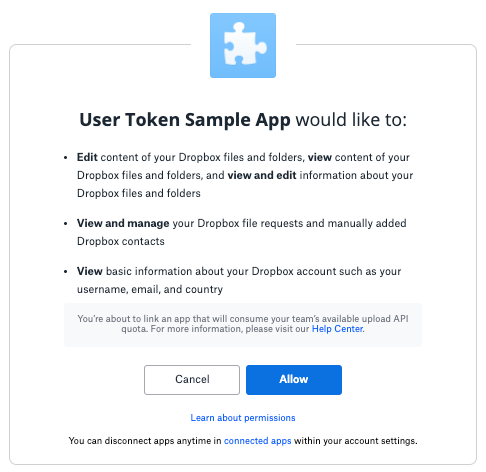
User consent page for Dropbox OAuth flow
Step 3: Capture the authorization code. After approval, copy the code from the response page. In production, this usually goes to a redirect_uri passed with the authorization request, but that parameter is omitted here.
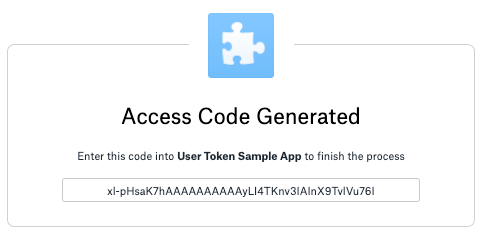
Authorization code provided after user allows app connection
Step 4: Trade the code and verifier for a token. POST to /oauth2/token with the authorization code, the grant type, and the original verifier, but no client_secret:
curl https://api.dropbox.com/oauth2/token \
-d code=<AUTHORIZATION_CODE> \
-d grant_type=authorization_code \
-d code_verifier=<CODE_VERIFIER> \
-d client_id=<APP_KEY>
The server hashes the verifier, compares it with the original challenge, and returns an access token only if they match.
{
  "access_token": "NW7lYmEWHgUAAAAAAAAAAbeutI8iL5CuBik9_CPD5r83XvcQPt-7O5diOdUUcsuX",
  "expires_in": 14399,
  "token_type": "bearer",
  "uid": "2589992144",
  "account_id": "dbid:AABuXdtqD88UpveXxu7rcVSo64ADcrWnBMk",
  "scope": "account_info.read contacts.write file_requests.read file_requests.write files.content.read files.content.write files.metadata.read files.metadata.write"
}
Step 5: Verify the token works. Optionally, confirm it with a call to the current account endpoint:
curl -X POST https://api.dropboxapi.com/2/users/get_current_account \
--header "Authorization: Bearer <Your_Access_Token>"
Why PKCE Is the Right Choice for Public Clients
PKCE was designed to let public clients — such as mobile apps, single-page applications, and serverless backends — use the more secure authorization code flow without relying on a client secret. In traditional OAuth 2.0, the authorization code flow requires a confidential client that can safely store a client secret. Public clients, by definition, cannot guarantee that. PKCE removes that dependency entirely.
Instead of a client secret, the client generates a random code_verifier and sends a hashed version, the code_challenge, in the authorization request. When the client exchanges the authorization code for tokens, it must present the original code_verifier. The authorization server verifies that the verifier matches the previously sent challenge. Any party that intercepts the authorization code cannot redeem it without the verifier, which the client never transmits during the initial request.
This design closes a gap that was previously addressed by the implicit flow, which returned tokens directly from the authorization endpoint and skipped the code exchange step. However, the implicit flow exposed tokens in the URL fragment and provided no way to bind the authorization code to a specific client. PKCE gives public clients the same protection as the authorization code flow while avoiding those weaknesses.
Making the Migration
If your application currently uses the implicit flow, migrating to PKCE is strongly recommended. PKCE offers better security with minimal changes to your authorization request: simply add the extra parameters — code_challenge and code_challenge_method — and handle the token exchange response. The flow ends with the client receiving an access token just as before, but through a more secure path that does not expose tokens in the URL.
Several official SDKs, including those for Dropbox, already have PKCE support built in. Using an SDK that handles the challenge generation and code exchange under the hood prevents common implementation mistakes, such as reusing a verifier or sending the wrong challenge method.
Before switching, review the OAuth guide for the service you are integrating with to understand which flows are supported, and confirm that your client type is eligible for PKCE. In most cases, any public client is a candidate. Once you have made the switch to the authorization code flow with PKCE, you can retire your legacy implicit-flow code paths entirely.


