Passkeys in Practice: What They Replace and How They Work
Passkeys are moving from standards-track proposals into shipping products. Safari, Android, macOS, and iOS already support them; Windows and Chrome OS support is on the way. For front-end engineers, the relevant shift is that authentication and form flows are changing underneath us. This is a look at what passkeys are, the cryptography they rely on, and what actually happens in the browser when a user registers or logs in.
Terminology worth knowing
Passkeys come wrapped in a lot of acronyms. These are the ones that matter:
- Relying Party: the server you are authenticating against (referred to as “server” below).
- Client: the web browser or operating system making the request.
- Authenticator: software or hardware that generates and stores public key pairs.
- FIDO: an open standards body that defines specifications for FIDO credentials.
- WebAuthn: the underlying protocol for passkeys, also known as a FIDO2 or single-device FIDO credential.
- Passkeys: WebAuthn with cloud syncing (also called multi-device, discoverable, or resident credentials).
- Public Key Cryptography: a generated key pair (private and public) used for signing/verification or encrypting/decryption; also called asymmetric cryptography.
- RSA: an older public key cryptography family based on factoring primes.
- Elliptic Curve Cryptography (ECC): a newer family based on elliptic curves.
- ES256: an ECC public key using the ECDSA signing algorithm with SHA256 hashing.
- RS256: RSA with RSASSA-PKCS1-v1.5 and SHA256.
What passkeys actually change
Passkeys are built on top of WebAuthn, which already allows public key cryptography to replace passwords. With WebAuthn, a security device like a hardware key or a Trusted Platform Module (TPM) creates a private and public key pair. The public key is shared; the private key never leaves the generating device. That was WebAuthn’s main limitation: lose the device and you lose access.
Passkeys add cloud sync to that model. Credentials created on one device can be used on another. Full cloud-synced support currently exists only in iOS, macOS, and Android, and is mediated by Apple’s iCloud Keychain or Google Password Manager, respectively. Browser choice still matters.
In public key cryptography, signing takes data and runs it through an algorithm with a private key; the result can be verified with the corresponding public key. A server stores the public key, and a user logs in by signing a random challenge, proving possession of the private key. This removes password databases from the attack surface: a breach leaks only public keys.
How access works underneath
Authenticators can be software or hardware. Software authenticators may use the TPM or secure enclave to create credentials, then sync them remotely — that is the passkey model. Hardware authenticators, like a YubiKey, generate and store keys on-device.
Browsers reach these authenticators through the Client to Authenticator Protocol (CTAP), which works over NFC, USB, or Bluetooth. This enables an interesting pattern: a phone can act as an authenticator for a computer over Bluetooth, letting you log into a browser on one device using another.
Passkeys versus WebAuthn credentials
Cryptographically the keys are the same; the difference is storage and how login starts. WebAuthn keys are single-device credentials. To authenticate, you provide a user handle, and the server returns an allowCredentials list telling the client which credentials are valid.
Passkeys skip that step entirely. They are multi-device credentials that rely on the server’s domain name to surface which keys are already associated with that site. The system already knows the passkeys bound to a server, so you just pick one.
The two phases of passkey flow
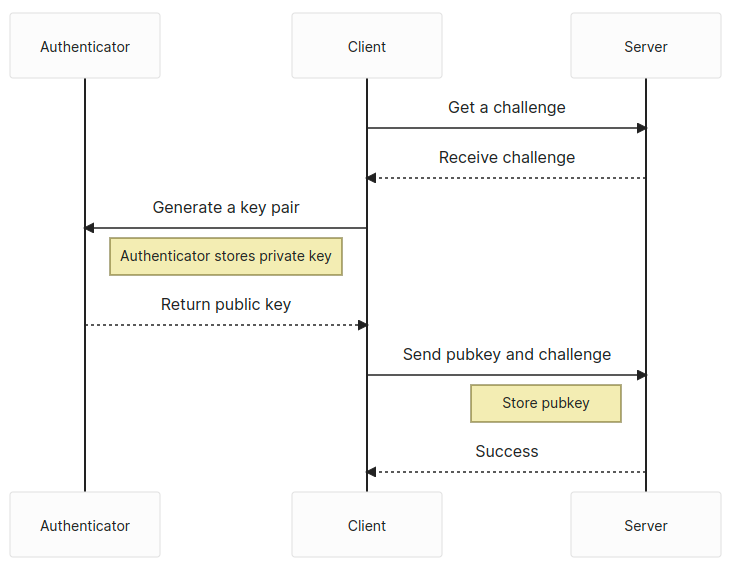
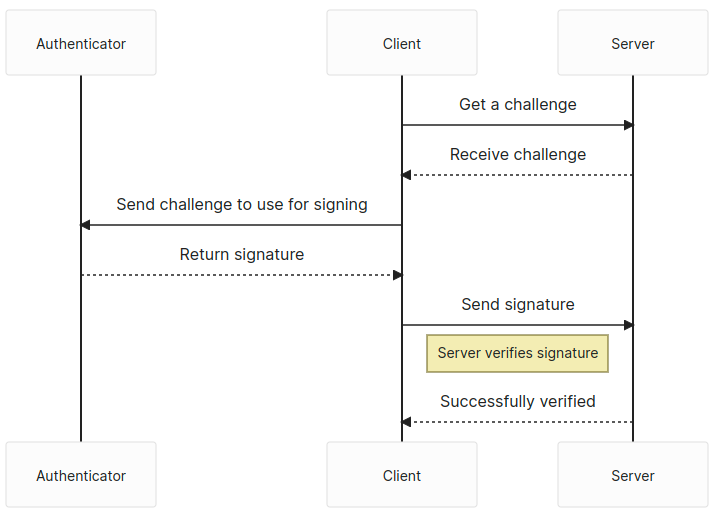
There are two distinct phases: attestation (registration) and assertion (login). Both start with the server issuing a challenge.
Attestation (registration)

Registration uses the navigator.credentials.create API. The caller passes options that specify the kind of key pair to generate, including the algorithm. The response is a PublicKeyCredential containing an AuthenticatorAttestationResponse with the credential ID.
// The `challenge` is random and has to come from the server
const publicKey: PublicKeyCredentialCreationOptions = {
  challenge: safeEncode(challenge),
  rp: {
    id: window.location.host,
    name: document.title,
  },
  user: {
    id: new TextEncoder().encode(crypto.randomUUID()), // Why not make it random?
    name: 'Your username',
    displayName: 'Display name in browser',
  },
  pubKeyCredParams: [
    {
      type: 'public-key',
      alg: -7, // ES256
    },
    {
      type: 'public-key',
      alg: -256, // RS256
    },
  ],
  authenticatorSelection: {
    userVerification: 'preferred', // Do you want to use biometrics or a pin?
    residentKey: 'required', // Create a resident key e.g. passkey
  },
  attestation: 'indirect', // indirect, direct, or none
  timeout: 60_000,
};
const pubKeyCredential: PublicKeyCredential = await navigator.credentials.create({
publicKey
});
const {
id // the key id a.k.a. kid
} = pubKeyCredential;
const pubKey = pubKeyCredential.response.getPublicKey();
const { clientDataJSON, attestationObject } = pubKeyCredential.response;
const { type, challenge, origin } = JSON.parse(new TextDecoder().decode(clientDataJSON));
// Send data off to the server for registrationThe response includes the public key, which must be sent to the server for storage. The clientDataJSON property decodes to the type, challenge, and origin of the passkey. On the server side, you validate those three values, store the public key with its identifier, and optionally keep the attestationObject. You should also store the COSE algorithm (as defined in PublicKeyCredentialCreationOptions with alg: -7 or alg: -256) to verify signed challenges later.
Assertion (login)

Login uses the navigator.credentials.get API.
// The `challenge` is random and has to come from the server
const publicKey: PublicKeyCredentialRequestOptions = {
  challenge: new TextEncoder().encode(challenge),
  rpId: window.location.host,
  timeout: 60_000,
};
const publicKeyCredential: PublicKeyCredential = await navigator.credentials.get({
publicKey,
mediation: 'optional',
});
const {
id // the key id, aka kid
} = pubKeyCredential;
const { clientDataJSON, attestationObject, signature, userHandle } = pubKeyCredential.response;
const { type, challenge, origin } = JSON.parse(new TextDecoder().decode(clientDataJSON));
// Send data off to the server for verificationAgain you get a PublicKeyCredential, this time with an AuthenticatorAssertionResponse. It contains the key identifier, plus a signature and authenticatorData in addition to the clientDataJSON. The type, challenge, and origin come from clientDataJSON as before.
The authenticatorData deserves close attention. The first 32 bytes hold the SHA256 hash of the origin, useful for verifying the request comes from the same server. The signCount field occupies bytes 33 to 37. It should always be 0 for multi-device passkeys, and for single-device credentials it should increase unpredictably; any regression could signal a cloned keying event.
Once the server verifies the signature against the stored public key, the user is logged in.
Current limitations
Passkey support is not uniform. Windows currently permits only single-device credentials, and Linux support is minimal. The vendor ecosystems do not interoperate: moving credentials from an Android phone to an iPhone is not possible at the time of writing. Cross-device login via Bluetooth works, but syncing remains locked to a vendor’s platform.
That said, broader operating system support is expected to drive adoption. Native support is planned for Android and iOS as first-class citizens, and password managers are adding passkey support directly.