
An nginx playground for testing configs safely
nginx configuration is notoriously finicky. A new web tool aims to make experimentation easier: nginx-playground.wizardzines.com lets you paste in an nginx config and a curl or http command, then run the request against that config in a sandboxed environment. The full source is available on GitHub.
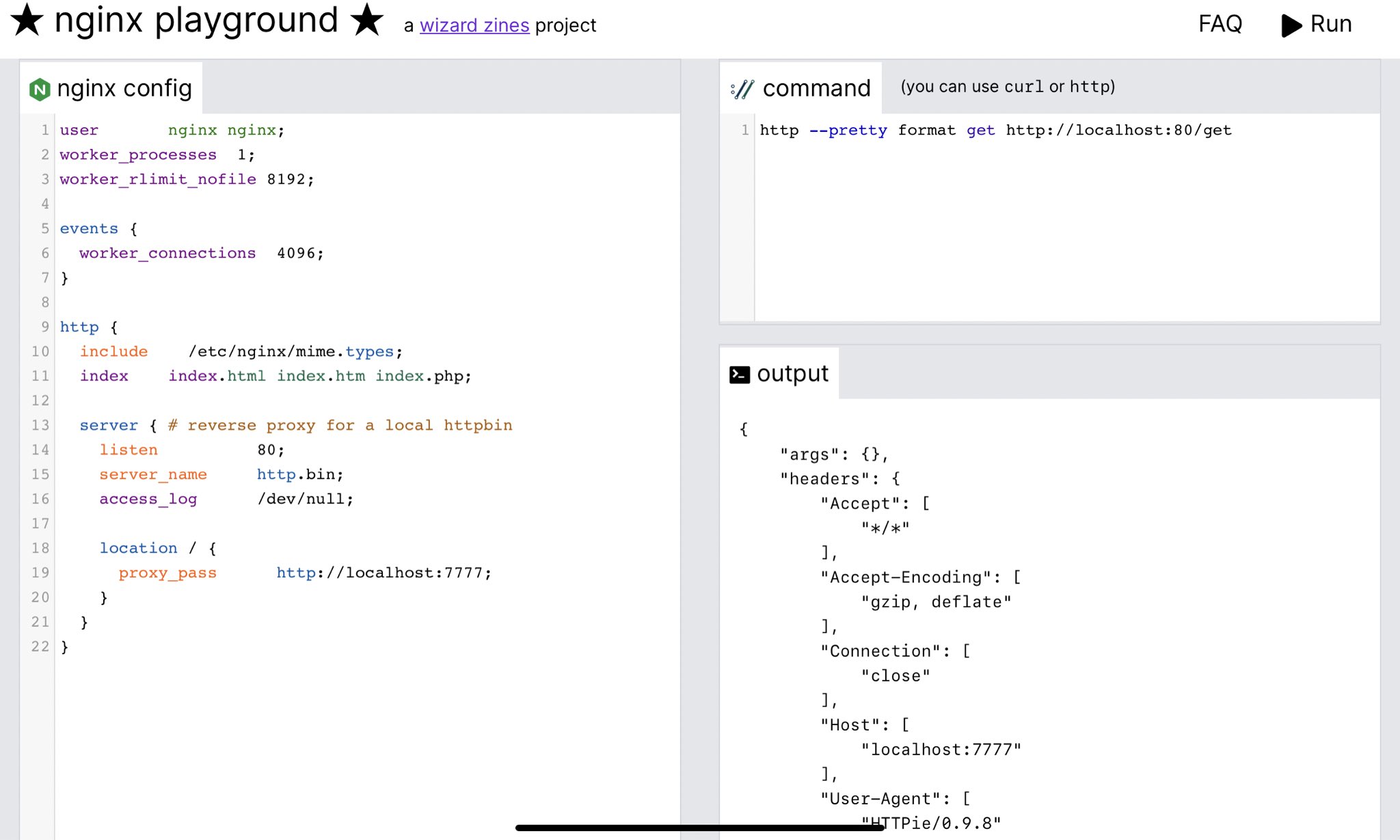
How the playground works
The tool takes two inputs: an nginx configuration and a shell command to make an HTTP request to that nginx instance. When you hit "Run," the backend either returns the output of your command (if nginx started successfully) or the nginx error logs (if it failed to boot). The project follows a simple architecture: a static frontend built with Vue.js and Tailwind, plus a Go backend with a single API endpoint that runs the config.
The backend executes an nginx config through a series of steps:
- Write the config to a temporary file.
- Create a new network namespace with
ip netns add $RANDOM_NAMESPACE_NAME. - Start go-httpbin on port 777 to serve as a configurable backend for proxy tests.
- Start nginx.
- Wait 100 ms; if startup failed, return nginx's error logs.
- Run the user-supplied command, verifying it starts with
curlorhttp. - Return the command output.
Security and isolation
Running arbitrary nginx configs carries obvious security risks, but the author aimed to host the service for free on a single shared server. The defense-in-depth approach relies on several layers:
- The frontend is hosted on a CDN, separate from the backend, so a backend compromise couldn't be used to serve malware.
- No database at all; browser local storage only.
- Each nginx instance runs in its own network namespace with no internet access.
- The backend uses Fly.io's free tier, isolating each run on its own VM.
This leaves a few theoretical attack surfaces: accessing other users' configs during concurrent runs, replacing the backend API to return malicious output, or attempting to mine cryptocurrency on the tiny 1-CPU, 256 MB instance. None of these pose serious harm, though the author notes it's possible something was overlooked. Someone already demonstrated reading /etc/passwd, which is possible but exposes nothing sensitive.
Container-level isolation was considered but initially skipped due to performance concerns. The namespace approach keeps each request at roughly 400 ms on the small server.
Performance notes
The small instance handles load reasonably well because the CDN serves all static assets; only actual config executions hit the backend. Other performance decisions included using a Go httpbin clone instead of the Python original for lighter weight, and keeping frontend CSS and JS in separate files without an npm build step to avoid deployment complexity.
One notable bug: initially the backend stopped nginx worker processes by sending SIGKILL, which killed only the main process, leaking workers and eventually exhausting memory. Switching to SIGTERM shut down the entire process tree correctly and resolved the issue.
Design and implementation
The UI pattern follows JSFiddle and CodePen. Like JSFiddle, the main area height is calculated as calc(100vh - 60px) with a 60px header. Syntax highlighting uses CodeMirror, which conveniently ships with both nginx and shell modes built in. Rather than using a Vue-specific CodeMirror wrapper (none was available for Vue 3), the implementation integrates directly with a simple change listener that synchronizes the editor content with Vue state.
The author plans to add more template nginx configs as starting points. The project's ease of construction suggests similar playgrounds may follow for other complex server software, with HAProxy as an obvious candidate.


