Building a “Focus and Reply” UI on Fastmail’s JMAP API
Fastmail has adopted JMAP, a modern email protocol that’s far easier to work with than IMAP. To test how approachable it really is, I implemented a small “focus and reply” tool—a feature popularized by Hey.com that lets you batch-reply to emails. This is a walkthrough of that project, with the full code in this GitHub repo and a quickstart gist for authentication and your first request.
Step 0: Reading Only, First
The immediate goal wasn’t to send email—that felt too risky for an initial build. Instead, I made a read-only UI that lists all emails requiring a reply and provides a text area for drafting each response. You then copy the draft and send it from your regular webmail. It’s slightly clunky but perfectly safe to prototype with.
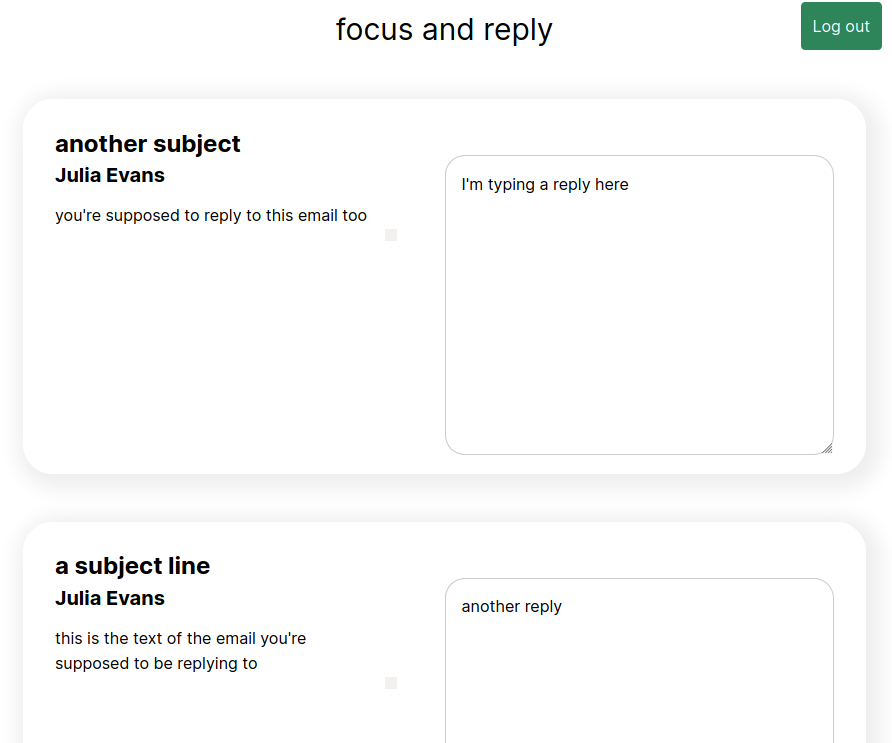
The source data came from a “Reply Later” folder already present in my Fastmail account, where I manually file emails that need a follow-up.
Step 1: Getting Started with JMAP
JMAP isn’t the most discoverable API for new users—there’s no obvious quickstart—so the first task was figuring out how to make a basic request. The authentication mechanism is straightforward: HTTP Basic authentication with your email address and a Fastmail app password.
The flow requires two steps:
- GET https://jmap.fastmail.com/.well-known/jmap to get a session object, which includes your account ID. This is needed for all subsequent calls. It’s an unusual endpoint for a
.well-knownURL because it requires authentication, unlike the static files those paths normally serve. - Use that account ID to POST requests to the main API endpoint at https://jmap.fastmail.com/api/.
One quirk of JMAP is that every request (and response) is wrapped in a structured envelope:
{
    "using": [ "urn:ietf:params:jmap:core", "urn:ietf:params:jmap:mail" ],
    "methodCalls": YOUR_REQUEST_HERE
}
For example, here’s a request that fetches all your mailboxes. The "0" is just an identifier for this particular request within the batch:
{
    "using": [ "urn:ietf:params:jmap:core", "urn:ietf:params:jmap:mail" ],
    "methodCalls": [[ "Mailbox/get", {
        "accountId": accountId,
        "ids": null
    }, "0" ]]
}
After some trial and error with the JMAP spec, the structure started to make sense.
Step 2: Querying Your Emails
Pulling the right emails wasn’t a single query—it was a chain of five related queries that all run in one request. For instance, one part finds all email IDs in the “Reply Later” mailbox:
[ "Email/query", {
    "accountId": accountId,
        // todo: actually do the reply later thing
        "filter": { "inMailbox": mailbox_id },
        "sort": [{ "property": "receivedAt", "isAscending": false }],
        "collapseThreads": true,
        "position": 0,
        "limit": 20,
        "calculateTotal": true
}, "t0" ],
[ "Email/get", {
    "accountId": accountId,
    "#ids": {
        "resultOf": "t0",
        "name": "Email/query",
        "path": "/ids"
    },
    "properties": [ "threadId" ]
}, "t1" ],
...
That result is stored under the variable t0, which a later query in the same request uses to fetch the full email objects. This chaining feature is a core JMAP concept: it avoids multiple round trips by letting you build on previous results within a single API call.
Step 3: Rendering and Results
Once the data was in hand, the frontend was easy—just Vue.js and Tailwind. The entire logic, including rendering and drafting, fits in roughly 170 lines of unpolished JavaScript.
It works and has already helped clear some replies. That said, there are two known issues with the current implementation, and likely more given the quick design:
- Passwords are stored in local storage, which isn’t a sound security practice.
- XSS vulnerabilities were initially present. The fix was rendering plaintext email bodies inside a
<pre>tag and escaping HTML entities—done in Vue as<pre>{{email}}</pre>—to prevent code injection.
How Fastmail’s Web Client Differs
Curiosity about Fastmail’s own use of JMAP led me to inspect their network traffic. Their webmail client deviates from the public API examples in a few ways:
- Requests go to https://www.fastmail.com/jmap/api rather than the documented
jmap.fastmail.comendpoint—potentially a same-origin proxy. - Authentication uses
Authorization: Bearertokens rather than HTTP Basic with an app password. How those tokens are generated isn’t publicly documented. - Responses are sometimes deflate-compressed instead of gzip. Firefox doesn’t decode deflate, making them unreadable in standard dev tools.
Despite these differences, JMAP proved to be a great way to build an email experiment entirely as a frontend app—no server-side code required. All email data is exposed through the API, and the chaining mechanism makes it perfectly feasible to run an entire email client from browser-side JavaScript alone.
Further Resources
- JMAP crash course on Topicbox, located after this project was finished but extremely helpful.
- Fastmail’s JMAP sample code on GitHub
- The JMAP specification
- DOMPurify, an HTML sanitizer recommended for preventing XSS


