
The cost of fragmented sign-in
Organizations increasingly operate across multiple domains — brand.example for marketing, service-app.example for the product, support-portal.example for customer service. The goal is a single, seamless sign-in across all of them. In practice, teams often wire these domains together with ad-hoc integrations that create identity fragmentation. The result: password managers stop working as expected, and passkey adoption stalls.
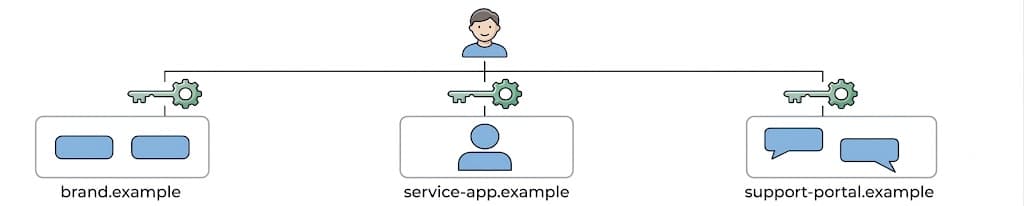
When the same account spans several domains, users must figure out that the domains belong to the same company and then reuse the same credentials at each sign-in. In the worst case, they create duplicate accounts or hand credentials to a phishing site. The fix lies in architectural standards and deliberate design: metadata, cross-origin iframes, identity federation, and subdomain consolidation.
Typical stopgaps and their limits
Several established approaches keep a cross-domain journey alive, but structural limits appear as browsers tighten privacy boundaries and security requirements.
Cross-origin fetches to a central auth API
Independently operated domains often have their frontends call a centralized authentication API via cross-origin fetch() requests, secured through CORS. Because browsers commonly block or restrict cross-site cookies, developers design these APIs to return tokens — JSON Web Tokens inside JSON payloads, for instance — instead of relying on Set-Cookie headers.
Centralized account storage
To unify identity without intricate frontend work, a team can point every domain at one user database. The authentication backend is shared, yet the login UI remains separate per property. Users still need to remember which domains share the same credentials, which is a poor experience on its own.
What breaks with disconnected sign-in
These workarounds get basic functionality working but miss the seamless experience. The friction they introduce has both usability and security consequences.
Password manager autofill falls apart
The first point of breakage is password manager behavior. Password managers attach saved credentials to the exact origin where they were registered, so the browser will not offer autofill on another domain even if the same organization owns it. A user moving from a domain with saved credentials to a new one in the same company gets no autofill prompt. They must look up the password, reset it, or start a duplicate account.
Once the password manager proves unreliable across these properties, users may stop using it for those sites. They then fall back to weak, reused passwords, which degrades the organization's overall security posture.
A training ground for phishing
That missed autofill also opens a security gap. The password manager's refusal to fill on an unrecognized domain is a core defense against phishing. When users must type credentials manually into different URLs, they are effectively being trained to enter them anywhere — exactly the habit phishing exploits.
The passkey stuck on one domain
Passkeys make the problem worse. WebAuthn cryptographically binds a passkey to a specific Relying Party ID, so one created on brand.example is not accepted on service-app.example. This creates an RP ID trap: the browser denies cross-domain use of the passkey. To avoid asking users to register separate passkeys on every site you operate, you need to bring the properties under a single RP ID.
Choosing a strategy for cross-domain identities
When credentials and passkeys are tied to isolated domains, users hit redundant login walls. The fix is to stop patching each sign-in flow and instead adopt a structural standard. Four approaches cover the main architectural paths: metadata files, cross-origin iframes, standard federation, and domain consolidation.
Metadata configuration files
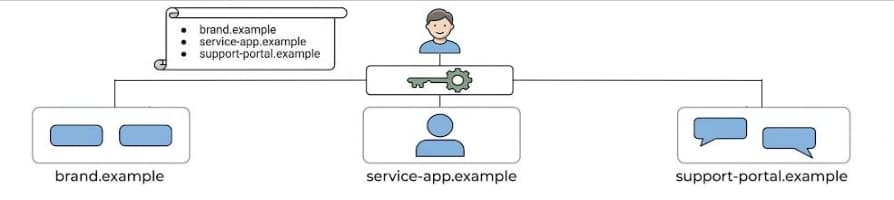
The core problem is that password managers treat separate domains as unrelated. You can solve this without re-architecting your sites by publishing small, static metadata files that cryptographically link your properties. Browsers, operating systems, and password managers read these files and bridge the identity context, enabling saved credentials and passkeys to autofill across your domains. This is also the only way to share web credentials with mobile apps, even after domain consolidation.
Two files cover the major platforms:
- Android and Chrome: Host a Digital Asset Links (DAL) JSON file at
/.well-known/assetlinks.json. This establishes the trust relationship between your apps and websites, enabling Seamless Credential Sharing where web-saved passwords autofill associated sites. For passkey sharing across multiple web domains, you still need Related Origin Requests. - iOS and Safari: Host an Apple App Site Association (AASA) file at
/.well-known/apple-app-site-association. This builds the cryptographic chain for Apple Passwords across iOS apps and Safari. For third-party tools, declare associated domains centrally via the Apple password-manager-resources repository, which 1Password and others ingest to recognize your shared identity context.
To share passkeys across web domains specifically, host a Related Origin Requests (ROR) file at /.well-known/webauthn that declares which domains may share a passkey RP ID.
Pros:
- Fix happens silently in the background at the OS or browser level; no UX change.
- Low-cost: static JSON hosting, no backend rework.
- Works without changing your brand or consolidating domains.
Cons:
- Platform limits apply. Chrome restricts a single RP ID to at most 5 associated eTLD+1 labels. A large or varied domain portfolio may exceed this.
- Extra network roundtrip to resolve metadata adds latency during authentication.
Cross-origin iframes
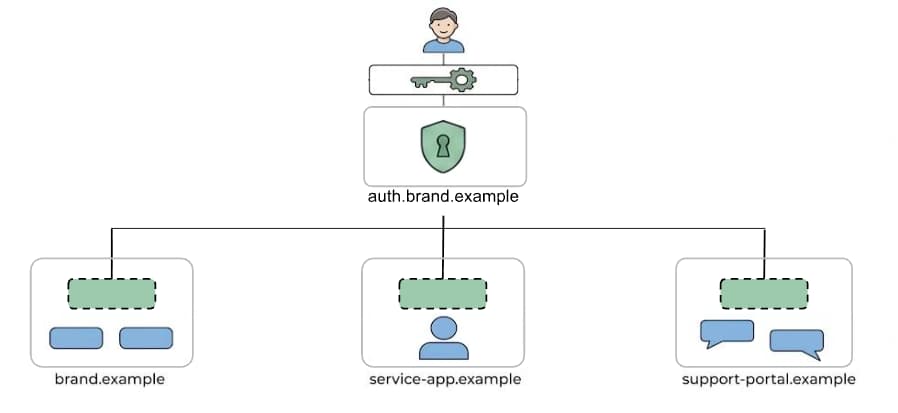
When ROR domain limits rule out metadata files, cross-origin iframes offer a standards-based alternative. Embed a central authentication origin—say auth.brand.example—as an iframe inside a relying party like brand.example.
For passwords, the browser's credential manager pairs autofill with the iframe's origin, so users see their centralized credentials on any site that embeds that origin. For passkeys, the parent page must grant the iframe access via the Permissions Policy, letting it invoke WebAuthn against its own RP ID. A strict Content Security Policy (CSP) using frame-ancestors prevents clickjacking; after success, the session is set with a partitioned cookie and the token is returned to the parent via secure postMessage().
Pros:
- One origin manages both passwords and a unified passkey RP ID—no domain consolidation required.
- Sign-in stays in context on the parent page; no federated redirects.
- Works under strict cross-site tracking protections because it uses partitioned cookies.
Cons:
- Specialized engineering: strict CSP, Permissions Policy for WebAuthn, and validated cross-document messaging. Follow the best practices for implementing WebAuthn within iframes to mitigate origin-spoofing and CSRF attacks.
Standard identity federation
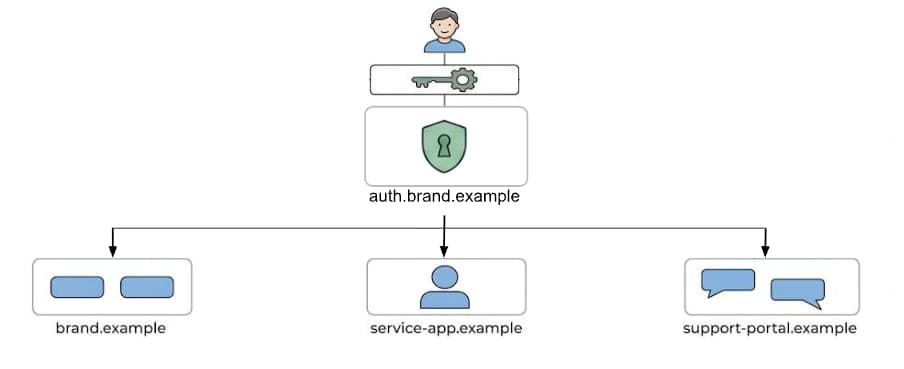
OpenID Connect formalizes cross-domain login by centralizing authentication on a dedicated Identity Provider (IdP) domain such as auth.brand.example. Applications redirect users to that hub, then receive a secure token to finish the login on the target domain. Though commonly linked with third-party sign-in, first-party federation is a proven replacement for fragile custom integrations.
Pros:
- Developers rely on standard knowledge and existing libraries, not custom protocols.
- Proven, secure, and far more stable than ad hoc implementations.
- Scales to new third-party services or acquisitions with no extra infrastructure.
- Users recognize the centralized IdP page as the authoritative brand login.
Cons:
- High integration overhead: migrating all connected apps to secure redirect-based flows requires security expertise.
- Users are sent away from the original site to the IdP, so the login is not in-context.
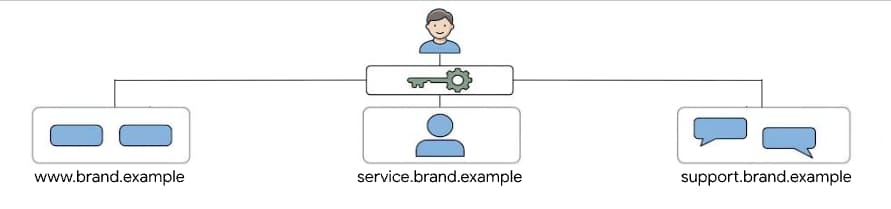
Consolidate under a common subdomain
The structural fix is to move everything beneath one registrable domain (the eTLD+1). Domains like service-app.example become service.brand.example.
Pros:
- Password managers treat the shared root as one entry, eliminating duplicate prompts.
- A passkey RP ID scoped to
brand.exampleworks on every subdomain immediately. - Wildcard cookies scoped to
Domain=brand.exampleshare sessions easily.
Cons:
- Brand constraints may forbid this if distinct top-level domains are required.
- Migration is heavy: HTTP redirects and legacy cross-origin configurations need careful remediation.
Weighing the trade-offs
No single approach fits every organization. Metadata files are the cheapest fix for credential fragmentation but run into platform caps. Iframes preserve in-context login without domain moves at the cost of engineering complexity. Federation delivers reliability and scalability but redirects users away. Domain consolidation simplifies everything technically but carries branding and migration baggage. Match the approach to your domain portfolio, user journey requirements, and engineering capacity—the right standard removes friction without adding fragility.


