
Looking under Git’s hood
Git’s reputation for confusion often traces back to how it describes history-rewriting commands like git cherry-pick and git rebase. The mental model many users pick up—that commits are diffs to be shuffled around—sets the wrong expectations. Commits are actually snapshots, and the gap between that reality and the common interpretation causes most of the friction.
The clearest way to see this is to examine how Git actually stores repository data. This article works through that model using the git/git repository at v2.29.2, with command-line examples you can follow yourself.
Object IDs: unique names for everything
Every Git object is identified by its object ID (OID), which is a content-addressed hash providing a unique name. You can discover OIDs for various references with git rev-parse <ref>, and inspect any object with git cat-file -p <oid>.
OIDs are usually shown abbreviated—long enough that only one object in the repository matches. If an abbreviation is too short, Git lists every OID that matches it:
$ git cat-file -t e0c03
error: short SHA1 e0c03 is ambiguous
hint: The candidates are:
hint: e0c03f27484 commit 2016-10-26 - contrib/buildsystems: ignore irrelevant files in Generators/
hint: e0c03653e72 tree
hint: e0c03c3eecc blob
fatal: Not a valid object name e0c03
Git objects come in three types: blob, tree, and commit. Understanding each one builds toward the full picture.
Blobs: pure file contents
Blobs are the bottom of the object model: they contain file contents and nothing else. To find the OID for a file at your current revision, run git rev-parse HEAD:<path>, then inspect it with git cat-file -p <oid>:
$ git rev-parse HEAD:README.md
eb8115e6b04814f0c37146bbe3dbc35f3e8992e0
$ git cat-file -p eb8115e6b04814f0c37146bbe3dbc35f3e8992e0 | head -n 8
[](https://github.com/git/git/actions?query=branch%3Amaster+event%3Apush)
Git - fast, scalable, distributed revision control system
=========================================================
Git is a fast, scalable, distributed revision control system with an
unusually rich command set that provides both high-level operations
and full access to internals.When you edit a file on disk, git status notices the modified timestamp and re-hashes the contents. If the hash doesn’t match the OID stored at HEAD:<path>, the file is reported as modified.
Trees: directory listings with names
Blobs don’t carry filenames—that responsibility belongs to trees. A tree is an ordered list of entries pairing path names with object types, Unix file modes, and OIDs. Subdirectories are represented by other trees, so trees can nest recursively.

In diagrams, blobs are boxes and trees are triangles:
$ git rev-parse HEAD^{tree}
75130889f941eceb57c6ceb95c6f28dfc83b609c

$ git cat-file -p 75130889f941eceb57c6ceb95c6f28dfc83b609c  | head -n 15
100644 blob c2f5fe385af1bbc161f6c010bdcf0048ab6671ed    .cirrus.yml
100644 blob c592dda681fecfaa6bf64fb3f539eafaf4123ed8    .clang-format
100644 blob f9d819623d832113014dd5d5366e8ee44ac9666a    .editorconfig
100644 blob b08a1416d86012134f823fe51443f498f4911909    .gitattributes
040000 tree fbe854556a4ae3d5897e7b92a3eb8636bb08f031    .github
100644 blob 6232d339247fae5fdaeffed77ae0bbe4176ab2de    .gitignore
100644 blob cbeebdab7a5e2c6afec338c3534930f569c90f63    .gitmodules
100644 blob bde7aba756ea74c3af562874ab5c81a829e43c83    .mailmap
100644 blob 05f3e3f8d79117c1d32bf5e433d0fd49de93125c    .travis.yml
100644 blob 5ba86d68459e61f87dae1332c7f2402860b4280c    .tsan-suppressions
100644 blob fc4645d5c08bd005238fc72cfa709495d8722e6a    CODE_OF_CONDUCT.md
100644 blob 536e55524db72bd2acf175208aef4f3dfc148d42    COPYING
040000 tree a58410edddbdd133cca6b3322bebe4fb37be93fa    Documentation
100755 blob ca6ccb49866c595c80718d167e40cfad1ee7f376    GIT-VERSION-GEN
100644 blob 9ba33e6a141a3906eb707dd11d1af4b0f8191a55    INSTALL
Trees include permission and type information for each entry. The root tree of a repository can be examined by path, and entries like README.md will point to the blob OID you saw earlier:
$ git cat-file -p 75130889f941eceb57c6ceb95c6f28dfc83b609c | grep README.md
100644 blob eb8115e6b04814f0c37146bbe3dbc35f3e8992e0    README.md
A tree doesn’t know its own location in the repository—that’s determined by what points to it. The tree referenced by <ref>^{tree} has a special status: it’s the root tree, linked directly from your commits.
Commits: full snapshots with metadata
A commit is a snapshot of the entire working directory at a point in time. Each commit stores a pointer to its root tree, a list of parent commits (empty for a root commit, multiple for a merge commit), author and committer details, and a commit message.
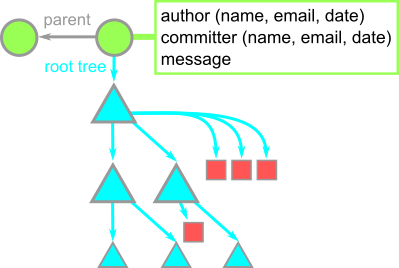
For example, the v2.29.2 commit in the Git repository documents that release, authored and committed by the maintainer:
$ git rev-parse HEAD
898f80736c75878acc02dc55672317fcc0e0a5a6

/c/_git/git ((v2.29.2))
$ git cat-file -p 898f80736c75878acc02dc55672317fcc0e0a5a6
tree 75130889f941eceb57c6ceb95c6f28dfc83b609c
parent a94bce62b99be35f2ee2b4c98f97c222e7dd9d82
author Junio C Hamano <[email protected]> 1604006649 -0700
committer Junio C Hamano <[email protected]> 1604006649 -0700

Git 2.29.2

Signed-off-by: Junio C Hamano <[email protected]>
History views show more descriptive messages for commits that change something meaningful relative to their parent:
$ git cat-file -p 16b0bb99eac5ebd02a5dcabdff2cfc390e9d92ef
tree d0e42501b1cf65395e91e22e74f75fc5caa0286e
parent 56706dba33f5d4457395c651cf1cd033c6c03c7a
author Jeff King <[email protected]> 1603436979 -0400
committer Junio C Hamano <[email protected]> 1603466719 -0700

am: fix broken email with --committer-date-is-author-date

Commit e8cbe2118a (am: stop exporting GIT_COMMITTER_DATE, 2020-08-17)
rewrote the code for setting the committer date to use fmt_ident(),
rather than setting an environment variable and letting commit_tree()
handle it. But it introduced two bugs:

- we use the author email string instead of the committer email

- when parsing the committer ident, we used the wrong variable to
compute the length of the email, resulting in it always being a
zero-length string

This commit fixes both, which causes our test of this option via the
rebase "apply" backend to now succeed.

Signed-off-by: Jeff King <[email protected]> Signed-off-by: Junio C Hamano <[email protected]>
In diagrams, commits are circles, giving us an alliterative key:
- Boxes are blobs—file contents.
- Triangles are trees—directories.
- Circles are commits—snapshots in time.
Branches: lightweight pointers, not objects
Branches are references stored as files like refs/heads/main, literally containing a hex string for a commit OID. Unlike blobs, trees, and commits—which are immutable (changing content produces a new OID)—branch files can be updated to point at different commits.
The special HEAD reference points to the current branch. Creating a new branch updates .git/HEAD and adds a new file under .git/refs/heads/:
$ git switch -c my-branch
Switched to a new branch 'my-branch'
$ cat .git/refs/heads/my-branch
1ec19b7757a1acb11332f06e8e812b505490afc6
$ cat .git/HEAD
ref: refs/heads/my-branch
As you commit, HEAD tracks the branch forward automatically.
The full object graph
All the pieces fit together like this: branches point to commits, commits point to other commits and their root trees, trees point to blobs and subtrees, and blobs are leaves. Time flows left to right while parent arrows point backward:
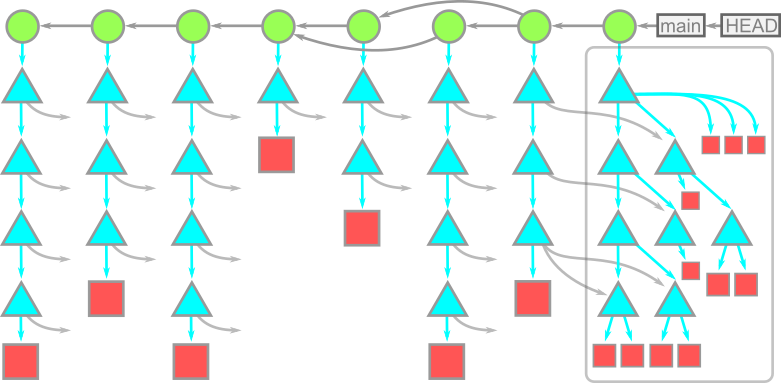
Because each commit’s root tree is complete, unrelated commits frequently share objects—no data is duplicated. The same tree or blob OID is referenced wherever its content appears. This content-addressable structure makes the whole repository a Merkle tree.
Diffs are computed, not stored
Commits are snapshots, but history views and GitHub display them as diffs. That diff is generated on demand by comparing the root trees of the commit and its parent. Git can compare any two commits, not just adjacent ones.
The comparison works recursively: start at the root trees, follow any subtree paths whose OIDs differ, and descend until reaching blobs, which are compared line-by-line. Subtrees with identical OIDs are skipped entirely:
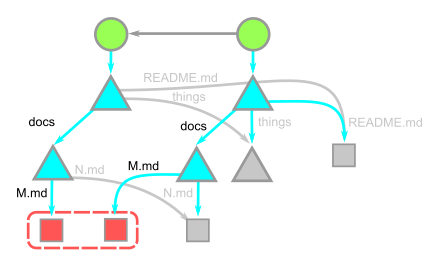
The cost of computing a diff is proportional to the number of paths with changed content, not to the overall repository size.
Patches: the non-object form of change
The common misconception that commits are diffs stems from patches—text documents describing how to alter a codebase. Patches were the primary way distributed teams shared code before pull requests became dominant, and still appear on mailing lists like git’s own.
Git can produce a patch from a commit with git format-patch, and apply one with git apply. But patches discard parent information: the commit created by applying a patch has your current HEAD as its parent, regardless of the original commit’s history. Even with an identical parent, the resulting commit differs because commit times and committer details change. This is why Git distinguishes “author” from “committer.”
Patches are also hard to apply when your working tree diverges from the sender’s baseline, since conflict resolution has no historical context to draw on.
What git cherry-pick really does
Despite its name, git cherry-pick <oid> doesn’t move a commit—it creates a new one with an identical diff whose parent is your current commit. The procedure is:
- Compute the diff between the commit
<oid>and its parent. - Apply that diff to the current
HEAD. - Create a new commit whose root tree matches the new working directory and whose parent is the commit at
HEAD. - Move the ref at
HEADto that new commit.
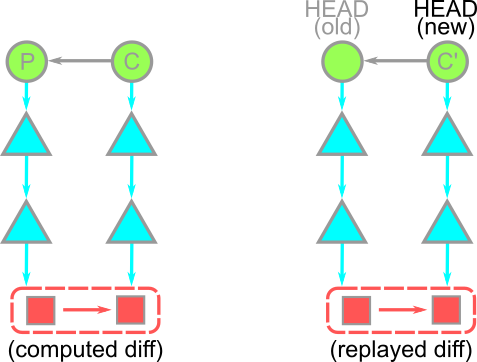
Afterward, git log -1 -p HEAD matches git log -1 -p <oid>. The original commit isn’t relocated; a fresh commit with the same diff takes its place on top of your branch.
Rebase: Replaying Shows, Not Moving Objects
The git rebase command can seem mystical, but at its heart it’s a convenience wrapper around git cherry-pick When you run git rebase <target>, Git first determines the list of commits reachable from HEAD that are not reachable from <target>. You can preview this set with git log --oneline <target>..HEAD.
Rebase then checks out <target> and replays each of those commits—oldest first—via cherry-pick. The result is a brand-new series of commits that apply the same diffs to a new base. These new commits have entirely different OIDs from their predecessors; the originals still exist in the repository until garbage collection removes them.
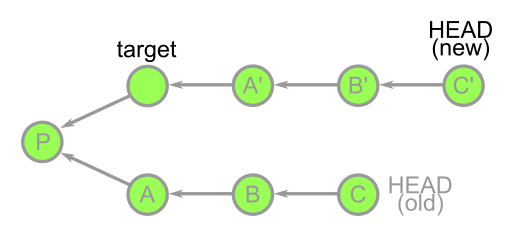
To visualize exactly what changed during a rebase, git range-diff is the tool of choice. For example, by rebasing some commits onto the v2.29.2 tag and then lightly editing the resulting tip, a range-diff can show which commits are identical snapshots (producing the same patch) and which differ. The following output illustrates this: the first pair is labeled “equal,” while the second pair shows a modified README.md and a changed commit message.
$ git checkout -f 8e86cf65816
$ git rebase v2.29.2
$ echo extra line >>README.md
$ git commit -a --amend -m "replaced commit message"
$ git range-diff v2.29.2 8e86cf65816 HEAD
1:  17e7dbbcbc = 1:  2aa8919906 sideband: avoid reporting incomplete sideband messages
2:  8e86cf6581 ! 2:  e08fff1d8b sideband: report unhandled incomplete sideband messages as bugs
    @@ Metadata
     Author: Johannes Schindelin <[email protected]>

      ## Commit message ##
    -    sideband: report unhandled incomplete sideband messages as bugs
    +    replaced commit message

    -    It was pretty tricky to verify that incomplete sideband messages are
    -    handled correctly by the `recv_sideband()`/`demultiplex_sideband()`
    -    code: they have to be flushed out at the end of the loop in
    -    `recv_sideband()`, but the actual flushing is done by the
    -    `demultiplex_sideband()` function (which therefore has to know somehow
    -    that the loop will be done after it returns).
    -
    -    To catch future bugs where incomplete sideband messages might not be
    -    shown by mistake, let's catch that condition and report a bug.
    -
    -    Signed-off-by: Johannes Schindelin <[email protected]>
    -    Signed-off-by: Junio C Hamano <[email protected]>
    + ## README.md ##
    +@@ README.md: and the name as (depending on your mood):
    + [Documentation/giteveryday.txt]: Documentation/giteveryday.txt
    + [Documentation/gitcvs-migration.txt]: Documentation/gitcvs-migration.txt
    + [Documentation/SubmittingPatches]: Documentation/SubmittingPatches
    ++extra line

      ## pkt-line.c ##
     @@ pkt-line.c: int recv_sideband(const char *me, int in_stream, int out)
If you inspect the histories of the two commit sets, you can also confirm that new commits are built on top of the v2.29.2 tag, while the old set still references the earlier v2.28.0 tag as its base.
$ git log --oneline -3 HEAD
e08fff1d8b2 (HEAD) replaced commit message
2aa89199065 sideband: avoid reporting incomplete sideband messages
898f80736c7 (tag: v2.29.2) Git 2.29.2

$ git log --oneline -3 8e86cf65816
8e86cf65816 sideband: report unhandled incomplete sideband messages as bugs
17e7dbbcbce sideband: avoid reporting incomplete sideband messages
47ae905ffb9 (tag: v2.28.0) Git 2.28
Renames Are Detected, Not Recorded
Version control users often wonder how Git handles file renames. The answer is that it doesn’t—at least not explicitly. Git’s object storage contains no record that a path changed from one name to another. Instead, rename detection is a dynamic, two-stage process applied when computing a diff.
During a diff computation, Git notes which paths were added and which were deleted. A file moved from one location to another naturally appears as a delete at the old path and an add at the new one. Git attempts to match these adds and deletes to infer renames. First, it checks for exact object ID matches (renames with unchanged content). Second, for less obvious cases, Git analyzes each added file against each deleted file to gauge content overlap. Files that share more than 50% of their lines by default are flagged as a potential edited rename.
This second stage is expensive. With A added files and D deleted files, Git performs A * D content comparisons. When that total is too large, Git skips edit-rename detection. You can raise the internal threshold via the diff.renameLimit config option, or turn off the behavior entirely with diff.renames.
This awareness can drive practical workflow decisions. For instance, when forking the VFS for Git codebase into the Scalar project, one developer intentionally structured a large restructuring into two distinct steps. First, they renamed all files without changing their contents; second, they changed string contents while leaving filenames untouched. This two-phase approach allows the linear history to show precise renames, so that git log --follow -- <path> can trace a ScalarVerb.cs file back through its former life as GVFSVerb.cs, even across a massive codebase reorganization.
$ git log --oneline --follow -- Scalar/CommandLine/ScalarVerb.cs
4183579d console: remove progress spinners from all commands
5910f26c ScalarVerb: extract Git version check
...
9f402b5a Re-insert some important instances of GVFS
90e8c1bd [REPLACE] Replace old name in all files
fb3a2a36 [RENAME] Rename all files
cedeeaa3 Remove dead GVFSLock and GitStatusCache code
a67ca851 Remove more dead hooks code
...
The Takeaway
Commits are complete snapshots, and diffs are always calculated on demand. This model clarifies everything from rebases to rename tracking, and it explains why Git repositories can remain reliable even when many sophisticated histories are being assembled layer by layer. Understanding that a commit is a full representation of the repository at one point gives you a solid basis for everything from crafting team workflows to debugging tricky history operations.


