
From Hand-Built Instances to a Shared Network Model
Slack's AWS footprint began modestly: a single account with a handful of manually provisioned EC2 instances. Over time, scripting, Chef, and Terraform replaced manual processes, and the service grew from tens of users to millions. But everything still lived in one large AWS account, which brought rate-limiting issues, poor cost separation, and confusion for internal engineering teams.
The first attempt at relief was child accounts. Service teams could request their own AWS accounts and peer VPCs when services needed to communicate across accounts. That worked for a while, but as the number of accounts grew into the hundreds, managing CIDR ranges and IP spaces became untenable. Overlapping CIDR ranges made VPC peering impossible and added significant administrative overhead.
Shared VPCs as the Foundation

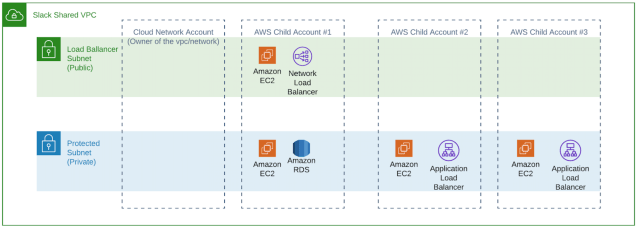
The Cloud Engineering team turned to AWS shared VPCs, a feature introduced in late 2018. This allows one AWS account to create VPCs and subnets, then share them with other accounts. Resources built on shared VPCs remain visible only to their owning account, and they are subject to that account's rate limits. This solved the earlier problem of concentrating all resources in one account and hitting AWS API limits.
For Slack's Cloud Engineering team, the appeal was clear: they could centrally manage IP space and VPC construction, then share the resulting networks with child account owners. Service teams could build on top of these VPCs without worrying about route tables or network ACLs.
The Whitecastle Build

The project was named Whitecastle after the lead engineer conceived the idea at the burger chain. The network was designed across three development environments—sandbox, dev, and prod—each in its own account. Sandbox is used for experimentation, dev for pre-production testing, and prod for customer-facing workloads. The Cloud Engineering team also created a separate network called Bellwether, a private sandbox for their own experimentation, inaccessible to Slack's service teams.
In each networking account within the us-east-1 region, they created a VPC with two /16 CIDR ranges—the largest AWS allows—and shared these VPCs with all child accounts. Two /16 ranges provide over 130,000 IP addresses per region. As capacity is approached, more /16 CIDRs can be added to the VPCs. The same build-out was then replicated in every other region where Slack operates.

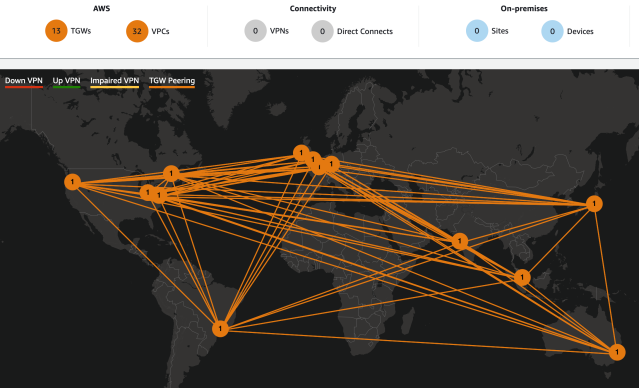
To connect regions—needed for workloads like image caching and service discovery—Slack adopted AWS Transit Gateway Inter-Region Peering, introduced in late 2019. A Transit Gateway was created in each region and attached to the local VPC. Transit Gateways were then peered with one another to establish inter-region connectivity.
The challenge was automating the peering process with Terraform. One Transit Gateway must request the peering connection while the other accepts it. Slack's solution: compute the md5sum of each Transit Gateway ID, take the last 16 characters, and convert them to an integer. This "Transit Gateway priority" determines which side requests and which accepts—higher number requests, lower number accepts.
Terraform also updates each Transit Gateway's route tables. All CIDR ranges across regions fall within the summary route 10.0.0.0/8. Each VPC's route table contains a single default route pointing to its local Transit Gateway, keeping route tables simple.
Continuous Network Validation
With many routes and VPCs, a single bad route can break service-to-service communication quickly. To catch problems early, Slack built a simple Go application called Whitecastle Network Tester. An autoscaling group with a single instance runs this application in each VPC. The app registers its VPC ID, environment, and instance IP in a DynamoDB table, which serves as a service discovery registry.
The application performs two tasks:
- Starts a web server responding with HTTP 200 on the
/healthendpoint. - Periodically reads a configuration file to determine which environments to connect to, looks up instance IPs in the DynamoDB table, tests connectivity, and writes results to CloudWatch by assuming a role in a designated account.
This CloudWatch data feeds a Grafana dashboard, enabling monitoring and alerting on failed network tests. The tester also validates new region build-outs by adding test cases before the build starts; failures turn to passes as connectivity is established between new and legacy regions.
Incremental Migration Path
Big-bang migrations are risky and hard to sell internally. Slack instead offered an incremental path: the new Transit Gateway was shared with child accounts and attached to each region's legacy VPC. This meant services that moved to new shared VPCs could still communicate with services still running in legacy VPCs. The sandbox environment operates similarly to dev but is not shown in the migration diagram.
With production workloads running on Whitecastle, Slack stopped making ad hoc changes to environments that could affect internal customers. The dedicated Cloud Engineering sandbox (Bellwether) allowed safe experimentation before rollout. Automated network testing built confidence in changes and provided prompt alerts when issues slipped through.
Slack continues to look for improvements. Once AWS releases BGP route propagation support for Transit Gateway peerings, the Plan is to replace the current inter-region route propagation logic. There will be more challenges as services move onto the new architecture, but the foundation and tooling are now in place to handle them.


