

Why friendly forks need active management
Friendly forks work well when upstream keeps accepting contributions, but that relationship only stays healthy with deliberate management. Three factors make ongoing attention essential: changes merged upstream usually benefit the fork too; the gap between upstream and the fork grows harder to bridge the longer it goes unaddressed; and security fixes from upstream need to land in the fork without fighting unrelated conflicts.
There is no single correct management model. GitHub maintains three friendly forks of git/git — git-for-windows/git, microsoft/git, and github/git — each with a different strategy matched to its own requirements.
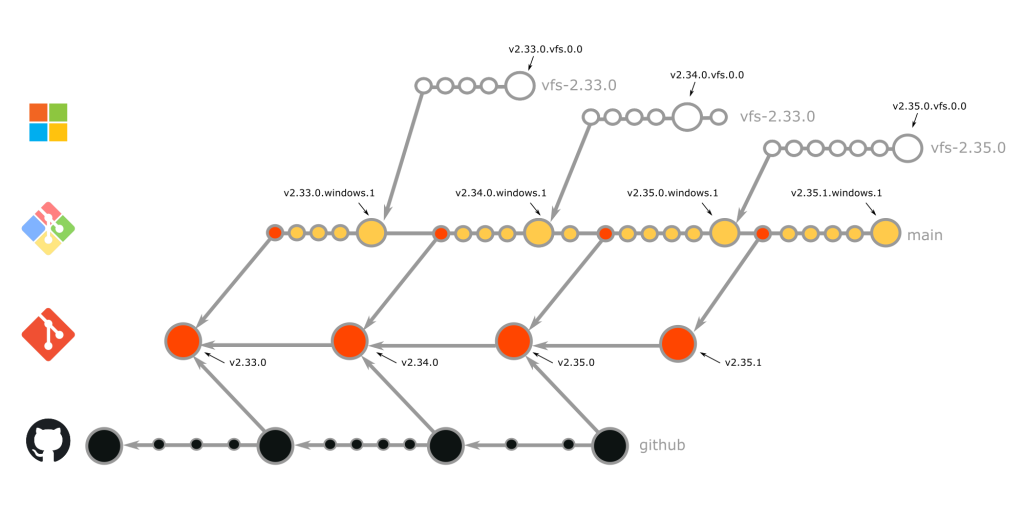
git-for-windows/git: merging rebase on the release cadence
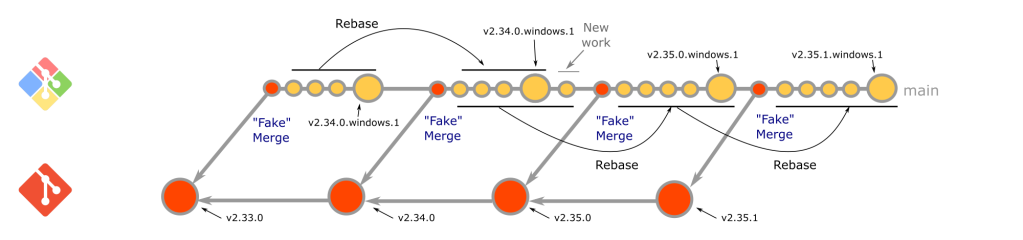
git-for-windows/git pulls upstream changes using a merging rebase — a combination of a merge and a rebase — executed at a predictable cadence tied to the git/git release cycle. When git/git publishes release candidates (typically rc0, rc1, rc2, and final), the fork runs a merging rebase of its main branch on top of each new candidate as soon as it appears.
The merge portion runs first:
$ git merge -s ours -m "Start the merging-rebase to <version>" HEAD@{1}
This creates what is called a "fake merge": the "ours" strategy discards all changes from main, providing a clean slate for the subsequent rebase while retaining the ability to fast-forward from earlier branch states.
During the rebase, conflicts arise when upstream changes collide with fork-specific work. A particularly common case is commits that originated in the fork and were later upstreamed. Upstream reviewers often request changes before acceptance, and since git/git accepts patches via mailing list rather than pull requests, commit IDs inevitably change. When such commits conflict during rebase, this command identifies commits that have already been upstreamed:
$ git range-diff --left-only <commit>^! <commit>..<upstream-branch>
The command compares two ranges: from the commit before the one being checked to the commit itself (containing only that commit), and the upstream commits not in the history of the commit in question. A matching commit in upstream appears in the output; the developer then uses git rebase --skip to bypass the local commit and implicitly accept the upstream version.
Because work begins immediately after each release candidate is created, this strategy is proactive — new git/git features are integrated and released as soon as possible. One developer typically executes the merging rebase for each candidate, with multiple developers reviewing the result using range-diff comparisons. Completed changes are pushed directly to main, followed by a new release.
microsoft/git: rebase onto git-for-windows, fresh branch per version
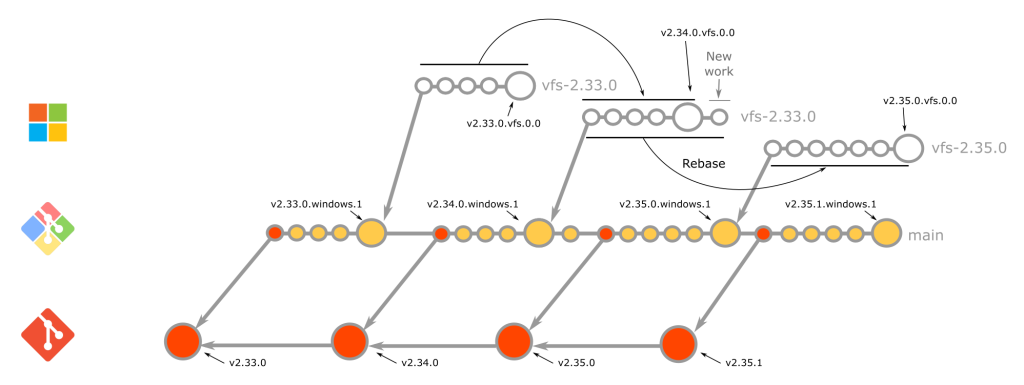
microsoft/git is also proactive, rebasing immediately after each new git/git release candidate, and uses the same technique for recognizing commits already upstreamed. Two key differences distinguish it from git-for-windows/git:
- Being a fork of
git-for-windows/git, it does not take commits directly fromgit/git. Instead, it waits for thegit-for-windows/gitmerging rebase to finish for each candidate, then rebases on top of the resulting tag. - Rather than repeatedly rebasing a designated
mainbranch, it cuts a new branch for every version using the naming schemevfs-2.X.Y. Each branch is based on the initialgit-for-windows/gitrelease candidate tag and is updated with rebases for each subsequent candidate. This release-branch model, borrowed from Azure DevOps branching practices, simplifies hotfixing and clarifies which commits ship with each version.
After rebases complete, the new vfs-2.X.Y branch becomes the default and a release is created.
github/git: cautious traditional merges
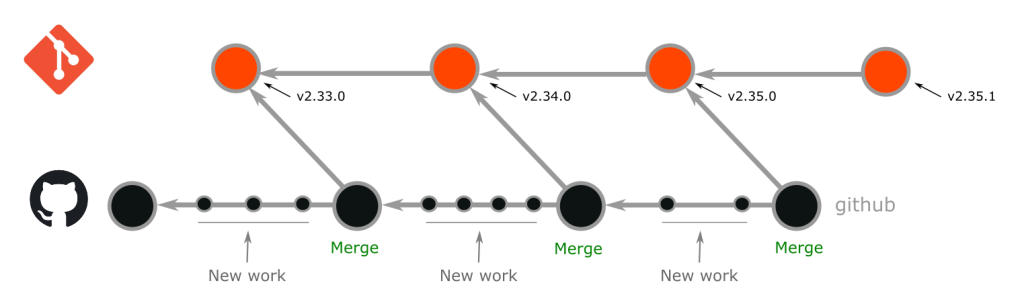
github/git integrates new git/git releases with a traditional merge strategy, and its cadence is deliberately cautious: new features are allowed to "simmer" before integration, so this fork typically stays one or two versions behind the latest upstream release. Release candidates are not considered.
At least two developers execute each merge in parallel to ensure accuracy and quality. For commits that originated in github/git and were later accepted upstream, the upstream version is generally preferred when resolving conflicts, though occasionally the github/git version — or parts of both — wins. The developers executing the merge decide per commit. When parallel merges are complete, the trees at the tip of each merge are compared, the differing conflict resolutions are reviewed, and the outcome is merged and deployed as a new release.
The traditional merge strategy is more straightforward than rebasing, but it carries tradeoffs. Merges get tricky once the fork has drifted far from upstream or when a sweeping upstream change affects many custom areas. The strategy also preserves all commits, including squash and fixup commits that the other two forks remove with git rebase --autosquash, so github/git merges involve more commits overall.
Strategy comparison at a glance
| Fork | Management Strategy | # of developers executing | Proactive or cautious | Long-running main branch | Integrates release candidates |
|---|---|---|---|---|---|
| git-for-windows/git | merging rebase | 1 | Proactive | Yes | Yes |
| microsoft/git | merging rebase | 1 | Proactive | No | Yes |
| github/git | merge | >=2 | Cautious | Yes | No |
git-for-windows/git and microsoft/git share much in common: proactive cadence, a single executing developer, and rebase-based integration of releases and release candidates. github/git differs on all three counts — merge-based integration, multiple simultaneous developers, and a cautious schedule that skips release candidates.
Choosing a strategy: four scenarios
Many contributors working simultaneously
Frequently rotating default branches leaves developers with open pull requests in awkward states, a real problem when development activity is healthy. A merge or merging rebase strategy avoids changing default branches and spares contributors constant rebasing.
Multiple versions needing security or bug-fix support
The rebase model makes cherry-picking fixes to supported versions straightforward. Cherry-picking features is possible with a merge-based workflow too, but later merging the commits that carried those cherry-picked features may require resolving trivial conflicts depending on the merge strategy used.
New features: take them now or later
Any of the strategies can run with a cautious or proactive cadence. Work with your team or management to set a schedule everyone is comfortable with, then stick to it.
First time managing a fork
If you or your team are new to fork maintenance or still learning Git, the merge strategy is the most straightforward starting point.


